
5 -10 second black screen before welcome screen.

mjpc

New member
Local time
8:38 AM
Messages
5
Location
Estonia
Hello,

i installed clean win7 ultimate 32bit with all important updates. Little over 200 updates if i remember correct. Then i installed zonealarm and wifi and everything worked ok.
Then i just in case made cloned image.:)

Then i started adding free antivirus. Avira free installed ok, but after reboot when windows logo dissapeared it shows about 10 seconds black screen with mouse pointer and then moves to welcome screen and then it is ok.

Then i restored clone image and tryed avg free. Same problem.

Restored again and tryed panda free. Now about 5 sec black screen.
In desktop everything works fast.

What could couse that black screen? It seems that every antivirus is causing black screen.:huh:
Before av install pc boots ok.
I made sfc /scannow, repair disk boot repair, (or what was its name) fixboot. Nothing helps.

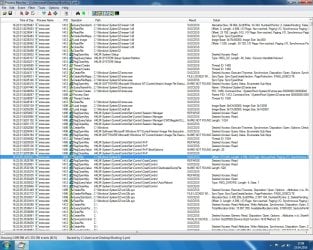
I made process monitor screenshot, hope that helps little bit. I dont know much how to use that program, but there seems to be that 5 sec "hole" in picture or is it something else ?
 

Attachments
  • prosessmon.jpg
    prosessmon.jpg
    688.7 KB · Views: 3

My Computer

Computer type
PC/Desktop
OS
win 7 ultimate 32bit
It's pretty common to get a black screen for a few seconds before the welcome screen. I have about a 2 to 3 second black screen myself.

It's just Windows loading background processes to get you ready to work with Windows. There isn't much you can do about it, depending on what you have loading, and what is set to load on start up.

My advice: Don't sweat it.
 

My Computer

Computer type
PC/Desktop
Computer Manufacturer/Model Number
Mellon Labs (custom build)
OS
Win 7 Pro x64/Win 10 Pro x64 dual boot
CPU
AMD FX 8350 Vishera @ 4200
Motherboard
ASUS M5A97 R2.0
Memory
16 GB Mushkin Blackline DDR3-2400 @ 1866 (9-10-10-10-31)
Graphics Card(s)
XFX Radeon R9 280 Double D Black Edition
Sound Card
Realtek HD Audio on MB. Sounds great.
Monitor(s) Displays
Acer 24", Acer 22"
Screen Resolution
3840 x 1080
Hard Drives
1 x Mushkin Chronos 120 GB SSD (Win 10)
1 x Samsung 850 EVO 250 GB SSD (Win 7)
1 x WD 1TB SATA Blue
1 x WD 1TB SATA Green
PSU
Corsair TX-750
Case
CoolerMaster HAF 912+
Cooling
Coolermaster Seidon 240M Liquid AIO. 6 case fans
Keyboard
Logitech G710+
Mouse
Logitech G500s
Internet Speed
Much better since I got fiber, but still way overpriced.
Antivirus
MSE, Malware Bytes for scanning
Browser
Firefox
Other Info
Corsair VOID USB headphones.

A Mellon Labs X-1 - LCD Smartie driven system status display.

Brought to you by the letter E
It's pretty common to get a black screen for a few seconds before the welcome screen. I have about a 2 to 3 second black screen myself.

It's just Windows loading background processes to get you ready to work with Windows. There isn't much you can do about it, depending on what you have loading, and what is set to load on start up.

My advice: Don't sweat it.

:ditto:That black screen, albeit disconcerting, is normal. I get the same thing.
 

My Computer

Computer type
PC/Desktop
Computer Manufacturer/Model Number
Custom Build
OS
Win 7 Ultimate 64 bit
CPU
Intel i7-3930K
Motherboard
ASUS P9X79 WS
Memory
Kingston HyperX Genesis 32GB Kit (8x4GB Modules) 1600MHz DDR
Graphics Card(s)
MSI R7850 Twin Frozr 2GD5/OC Radeon HD 7850 2GB 256-bit GDDR
Sound Card
Asus Xonar Essence STX
Monitor(s) Displays
3x Asus VG248QE 24", Vizio 32" TV
Screen Resolution
1920 x 1080, ?
Hard Drives
Samsung 128GB 840 Pro SSD (1),
Samsung 4TB 850 EVO SSDs (4)
Samsung 4TB 850 EVO SSDs (16) external backup drives used in 2.5" hot swap bays in the computer.
PSU
Corsair HX750w
Case
Antec Two Hundred v2 (modified)
Cooling
Cooler Master GeminII S524 120mm (fan replaced with a 140mm)
Keyboard
Logitech G510s
Mouse
Logitech M525 (two in use)
Internet Speed
=< 32Mbps down, 8Mbps up
Antivirus
AVAST!, MBAM, SAS, Spybot S&D (all but MBAM free) Glary Util
Browser
IE11
Other Info
LSI 9211-8i HBA card (8 SATA III ports), 2.5" & 3.5" Hot Swap Bays, HooToo HT-CR001 PCI-E to USB 3.0 Internal Hub + 6 Slot Card Reader, and LG Model CH12LS28 BD-ROM Optical Drive. Also, ScanSnap S1500 ADF duplexing scanner, Canon 9000F flat bed scanner, Corsair SP2500 2.1 speakers, Samsung CLP 415nw laser color printer, Cyberpower PP2200SW UPS
Hi,
Yep it does depend on what is loading with windows,
Use Start and msconfig and post the startup section for a better idea
But I use Panda free also it's a keeper :)
 

My Computer

Computer type
PC/Desktop
Computer Manufacturer/Model Number
Custom assembled by me :}
OS
Win-7-Pro64bit 7-H-Prem-64bit
CPU
i7-5930K 2nd i9-9940x both water blocked VRM's too
Motherboard
ASUS SABERTOOTH X99 2nd ASUS x299 Apex
Memory
Trident-z 3200C14 2nd Trident-z 3600C16
Graphics Card(s)
EVGA 1080ti ftw3 2nd Titan Xp both water blocked
Sound Card
Built-in Realtek
Monitor(s) Displays
1-AOC G2460PG 24"G-Sync 144Hz/ 2nd 1-ASUS VG248QE 24" 144Hz
Screen Resolution
1920 x 1080 144Hz
Hard Drives
2-Samsung M.2 Evo & Evo Plus
2-Samsung 850 EVO 500GB SSD's/ 3-2.5 W.D. Black 1tb-&3-1tb/3-3.5 WD Black 1tb hdd's
PSU
EVGA SuperNOVA 1000-P2 2nd 1200-P2
Case
2-Corsair Obsidian Series 450D Black ATX Mid Tower
Cooling
Custom water loops
Keyboard
Logitech G710+/ 2nd Logitech G910
Mouse
2-RedDragon M901 Perdition 16400 dpi Gaming mouse = wired
Internet Speed
Comcast Ping 19ms 89.31mbps download speed 6.12mbps upload
Antivirus
Malwarebytes Pro/ Superantispyware Pro
Browser
FireFox & Pale moon
Other Info
2nd ASUS X299 Apex/Intel i9-9940x with Custom water loop/7H-Prem-x64/Corsair 450D case/Ram Trident-z 3600C16 4x8gb / Samsung970Evo plus 500gb SSD/Dual ssd EZ swap evo/PSU EVGA SuperNova 1200w-P2 80+Platinum/GPU Titan Xp /8-ML-140 on push-pull on 2-280GTX rads
Hello again.:)
2-3 sec would be ok, but at the moment it is 7 or something like that.:confused:

I restored image again (win7 with updates and zonealarm, without antivirus) and black screen was about 5 seconds.
Then i looked inside firewall and saw that explorer.exe and other important windows components had question marks in firewall. So i set those prosesses to "trusted" inside firewall and black screen time went to about 1-2 seconds. I think that zonealarm did not let explorer to start or something like that.

Then i installed panda free and black screen time went to about 7 seconds.
In screenshot below You can see that panda "nanoservicemain" is taking long time to end its prosesess.
http://i63.tinypic.com/n3ndyd.jpg
http://i65.tinypic.com/dvskco.jpg

I tryed to put it to delayed start, but it does let me to do it.
In other computers ZA and panda work together without any black screen.

Is there somekind of method how can i do so that panda does not start "so early before desktop."
I think that now the panda is blocking something important, but i cant do anything becouse it has so basic config options.
 

My Computer

Computer type
PC/Desktop
OS
win 7 ultimate 32bit
Hi,
You can add exceptions but I would not be using ZA personally
I would just add mbam free or premium and call it a day.

Panda free does have usb scanning I personally turn that option off I only use my usb's
I also turn off Panda news as well General all the way at the bottom,
I also do not or have not registered a email account with Panda I just click later every time I open it.
 

My Computer

Computer type
PC/Desktop
Computer Manufacturer/Model Number
Custom assembled by me :}
OS
Win-7-Pro64bit 7-H-Prem-64bit
CPU
i7-5930K 2nd i9-9940x both water blocked VRM's too
Motherboard
ASUS SABERTOOTH X99 2nd ASUS x299 Apex
Memory
Trident-z 3200C14 2nd Trident-z 3600C16
Graphics Card(s)
EVGA 1080ti ftw3 2nd Titan Xp both water blocked
Sound Card
Built-in Realtek
Monitor(s) Displays
1-AOC G2460PG 24"G-Sync 144Hz/ 2nd 1-ASUS VG248QE 24" 144Hz
Screen Resolution
1920 x 1080 144Hz
Hard Drives
2-Samsung M.2 Evo & Evo Plus
2-Samsung 850 EVO 500GB SSD's/ 3-2.5 W.D. Black 1tb-&3-1tb/3-3.5 WD Black 1tb hdd's
PSU
EVGA SuperNOVA 1000-P2 2nd 1200-P2
Case
2-Corsair Obsidian Series 450D Black ATX Mid Tower
Cooling
Custom water loops
Keyboard
Logitech G710+/ 2nd Logitech G910
Mouse
2-RedDragon M901 Perdition 16400 dpi Gaming mouse = wired
Internet Speed
Comcast Ping 19ms 89.31mbps download speed 6.12mbps upload
Antivirus
Malwarebytes Pro/ Superantispyware Pro
Browser
FireFox & Pale moon
Other Info
2nd ASUS X299 Apex/Intel i9-9940x with Custom water loop/7H-Prem-x64/Corsair 450D case/Ram Trident-z 3600C16 4x8gb / Samsung970Evo plus 500gb SSD/Dual ssd EZ swap evo/PSU EVGA SuperNova 1200w-P2 80+Platinum/GPU Titan Xp /8-ML-140 on push-pull on 2-280GTX rads
Seven seconds is what I have and, frankly, I don't think seven seconds is anything to be concerned about. It seems like seven hours when I'm sitting there watching the screen so I just start the machine (or restart it), then walk away for a bit to do something like make a pit stop, grab a snack, grab a fresh bottle of water, whatever.

Or I just sit there and be patient. That seven seconds is only a small part of the total boot process that also includes booting up a Marvel chip on my MOBO and booting up the HBA card as well as the BIOS, then Win 7 (which has a lot of background processes to load).

My notebooks boot lightning fast compared to my desktop with only a short blackout—roughly two seconds—but those are simple machines for simple use (primarily, web browsing) so I have a lot less going on with them.

There is nothing wrong with Zone Alarm if it is used properly.
 

My Computer

Computer type
PC/Desktop
Computer Manufacturer/Model Number
Custom Build
OS
Win 7 Ultimate 64 bit
CPU
Intel i7-3930K
Motherboard
ASUS P9X79 WS
Memory
Kingston HyperX Genesis 32GB Kit (8x4GB Modules) 1600MHz DDR
Graphics Card(s)
MSI R7850 Twin Frozr 2GD5/OC Radeon HD 7850 2GB 256-bit GDDR
Sound Card
Asus Xonar Essence STX
Monitor(s) Displays
3x Asus VG248QE 24", Vizio 32" TV
Screen Resolution
1920 x 1080, ?
Hard Drives
Samsung 128GB 840 Pro SSD (1),
Samsung 4TB 850 EVO SSDs (4)
Samsung 4TB 850 EVO SSDs (16) external backup drives used in 2.5" hot swap bays in the computer.
PSU
Corsair HX750w
Case
Antec Two Hundred v2 (modified)
Cooling
Cooler Master GeminII S524 120mm (fan replaced with a 140mm)
Keyboard
Logitech G510s
Mouse
Logitech M525 (two in use)
Internet Speed
=< 32Mbps down, 8Mbps up
Antivirus
AVAST!, MBAM, SAS, Spybot S&D (all but MBAM free) Glary Util
Browser
IE11
Other Info
LSI 9211-8i HBA card (8 SATA III ports), 2.5" & 3.5" Hot Swap Bays, HooToo HT-CR001 PCI-E to USB 3.0 Internal Hub + 6 Slot Card Reader, and LG Model CH12LS28 BD-ROM Optical Drive. Also, ScanSnap S1500 ADF duplexing scanner, Canon 9000F flat bed scanner, Corsair SP2500 2.1 speakers, Samsung CLP 415nw laser color printer, Cyberpower PP2200SW UPS
Back
Top