
Solved 5 missing Drivers that wont update

Although quite a few BSOD issues are caused by drivers, a large amount is also caused by hardware. With hardware you can expect anything in which case Bluescreenview and WhoCrashed are useless.
 

My Computer

Computer type
PC/Desktop
Computer Manufacturer/Model Number
Custom build
OS
Windows 10 Pro
CPU
i5-6500
Motherboard
Gigabyte B150-HD3P-CF
Memory
16GB DDR4 2133 Crucial Ballistix Sport LT
Graphics Card(s)
MSI GeForce GTX 1060 GAMING X 6G
Sound Card
Intel Display Audio
Monitor(s) Displays
Liyama ProLite XB2483HSU-B2
Screen Resolution
1920 x 1080
Hard Drives
Crucial MX200 500GB & Toshiba DT01ACA300 3TB
PSU
Corsair RM550x
Case
Fractal Design Define S
Cooling
Cooler Master TX3 i
Keyboard
Func KB-460 (MX Red)
Mouse
Corsair Gaming M65 RGB
Antivirus
Bitdefender Total Security 2016 + MBAM Pro + MBAE Pro
Browser
Google Chrome
Other Info
Creative Sound Blaster Tactic3D Rage V2 headset
So I am confused what I should do, I read an article i believe on here or somewhere and it said to uninstall all the usb drivers and reboot so it reinstalls them. Should I do this bc I do not feel comfortable to run the driver verifier. also if its not the usb ports could it be the mouse? I have used the same one for years and I read logictechs arent very good. I use it bc I hate the touchpad. thank you for any help.

I know it needs to be reloaded bc I still have no background I am just trying to solve the BSOD first bc they told me that it was from the over heating. thanks again for everyones input
 

My Computer

Computer type
Laptop
Computer Manufacturer/Model Number
HP
OS
Windows 7 Home Premium 64-bit SP1
CPU
AMD A6-3400M APU with Radeon(tm) HD Graphics, 1400 4 core
Motherboard
Hewlett-Packard 358B (Socket FS1)
Memory
4.00GB DDR3 @ 672MHz (9-9-9-24)
Graphics Card(s)
Generic PnP Monitor (1366x768@60Hz) 512MB ATI AMD Radeon HD
Sound Card
AMD High Definition Audio Device IDT High Definition Audio C
Monitor(s) Displays
Generic PnP Monitor on AMD Radeon HD 6520G
Screen Resolution
1366x788x60 GHZ
Hard Drives
931GB Seagate ST1000LM 048-2E7172 SATA Disk Device (SATA )
Keyboard
Standard ps/2
Mouse
HID -compliant mouse
Antivirus
Avira
Browser
Chrome
Did you run BlueScreenView?
 

My Computer

Computer type
Laptop
Computer Manufacturer/Model Number
Dell M6500 Precision Work Station
OS
Windows 7 Pro SP1 64 bit
Memory
8 GB
Screen Resolution
1920x
Internet Speed
30 Mbps
Antivirus
Norton Security
Browser
IE 11

Attachments

My Computer

Computer type
Laptop
Computer Manufacturer/Model Number
HP
OS
Windows 7 Home Premium 64-bit SP1
CPU
AMD A6-3400M APU with Radeon(tm) HD Graphics, 1400 4 core
Motherboard
Hewlett-Packard 358B (Socket FS1)
Memory
4.00GB DDR3 @ 672MHz (9-9-9-24)
Graphics Card(s)
Generic PnP Monitor (1366x768@60Hz) 512MB ATI AMD Radeon HD
Sound Card
AMD High Definition Audio Device IDT High Definition Audio C
Monitor(s) Displays
Generic PnP Monitor on AMD Radeon HD 6520G
Screen Resolution
1366x788x60 GHZ
Hard Drives
931GB Seagate ST1000LM 048-2E7172 SATA Disk Device (SATA )
Keyboard
Standard ps/2
Mouse
HID -compliant mouse
Antivirus
Avira
Browser
Chrome
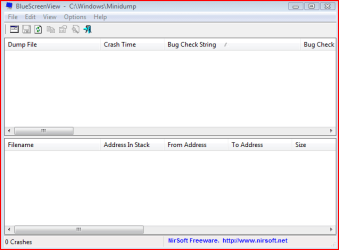
This is what the bluescreenview should look like by default (I don't have any BSODs on this system so everything is empty). I don't see that on page 2.
 

Attachments

  • bluescreenviewdefaultscreen.PNG
    bluescreenviewdefaultscreen.PNG
    7.3 KB · Views: 13

My Computer

Computer type
Laptop
Computer Manufacturer/Model Number
Dell M6500 Precision Work Station
OS
Windows 7 Pro SP1 64 bit
Memory
8 GB
Screen Resolution
1920x
Internet Speed
30 Mbps
Antivirus
Norton Security
Browser
IE 11
attached an entire screen shot I hope this is the info you needed. thanks for helping
 

Attachments

  • bsod.png
    bsod.png
    34.7 KB · Views: 1

My Computer

Computer type
Laptop
Computer Manufacturer/Model Number
HP
OS
Windows 7 Home Premium 64-bit SP1
CPU
AMD A6-3400M APU with Radeon(tm) HD Graphics, 1400 4 core
Motherboard
Hewlett-Packard 358B (Socket FS1)
Memory
4.00GB DDR3 @ 672MHz (9-9-9-24)
Graphics Card(s)
Generic PnP Monitor (1366x768@60Hz) 512MB ATI AMD Radeon HD
Sound Card
AMD High Definition Audio Device IDT High Definition Audio C
Monitor(s) Displays
Generic PnP Monitor on AMD Radeon HD 6520G
Screen Resolution
1366x788x60 GHZ
Hard Drives
931GB Seagate ST1000LM 048-2E7172 SATA Disk Device (SATA )
Keyboard
Standard ps/2
Mouse
HID -compliant mouse
Antivirus
Avira
Browser
Chrome
I suggest manually creating a system restore point.

Then, open Control Panel, Device Manager, Universal Serial Bus Controllers

Right click on each listed item and select uninstall. (Don't delete the Universal Serial Bus Controllers category.)

When done, reboot.

Do business as usual. Report back if you still get a BSOD.
 

My Computer

Computer type
Laptop
Computer Manufacturer/Model Number
Dell M6500 Precision Work Station
OS
Windows 7 Pro SP1 64 bit
Memory
8 GB
Screen Resolution
1920x
Internet Speed
30 Mbps
Antivirus
Norton Security
Browser
IE 11
I suggest manually creating a system restore point.

Then, open Control Panel, Device Manager, Universal Serial Bus Controllers

Right click on each listed item and select uninstall. (Don't delete the Universal Serial Bus Controllers category.)

When done, reboot.

Do business as usual. Report back if you still get a BSOD.

theres a lot listed so do i delete them all on by one and I get a message do I want to delete the driver as well or just uninstall them and reboot?
 

My Computer

Computer type
Laptop
Computer Manufacturer/Model Number
HP
OS
Windows 7 Home Premium 64-bit SP1
CPU
AMD A6-3400M APU with Radeon(tm) HD Graphics, 1400 4 core
Motherboard
Hewlett-Packard 358B (Socket FS1)
Memory
4.00GB DDR3 @ 672MHz (9-9-9-24)
Graphics Card(s)
Generic PnP Monitor (1366x768@60Hz) 512MB ATI AMD Radeon HD
Sound Card
AMD High Definition Audio Device IDT High Definition Audio C
Monitor(s) Displays
Generic PnP Monitor on AMD Radeon HD 6520G
Screen Resolution
1366x788x60 GHZ
Hard Drives
931GB Seagate ST1000LM 048-2E7172 SATA Disk Device (SATA )
Keyboard
Standard ps/2
Mouse
HID -compliant mouse
Antivirus
Avira
Browser
Chrome
Did you run BlueScreenView?

You know the OP uploaded the report of this program as a text file right? It's the same as the screenshot...
 

My Computer

Computer type
PC/Desktop
Computer Manufacturer/Model Number
Custom build
OS
Windows 10 Pro
CPU
i5-6500
Motherboard
Gigabyte B150-HD3P-CF
Memory
16GB DDR4 2133 Crucial Ballistix Sport LT
Graphics Card(s)
MSI GeForce GTX 1060 GAMING X 6G
Sound Card
Intel Display Audio
Monitor(s) Displays
Liyama ProLite XB2483HSU-B2
Screen Resolution
1920 x 1080
Hard Drives
Crucial MX200 500GB & Toshiba DT01ACA300 3TB
PSU
Corsair RM550x
Case
Fractal Design Define S
Cooling
Cooler Master TX3 i
Keyboard
Func KB-460 (MX Red)
Mouse
Corsair Gaming M65 RGB
Antivirus
Bitdefender Total Security 2016 + MBAM Pro + MBAE Pro
Browser
Google Chrome
Other Info
Creative Sound Blaster Tactic3D Rage V2 headset
So I am confused what I should do, I read an article i believe on here or somewhere and it said to uninstall all the usb drivers and reboot so it reinstalls them. Should I do this bc I do not feel comfortable to run the driver verifier. also if its not the usb ports could it be the mouse? I have used the same one for years and I read logictechs arent very good. I use it bc I hate the touchpad. thank you for any help.

I know it needs to be reloaded bc I still have no background I am just trying to solve the BSOD first bc they told me that it was from the over heating. thanks again for everyones input

What part of driver verifier makes you feel uncomfortable?
 

My Computer

Computer type
PC/Desktop
Computer Manufacturer/Model Number
Custom build
OS
Windows 10 Pro
CPU
i5-6500
Motherboard
Gigabyte B150-HD3P-CF
Memory
16GB DDR4 2133 Crucial Ballistix Sport LT
Graphics Card(s)
MSI GeForce GTX 1060 GAMING X 6G
Sound Card
Intel Display Audio
Monitor(s) Displays
Liyama ProLite XB2483HSU-B2
Screen Resolution
1920 x 1080
Hard Drives
Crucial MX200 500GB & Toshiba DT01ACA300 3TB
PSU
Corsair RM550x
Case
Fractal Design Define S
Cooling
Cooler Master TX3 i
Keyboard
Func KB-460 (MX Red)
Mouse
Corsair Gaming M65 RGB
Antivirus
Bitdefender Total Security 2016 + MBAM Pro + MBAE Pro
Browser
Google Chrome
Other Info
Creative Sound Blaster Tactic3D Rage V2 headset
What part of driver verifier makes you feel uncomfortable?

Teh part where it could crash and not come back on. i need my laptop until I can take it in and get it reloaded to fix the background and other issues. im just trying to resolve the bsod issue bc the last time they had it they couldnt figure it out after a reload. i also cant risk it resetting and I lose my MS office, i dont have anymore installs on the disc so one i lose it I wont be able to get it back and I cant afford 150.00
 

My Computer

Computer type
Laptop
Computer Manufacturer/Model Number
HP
OS
Windows 7 Home Premium 64-bit SP1
CPU
AMD A6-3400M APU with Radeon(tm) HD Graphics, 1400 4 core
Motherboard
Hewlett-Packard 358B (Socket FS1)
Memory
4.00GB DDR3 @ 672MHz (9-9-9-24)
Graphics Card(s)
Generic PnP Monitor (1366x768@60Hz) 512MB ATI AMD Radeon HD
Sound Card
AMD High Definition Audio Device IDT High Definition Audio C
Monitor(s) Displays
Generic PnP Monitor on AMD Radeon HD 6520G
Screen Resolution
1366x788x60 GHZ
Hard Drives
931GB Seagate ST1000LM 048-2E7172 SATA Disk Device (SATA )
Keyboard
Standard ps/2
Mouse
HID -compliant mouse
Antivirus
Avira
Browser
Chrome
theres a lot listed so do i delete them all on by one and I get a message do I want to delete the driver as well or just uninstall them and reboot?

I would delete the drivers as well.

As mentioned, make sure you create a system restore point first.
 

My Computer

Computer type
Laptop
Computer Manufacturer/Model Number
Dell M6500 Precision Work Station
OS
Windows 7 Pro SP1 64 bit
Memory
8 GB
Screen Resolution
1920x
Internet Speed
30 Mbps
Antivirus
Norton Security
Browser
IE 11
Teh part where it could crash and not come back on. i need my laptop until I can take it in and get it reloaded to fix the background and other issues. im just trying to resolve the bsod issue bc the last time they had it they couldnt figure it out after a reload. i also cant risk it resetting and I lose my MS office, i dont have anymore installs on the disc so one i lose it I wont be able to get it back and I cant afford 150.00

I understand your concern, and since many have had the same concern you have there is a solution with which you can go back to the same state you're currently in regarding the licenses.
The solution is a program like Macrium Reflect, Acronis, Aomei or similar programs, i.e. imaging software.
Macrium is the software that's mostly preferred on this forum and sister forums.
Imaging with free Macrium
MACRIUM REFLECT - Create Bootable Rescue USB Drive
 

My Computer

Computer type
PC/Desktop
Computer Manufacturer/Model Number
Custom build
OS
Windows 10 Pro
CPU
i5-6500
Motherboard
Gigabyte B150-HD3P-CF
Memory
16GB DDR4 2133 Crucial Ballistix Sport LT
Graphics Card(s)
MSI GeForce GTX 1060 GAMING X 6G
Sound Card
Intel Display Audio
Monitor(s) Displays
Liyama ProLite XB2483HSU-B2
Screen Resolution
1920 x 1080
Hard Drives
Crucial MX200 500GB & Toshiba DT01ACA300 3TB
PSU
Corsair RM550x
Case
Fractal Design Define S
Cooling
Cooler Master TX3 i
Keyboard
Func KB-460 (MX Red)
Mouse
Corsair Gaming M65 RGB
Antivirus
Bitdefender Total Security 2016 + MBAM Pro + MBAE Pro
Browser
Google Chrome
Other Info
Creative Sound Blaster Tactic3D Rage V2 headset
I would delete the drivers as well.

As mentioned, make sure you create a system restore point first.

Got them all deleted and rebooted and seems that the over heating is a little better. I accidently fell asleep with my laptop on my bed and it didnt over heat. the bsod randomly pops up sometimes I can go a few weeks before it shows up. I will keep an eye on it, I will probably be taking it into the shop to have it reloaded. aside from the black background and the icons that you cant see its running a lot faster. even my VPN popped right up. thank you and I will report back in a few days
 

My Computer

Computer type
Laptop
Computer Manufacturer/Model Number
HP
OS
Windows 7 Home Premium 64-bit SP1
CPU
AMD A6-3400M APU with Radeon(tm) HD Graphics, 1400 4 core
Motherboard
Hewlett-Packard 358B (Socket FS1)
Memory
4.00GB DDR3 @ 672MHz (9-9-9-24)
Graphics Card(s)
Generic PnP Monitor (1366x768@60Hz) 512MB ATI AMD Radeon HD
Sound Card
AMD High Definition Audio Device IDT High Definition Audio C
Monitor(s) Displays
Generic PnP Monitor on AMD Radeon HD 6520G
Screen Resolution
1366x788x60 GHZ
Hard Drives
931GB Seagate ST1000LM 048-2E7172 SATA Disk Device (SATA )
Keyboard
Standard ps/2
Mouse
HID -compliant mouse
Antivirus
Avira
Browser
Chrome
I will probably be taking it into the shop to have it reloaded to fix the background and other issues..

Why pay someone for something we can assist you with here for free?
What you want to do is a Repair Install, it replaces your Windows OS and retains all your files, folders, music, video, pictures, installed programs, etc.
Repair Install - Windows 7 Help Forums
Repair Install to Fix Windows 7 Without Reformatting by Britec
It's simple to do, make sure you have your 25 character product key
If it's not on the machine you can find it on you computer with
KeyFinder | Magical Jelly Bean
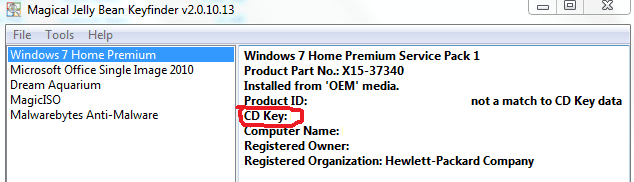
You want the CD key, not product ID from magic jellybean

Capture.PNG

Nic


My Computer

Computer type
PC/Desktop
Computer Manufacturer/Model Number
HP Desktop & Compaq Laptop
OS
Win 10 x64, Linux Lite, Win 7 x64, BlackArch, & Kali
Hard Drives
Samsung 850 Pro 256Gb,
Hitachi HDD 1Tb,
Crucial MX SSD 250Gb
Segate 3Tb USB 3.0 Ext. Backup HDD
Internet Speed
150Mbps dn, 20Mbps up
Antivirus
Avast Free, Malwarebytes Anti-Exploit & Anti-Ransomware
Browser
Firefox, Chrome, Opera, & VPN
i am having a couple other issues that arent hardware related like the screen has a short in it so it goes in and out. but i think i resolved the over heating. i will look those articles over though. I also dont have the windows discs, i never got a chance to make them and when i went to do so it says there was one completed.
 

My Computer

Computer type
Laptop
Computer Manufacturer/Model Number
HP
OS
Windows 7 Home Premium 64-bit SP1
CPU
AMD A6-3400M APU with Radeon(tm) HD Graphics, 1400 4 core
Motherboard
Hewlett-Packard 358B (Socket FS1)
Memory
4.00GB DDR3 @ 672MHz (9-9-9-24)
Graphics Card(s)
Generic PnP Monitor (1366x768@60Hz) 512MB ATI AMD Radeon HD
Sound Card
AMD High Definition Audio Device IDT High Definition Audio C
Monitor(s) Displays
Generic PnP Monitor on AMD Radeon HD 6520G
Screen Resolution
1366x788x60 GHZ
Hard Drives
931GB Seagate ST1000LM 048-2E7172 SATA Disk Device (SATA )
Keyboard
Standard ps/2
Mouse
HID -compliant mouse
Antivirus
Avira
Browser
Chrome
Laptop screens are cheap and easy to replace. I purchased one for about $50 US including shipping a short time ago on Amazon. Your system specs don't say what model HP laptop, so I can't google and locate one for you. Google your laptop model screen replacement and see if there is a video on it, most likely there is. Don't purchase a used one because it may be short lived before the back-lighting goes south.

Win7 ISO at TechBench (only link to Win7 Ultimate working) all editions (pro, home premium, etc.) can be made available from any windows 7 ISO - either by removing the ei.cfg file from the sources folder, or by using eicfg_removal_utility.zip

Repair install is done from within windows. Brian, Britec Computers UK's video is excellent on repair install.

You will need to extract the contents of the ISO with 7-zip so that you can click on setup.exe to start the repair install process. You only have to remember to click upgrade & have your 25 character key. You don't actually upgrade, you are replacing Win7 OS.

Simple, I've done too many to count!
 

My Computer

Computer type
PC/Desktop
Computer Manufacturer/Model Number
HP Desktop & Compaq Laptop
OS
Win 10 x64, Linux Lite, Win 7 x64, BlackArch, & Kali
Hard Drives
Samsung 850 Pro 256Gb,
Hitachi HDD 1Tb,
Crucial MX SSD 250Gb
Segate 3Tb USB 3.0 Ext. Backup HDD
Internet Speed
150Mbps dn, 20Mbps up
Antivirus
Avast Free, Malwarebytes Anti-Exploit & Anti-Ransomware
Browser
Firefox, Chrome, Opera, & VPN
Got them all deleted and rebooted and seems that the over heating is a little better. I accidently fell asleep with my laptop on my bed and it didnt over heat. the bsod randomly pops up sometimes I can go a few weeks before it shows up. I will keep an eye on it, I will probably be taking it into the shop to have it reloaded. aside from the black background and the icons that you cant see its running a lot faster. even my VPN popped right up. thank you and I will report back in a few days

Glad to hear it helped a bit. Of course, if you reinstall\repair Windows following Snick' suggestion, it will replace all the drivers again.
 

My Computer

Computer type
Laptop
Computer Manufacturer/Model Number
Dell M6500 Precision Work Station
OS
Windows 7 Pro SP1 64 bit
Memory
8 GB
Screen Resolution
1920x
Internet Speed
30 Mbps
Antivirus
Norton Security
Browser
IE 11
I believe, at this point, reading the prior post, Repair Install is moot.

Nic
 

My Computer

Computer type
PC/Desktop
Computer Manufacturer/Model Number
HP Desktop & Compaq Laptop
OS
Win 10 x64, Linux Lite, Win 7 x64, BlackArch, & Kali
Hard Drives
Samsung 850 Pro 256Gb,
Hitachi HDD 1Tb,
Crucial MX SSD 250Gb
Segate 3Tb USB 3.0 Ext. Backup HDD
Internet Speed
150Mbps dn, 20Mbps up
Antivirus
Avast Free, Malwarebytes Anti-Exploit & Anti-Ransomware
Browser
Firefox, Chrome, Opera, & VPN
I mainly did the driver to see if that would solve the over heating in the first place so when I do take it in (they are going to cut me a deal) they wont tear it apart and try to fix something when i was able to. I will most likely have to reinstall the driver again but at least i have it answered as to what was causing the over heating in the first place. i have yet to get a blue screen for the over driver but when I install updates and reboot it will come up with a couple blue screens but everything seems fine. I know I will need a new laptop but trying to make the best out of it. I will check back in a few days to see if the driver BSOD pops up. thanks for the help.
 

My Computer

Computer type
Laptop
Computer Manufacturer/Model Number
HP
OS
Windows 7 Home Premium 64-bit SP1
CPU
AMD A6-3400M APU with Radeon(tm) HD Graphics, 1400 4 core
Motherboard
Hewlett-Packard 358B (Socket FS1)
Memory
4.00GB DDR3 @ 672MHz (9-9-9-24)
Graphics Card(s)
Generic PnP Monitor (1366x768@60Hz) 512MB ATI AMD Radeon HD
Sound Card
AMD High Definition Audio Device IDT High Definition Audio C
Monitor(s) Displays
Generic PnP Monitor on AMD Radeon HD 6520G
Screen Resolution
1366x788x60 GHZ
Hard Drives
931GB Seagate ST1000LM 048-2E7172 SATA Disk Device (SATA )
Keyboard
Standard ps/2
Mouse
HID -compliant mouse
Antivirus
Avira
Browser
Chrome
Back
Top