500 GB Toshiba Canvio not recognized by computer

trevor7909

New member
Local time
7:53 AM
Messages
3
Hello!

I have a Toshiba external hard drive which has had some issues lately. It is not recognized in "My Computer" and I am unable to access any of the data on it. In Disk Management it appears under a black bar in the Disk 1 row.

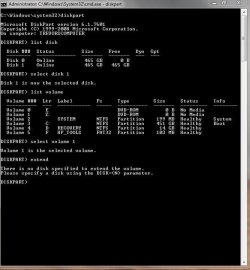
When I try to initialize the drive in Disk Management I get an error saying: (Data error) cyclic redundancy check. I have also tried renaming the drive through DISKPART but that didn't seem to solve anything either.

The attached screencap is what I get in disk management.

This is very frustrating and any help is greatly appreciated!
:D
 

Attachments

  • screencap1.jpg
    screencap1.jpg
    107.5 KB · Views: 5
Last edited:

My Computer My Computer

At a glance

Windows 7 Home Premium x64
Computer type
Laptop
Computer Manufacturer/Model Number
HP Pavillion g6
OS
Windows 7 Home Premium x64

My Computer My Computer

At a glance

Desk1 7 Home Prem / Desk2 10 Pro / Main lap A...Desk1 i5 3750K / Laptop i7 GTX 860M / Desk2 i...Desk1 8GB (1866) / Desk2 16GB (1333) / Laptop...Desk 1& 2NVidia GTX 650 & Laptops on board Intel
Computer type
PC/Desktop
Computer Manufacturer/Model Number
Own build (new) Desk1 / Asus ROG Win 7 / Desk2 1st build
OS
Desk1 7 Home Prem / Desk2 10 Pro / Main lap Asus ROG 10 Pro 2 laptop Toshiba 7 Pro Asus P2520 7 & 10
CPU
Desk1 i5 3750K / Laptop i7 GTX 860M / Desk2 i5 2500
Motherboard
Desk1 Asus P877-V / Desk2 Gigabyte H67 UD3H / Laptop ?
Memory
Desk1 8GB (1866) / Desk2 16GB (1333) / Laptop 8Gb DDR3
Graphics Card(s)
Desk 1& 2NVidia GTX 650 & Laptops on board Intel
Sound Card
Desk 1 & 2 -XONAR DG Realtek High Def audio Laptop
Monitor(s) Displays
Desk 1 Benq HD 2450 / Desk2 Philips 24" / Laptop 17.5"
Screen Resolution
1920x1080 D1 & D2 & Laptop 1
Hard Drives
Desk1 Samsung 120GB 830 SSD
Asus ROG 256GB 850 Pro SSD
Desk2 Samsung 840 256 SSD
Toshiba 120GB EVO
PSU
Desk 1 Corsair HX 1050/ Laptop ? / Desk 2 Corsair HX 650
Case
Desk 1 Cooler HAF XM ? Toshiba laptop / Desk2 Coolermaster
Cooling
Fans on all Desk1 -2 Desk2 - all Coolermasters 5 Laptop ?
Keyboard
Desk 1 MS Sidewinder X6 Desk 2 MS Sidewinder X 4
Mouse
Desk 1&2 - Gigabyte MS 900 gamer - laptop - Logitec wireless
Internet Speed
ADSL2+
Other Info
One other Desktop (tester) and spare Toshba laptop both with SSD's
Running Kaspersky 2016 ISS on all machines config'd identically
Logitec audio stereo systems on each machine (x3)
Canon MG5250MFC
Router/modem TP-Link running WPA2SK
Thanks for the quick response!

There is data on the drive and diskpart seems to recognize it. It is a fairly new drive but only recently I installed the HDD Password tool which might have moved around the autorun.inf file. I don't think it's a hardware issue, but more like a software issue.

The attached image is what I get when I try to partition in diskpart. (I renamed the drive Z: but that didn't solve it either)
 

Attachments

  • cmd diskpart.JPG
    cmd diskpart.JPG
    55.4 KB · Views: 2

My Computer My Computer

At a glance

Windows 7 Home Premium x64
Computer type
Laptop
Computer Manufacturer/Model Number
HP Pavillion g6
OS
Windows 7 Home Premium x64
Hmm do you really need that password tool mate as most in here will tell you that pre builds always come with what we call bloatware and this is one piece of it. I tried once with a Toshiba laptop to get a fingerprint pass going and spent many hours trying to work out what the dickens was happening so ditched that idea. In fact the Toshiba bloatware was so intrusive I installed new drives to both of them and flipped in an OEM but that was before I knew about this
http://www.sevenforums.com/tutorials/219487-clean-reinstall-factory-oem-windows-7-a.html

It is an option worth thinking about only back up any data you need fist to an external drive.

You will find the machine will run ten times as fast and no rotten bloat. I think just making the machine Admin password controlled mate is just as good as any other built in stuff plus there are programs if you want to go down that path to password stuff you want to.
 

My Computer My Computer

At a glance

Desk1 7 Home Prem / Desk2 10 Pro / Main lap A...Desk1 i5 3750K / Laptop i7 GTX 860M / Desk2 i...Desk1 8GB (1866) / Desk2 16GB (1333) / Laptop...Desk 1& 2NVidia GTX 650 & Laptops on board Intel
Computer type
PC/Desktop
Computer Manufacturer/Model Number
Own build (new) Desk1 / Asus ROG Win 7 / Desk2 1st build
OS
Desk1 7 Home Prem / Desk2 10 Pro / Main lap Asus ROG 10 Pro 2 laptop Toshiba 7 Pro Asus P2520 7 & 10
CPU
Desk1 i5 3750K / Laptop i7 GTX 860M / Desk2 i5 2500
Motherboard
Desk1 Asus P877-V / Desk2 Gigabyte H67 UD3H / Laptop ?
Memory
Desk1 8GB (1866) / Desk2 16GB (1333) / Laptop 8Gb DDR3
Graphics Card(s)
Desk 1& 2NVidia GTX 650 & Laptops on board Intel
Sound Card
Desk 1 & 2 -XONAR DG Realtek High Def audio Laptop
Monitor(s) Displays
Desk 1 Benq HD 2450 / Desk2 Philips 24" / Laptop 17.5"
Screen Resolution
1920x1080 D1 & D2 & Laptop 1
Hard Drives
Desk1 Samsung 120GB 830 SSD
Asus ROG 256GB 850 Pro SSD
Desk2 Samsung 840 256 SSD
Toshiba 120GB EVO
PSU
Desk 1 Corsair HX 1050/ Laptop ? / Desk 2 Corsair HX 650
Case
Desk 1 Cooler HAF XM ? Toshiba laptop / Desk2 Coolermaster
Cooling
Fans on all Desk1 -2 Desk2 - all Coolermasters 5 Laptop ?
Keyboard
Desk 1 MS Sidewinder X6 Desk 2 MS Sidewinder X 4
Mouse
Desk 1&2 - Gigabyte MS 900 gamer - laptop - Logitec wireless
Internet Speed
ADSL2+
Other Info
One other Desktop (tester) and spare Toshba laptop both with SSD's
Running Kaspersky 2016 ISS on all machines config'd identically
Logitec audio stereo systems on each machine (x3)
Canon MG5250MFC
Router/modem TP-Link running WPA2SK
Yes I would like to retrieve the data on the drive and it's external, I plug it in via USB. I just can't get to the files on the drive from my computer or even initialize the drive.
 

My Computer My Computer

At a glance

Windows 7 Home Premium x64
Computer type
Laptop
Computer Manufacturer/Model Number
HP Pavillion g6
OS
Windows 7 Home Premium x64
Back
Top