
500GB HDD only shows 3.86GB in Disk Management

Lenni

New member
Local time
8:48 PM
Messages
4
Hi,

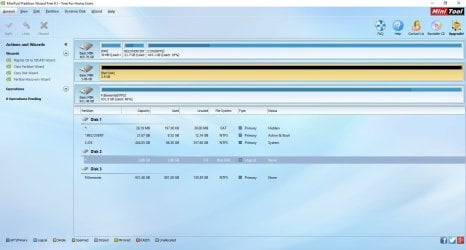
My computer's internal hard drive (Seagate 500GB) failed and PC could not boot up. When a friend helped to take out the drive and connected it to another PC, the disk shows up only in the disk management, but sizes is only 3.8GB instead of 500. I found some earlier thread in this forum and downloaded the Partition Wizard, and the screenshot from the PWfree9.1 looks like below.

Desperately trying to get back family pictures and

Thanks so much for your help!

Lenni
 

Attachments
  • screen1.jpg
    screen1.jpg
    101.8 KB · Views: 23

My Computer My Computer

At a glance

Windows 7 Home3.0gh
Computer type
PC/Desktop
Computer Manufacturer/Model Number
Dell
OS
Windows 7 Home
CPU
3.0gh
Hard Drives
seagate 500GB
I've not seen any responses, I suppose either the drive is really dead or no one has seen this kind of error before?

Anyway, thanks for this forum
 

My Computer My Computer

At a glance

Windows 7 Home3.0gh
Computer type
PC/Desktop
Computer Manufacturer/Model Number
Dell
OS
Windows 7 Home
CPU
3.0gh
Hard Drives
seagate 500GB
Welcome to Seven Forums.

You need to provide more details on the problem, and how & when this happened.
Such as;

1. When did you bought this HDD, and the condition is it did use before this problem pop-up.
1.1. Normally if it still new, you may also able to go back to the retailer &or HDD Brand Service Center, to repair or replacement.

2. Is there data inside the HDD.

3. How did you format the HDD
3.1. Mostly all HDD is format as Primary, but it indicate as Logical, which should not be.

And any other details, if any.

Without any details &or info, it is hard to understand what is the problem.
 

My Computer My Computer

At a glance

Windows 7 x64
Computer type
Laptop
Computer Manufacturer/Model Number
Toshiba L630 and L735
OS
Windows 7 x64
Hard Drives
240 GB SSD
If it was your boot disk there could be a reserved portion of the drive that is not showing as accessible - especially if it was OEM. Have you tried a disk manager from Seagate? Most manufacturers supply a free hardware analyzer on their websites. This may tell you what parts of your drive have failed.

If you just had a failure in the boot sector, many files might be recoverable. When you plugged it in to another PC - were you not able to access any files at all?
 

My Computer My Computer

At a glance

7 x64 UltimateAMD Ryzen 516GB DDR4Radeon R7 360
Computer type
PC/Desktop
Computer Manufacturer/Model Number
Custom
OS
7 x64 Ultimate
CPU
AMD Ryzen 5
Motherboard
Gigabyte GA-AB350-Gaming
Memory
16GB DDR4
Graphics Card(s)
Radeon R7 360
Monitor(s) Displays
2 x Dell U2518D
Screen Resolution
2560x1440 2560x1440
Hard Drives
WD 500GB x2
Samsung SSD 128MB (OS)
XPG SX8200 Pro M.2 2280 1TB
PSU
Antec 500
Cooling
Hyper 212 EVO
Keyboard
Logitech cordless K800
Mouse
Logitech M510
Antivirus
Avira
Thanks Eric3742 and RogerR.

The HDD was the main drive/boot disk for my Dell desktop, Inspiron 660 I bought a bit less than 4 years ago. Regarding Eric3742's:

1. condition when HDD went bad: I kept the PC on for a few days, and it somehow failed overnight.
2. I did not format the disk since it was the boot/main HDD;
3. there is data inside the disk, I did a partial backup two months ago, so not all is lost, but fair amount just might be

RogerR:

I did plug the drive to another PC, the drive was not recognized, except for the 3.8GB unformatted and unallocated (disk total should be about 500GB)

I also tried Seagate's SeaTool, but it could not find any controllers.

Thanks for your help!
Lenni
 

My Computer My Computer

At a glance

Windows 7 Home3.0gh
Computer type
PC/Desktop
Computer Manufacturer/Model Number
Dell
OS
Windows 7 Home
CPU
3.0gh
Hard Drives
seagate 500GB
I did plug the drive to another PC, the drive was not recognized, except for the 3.8GB unformatted and unallocated (disk total should be about 500GB)

I also tried Seagate's SeaTool, but it could not find any controllers.

I have to say then, that it sounds bad and perhaps terminal. :eek:

Since at least 3.8GB of platter do not appear to be physically damaged, you might try software such as Recuva from Piriform to try and pull more files off. I know you can replace the controllers on some hard drives, but it is technical and must be exactly the same controller as originally installed. Not for the faint of heart and generally worth attempting only if the drive contains items of great value.

I hope someone else here has a better idea, but otherwise it might be time to take the lesson and move on.
 

My Computer My Computer

At a glance

7 x64 UltimateAMD Ryzen 516GB DDR4Radeon R7 360
Computer type
PC/Desktop
Computer Manufacturer/Model Number
Custom
OS
7 x64 Ultimate
CPU
AMD Ryzen 5
Motherboard
Gigabyte GA-AB350-Gaming
Memory
16GB DDR4
Graphics Card(s)
Radeon R7 360
Monitor(s) Displays
2 x Dell U2518D
Screen Resolution
2560x1440 2560x1440
Hard Drives
WD 500GB x2
Samsung SSD 128MB (OS)
XPG SX8200 Pro M.2 2280 1TB
PSU
Antec 500
Cooling
Hyper 212 EVO
Keyboard
Logitech cordless K800
Mouse
Logitech M510
Antivirus
Avira
RogerR,

I did buy another PCB board from hdd-parts.com, supposedly they did swap something from my original PCB to the cloned board but still I could not get anything from my hard drive.

I will try Recuva as you suggested before i gave up. Thanks!

Lesson learned.

Sigh....
 

My Computer My Computer

At a glance

Windows 7 Home3.0gh
Computer type
PC/Desktop
Computer Manufacturer/Model Number
Dell
OS
Windows 7 Home
CPU
3.0gh
Hard Drives
seagate 500GB
I saw your first post but did not want to poke my nose into it since you had removed the drive from its original location and now I know that the complete history also was not given. The board/some component in the board has been changed.When you remove the HDD from its original location and do other things the situation could worsen depending upon the technical capability of the person handling the removed HDD and actions done on it..

If only you had come here immediately after your Dell PC became unbootable, we could have tried various data recovery procedures with the HDD in-situ. Only when all those things fail, one should remove the HDD and try it on another system or try swapping the PCB. That should be the last resort and not the first.

Always make a backup of all important data you may not want to lose.
 

My Computer My Computer

At a glance

Windows 7 Home Premium 32 bit
OS
Windows 7 Home Premium 32 bit
Back
Top