
59Hz

It's never visually affected me. Anyway reading this post I just checked Windows and mine now say 60Hz, use to say 59Hz. I have no idea when it changed. For all I know it could have happened with SP1 or changed updates ago. Any rate it's 60 now...
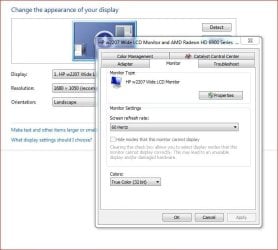
Screen Refresh Rate.JPG
 

My Computer

Computer type
PC/Desktop
Computer Manufacturer/Model Number
Custom built by me.
OS
Windows 10 Pro
CPU
Intel Core i7-4770K (3.5Ghz)
Motherboard
Gigabyte G1 Sniper 5 (F10 Bios)
Memory
32 gig Corsair Dominator Platinum (4x8Gig)
Graphics Card(s)
Sapphire Tri-X R9 Fury
Sound Card
Soundblaster ZXR
Monitor(s) Displays
NEC PA242W 24" LCD Monitor
Screen Resolution
1920 x 1200
Hard Drives
Primary - Samsung 850 Pro (512gig), Samsung 840 Pro (256gig), 2TB WD Caviar Black.
PSU
EVGA Supernova 1000 G2
Case
Cooler Master HAF X
Cooling
Corsair H100i with Corsair Air Series SP120 Quiet Fans
Keyboard
Logitech Wireless Wave
Mouse
Logitech Performance MX
Internet Speed
High Speed Cable
Antivirus
Norton Security
Browser
IE11
Other Info
Memory Timings - 1866MHz @ 9-9-9-27-1T @ 1.5 volts
I actually fixed mine today after seeing this thread, so this old thread was useful in kicking me to correcting it. I can't really say if it had a visual impact - maybe. But SP1 definitely didn't fix it for me.

Cheers
 

My Computer

Computer type
PC/Desktop
Computer Manufacturer/Model Number
Home built (GeneO industries)/Model 4
OS
Windows 10 Pro. EFI boot partition, full EFI boot
CPU
i7 4770k 4.4GHz (44-44-43-43 turbo) @ 1.248V
Motherboard
ASUS Maximus VI Hero
Memory
16GB (8GBx2) @2200 MHz G.skill Sniper 10-11-10-30-1, 1.6V
Graphics Card(s)
MSI GTX 970 Gaming 4G
Sound Card
Onboard SupremeFX Audio
Monitor(s) Displays
NEC Spectraview 2490WUXi-SV
Screen Resolution
1920 x 1200
Hard Drives
Samsung 850 Pro 256GB (OS), Samsung 2x 128GB 840 Pro SSD in RAID0, 3x WD Blue 6Gb/s 1TB RAID0, WD 2TB Black external USB 3.0, 2TB WD20EARS Green external USB 3.0, 2x 500GB Seagate and 1 750 GB external USB, 1x 350GB external USB3
PSU
Seasonic X-850 (2012 KM3 model)
Case
Fractal Design Define R4
Cooling
NH-D14, NF-F12, NF-A15; NF-P14, NF-P12,NF-A14, S12A PWM
Keyboard
Cooler Master Storm Quickfire Rapid - Brown
Mouse
Logitech G602
Internet Speed
126.4 Mb/s down, 24.3 Mb/s up
Other Info
USB 3.0 x8 , SATA III x8, eSATA, USB 2.0 x6. Samsung DVD R/W drive.

WEI: CPU 7.8, Memory 7.9, Graphics 7.9, Disk 7.9
I actually fixed mine today after seeing this thread, so this old thread was useful in kicking me to correcting it. I can't really say if it had a visual impact - maybe. But SP1 definitely didn't fix it for me.

Cheers

Perhaps you can say what you did to fix yours? So others may benefit.

Thanks
 

My Computer

Computer type
PC/Desktop
Computer Manufacturer/Model Number
Custom built by me.
OS
Windows 10 Pro
CPU
Intel Core i7-4770K (3.5Ghz)
Motherboard
Gigabyte G1 Sniper 5 (F10 Bios)
Memory
32 gig Corsair Dominator Platinum (4x8Gig)
Graphics Card(s)
Sapphire Tri-X R9 Fury
Sound Card
Soundblaster ZXR
Monitor(s) Displays
NEC PA242W 24" LCD Monitor
Screen Resolution
1920 x 1200
Hard Drives
Primary - Samsung 850 Pro (512gig), Samsung 840 Pro (256gig), 2TB WD Caviar Black.
PSU
EVGA Supernova 1000 G2
Case
Cooler Master HAF X
Cooling
Corsair H100i with Corsair Air Series SP120 Quiet Fans
Keyboard
Logitech Wireless Wave
Mouse
Logitech Performance MX
Internet Speed
High Speed Cable
Antivirus
Norton Security
Browser
IE11
Other Info
Memory Timings - 1866MHz @ 9-9-9-27-1T @ 1.5 volts
I actually fixed mine today after seeing this thread, so this old thread was useful in kicking me to correcting it. I can't really say if it had a visual impact - maybe. But SP1 definitely didn't fix it for me.

Cheers

Perhaps you can say what you did to fix yours? So others may benefit.

Thanks

I did a few posts back - created and used a custom 1920x1200 @60Hz in the Nvidia control panel - a possible solution posted way back in this thread.
 

My Computer

Computer type
PC/Desktop
Computer Manufacturer/Model Number
Home built (GeneO industries)/Model 4
OS
Windows 10 Pro. EFI boot partition, full EFI boot
CPU
i7 4770k 4.4GHz (44-44-43-43 turbo) @ 1.248V
Motherboard
ASUS Maximus VI Hero
Memory
16GB (8GBx2) @2200 MHz G.skill Sniper 10-11-10-30-1, 1.6V
Graphics Card(s)
MSI GTX 970 Gaming 4G
Sound Card
Onboard SupremeFX Audio
Monitor(s) Displays
NEC Spectraview 2490WUXi-SV
Screen Resolution
1920 x 1200
Hard Drives
Samsung 850 Pro 256GB (OS), Samsung 2x 128GB 840 Pro SSD in RAID0, 3x WD Blue 6Gb/s 1TB RAID0, WD 2TB Black external USB 3.0, 2TB WD20EARS Green external USB 3.0, 2x 500GB Seagate and 1 750 GB external USB, 1x 350GB external USB3
PSU
Seasonic X-850 (2012 KM3 model)
Case
Fractal Design Define R4
Cooling
NH-D14, NF-F12, NF-A15; NF-P14, NF-P12,NF-A14, S12A PWM
Keyboard
Cooler Master Storm Quickfire Rapid - Brown
Mouse
Logitech G602
Internet Speed
126.4 Mb/s down, 24.3 Mb/s up
Other Info
USB 3.0 x8 , SATA III x8, eSATA, USB 2.0 x6. Samsung DVD R/W drive.

WEI: CPU 7.8, Memory 7.9, Graphics 7.9, Disk 7.9
I noticed the date and am unable to use any of the solutions that were talked about. I read every post on all 40 some pages.

I am beginning to think that no one actually read my post. I believe the only way to fix my problem is to use the custom driver method and asked for help setting the refresh in the native resolution in Phenix block one detailed timings. If anyone can help with this it would be great.

This is important to me because bouth laptops that have this problem seem to be causing serious eye strain and the entire purpose of getting them for my mother and father is there eye sight isn't what it used to be. Now I have too expensive laptops that I cant use for more than 5 min without feeling my eyes burring and wanting to pop out of my head. It is possible that this is not the problem but I suspect it because there did not seem to be any problems with the previously installed operation system.

Thank you for your time and help.
 

My Computer

Computer Manufacturer/Model Number
sony vaio aw 190 and aw 160j
OS
windows 7 ultimate 64
I doubt it is the problem. Regardless if the refreash rate is 60Hz or 59Hz the display will still work at the defined rate which is ~59.94Hz. 59 or 60 is just a display quirk of not being able to show decimal places. Furthermore, that standard defines if one is not able to display decimal places then the value is to be rounded down. Windows is complying with the standard, but your display is still working at its defined rate which is 59.94Hz, give or take.

I honestly, will find it hard to believe this is causing your eye strain. As even in previous versions, even tho Windows displayed 60Hz the display was still operating at 59.94Hz.

Just one more thing, LCDs do not actually have a refresh rate like an CRT. Eye strain is not associated with the refresh rate for LCDs but rather with there source of light.
 

My Computer

Computer type
PC/Desktop
Computer Manufacturer/Model Number
Alienware Aurora ALX R4
OS
Windows 10 Pro (x64)
CPU
Intel Core i7-3930K (3.2GHz - 4.5GHz)
Motherboard
Alienware Aurora-R4 x79
Memory
4x Samsung 4GB PC3-12800 DDR3 (16GB 1600MHz)
Graphics Card(s)
Nvidia Geforce GTX 690
Sound Card
SteelSeries Siberia Elite
Monitor(s) Displays
Dell UltraSharp U3011
Screen Resolution
2560x1600
Hard Drives
Samsung 850 Pro 256 GB, Seagate 1TB Desktop Hybrid HDD, 2x Western Digital 4TB Green HDD
PSU
875W Some Dell PSU <.<
Case
Alienware Aurora ALX
Cooling
Custom Liquid Cooling (EK CPU & GPU blocks) dual EK 480RAD
Keyboard
Logitech G710+ Mechanical
Mouse
Logitech G700s
Internet Speed
Verizon Fios (50 mbps average)
Other Info
Server: Intel NUC D54250WYK: i5-4250U, 16GB, 256 GB mSATA, Windows Server 2012 R2
you are right that this may not be the problem but I honestly cannot remember ever having problems with it before. I just remembered that I had to do some weird editing to fire fox to get it to display properly when it was installed. I might need to check and see if I am running in a weird VAIO comparability mode or something of the sort. in the mean time I would like to be able to define a custom resolution and change the timing anyways.
 

My Computer

Computer Manufacturer/Model Number
sony vaio aw 190 and aw 160j
OS
windows 7 ultimate 64
My SynchMaster P2350 has always been set to 59Hz. I use it with Photoshop and some video and it's never been a problem.
Does setting 60Hz in some application's configuration table cause any issues? If it did, it becomes an issue.
 

My Computer

Computer type
PC/Desktop
Computer Manufacturer/Model Number
Own build
OS
Windows 7x64 Home Premium SP1
CPU
Intel i7 2600k
Motherboard
ASUS P8Z68 Deluxe
Memory
G.Skill Ripjaws (DDR3-1600) 2x4GB
Graphics Card(s)
Nvidia GeForce GTS 450; Intel HD Graphics 3000(GT2+)
Monitor(s) Displays
Dell Ultrasharp IPS panel U2311H, Samsung SyncMaster P2350
Screen Resolution
1920x1080
Hard Drives
Samsung 850 Pro SSD 256GB, Samsung SSD 840 120GB, Seagates 1TB Barracuda ST31000528AS x2
PSU
Seasonic M12II 520W
Case
Lian Li Lancool PC-K60
Cooling
Case: 1x120mm, 3x140mm CPU: Hyper 212+
Keyboard
Logitech MK520 (wireless)
Mouse
Logitech MK520
Internet Speed
6-7 Mbps
Antivirus
Norton Security Premium, Malwarebytes on 2 (MSE on 3rd PC)
Browser
FireFox
Other Info
Audio: Logitech Z523 2.1
I have managed to get windows to display 60hz confirmed in DXDIAG. This solution is based on ATI hardware using a Samsung 2443bw monitor. However upon restart you have to change the refresh rate to 60hz again.

1) Via CCC enable "Reduce DVI frequency on high resolution monitors" and click apply.

2) Restart computer

3) Once rebooted open up CCC and Click on the "Detect Displays" button via the "Creating and arranging desktops" section under the "desktop management tab". There is an option to automatically detect displays upon CCC being opened under the "Advanced Display Settings" so you don't have to keep clicking to detect your monitor. This step is mandatory in allowing Windows to set the refresh rate to 60hz!

4) Open the"Advanced Settings" under the "Screen resolution" option found by right clicking on your desktop and Change your screen refresh rate to 60hz and click apply. Your screen should go blank for a few seconds, you should notice this takes slightly longer than changing from 59hz to 60hz when the refresh rate hasn't properly been applied.

5) Close and reopen to see if the refresh rate has been successfully applied to 60hz, to verify run DXDIAG and check the refresh rate under the Display Tab.

This worked for me and hopefully this should work for single display ATI users however as mentioned above the refresh rate reverts back to 59hz upon reboot of the computer, simply repeat step 3 > to remedy. With most Windows issues usually the solution is based on the method used.

Godspeed.
 
Last edited:

My Computer

OS
windows 7
This recently just happened to me. It didnt "seem" to happen until I tried to mess around and add a dual monitor. I was like fine. I hate 60 hz as it is but Ive gotten used to it over the past 2 yrs.

I noticed it said 59hz. I may just have a sharp eye but to me it looked slightly "watered". Went to change it to 1920x1080 HD 60 hz and the highest it went was 59.

I said eff it and chose SD 1920x1080 HD 60hz. It took the setting and asked did I want to keep it. After saying yes it reverted back to the 59hz mode. I was like wtf. I didnt want unsintall drivers clean as nothing is technically "broken". Ill do a clean install when the next nvidia driver is released because I dont prefer custom modes.

Found this article.Followed instructions I had to manually add the 1 in the 60.0001.It still sets that back to 60.0000 but so far it looks like it used to so Ill take it. I have no clue as to what caused this cause I know for a fact it was on 60. I did notice that my HDCP status is now unlocked and it wasnt before, maybe if I can re-lock it, it would "fix" it. For now ill try this.

**EDIT....Dxdiag reports the monitor is running at 59 hz :(
 

My Computer

OS
Windows Ultimate 64 bit
This recently just happened to me. It didnt "seem" to happen until I tried to mess around and add a dual monitor. I was like fine. I hate 60 hz as it is but Ive gotten used to it over the past 2 yrs.

I noticed it said 59hz. I may just have a sharp eye but to me it looked slightly "watered". Went to change it to 1920x1080 HD 60 hz and the highest it went was 59.

I said eff it and chose SD 1920x1080 HD 60hz. It took the setting and asked did I want to keep it. After saying yes it reverted back to the 59hz mode. I was like wtf. I didnt want unsintall drivers clean as nothing is technically "broken". Ill do a clean install when the next nvidia driver is released because I dont prefer custom modes.

Found this article.Followed instructions I had to manually add the 1 in the 60.0001.It still sets that back to 60.0000 but so far it looks like it used to so Ill take it. I have no clue as to what caused this cause I know for a fact it was on 60. I did notice that my HDCP status is now unlocked and it wasnt before, maybe if I can re-lock it, it would "fix" it. For now ill try this.

**EDIT....Dxdiag reports the monitor is running at 59 hz :(
it's a known issue in Windows 7, microsoft have acknowledged the fault and explained the cause and no action is needed as it's supposed to do that apparently Screen refresh rate in Windows 7 does not apply the user selected settings on monitors & TVs (that report specific TV compatible timings)
 

My Computer

Computer type
PC/Desktop
Computer Manufacturer/Model Number
Custom Build
OS
Windows 7 Ultimate x64 SP1
CPU
Intel Q6600 @ 2.6Ghz
Motherboard
Evga NF78-CK-132-A 3-Way SLI
Memory
4Gb DDR2 Corsair Dominator @ 800Mhz 5-5-5-15
Graphics Card(s)
EVGA 560 GTX SC FTW 1GB
Sound Card
Realtek HD 7.1 Audio, Plantronics GameCom780 7.1 Headset
Monitor(s) Displays
Dell S2409W
Screen Resolution
1920 x 1080
Hard Drives
SanDisk SDSSDHII-120G-G25 120GB SSD
Samsung 7200RPM 750Gb SATA
Samsung 850 EVO 120GB SSD
Western Digital Green 1TB 7200RPM
PSU
Xigmatek 750W Quad sli quad core 80% eff
Case
Antec 900 Gaming Case
Cooling
Zalman CNPS9700-NT NVIDIA Tritium
Keyboard
Logitech generic keyboard, MS wireless keyboard
Mouse
Razor Lachesis Banshee V2 Blue, 4000DPI, MS wireless mouse
Internet Speed
152Mb Virgin Media Fibre Optic
Antivirus
Microsoft Security Essentials
Browser
Google Chrome
Other Info
Wireless Gaming Receiver for Windows, Wireless Xbox 360 Pad
silent hunter wont display go to nvidia contol panel adjust image set

Hey all, I found something that is maybe the reason the custom resolution works for some of you and not for others. Apologies if this has been said before, not gonna read the entire thread.

The original instructions just say to create a custom resolution and then go straight to manual timing. This failed for me when I tried to put 60.001 "Test" went grey. What I did then was change the top number from 59 to 60. After that it let me use 60.001 in manual timing:
all i did was go to nvidia control panel by right clicking and were it says 3d setings click on adjust image with preview. then click on let the 3d application decide and presto hope iy works for u! it worked for me and i have both silent hunter 3 and 4. and im running windows 7 ultimate 32 bit. good luck
 

My Computer

OS
windows 7 ultimate 32 bit
Back
Top