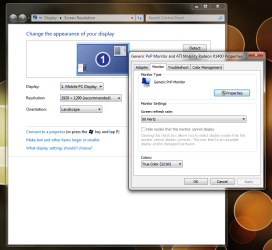
Ok let me be clear why I know that there is a real problem here: When I turn on my computer, and I go to either 'Advanced Settings in 'Screen Resolution' or 'Change Resolution' in the 'nVidia Control Panel', the refresh rate is at 59Hz. Yes, it may be 59.9 or 59.1, I don't know, but that's not the issue. I can change it to 60Hz in either panel, but when I do, my screen goes black for a second and then it changes to 60Hz. This shows to me that it's really switching refresh rates, just like when you change the resolution it also goes black for an instant. However, the selection box then automatically reverts back to 59Hz **without** the screen going black to indicate that it's really reverting back to 59Hz. This is what bothers me! I don't know if my screen is actually set to 59Hz or in reality it's set at 60Hz but showing 59Hz. If I try to then change it back to 60Hz again, the screen doesn't go black - so what gives? What is it actually set to at this point? I don't necessarily complain about having to do extra things to make things work, but with this, I can't see a reason why it's not getting fixed, if for any other reason but to calm us down.
Been a while since I posted on this comment...
As you mentioned above, I have exactly the same problem...
Select 60, just reverts back to 59! REALLY IRRITATING!!!
I suppose we will just have to get used to it until Win 7 eventually takes over from XP (I recon a year or 2!) then, only then will this problem eventually be resolved with service pack 4 or something!
BUT, I have run into 2 other problems which I think are sort of related here, and I hope other might be experiencing it too....
Firstly, the aspect ratio thing...
I usually set the nVidia aspect ratio to "use NVIDIA scaling with fixed-aspect ratio". If I run something with a 4:3 ratio, the screen should display it as that and not stretch it.
Now, when I select this, and hit apply, it confirms the change, then just reverts back to using the monitors built in scaling?!?!?! WTF?????
Secondly, When I play games, watch a movie or basically do anything in full screen and something that is very bright comes on, the monitor blanks out for a few seconds. For example, with the new game Castle Wolfenstien. When this was released, I rushed out and bought (waiting for ages for it! Awesome game!). Now, when ever there is an explosion or something bright on the screen, and you are looking in that direction, the screen will blank out!
This is VERY irritating....
From what I have sort of worked out is that it might have something to, possibly, with DirectX and the drivers, but I am not sure...
Anybody else having this problem?
P.S. Sorry for trying to change the subject here, but these could be related somehow?!?!