59Hz

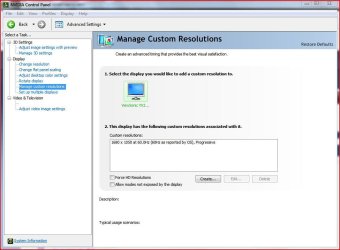
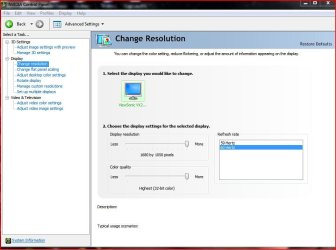
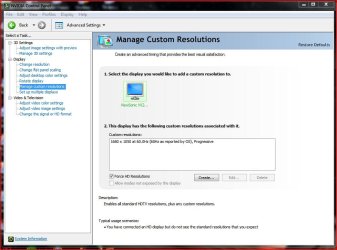
Managed to force 60hz in the nVidia's CP Manage Custom Resolution settings.
 

Attachments

  • Capture.JPG
    Capture.JPG
    66.6 KB · Views: 815
  • Capture2.JPG
    Capture2.JPG
    66.7 KB · Views: 827

My Computer

Computer type
PC/Desktop
Computer Manufacturer/Model Number
Alienware® ALX X58
OS
Win 7 Ult SP1/Win 10 Pro (all x64)
CPU
Intel® Core™ i7-975 Extreme O/C to 4.02 GHz, 8MB Cache
Motherboard
Asus® P6T Deluxe V2 X58 LGA1366
Memory
24GB Corsair Vengeance DDR3 SDRAM at 1600MHz - 6 x 4096MB
Graphics Card(s)
1792 MB NVIDIA® GeForce® GTX 295 Dual Core
Sound Card
Onboard Soundmax® High-Definition 7.1 Performance Audio
Monitor(s) Displays
Samsung XL2370 LED backlit 23" W/S 2ms response time
Screen Resolution
1920 X 1080
Hard Drives
2 x 500gb SATA II
1 x 1TB SATA II
1 external eSATA LaCie 3TB
(Non-RAID)
PSU
Alienware® 1200 Watt Multi-GPU
Case
Alienware® P2 ALX Chassis with AlienIce™ 3.0 Video Cooling
Cooling
Alienware® High-Perf. Liquid Cooling + Acoustic Dampening
Keyboard
Microsoft® Wireless Entertainment 8000 + Logitech® G15 Wired
Mouse
Microsoft® Wireless Laser 8000 + Logitech® G9 Wired
Internet Speed
1Gb/s
Antivirus
McAfee LiveSafe
Browser
Firefox - latest
Other Info
Using non-RAID on purpose as I find RAID to be too temperamental.
Now set to AHCI
Its the same with my xfx 9800GTX card and the latest 182.05 beta driver.
 

My Computer

Computer Manufacturer/Model Number
self built
OS
Windows 7 Professional 64-bit
CPU
Intel E8400 3GHz
Motherboard
Intel DX48BT2
Memory
Kingston PC3-10700H 4Gb
Graphics Card(s)
XFX Radeon HD 5850 BlackEd.
Sound Card
Asus Xonar DG
Monitor(s) Displays
2x Samsung SM-T220HD 22"
Screen Resolution
1680x1050 on two monitors
Hard Drives
OCZ Vertex 2 120gb 3.5" (OS)
Seagate Momentus XT 500gb
Samsung F3 1Tb (games)
2x Samsung F1 1Tb
PSU
Thermaltake ToughPower 850w
Case
Thermaltake Armor
Cooling
Scythe Mugen II
Keyboard
Microsoft Comfort Curve USB
Mouse
Razer Diamondback 3G
Internet Speed
8128/443
Well here's me crowing that I got 60hz to stick and after a reboot it was back to 59hz, however, I can now change it and it stays until the next reboot. I doubt it really makes much difference if the truth were known.
According to Amorphous over at the nVidia forums (Hardware/Geforce) there's a new driver coming out in March which should be OK for Win 7. As I feel it's the driver to blame here I'll wait and see.
 

My Computer

Computer type
PC/Desktop
Computer Manufacturer/Model Number
Alienware® ALX X58
OS
Win 7 Ult SP1/Win 10 Pro (all x64)
CPU
Intel® Core™ i7-975 Extreme O/C to 4.02 GHz, 8MB Cache
Motherboard
Asus® P6T Deluxe V2 X58 LGA1366
Memory
24GB Corsair Vengeance DDR3 SDRAM at 1600MHz - 6 x 4096MB
Graphics Card(s)
1792 MB NVIDIA® GeForce® GTX 295 Dual Core
Sound Card
Onboard Soundmax® High-Definition 7.1 Performance Audio
Monitor(s) Displays
Samsung XL2370 LED backlit 23" W/S 2ms response time
Screen Resolution
1920 X 1080
Hard Drives
2 x 500gb SATA II
1 x 1TB SATA II
1 external eSATA LaCie 3TB
(Non-RAID)
PSU
Alienware® 1200 Watt Multi-GPU
Case
Alienware® P2 ALX Chassis with AlienIce™ 3.0 Video Cooling
Cooling
Alienware® High-Perf. Liquid Cooling + Acoustic Dampening
Keyboard
Microsoft® Wireless Entertainment 8000 + Logitech® G15 Wired
Mouse
Microsoft® Wireless Laser 8000 + Logitech® G9 Wired
Internet Speed
1Gb/s
Antivirus
McAfee LiveSafe
Browser
Firefox - latest
Other Info
Using non-RAID on purpose as I find RAID to be too temperamental.
Now set to AHCI
Hi guys,
I have a somehow same problem, but not totally the same.
My problem is my monitir isn't recognized as it should anymore. I mean at the install of Seven, i could find Siemens Nixdorf MCM 2110 MTD monitor (old 21' crt).
But for any reason, now Seven only shows non-PnP monitor. And so, I cannot set it at 100mhz 32bit color but only 70mhz/32 bit.
I thought it was a nVIDIA driver matter, so tried (for 7600GT GoldenSample agp) WDDM 1.1, 180.xx, 181.22, 182.05 but i only can run WDDM 1.0.
I'm now trying to find a driver for my monitor, but it seems it's no way.
Is there according to you any other solution?
That 'd help me so much 'caus having flikering screen every 2/3 minuts is so boring...
Thank you so much for help.
 

My Computer

OS
windows Seven 32bit RC
CPU
AMD Athlon XP 2500+M Barthon @3500
Motherboard
Epox 8RDA3+
Memory
2x Kingston HyperX 1Go
Graphics Card(s)
Gainward 7600GT agp GoldenSample
Monitor(s) Displays
Hitashi CRT 22"
Screen Resolution
1024/768 - 32Hz
Hard Drives
Samsung S-Ata2 500Go SpinPoint
2x Hitashi ata 133 40Go
PSU
Antec SmartPower 450w
Cooling
ArcticCooling Silent2
Internet Speed
3200
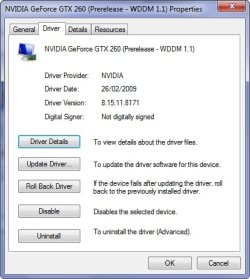
I can confirm that this problem is solved in nVidia's official beta drivers for W7 (181.71). It installs it with 59Hz as default but you can correct it to 60Hz and it will stay put even after rebooting.
 

My Computer

Computer Manufacturer/Model Number
DIY
OS
Windows 7 x64
CPU
Intel Core 2 Duo E6750
Motherboard
Gigabyte GA-P35-DS3-L V2.0
Memory
4GB G.Skill PC2-8500
Graphics Card(s)
eVGA GTX 460
Sound Card
Auzentech X-Fi Prelude 7.1
Monitor(s) Displays
Envision 2219S-1 (22")
Screen Resolution
1680x1050
Hard Drives
Samsung 750GB [SATA 2] //
Seagate FreeAgent Go 500GB
PSU
Corsair CX400
Case
Raidmax Sagitta
Cooling
Stock
Keyboard
HP Wireless Elite
Mouse
Logitech G7 Gaming Mouse
Internet Speed
1Mbit
Other Info
*Gaming Input: xBox 360 Controller + Logitech Rumblepad 2 Cordless
*Speakers: Logitech Z5500
*Headphones: Sennheiser HD555
Good news, thanks.
 

My Computer

Computer type
PC/Desktop
Computer Manufacturer/Model Number
Alienware® ALX X58
OS
Win 7 Ult SP1/Win 10 Pro (all x64)
CPU
Intel® Core™ i7-975 Extreme O/C to 4.02 GHz, 8MB Cache
Motherboard
Asus® P6T Deluxe V2 X58 LGA1366
Memory
24GB Corsair Vengeance DDR3 SDRAM at 1600MHz - 6 x 4096MB
Graphics Card(s)
1792 MB NVIDIA® GeForce® GTX 295 Dual Core
Sound Card
Onboard Soundmax® High-Definition 7.1 Performance Audio
Monitor(s) Displays
Samsung XL2370 LED backlit 23" W/S 2ms response time
Screen Resolution
1920 X 1080
Hard Drives
2 x 500gb SATA II
1 x 1TB SATA II
1 external eSATA LaCie 3TB
(Non-RAID)
PSU
Alienware® 1200 Watt Multi-GPU
Case
Alienware® P2 ALX Chassis with AlienIce™ 3.0 Video Cooling
Cooling
Alienware® High-Perf. Liquid Cooling + Acoustic Dampening
Keyboard
Microsoft® Wireless Entertainment 8000 + Logitech® G15 Wired
Mouse
Microsoft® Wireless Laser 8000 + Logitech® G9 Wired
Internet Speed
1Gb/s
Antivirus
McAfee LiveSafe
Browser
Firefox - latest
Other Info
Using non-RAID on purpose as I find RAID to be too temperamental.
Now set to AHCI
Allo, this has been wrecking my head also and im delighted its being looked into. I am currently using an LG 37inch LCD as my main monitor using the DVI-HDMI connector i bought in argos and a HD4870 single card.

My resolution is normally 1920x1080p, yet when i boot Win7 it defaults it to 59 Htz and there is underscan/overscan... whatever. I have to force 60 htz in the display manager of the ATI catalylst utlity and it defaults back on next boot or when i load up Left for dead a couple of times (first load works).

This is what rivatuner reports when i try messing with stuff or trying to create my own monitor driver with minimum 60htz refresh rate... which also didnt work BTW.


It would seem that the cheap HDMI connector is the problem as has been theorised earlier. It is getting the Hardware ID of the Monitor, in this case 37LF75 but the refresh rate (possibly provided by the connector) is the limiting factor. Also, the Maximum Resolution is incorrect. Is the connector corrupting the EDID?

Code:
Monitor
  Model name............... 37LF75
  Manufacturer............. LGE
  Plug and Play ID......... GSM75DB
  Serial number............ n/a
  Manufacture date......... 2007, ISO week 8
  -------------------------
  EDID revision............ 1.3
  Input signal type........ Digital
  Color bit depth.......... Undefined
  Display type............. RGB color
  Screen size.............. 700 x 390 mm (31.5 in)
  Power management......... Standby, Suspend, Active off/sleep
  Extension blocs.......... 1 (CEA-EXT)
  -------------------------
  DDC/CI................... Not supported

Color characteristics
  Default color space...... Non-sRGB
  Display gamma............ 2.20
  Red chromaticity......... Rx 0.640 - Ry 0.341
  Green chromaticity....... Gx 0.287 - Gy 0.610
  Blue chromaticity........ Bx 0.146 - By 0.069
  White point (default).... Wx 0.285 - Wy 0.293
  Additional descriptors... None

Timing characteristics
  Horizontal scan range.... 31-84kHz
  Vertical scan range...... 57-75Hz
  Video bandwidth.......... 180MHz
  CVT standard............. Not supported
  GTF standard............. Not supported
  Additional descriptors... None
  Preferred timing......... Yes
  Native/preferred timing.. 1920x1080p at 60Hz 
    Modeline............... "1920x1080" 138.500 1920 1968 2000 2080 1080 1083 1088 1111 +hsync -vsync
  Detailed timing #1....... 1360x768p at 60Hz 
    Modeline............... "1360x768" 84.750 1360 1432 1568 1776 768 771 776 798 -hsync +vsync

Standard timings supported
     720 x  400p at  70Hz - IBM VGA
     640 x  480p at  60Hz - IBM VGA
     640 x  480p at  75Hz - VESA
     800 x  600p at  60Hz - VESA
     800 x  600p at  75Hz - VESA
     832 x  624p at  75Hz - Apple Mac II
    1024 x  768p at  60Hz - VESA
    1024 x  768p at  70Hz - VESA
    1024 x  768p at  75Hz - VESA
     640 x  480p at  60Hz - VESA STD
     800 x  600p at  60Hz - VESA STD
    1024 x  768p at  60Hz - VESA STD
    1280 x 1024p at  60Hz - VESA STD
    1400 x 1050p at  60Hz - VESA STD
    1600 x 1200p at  60Hz - VESA STD
    1920 x 1080p at  60Hz - VESA STD

EIA/CEA-861 Information
  Revision number.......... 3
  DTV underscan............ Supported
  Basic audio.............. Supported
  YCbCr 4:4:4.............. Supported
  YCbCr 4:2:2.............. Supported
  Native formats........... 1
  Detailed timing #1....... 1280x720p at 60Hz 
    Modeline............... "1280x720" 74.250 1280 1344 1472 1664 720 723 728 748 +hsync +vsync
  Detailed timing #2....... 720x480p at 60Hz (4:3)
    Modeline............... "720x480" 27.000 720 736 798 858 480 489 495 525 -hsync -vsync
  Detailed timing #3....... 1920x1080p at 60Hz (16:10)
    Modeline............... "1920x1080" 148.500 1920 2008 2052 2200 1080 1084 1089 1125 +hsync +vsync
  Detailed timing #4....... 1920x1080i at 60Hz (16:9)
    Modeline............... "1920x1080" 74.250 1920 2008 2052 2200 1080 1084 1094 1124 interlace +hsync +vsync
  Detailed timing #5....... 1280x768p at 60Hz 
    Modeline............... "1280x768" 80.140 1280 1344 1472 1664 768 771 778 798 -hsync -vsync

CE video data (timings supported)
     640 x  480p at  60Hz - Default (4:3, 1:1) [Native]
     720 x  480p at  60Hz - EDTV (4:3, 8:9)
     720 x  480p at  60Hz - EDTV (16:9, 32:27)
     720 x  576i at  50Hz - Doublescan (4:3, 16:15)
     720 x  576p at  50Hz - EDTV (16:9, 64:45)
    1280 x  720p at  50Hz - HDTV (16:9, 1:1)
    1280 x  720p at  60Hz - HDTV (16:9, 1:1)
    1920 x 1080i at  50Hz - HDTV (16:9, 1:1)
    1920 x 1080i at  60Hz - HDTV (16:9, 1:1)
    1920 x 1080p at  24Hz - HDTV (16:9, 1:1)
    1920 x 1080p at  25Hz - HDTV (16:9, 1:1)
    1920 x 1080p at  30Hz - HDTV (16:9, 1:1)
    1920 x 1080p at  50Hz - HDTV (16:9, 1:1)
    1920 x 1080p at  60Hz - HDTV (16:9, 1:1)
    NB: NTSC refresh rate = (Hz*1000)/1001

CE audio data (formats supported)
  LPCM    2-channel, 16/20/24 bit depths at 32/44/48 kHz

CE speaker allocation data
  Channel configuration.... 2.0
  Front left/right......... Yes
  Front LFE................ No
  Front center............. No
  Rear left/right.......... No
  Rear center.............. No
  Front left/right center.. No
  Rear left/right center... No
  Rear LFE................. No

CE vendor specific data (VSDB)
  IEEE registration number. 0x000C03
  CEC physical address..... 0.1.0.0
  Maximum TMDS clock....... 165MHz

Report information
  Date generated........... 20/03/2009
  Software revision........ 2.30.0.797
  Operating system......... 6.1.7057.2

Raw data
  00,FF,FF,FF,FF,FF,FF,00,1E,6D,DB,75,01,01,01,01,08,11,01,03,80,46,27,78,EA,D9,B0,A3,57,49,9C,25,
  11,49,4B,A5,6E,00,31,40,45,40,61,40,81,80,90,40,A9,40,D1,C0,01,01,1A,36,80,A0,70,38,1F,40,30,20,
  35,00,E8,26,32,00,00,1A,1B,21,50,A0,51,00,1E,30,48,88,35,00,BC,86,21,00,00,1C,00,00,00,FD,00,39,
  4B,1F,54,12,00,0A,20,20,20,20,20,20,00,00,00,FC,00,33,37,4C,46,37,35,0A,20,20,20,20,20,20,01,EE,
  02,03,21,F1,4E,81,02,03,15,12,13,04,14,05,20,21,22,1F,10,23,09,07,07,83,01,00,00,65,03,0C,00,10,
  00,01,1D,00,80,51,D0,1C,20,40,80,35,00,BC,88,21,00,00,1E,8C,0A,D0,8A,20,E0,2D,10,10,3E,96,00,13,
  8E,21,00,00,18,02,3A,80,18,71,38,2D,40,58,2C,45,00,06,44,21,00,00,1E,01,1D,80,18,71,1C,16,20,58,
  2C,25,00,C4,8E,21,00,00,9E,4E,1F,00,80,51,00,1E,30,40,80,37,00,BC,88,21,00,00,18,00,00,00,00,1D

 
Last edited:

My Computer

Computer Manufacturer/Model Number
Me
OS
Wista!, Need 59hz issue fix on 7.
CPU
Intel Core2 Duo CPU E8400 @ 3.00GHz
Motherboard
Gigabyte P35T-DS3P
Graphics Card(s)
ATI 4870
Sound Card
Onboard 7.1
Monitor(s) Displays
LG 37inch
Screen Resolution
1920x1080p
This is an issue that has been around since the 7000 build but it is finally working in build 7057, but only when using the latest Windows 7 drivers from Nvidia, I tried with the latest Vista driver but still could not get 60Hz

2009-03-21_115522.jpg2009-03-21_115511.jpg
 

My Computer

Computer Manufacturer/Model Number
Home Brew
OS
Windows 7 Ultimate Vista Ultimate x64
CPU
Core 2 Duo E8500 3.16Ghz @ 3.8Ghz
Motherboard
eVGA 750i FTW
Memory
2x2Gigs Patriot PC2-6400 LL
Graphics Card(s)
Inno3D GeForce GTX260 216 SP
Monitor(s) Displays
ASUS VW222U 22" 2ms Response time
Screen Resolution
1680x1050
Hard Drives
SATA 150GB
SATA II 250GB
USB IDE 750GB Ext.
PSU
HYTEC 600W & Thermaltake 650W Toughpower Power Exp
Case
Thermaltake Armor LCS (Liquid Cooling System)
Cooling
Liquid Cooling System
Keyboard
Logitech G15 Gaming Keyboard
Mouse
Logitech G9 Gaming Mouse
You no longer have to use vista drivers or the old version from WU. They have fixed this particular issue with new drivers direct from their website. So go to nvidia.com and download the win 7 drivers there.
 

My Computer

Computer Manufacturer/Model Number
self built
OS
Windows 7 Professional 64-bit
CPU
Intel E8400 3GHz
Motherboard
Intel DX48BT2
Memory
Kingston PC3-10700H 4Gb
Graphics Card(s)
XFX Radeon HD 5850 BlackEd.
Sound Card
Asus Xonar DG
Monitor(s) Displays
2x Samsung SM-T220HD 22"
Screen Resolution
1680x1050 on two monitors
Hard Drives
OCZ Vertex 2 120gb 3.5" (OS)
Seagate Momentus XT 500gb
Samsung F3 1Tb (games)
2x Samsung F1 1Tb
PSU
Thermaltake ToughPower 850w
Case
Thermaltake Armor
Cooling
Scythe Mugen II
Keyboard
Microsoft Comfort Curve USB
Mouse
Razer Diamondback 3G
Internet Speed
8128/443
You no longer have to use vista drivers or the old version from WU. They have fixed this particular issue with new drivers direct from their website. So go to nvidia.com and download the win 7 drivers there.

Yes that's what I was saying in the previous post, if you want 60Hz get the latest Windows 7 driver from Nvidia.
 

My Computer

Computer Manufacturer/Model Number
Home Brew
OS
Windows 7 Ultimate Vista Ultimate x64
CPU
Core 2 Duo E8500 3.16Ghz @ 3.8Ghz
Motherboard
eVGA 750i FTW
Memory
2x2Gigs Patriot PC2-6400 LL
Graphics Card(s)
Inno3D GeForce GTX260 216 SP
Monitor(s) Displays
ASUS VW222U 22" 2ms Response time
Screen Resolution
1680x1050
Hard Drives
SATA 150GB
SATA II 250GB
USB IDE 750GB Ext.
PSU
HYTEC 600W & Thermaltake 650W Toughpower Power Exp
Case
Thermaltake Armor LCS (Liquid Cooling System)
Cooling
Liquid Cooling System
Keyboard
Logitech G15 Gaming Keyboard
Mouse
Logitech G9 Gaming Mouse
this bug has been brought back from the dead in the latest W7 build (7077). at least with Windows 7's official nvidia driver: 181.71. :shock:

gonna try the latest Vista drivers to see if it's fixed there.
 

My Computer

Computer Manufacturer/Model Number
DIY
OS
Windows 7 x64
CPU
Intel Core 2 Duo E6750
Motherboard
Gigabyte GA-P35-DS3-L V2.0
Memory
4GB G.Skill PC2-8500
Graphics Card(s)
eVGA GTX 460
Sound Card
Auzentech X-Fi Prelude 7.1
Monitor(s) Displays
Envision 2219S-1 (22")
Screen Resolution
1680x1050
Hard Drives
Samsung 750GB [SATA 2] //
Seagate FreeAgent Go 500GB
PSU
Corsair CX400
Case
Raidmax Sagitta
Cooling
Stock
Keyboard
HP Wireless Elite
Mouse
Logitech G7 Gaming Mouse
Internet Speed
1Mbit
Other Info
*Gaming Input: xBox 360 Controller + Logitech Rumblepad 2 Cordless
*Speakers: Logitech Z5500
*Headphones: Sennheiser HD555
Same problem, only with an ATi card. Encountered it in Vista, 6956, through 7068. I can "Apply" 60hz in Windows, however bringing back up the settings page, it shows 59hz. So does dxdiag.
 

My Computer

Computer Manufacturer/Model Number
Asus EEE PC 900HD
OS
Windows XP
CPU
Intel Celeron ULV (max 900 mhz; set to 630 mhz)
Memory
1 GB DDR2
Graphics Card(s)
Intel GMA 900 64 MB
Sound Card
Realtek HD Audio
Monitor(s) Displays
8.9 inch LED backlight display
Screen Resolution
1024 by 600
Hard Drives
160 GB
PSU
35 watt
Keyboard
just fine
Mouse
multi-touch touchpad
Internet Speed
slow
Other Info
Using a netbook currently for travel. Also own a Dell 755 and a T500 and a Toshiba P105.
Says 59hz here as well. Running Win7 x64 build 7077 with ATI 4890 Cat 9.4.
 

My Computer

OS
Windows 7 Ultimate x64
CPU
Intel Q6600 2,4GHz@3GHz
Motherboard
Asus P5K-E WIFI/AP
Memory
GeIL 4x1024MB
Graphics Card(s)
ATI Radeon HD 4890
Sound Card
Creative X-FI XtremeMusic
Monitor(s) Displays
Benq G2400WD
Screen Resolution
1920x1200
Hard Drives
1xSamsung SpinPoint F1 1TB, WDC 2x500GB
PSU
Corsair TX750w
Case
Lian Li PC-A71
wonky windows . . .

I have a pair of HP LP2475w monitors and an NEC 20WMGX2 -- all three of them were 60Hz under XP Pro, Vista Home Premium 32-bit and Vista Ultimate 64-bit. And all three revert to 59Hz under both of the Win7 versions I've tried -- 7000 x64 and 7068 x64 -- regardless of the driver installed (packaged with Win7 or from video card mfgr website), the monitor profile (again, pkgd w/ W7 or f/ mfgr), or where I attempt to force the settings. Three different computers (P965/Q6600, P45/Q9650 & X58/i7-920), three different video cards (ATI 3650, 4650, 4850). Something's wonky with windows.
 
Last edited:

My Computer

Computer Manufacturer/Model Number
home brew
OS
Win.7.Ult.x64
CPU
Intel Core i7 970
Motherboard
Gigabyte GA-X58-UD5
Memory
12GB (6x2GB) OCZ Platinum DDR3 1600
Graphics Card(s)
Gigabyte GV-R485MC-1GH, ATI 4850, 1GB GDDR3, passive cooler
Sound Card
(on-board) Speakers - Klipsch ProMedia 2.1
Monitor(s) Displays
2x Dell U2410 (H-IPS)
Screen Resolution
1920x1200, 1920x1200
Hard Drives
System = Intel 320 160GB SSD --
Data = 2x WD2002FAEX, RAID1 (ICH10R) --
Backup = 5x WD20EARS (eSata port) --
Add'l Storage = 8x WD20EARS, RAID6 (Adaptec 5805)
PSU
PCP&C S75QB
Case
Lian Li PC-V2010B + EX-H34 expansion HD cage
Cooling
Xigmatek HDT-1283 heatsink & bracket + Scythe S-Flex SFF21E
Keyboard
Das Keyboard Professional, Logitech UltraX
Mouse
Logitech G400
Internet Speed
6.85 Mb/s down, 0.35 Mb/s up (typical)
Other Info
Pioneer DVR-217DBK burner --
stock Lian Li case fans + BS-06 PCI 140mm exhaust (all set on 'low')
Same problem for me.I didn't have this problem with 7068.
 

My Computer

Computer Manufacturer/Model Number
PNY Technologies
OS
Windows 7 Ultimate Build 7100 RC x86/Windows XP SP3 x86 (Dual Boot)
CPU
Intel Pentium Dual CPU E2200 @ 2.20 GHz
Motherboard
PNY Technologies MBM630I7150 1.0
Memory
2GB
Graphics Card(s)
NVIDIA GeForce 9600 GSO
Sound Card
NVIDIA HDMI Audio Device
Monitor(s) Displays
Acer LCD Monitor V223W
Screen Resolution
1680x1050
Hard Drives
WDC WD7500AYPS-01ZKB0 [Hard drive] (750.16 GB)
Keyboard
Gateway
Mouse
Logitech
Internet Speed
DSL
ok I think Ive found the fix for this issue. Like you guys mine was reading 59hz after installing 7077.

What you need to do is:

1. right click on desktop and select screen resolution,
2. On the screen that appears, select advanced settings (if you have more than one monitor you will need to use the monitor selector at the top and then advanced settings for each monitor),
3. select the adapter tab and click list all modes and then select a mode with 60hz (again you'l need to do this for each monitor),
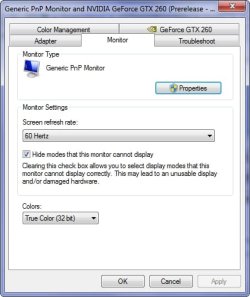
4. Go to the monitor tab, and choose 60hz and then apply and ok.

hopefully this should fix the problem. It is preferable that you have proper drivers for your monitor rather than the generic drivers.
 

My Computer

Computer Manufacturer/Model Number
self built
OS
Windows 7 Professional 64-bit
CPU
Intel E8400 3GHz
Motherboard
Intel DX48BT2
Memory
Kingston PC3-10700H 4Gb
Graphics Card(s)
XFX Radeon HD 5850 BlackEd.
Sound Card
Asus Xonar DG
Monitor(s) Displays
2x Samsung SM-T220HD 22"
Screen Resolution
1680x1050 on two monitors
Hard Drives
OCZ Vertex 2 120gb 3.5" (OS)
Seagate Momentus XT 500gb
Samsung F3 1Tb (games)
2x Samsung F1 1Tb
PSU
Thermaltake ToughPower 850w
Case
Thermaltake Armor
Cooling
Scythe Mugen II
Keyboard
Microsoft Comfort Curve USB
Mouse
Razer Diamondback 3G
Internet Speed
8128/443
ok I think Ive found the fix for this issue. Like you guys mine was reading 59hz after installing 7077.

What you need to do is:

1. right click on desktop and select screen resolution,
2. On the screen that appears, select advanced settings (if you have more than one monitor you will need to use the monitor selector at the top and then advanced settings for each monitor),
3. select the adapter tab and click list all modes and then select a mode with 60hz (again you'l need to do this for each monitor),
4. Go to the monitor tab, and choose 60hz and then apply and ok.

hopefully this should fix the problem. It is preferable that you have proper drivers for your monitor rather than the generic drivers.

The problem is not selecting 60Hz, the problem is that once you have set it, go back and have another look and you will see that it has revered to 59Hz again, the only time I've had it stick was when I used the Windows 7 driver from Nvidia.
 

My Computer

Computer Manufacturer/Model Number
Home Brew
OS
Windows 7 Ultimate Vista Ultimate x64
CPU
Core 2 Duo E8500 3.16Ghz @ 3.8Ghz
Motherboard
eVGA 750i FTW
Memory
2x2Gigs Patriot PC2-6400 LL
Graphics Card(s)
Inno3D GeForce GTX260 216 SP
Monitor(s) Displays
ASUS VW222U 22" 2ms Response time
Screen Resolution
1680x1050
Hard Drives
SATA 150GB
SATA II 250GB
USB IDE 750GB Ext.
PSU
HYTEC 600W & Thermaltake 650W Toughpower Power Exp
Case
Thermaltake Armor LCS (Liquid Cooling System)
Cooling
Liquid Cooling System
Keyboard
Logitech G15 Gaming Keyboard
Mouse
Logitech G9 Gaming Mouse
Still wont stay at 60 once i set it.It reverts back to 59 after reboot.
 

My Computer

Computer Manufacturer/Model Number
PNY Technologies
OS
Windows 7 Ultimate Build 7100 RC x86/Windows XP SP3 x86 (Dual Boot)
CPU
Intel Pentium Dual CPU E2200 @ 2.20 GHz
Motherboard
PNY Technologies MBM630I7150 1.0
Memory
2GB
Graphics Card(s)
NVIDIA GeForce 9600 GSO
Sound Card
NVIDIA HDMI Audio Device
Monitor(s) Displays
Acer LCD Monitor V223W
Screen Resolution
1680x1050
Hard Drives
WDC WD7500AYPS-01ZKB0 [Hard drive] (750.16 GB)
Keyboard
Gateway
Mouse
Logitech
Internet Speed
DSL
Have you tried the "Manage Custom Resolutions" tab in nVidia Control Panel?

That's how I got it to stick on mine.
 

Attachments

  • Capture.JPG
    Capture.JPG
    74.3 KB · Views: 216

My Computer

Computer type
PC/Desktop
Computer Manufacturer/Model Number
Alienware® ALX X58
OS
Win 7 Ult SP1/Win 10 Pro (all x64)
CPU
Intel® Core™ i7-975 Extreme O/C to 4.02 GHz, 8MB Cache
Motherboard
Asus® P6T Deluxe V2 X58 LGA1366
Memory
24GB Corsair Vengeance DDR3 SDRAM at 1600MHz - 6 x 4096MB
Graphics Card(s)
1792 MB NVIDIA® GeForce® GTX 295 Dual Core
Sound Card
Onboard Soundmax® High-Definition 7.1 Performance Audio
Monitor(s) Displays
Samsung XL2370 LED backlit 23" W/S 2ms response time
Screen Resolution
1920 X 1080
Hard Drives
2 x 500gb SATA II
1 x 1TB SATA II
1 external eSATA LaCie 3TB
(Non-RAID)
PSU
Alienware® 1200 Watt Multi-GPU
Case
Alienware® P2 ALX Chassis with AlienIce™ 3.0 Video Cooling
Cooling
Alienware® High-Perf. Liquid Cooling + Acoustic Dampening
Keyboard
Microsoft® Wireless Entertainment 8000 + Logitech® G15 Wired
Mouse
Microsoft® Wireless Laser 8000 + Logitech® G9 Wired
Internet Speed
1Gb/s
Antivirus
McAfee LiveSafe
Browser
Firefox - latest
Other Info
Using non-RAID on purpose as I find RAID to be too temperamental.
Now set to AHCI
I don't have a Nvidia control panel to try it with.Windows 7 installed the drivers for me but i didn't get a control panel with it.
 

My Computer

Computer Manufacturer/Model Number
PNY Technologies
OS
Windows 7 Ultimate Build 7100 RC x86/Windows XP SP3 x86 (Dual Boot)
CPU
Intel Pentium Dual CPU E2200 @ 2.20 GHz
Motherboard
PNY Technologies MBM630I7150 1.0
Memory
2GB
Graphics Card(s)
NVIDIA GeForce 9600 GSO
Sound Card
NVIDIA HDMI Audio Device
Monitor(s) Displays
Acer LCD Monitor V223W
Screen Resolution
1680x1050
Hard Drives
WDC WD7500AYPS-01ZKB0 [Hard drive] (750.16 GB)
Keyboard
Gateway
Mouse
Logitech
Internet Speed
DSL
Back
Top