
Solved 6 GB Installed (3 GB usable)

ShouldaGotLinux

New member
Local time
7:50 PM
Messages
14
Howdy!

So I've read up a bit on this from other posts of the same problem and here's what I've tried:

  • Tried msconfig---every time I try to set the amount to anything above 2048 it resets. Tried deselecting "Max Memory" and it shows the same amount.
  • Updated BIOS (Which only detected 3063 TOTAL)
  • Looked up 'System Information' (See Attached Picture)
  • Looked up 'Resource Monitor' (See Attached Picture)
  • Looked up 'Control Panel -> System & Security -> System (See Attached Picture)
What I have not tried is unseating and reseating the RAM for two reasons; 1) I would have to remove the Video card (which sits so close to the RAM locking arms they would hit the back if I tried opening them) and the HDD (because it hangs over the Video Card) which I'm not entirely sure would work because 2) Windows seems to know there's more there.

It detects it in Control Panel, System Information, and System Resources. I just can't get it to use it for anything other than BIOS.

So, I would be tremendously grateful for any other suggestions to try before I go yanking the guts of my PC out. Thank you.:D

***Edit: Did some more reading --- The RAM came straight from the store the way it was. From what I can tell, there are two red colored banks and two black colored banks. The 2 2-GB sticks appear to be in one color and the 2 1-GB sticks appear to be in the other. ***

***Update: Think two of the slots might have been bad---I now have 4 usable GB of RAM, instead of 3. It still detects all of it, it's just not usable at the moment.***
 

Attachments
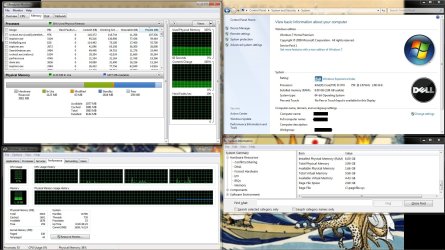
  • SysInfo.jpg
    SysInfo.jpg
    265.4 KB · Views: 354
Last edited:

My Computer

Computer Manufacturer/Model Number
Dell Studio XPS 8000
OS
Windows 7 X64
CPU
Intel i5 - 750
Motherboard
0X231R
Memory
6 GB DDR3
Graphics Card(s)
MSi Twin Frozr II (ATI Radeon 5850 Chipset --- 1GB GDDR5)
Sound Card
Integrated
Monitor(s) Displays
23" HP w2338h
Hard Drives
Samsung HD103UJ 1 TB ATA HDD
PSU
Antec 500 Watt ATX12V
Case
OEM Case
Cooling
OEM Heat-sink and Fan

My Computer

Computer type
PC/Desktop
Computer Manufacturer/Model Number
Custom built by me.
OS
Windows 10 Pro
CPU
Intel Core i7-4770K (3.5Ghz)
Motherboard
Gigabyte G1 Sniper 5 (F10 Bios)
Memory
32 gig Corsair Dominator Platinum (4x8Gig)
Graphics Card(s)
Sapphire Tri-X R9 Fury
Sound Card
Soundblaster ZXR
Monitor(s) Displays
NEC PA242W 24" LCD Monitor
Screen Resolution
1920 x 1200
Hard Drives
Primary - Samsung 850 Pro (512gig), Samsung 840 Pro (256gig), 2TB WD Caviar Black.
PSU
EVGA Supernova 1000 G2
Case
Cooler Master HAF X
Cooling
Corsair H100i with Corsair Air Series SP120 Quiet Fans
Keyboard
Logitech Wireless Wave
Mouse
Logitech Performance MX
Internet Speed
High Speed Cable
Antivirus
Norton Security
Browser
IE11
Other Info
Memory Timings - 1866MHz @ 9-9-9-27-1T @ 1.5 volts
download CPUID program cpuz and look to see what the memory and spd tabs have showing for each slot...
 

My Computer

Computer type
Laptop
Computer Manufacturer/Model Number
HP 17-ak0xx, dv7 3173nr
OS
Win7 Home Premium x64 W10Pro&Home
CPU
A12 9720p 4+8 TurionII M520
Motherboard
HP 3839
Memory
6GB 8GB
Graphics Card(s)
R7
Monitor(s) Displays
24" sa550
Screen Resolution
1600x900 1920x1080
Mouse
Logitechx2
Internet Speed
120Mb/s down 12up
@ sygnus21 --- Yes, I am absolutely positive it's not clicked. I've restarted 4 or 5 times, and just now I went into msconfig, saw that it was blank, clicked it, the number "6144" popped up (which is not the first time I've seen it do it, because I did it, unclicked it again and restarted it just to be sure all it needed was a little reboot---no luck)

@DMHolt57 --- Okey dokey, will do. I ran the utility that is available on the Dell site, and it said:

DIMM1, Capacity: 2048 Mb, Speed: 1066 Mhz
DIMM2, Capacity: 2048 Mb, Speed: 1066 Mhz
DIMM3, Capacity: 1024 Mb, Speed: 1066 Mhz
DIMM4, Capacity: 1024 Mb, Speed: 1066 Mhz

If that helps while I download and run CPUID
 

My Computer

Computer Manufacturer/Model Number
Dell Studio XPS 8000
OS
Windows 7 X64
CPU
Intel i5 - 750
Motherboard
0X231R
Memory
6 GB DDR3
Graphics Card(s)
MSi Twin Frozr II (ATI Radeon 5850 Chipset --- 1GB GDDR5)
Sound Card
Integrated
Monitor(s) Displays
23" HP w2338h
Hard Drives
Samsung HD103UJ 1 TB ATA HDD
PSU
Antec 500 Watt ATX12V
Case
OEM Case
Cooling
OEM Heat-sink and Fan
@DMHolt57 --- Memory tab shows 6144 MBytes as its Size, DDR3 as it's Type---SPD tab shows Module Size 2048 - DDR3 in Slot #1 and Slot #3; In Slots #2 and #4 are the 1024 modules, also DDR3.

***Edit: Just restarted the whole shooting match again, this time with max memory clicked and set to 6144, but it doesn't look like it's sticking---went back in and it was changed to 2048. Bios still reads 3074 (3063 available). If the memory modules are in the wrong slots, would that produce only 3 GB? I mean, if two slots could only read 1GB amounts, and one of them had a 2 GB stick in it, wouldn't that leave 4 GB's left? Because the slot that had a 1 GB stick where a 2GB stick ought to go would still read it, correct? Or is that incorrect? Just seems like there should be 2 GB's TOTAL or 4 GB's total, not a random odd number like 3.)***
 
Last edited:

My Computer

Computer Manufacturer/Model Number
Dell Studio XPS 8000
OS
Windows 7 X64
CPU
Intel i5 - 750
Motherboard
0X231R
Memory
6 GB DDR3
Graphics Card(s)
MSi Twin Frozr II (ATI Radeon 5850 Chipset --- 1GB GDDR5)
Sound Card
Integrated
Monitor(s) Displays
23" HP w2338h
Hard Drives
Samsung HD103UJ 1 TB ATA HDD
PSU
Antec 500 Watt ATX12V
Case
OEM Case
Cooling
OEM Heat-sink and Fan
Okey dokey, so I just switched all the RAM sticks around, and it's still showing 3 GB available, and the other 3 are for when the Rapture comes. They were numbered exactly as the Dell site listed them---The 2 GB sticks were in slots 1 and 2, the 1 GB sticks were in slots 3 and 4. I'm wondering what Dell did differently from CPUID, because CPUID lists them slot 1 and 2 having a 2GB stick and 1GB stick, respectively. Ditto for slots 3 and 4. I'm gonna take everything back out, and try moving it the way CPUID says they're laid out.
 

My Computer

Computer Manufacturer/Model Number
Dell Studio XPS 8000
OS
Windows 7 X64
CPU
Intel i5 - 750
Motherboard
0X231R
Memory
6 GB DDR3
Graphics Card(s)
MSi Twin Frozr II (ATI Radeon 5850 Chipset --- 1GB GDDR5)
Sound Card
Integrated
Monitor(s) Displays
23" HP w2338h
Hard Drives
Samsung HD103UJ 1 TB ATA HDD
PSU
Antec 500 Watt ATX12V
Case
OEM Case
Cooling
OEM Heat-sink and Fan
@DMHolt57 --- Memory tab shows 6144 MBytes as its Size, DDR3 as it's Type---SPD tab shows Module Size 2048 - DDR3 in Slot #1 and Slot #3; In Slots #2 and #4 are the 1024 modules, also DDR3.

***Edit: Just restarted the whole shooting match again, this time with max memory clicked and set to 6144, but it doesn't look like it's sticking---went back in and it was changed to 2048. Bios still reads 3074 (3063 available). If the memory modules are in the wrong slots, would that produce only 3 GB? I mean, if two slots could only read 1GB amounts, and one of them had a 2 GB stick in it, wouldn't that leave 4 GB's left? Because the slot that had a 1 GB stick where a 2GB stick ought to go would still read it, correct? Or is that incorrect? Just seems like there should be 2 GB's TOTAL or 4 GB's total, not a random odd number like 3.)***

The fact that Resource Monitor is showing 6gig of RAM says the motherboard is reading the all the RAM installed. You really didn't need CPU-Z for this issue but it didn't hut to post what you saw.

Anyway I suggest you go back through that thread I referenced to and look it over. Also DO NOT tick that Max Mem box, or the Processor box as they WILL cause you issues.

You probably need to look through yor BIOS and check what memory setting you have set. Again look through that thread I referenced to.

BTW you need to get a little more specific on you motherboard specs. What's a 0X231R ???

Let me know.
 

My Computer

Computer type
PC/Desktop
Computer Manufacturer/Model Number
Custom built by me.
OS
Windows 10 Pro
CPU
Intel Core i7-4770K (3.5Ghz)
Motherboard
Gigabyte G1 Sniper 5 (F10 Bios)
Memory
32 gig Corsair Dominator Platinum (4x8Gig)
Graphics Card(s)
Sapphire Tri-X R9 Fury
Sound Card
Soundblaster ZXR
Monitor(s) Displays
NEC PA242W 24" LCD Monitor
Screen Resolution
1920 x 1200
Hard Drives
Primary - Samsung 850 Pro (512gig), Samsung 840 Pro (256gig), 2TB WD Caviar Black.
PSU
EVGA Supernova 1000 G2
Case
Cooler Master HAF X
Cooling
Corsair H100i with Corsair Air Series SP120 Quiet Fans
Keyboard
Logitech Wireless Wave
Mouse
Logitech Performance MX
Internet Speed
High Speed Cable
Antivirus
Norton Security
Browser
IE11
Other Info
Memory Timings - 1866MHz @ 9-9-9-27-1T @ 1.5 volts
All right, so, I switched the RAM sticks according to the way dell says they should be laid out and the way CPUID says they're laid out. I restarted it after the dell layout, messed with msconfig, reboot, nothing. Laying it out the way I (guess) CPUID has it laid out gives me: 4048 detected in bios, and 4087 total physical memory. So, that means either A) The two 2-GB sticks are working (which would suggest TWO dead slots) or B) One of the 2-GB sticks is working and BOTH of the 1-GB sticks are working, which suggests ONE dead slot.

Considering the max the Dell documentation this PC is designed for is 16 GB's, I'd wager that all of these slots are designed to work with 4 GB modules. UNLESS I'M WRONG (which happens more than I'm willing to admit), I can only think of a couple other configuration that adds up to 16 total gigabytes using 1-, 2-, 4-, and 8-GB sticks (An 8, a 4, and 2-2's) OR 4 4-GB sticks, which makes me think that all of these slots can take at least a 4-GB stick. Unless one slot's max is 8, the next two slots' max are 4, and the last is 2. Which makes me think one slot on the PC went out and the 2 1-GB sticks + 1 2-GB stick are doing their duty and the last stick is sitting idle in a dead slot.

So, if I'm right, and it's just one dead slot, and the worst case scenario means even the very weakest, lowest-capacity slot can hold the BIGGEST stick of RAM I have, then I might be able to crank out 1 more GB of RAM by moving the 2-GB stick out of the dead slot, one of the 1-GB sticks in.

***On second thought, if three slots worked, I would've had 5 GB of ram available to begin with, not three. So when I switched the 1-GB stick and the 2-GB stick, I would've had just the 2-2 GB sticks working, right? Certainly not the 2 1-GB sticks + 1 2-GB stick.***
 
Last edited:

My Computer

Computer Manufacturer/Model Number
Dell Studio XPS 8000
OS
Windows 7 X64
CPU
Intel i5 - 750
Motherboard
0X231R
Memory
6 GB DDR3
Graphics Card(s)
MSi Twin Frozr II (ATI Radeon 5850 Chipset --- 1GB GDDR5)
Sound Card
Integrated
Monitor(s) Displays
23" HP w2338h
Hard Drives
Samsung HD103UJ 1 TB ATA HDD
PSU
Antec 500 Watt ATX12V
Case
OEM Case
Cooling
OEM Heat-sink and Fan
The motherboard number I referenced is the only thing I could find for my motherboard. That's just the model-number, and it seems like it's a dell product. Entering in that number along with the terms 'Dell XPS Studio 8000' yields replacement motherboards for my computer.
 

My Computer

Computer Manufacturer/Model Number
Dell Studio XPS 8000
OS
Windows 7 X64
CPU
Intel i5 - 750
Motherboard
0X231R
Memory
6 GB DDR3
Graphics Card(s)
MSi Twin Frozr II (ATI Radeon 5850 Chipset --- 1GB GDDR5)
Sound Card
Integrated
Monitor(s) Displays
23" HP w2338h
Hard Drives
Samsung HD103UJ 1 TB ATA HDD
PSU
Antec 500 Watt ATX12V
Case
OEM Case
Cooling
OEM Heat-sink and Fan

My Computer

Computer type
PC/Desktop
Computer Manufacturer/Model Number
Self Built
OS
Win 10 Pro x64
CPU
Intel I5-2500K @3.3GHz
Motherboard
Asrock P67 Extreme4
Memory
16GB G.Skill Ripjaws X (4x4GB)
Graphics Card(s)
EVGA GeForce 750 Ti SC 2GB
Sound Card
ASUS Xonar DG 5.1 Channels 24-bit 96KHz PCI Interface Sound
Monitor(s) Displays
auria eq2367
Screen Resolution
1920 x 1080
Hard Drives
250GB Samsung 850 EVO SSD
1TB WD Blue
1TB Hitachi
PSU
SeaSonic X 650W 80 Plus Gold
Case
Corsair Obsidian 750D
Cooling
Corsair H60, Three 140mm case fans
Keyboard
Logitech Wireless Keyboard K520
Mouse
Logitech Wireless Mouse M310
Internet Speed
Wave Broadband ~ 100 dn 5 up
Antivirus
Windows Defender, Malwarebytes Premium
Browser
Edge, IE11, Chrome
Other Info
Laptop specs: HP g7-1365dx /
CPU: AMD A6-3420M APU with Radeon(tm) HD Graphics /
RAM: Crucial 8Gb (2x4Gb) /
SSD: Crucial M4-CT128M4SSD2 ATA Device/ FW 000F /
GFX: AMD Radeon HD 6520G /
OS: Windows 10 Pro x64
Well your need to know something about the motherboard since that's where you'll have to look for your RAM issue, at least the BIOS.

I'm guessing this might be your system - Dell Studio XPS 8000 Desktop Details | Dell ???
 

My Computer

Computer type
PC/Desktop
Computer Manufacturer/Model Number
Custom built by me.
OS
Windows 10 Pro
CPU
Intel Core i7-4770K (3.5Ghz)
Motherboard
Gigabyte G1 Sniper 5 (F10 Bios)
Memory
32 gig Corsair Dominator Platinum (4x8Gig)
Graphics Card(s)
Sapphire Tri-X R9 Fury
Sound Card
Soundblaster ZXR
Monitor(s) Displays
NEC PA242W 24" LCD Monitor
Screen Resolution
1920 x 1200
Hard Drives
Primary - Samsung 850 Pro (512gig), Samsung 840 Pro (256gig), 2TB WD Caviar Black.
PSU
EVGA Supernova 1000 G2
Case
Cooler Master HAF X
Cooling
Corsair H100i with Corsair Air Series SP120 Quiet Fans
Keyboard
Logitech Wireless Wave
Mouse
Logitech Performance MX
Internet Speed
High Speed Cable
Antivirus
Norton Security
Browser
IE11
Other Info
Memory Timings - 1866MHz @ 9-9-9-27-1T @ 1.5 volts
@derekIMO - Thank you much! I appreciate it!

System Info: Motherboard Infos:

Manufacturer: Dell Inc.
Name: Base Board
Product: 0X231R
Version: A01 (BIOS had the same number, till I upgraded it to A03)
Serial Number:..CN73,etc,etc.
Removable: False
Replaceable: True
 

My Computer

Computer Manufacturer/Model Number
Dell Studio XPS 8000
OS
Windows 7 X64
CPU
Intel i5 - 750
Motherboard
0X231R
Memory
6 GB DDR3
Graphics Card(s)
MSi Twin Frozr II (ATI Radeon 5850 Chipset --- 1GB GDDR5)
Sound Card
Integrated
Monitor(s) Displays
23" HP w2338h
Hard Drives
Samsung HD103UJ 1 TB ATA HDD
PSU
Antec 500 Watt ATX12V
Case
OEM Case
Cooling
OEM Heat-sink and Fan
Your system isdesigned to take 2 or 4 memory sticks - i5-750 CPU as opposed to a i7-900 series CPU which uses a tripple channel memory configuration - 3 or 6 sticks of memory.

Basically I think you have the wrong memory configuration for that system seeing that you say you have 6gig when you should either have 4 or 8gig. (in a nutshell)

An i5-750 only runs in dual channel configuration - Intel® Core)
 

My Computer

Computer type
PC/Desktop
Computer Manufacturer/Model Number
Custom built by me.
OS
Windows 10 Pro
CPU
Intel Core i7-4770K (3.5Ghz)
Motherboard
Gigabyte G1 Sniper 5 (F10 Bios)
Memory
32 gig Corsair Dominator Platinum (4x8Gig)
Graphics Card(s)
Sapphire Tri-X R9 Fury
Sound Card
Soundblaster ZXR
Monitor(s) Displays
NEC PA242W 24" LCD Monitor
Screen Resolution
1920 x 1200
Hard Drives
Primary - Samsung 850 Pro (512gig), Samsung 840 Pro (256gig), 2TB WD Caviar Black.
PSU
EVGA Supernova 1000 G2
Case
Cooler Master HAF X
Cooling
Corsair H100i with Corsair Air Series SP120 Quiet Fans
Keyboard
Logitech Wireless Wave
Mouse
Logitech Performance MX
Internet Speed
High Speed Cable
Antivirus
Norton Security
Browser
IE11
Other Info
Memory Timings - 1866MHz @ 9-9-9-27-1T @ 1.5 volts
So, they just gave me too much RAM? The only thing's I've added to it are a PSU and a new GPU. Everything else is stock. The mobo has 4 slots, and each slot is filled. Did they just put the wrong mobo in it or something? A system designed for 2 slots, gets a mobo with 4 slots, but can only utilize 2 of them? Huh. Funny.

On a side note, when I was taking out the GPU, I scratched some of the paths on the mobo putting it back in, so, heh, I *might* be in the market for a new mobo anyway. . . Know any reputable dealers?? :o

***Edit: Even the i7 processor that would work with this board only has 2 memory channels which means---I'd need a new motherboard AND processor to use the memory that came with it. . . Ahh heck with it, I got one more GB of RAM, if I get picky, I'll just buy a 4-GB stick and call it good. I've been playing Just Cause 2, Oblivion, Fallout 3 AND New Vegas, and Duke Nukem: Forever with just what I got, I didn't miss it before, probably won't now.***
 

My Computer

Computer Manufacturer/Model Number
Dell Studio XPS 8000
OS
Windows 7 X64
CPU
Intel i5 - 750
Motherboard
0X231R
Memory
6 GB DDR3
Graphics Card(s)
MSi Twin Frozr II (ATI Radeon 5850 Chipset --- 1GB GDDR5)
Sound Card
Integrated
Monitor(s) Displays
23" HP w2338h
Hard Drives
Samsung HD103UJ 1 TB ATA HDD
PSU
Antec 500 Watt ATX12V
Case
OEM Case
Cooling
OEM Heat-sink and Fan
I don't know what Dell did. It seems strange that they would have gave you 6gig of memory in a dual channel'd system (i5-750), but then again I've been seeing some strange things from PC makers lately with regards to memory so.... :confused:

Anyway you need to find the owners manual on link to it so that we can see what you memory configuration IS supposed to be. And I asked you a question that you haven't answered.....

Well your need to know something about the motherboard since that's where you'll have to look for your RAM issue, at least the BIOS.

I'm guessing this might be your system - Dell Studio XPS 8000 Desktop Details | Dell ???

***Edit: Even the i7 processor that would work with this board only has 2 memory channels which means---I'd need a new motherboard AND processor to use the memory that came with it. . . Ahh heck with it, I got one more GB of RAM, if I get picky, I'll just buy a 4-GB stick and call it good. I've been playing Just Cause 2, Oblivion, Fallout 3 AND New Vegas, and Duke Nukem: Forever with just what I got, I didn't miss it before, probably won't now.***

Which is why I question the amount of memory in that system??? And you don't necessarily need a new motherboard and processor; you could simply just remove one of the sticks, or reconfigure them to work correctly. Or yeah, you could buy another stick of RAM.... but before going through all of that, let's just remove a stick first and see what happens.
 

My Computer

Computer type
PC/Desktop
Computer Manufacturer/Model Number
Custom built by me.
OS
Windows 10 Pro
CPU
Intel Core i7-4770K (3.5Ghz)
Motherboard
Gigabyte G1 Sniper 5 (F10 Bios)
Memory
32 gig Corsair Dominator Platinum (4x8Gig)
Graphics Card(s)
Sapphire Tri-X R9 Fury
Sound Card
Soundblaster ZXR
Monitor(s) Displays
NEC PA242W 24" LCD Monitor
Screen Resolution
1920 x 1200
Hard Drives
Primary - Samsung 850 Pro (512gig), Samsung 840 Pro (256gig), 2TB WD Caviar Black.
PSU
EVGA Supernova 1000 G2
Case
Cooler Master HAF X
Cooling
Corsair H100i with Corsair Air Series SP120 Quiet Fans
Keyboard
Logitech Wireless Wave
Mouse
Logitech Performance MX
Internet Speed
High Speed Cable
Antivirus
Norton Security
Browser
IE11
Other Info
Memory Timings - 1866MHz @ 9-9-9-27-1T @ 1.5 volts
I don't know what Dell did. It seems strange that they would have gave you 6gig of memory in a dual channel'd system (i5-750), but then again I've been seeing some strange things from PC makers lately with regards to memory so.... :confused:

Anyway you need to find the owners manual on link to it so that we can see what you memory configuration IS supposed to be. And I asked you a question that you haven't answered.....

Well your need to know something about the motherboard since that's where you'll have to look for your RAM issue, at least the BIOS.

I'm guessing this might be your system - Dell Studio XPS 8000 Desktop Details | Dell ???

Yes, that is my system.
 

My Computer

Computer Manufacturer/Model Number
Dell Studio XPS 8000
OS
Windows 7 X64
CPU
Intel i5 - 750
Motherboard
0X231R
Memory
6 GB DDR3
Graphics Card(s)
MSi Twin Frozr II (ATI Radeon 5850 Chipset --- 1GB GDDR5)
Sound Card
Integrated
Monitor(s) Displays
23" HP w2338h
Hard Drives
Samsung HD103UJ 1 TB ATA HDD
PSU
Antec 500 Watt ATX12V
Case
OEM Case
Cooling
OEM Heat-sink and Fan

My Computer

Computer Manufacturer/Model Number
Dell Studio XPS 8000
OS
Windows 7 X64
CPU
Intel i5 - 750
Motherboard
0X231R
Memory
6 GB DDR3
Graphics Card(s)
MSi Twin Frozr II (ATI Radeon 5850 Chipset --- 1GB GDDR5)
Sound Card
Integrated
Monitor(s) Displays
23" HP w2338h
Hard Drives
Samsung HD103UJ 1 TB ATA HDD
PSU
Antec 500 Watt ATX12V
Case
OEM Case
Cooling
OEM Heat-sink and Fan
I just restarted and looked through all the options in BIOS, and none of them related to memory except for the System Info option which informed me I had 4096 total installed and 4088 available. Looking at the documentation, they really believe I ought to have 4 memory slots in there, at any rate.

If you remove your original memory module(s) from the computer during a memory upgrade, keep them separate from any new module(s) that you may have, even if you purchased the new module(s) from Dell™. If possible, do not pair an original memory module with a new memory module. Otherwise, your computer may not start properly. The recommended memory configurations are:
Matched memory module(s) installed in DIMM connectors 1 and 2 and another matched memory module(s) installed in DIMM connectors 3 and 4.

In my rooting around in the case, I altered the layout; the two 2-GB sticks are now located in slots 2 and 4.
 

My Computer

Computer Manufacturer/Model Number
Dell Studio XPS 8000
OS
Windows 7 X64
CPU
Intel i5 - 750
Motherboard
0X231R
Memory
6 GB DDR3
Graphics Card(s)
MSi Twin Frozr II (ATI Radeon 5850 Chipset --- 1GB GDDR5)
Sound Card
Integrated
Monitor(s) Displays
23" HP w2338h
Hard Drives
Samsung HD103UJ 1 TB ATA HDD
PSU
Antec 500 Watt ATX12V
Case
OEM Case
Cooling
OEM Heat-sink and Fan
Documentation

This is the service manual.

Yeah, I just found it. Found this as well - Documentation

So why how does your system have 6gig of memory?

- Do you you have 2 2gig modules and 2 1gig modules?
- Do you have just 3 modules?

And BTW Why is this thread marked solved?

Anyway I'm out for now. Later :sleepy:
 

My Computer

Computer type
PC/Desktop
Computer Manufacturer/Model Number
Custom built by me.
OS
Windows 10 Pro
CPU
Intel Core i7-4770K (3.5Ghz)
Motherboard
Gigabyte G1 Sniper 5 (F10 Bios)
Memory
32 gig Corsair Dominator Platinum (4x8Gig)
Graphics Card(s)
Sapphire Tri-X R9 Fury
Sound Card
Soundblaster ZXR
Monitor(s) Displays
NEC PA242W 24" LCD Monitor
Screen Resolution
1920 x 1200
Hard Drives
Primary - Samsung 850 Pro (512gig), Samsung 840 Pro (256gig), 2TB WD Caviar Black.
PSU
EVGA Supernova 1000 G2
Case
Cooler Master HAF X
Cooling
Corsair H100i with Corsair Air Series SP120 Quiet Fans
Keyboard
Logitech Wireless Wave
Mouse
Logitech Performance MX
Internet Speed
High Speed Cable
Antivirus
Norton Security
Browser
IE11
Other Info
Memory Timings - 1866MHz @ 9-9-9-27-1T @ 1.5 volts
Sorry, kinda got excited when I saw the amount of total RAM I had go up to 3.99 after I moved the 2X2 GB modules to locations 2 and 4 on the diagram, which was an improvement over the 2.99 it was at. Seems there is a bit more troubleshooting to consider, so I un-Solved it. I appreciate all the help, by the way.

My system has 2X2 GB sticks and 2X1 GB sticks. I have 4 modules.

Aaand, I live in Virginia, too, soo---yeah, G'Night, heh. :) Got work next two nights, so seeya Monday? Thanks again for all the help!
 

My Computer

Computer Manufacturer/Model Number
Dell Studio XPS 8000
OS
Windows 7 X64
CPU
Intel i5 - 750
Motherboard
0X231R
Memory
6 GB DDR3
Graphics Card(s)
MSi Twin Frozr II (ATI Radeon 5850 Chipset --- 1GB GDDR5)
Sound Card
Integrated
Monitor(s) Displays
23" HP w2338h
Hard Drives
Samsung HD103UJ 1 TB ATA HDD
PSU
Antec 500 Watt ATX12V
Case
OEM Case
Cooling
OEM Heat-sink and Fan
Back
Top