
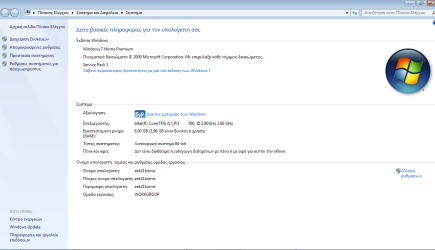
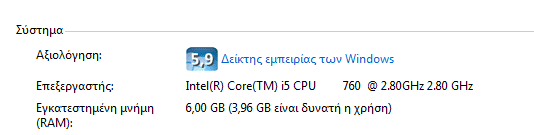
6 gb ram only 3.96 gb usable

note: ram issue was before I updated my bios
so @rvsjew, you're telling me to load setup defaults and then save the changes?

yes and even if it was an issue before updating you should do this since it may just be why the ram is messed up to gin with. Also try it with one stick and try booting with it in each slot one at at a time to rule out bad slots (do this with the stick you know is good) also you have three sticks in place now yes, if so is the first pair staggered as in in bank 1,3 and 2 is by the odd one out?
 

My Computer My Computer

At a glance

10 Pro x64Ryzen 9 3900X64GB(4x16GB) DDR4EVGA 1080ti FTW3
Computer type
PC/Desktop
Computer Manufacturer/Model Number
Custom
OS
10 Pro x64
CPU
Ryzen 9 3900X
Motherboard
Asrock x370 Tachi
Memory
64GB(4x16GB) DDR4
Graphics Card(s)
EVGA 1080ti FTW3
Sound Card
ASUS Xonar Essence STX (V4 Bursons), ODAC rev B, NFB-11, O2
Monitor(s) Displays
3xASUS PB278Q/R, Optoma HD142X
Screen Resolution
3x1440p, 1080p
Hard Drives
512GB 850 EVO(OS, Programs)
4TB (Movies)
3TB (Downloads)
3TB (Programs)
1TB HDD (Games)
2x6TB R1 (videos)
PSU
AX760
Case
Fractal Define R5
Cooling
NH-D15S
Keyboard
Massdrop Ctrl with Box Navy's
Mouse
G903, Alioth XXL Mat
Internet Speed
280/40
Antivirus
MBAM, ESET
Browser
Canary 64 Bit
Other Info
I also own a Thinkpad P50 Xeon 4K, X220T, X1C5
just did it but nothing changed...
also as I said I only have 2 slots for ram (4 gb and 2 gb modules)
 

My Computer My Computer

At a glance

Windows 7 Home Premium 64bitIntel Core i5 760 @ 2.80GHz4 gb2047MB NVIDIA GeForce GT 640 (Gigabyte) 29 °C
Computer type
PC/Desktop
OS
Windows 7 Home Premium 64bit
CPU
Intel Core i5 760 @ 2.80GHz
Motherboard
ASUSTeK Computer INC. P7H55-M LE (LGA1156)
Memory
4 gb
Graphics Card(s)
2047MB NVIDIA GeForce GT 640 (Gigabyte) 29 °C
Sound Card
NVIDIA High Definition Audio
Screen Resolution
1280X768
Antivirus
avast!
Browser
Google Chrome
you might want to try using only the 4GB module then re-flash your bios with ez flash and only after re downloading the bios file. It seems like your os is only giving 32 bit of ram which is odd as you have a 64 bit OS. It could be do to the timings difference of your two sticks are not playing well, but speccy shows it is mixing well but it could be reading it wrong. hmm need to think of this more but if you could post a pic of your advanced settings in the bios that would be helpful also you might want to try running a live cd of say ubuntu and see what ram it thinks you have to be sure its not just windows.
 

My Computer My Computer

At a glance

10 Pro x64Ryzen 9 3900X64GB(4x16GB) DDR4EVGA 1080ti FTW3
Computer type
PC/Desktop
Computer Manufacturer/Model Number
Custom
OS
10 Pro x64
CPU
Ryzen 9 3900X
Motherboard
Asrock x370 Tachi
Memory
64GB(4x16GB) DDR4
Graphics Card(s)
EVGA 1080ti FTW3
Sound Card
ASUS Xonar Essence STX (V4 Bursons), ODAC rev B, NFB-11, O2
Monitor(s) Displays
3xASUS PB278Q/R, Optoma HD142X
Screen Resolution
3x1440p, 1080p
Hard Drives
512GB 850 EVO(OS, Programs)
4TB (Movies)
3TB (Downloads)
3TB (Programs)
1TB HDD (Games)
2x6TB R1 (videos)
PSU
AX760
Case
Fractal Define R5
Cooling
NH-D15S
Keyboard
Massdrop Ctrl with Box Navy's
Mouse
G903, Alioth XXL Mat
Internet Speed
280/40
Antivirus
MBAM, ESET
Browser
Canary 64 Bit
Other Info
I also own a Thinkpad P50 Xeon 4K, X220T, X1C5
yeah, my friend actually suggested me buying an exact 4 gb module so it can work but since I don't want to spend any more money on that I would love to know how to make it work as 6 gb.
I actually put the 2 gb module on slot 1 and my system read only slot 1 and just ignored the 2nd one where I put the 4gb module, so I don't know.
 

My Computer My Computer

At a glance

Windows 7 Home Premium 64bitIntel Core i5 760 @ 2.80GHz4 gb2047MB NVIDIA GeForce GT 640 (Gigabyte) 29 °C
Computer type
PC/Desktop
OS
Windows 7 Home Premium 64bit
CPU
Intel Core i5 760 @ 2.80GHz
Motherboard
ASUSTeK Computer INC. P7H55-M LE (LGA1156)
Memory
4 gb
Graphics Card(s)
2047MB NVIDIA GeForce GT 640 (Gigabyte) 29 °C
Sound Card
NVIDIA High Definition Audio
Screen Resolution
1280X768
Antivirus
avast!
Browser
Google Chrome
yeah, my friend actually suggested me buying an exact 4 gb module so it can work but since I don't want to spend any more money on that I would love to know how to make it work as 6 gb.
I actually put the 2 gb module on slot 1 and my system read only slot 1 and just ignored the 2nd one where I put the 4gb module, so I don't know.

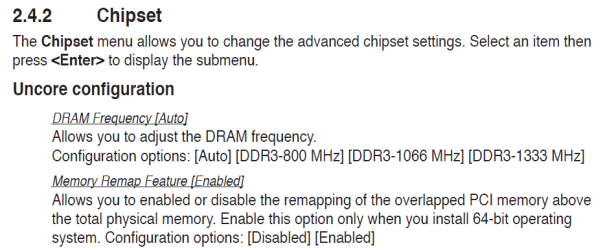
when you look in the bios doe sit show that your second stick is in there or it thinks it's blank? Also try changing to 667 if you can force it in the advanced chipset options. Also try the remapping feature if its disabled enable it. make slot 1 your 4GB 800 chip and slot 2 the slower one and then set the setting I mentioned to 667 if it lets both go there.

From your manual:
 

Attachments

  • ss (2014-11-20 at 01.02.56).png
    ss (2014-11-20 at 01.02.56).png
    22.5 KB · Views: 0

My Computer My Computer

At a glance

10 Pro x64Ryzen 9 3900X64GB(4x16GB) DDR4EVGA 1080ti FTW3
Computer type
PC/Desktop
Computer Manufacturer/Model Number
Custom
OS
10 Pro x64
CPU
Ryzen 9 3900X
Motherboard
Asrock x370 Tachi
Memory
64GB(4x16GB) DDR4
Graphics Card(s)
EVGA 1080ti FTW3
Sound Card
ASUS Xonar Essence STX (V4 Bursons), ODAC rev B, NFB-11, O2
Monitor(s) Displays
3xASUS PB278Q/R, Optoma HD142X
Screen Resolution
3x1440p, 1080p
Hard Drives
512GB 850 EVO(OS, Programs)
4TB (Movies)
3TB (Downloads)
3TB (Programs)
1TB HDD (Games)
2x6TB R1 (videos)
PSU
AX760
Case
Fractal Define R5
Cooling
NH-D15S
Keyboard
Massdrop Ctrl with Box Navy's
Mouse
G903, Alioth XXL Mat
Internet Speed
280/40
Antivirus
MBAM, ESET
Browser
Canary 64 Bit
Other Info
I also own a Thinkpad P50 Xeon 4K, X220T, X1C5
Hmm, just checked and it's like that:

Advanced

IMC Type: Lynnfield

DRAM Frequency: Auto
DDR3 - 800 MHz
DDR3 - 1066 MHz
DDR3 - 1333 MHz

Memory Remap Feature: Enabled

PCI MMIO Allocation: 4 gb to 3584 GB

Inititate Graphic Adapter [PCIE/PCI]
 

My Computer My Computer

At a glance

Windows 7 Home Premium 64bitIntel Core i5 760 @ 2.80GHz4 gb2047MB NVIDIA GeForce GT 640 (Gigabyte) 29 °C
Computer type
PC/Desktop
OS
Windows 7 Home Premium 64bit
CPU
Intel Core i5 760 @ 2.80GHz
Motherboard
ASUSTeK Computer INC. P7H55-M LE (LGA1156)
Memory
4 gb
Graphics Card(s)
2047MB NVIDIA GeForce GT 640 (Gigabyte) 29 °C
Sound Card
NVIDIA High Definition Audio
Screen Resolution
1280X768
Antivirus
avast!
Browser
Google Chrome
After following the advice and suggestions already offered by other members and posting the outcome, here are a few things to consider:

The most common cause of this is misidentifying the bit depth of the OS.
MSDN said:
Physical Memory Limits: Windows 7

The following table specifies the limits on physical memory for Windows 7.

Version.....................Limit on X86.....Limit on X64
Windows 7 Ultimate..............4 GB.....192 GB
Windows 7 Enterprise............4 GB.....192 GB
Windows 7 Professional.........4 GB.....192 GB
Windows 7 Home Premium....4 GB.......16 GB
Windows 7 Home Basic..........4 GB........8 GB
Windows 7 Starter................2 GB........N/A

You posted screen shots of Speccy, but a PUBLISHED snapshot provides a more complete picture.
Please follow this tutorial to provide the current operating environment of your machine.
http://www.sevenforums.com/tutorials/311593-speccy-publish-snapshot-your-system-specs.html

The other common cause is dual channel - memory sticks are not matched.
If I found the correct Mobo, you only have memory two slots - is this correct?
ASUS P7H55-M LE Specs
mobo-p7h55M-LE-b.png

ASUS P7H55-M LE Manual & Document
Version: E5956
Description: P7H55-M LE/LX User's Manual (English)
File Size: 1.46 MBytes
update 2010/12/06
Download P7H55-M_LE/E5956_P7H55-M_LE_Series.zip from Global

If resetting BIOS to defaults
and trying different memory configurations
A=2GB B=4GB
A=4GB B=2GB
and verifying Windows bit-depth is 64-bits

If those don't help, the worst thing is that you have faster 4GB of memory. I did not cross check your memory to the Mobo specs.

Run with the new 4GB stick in slot A and nothing in memory slot B.
When you have the inclination and your budget allows, purchase a 2nd identical 4GB stick and install it in your machine.

Continue trouble shooting with other members.
 

My Computer My Computer

At a glance

x64 (6.3.9600) Win8.1 Pro & soon dual boot x6...AMD A6-3420M APU with Radeon(tm) HD Graphics6.00 GBAMD Radeon(TM) HD 6520G
Computer type
Laptop
Computer Manufacturer/Model Number
HP Pavilion dv6-6c10us
OS
x64 (6.3.9600) Win8.1 Pro & soon dual boot x64 (6.1.7601) Win7_SP1 HomePrem
CPU
AMD A6-3420M APU with Radeon(tm) HD Graphics
Motherboard
Hewlett-Packard 1805
Memory
6.00 GB
Graphics Card(s)
AMD Radeon(TM) HD 6520G
Sound Card
(1) AMD High Definition Audio Device (2) IDT High Definiti
Monitor(s) Displays
HP W2072a 20" LCD (1600 x 900) @ 60 Hz
Screen Resolution
1366 x 768 x 32 bits (4294967296 colors) @ 60 Hz
Hard Drives
ST640LM0 00 HM641JI SATA Disk Device
Keyboard
Logitech k520 wireless KB
Mouse
Logitech m320 wireless mouse (bundled with KB)
Internet Speed
15/5 | 54 MB Wireless 'n'
Antivirus
Realtime: Defender or Avast | On-demand: Malwarebytes, ESET
Browser
IE 11 on Win8, IE 10 on win 7
Other Info
Media: [Gimp, Audacity, VLC] || Comm: [WEmail 2012, Skype] || Productivity: [OpenOffice,| Textpad] || Utils: [Sysinternals, cCleaner, Speccy, Defraggler]
What options do you get for pci MMio?
 

My Computer My Computer

At a glance

10 Pro x64Ryzen 9 3900X64GB(4x16GB) DDR4EVGA 1080ti FTW3
Computer type
PC/Desktop
Computer Manufacturer/Model Number
Custom
OS
10 Pro x64
CPU
Ryzen 9 3900X
Motherboard
Asrock x370 Tachi
Memory
64GB(4x16GB) DDR4
Graphics Card(s)
EVGA 1080ti FTW3
Sound Card
ASUS Xonar Essence STX (V4 Bursons), ODAC rev B, NFB-11, O2
Monitor(s) Displays
3xASUS PB278Q/R, Optoma HD142X
Screen Resolution
3x1440p, 1080p
Hard Drives
512GB 850 EVO(OS, Programs)
4TB (Movies)
3TB (Downloads)
3TB (Programs)
1TB HDD (Games)
2x6TB R1 (videos)
PSU
AX760
Case
Fractal Define R5
Cooling
NH-D15S
Keyboard
Massdrop Ctrl with Box Navy's
Mouse
G903, Alioth XXL Mat
Internet Speed
280/40
Antivirus
MBAM, ESET
Browser
Canary 64 Bit
Other Info
I also own a Thinkpad P50 Xeon 4K, X220T, X1C5
After following the advice and suggestions already offered by other members and posting the outcome, here are a few things to consider:

The most common cause of this is misidentifying the bit depth of the OS.
MSDN said:
Physical Memory Limits: Windows 7

The following table specifies the limits on physical memory for Windows 7.

Version.....................Limit on X86.....Limit on X64
Windows 7 Ultimate..............4 GB.....192 GB
Windows 7 Enterprise............4 GB.....192 GB
Windows 7 Professional.........4 GB.....192 GB
Windows 7 Home Premium....4 GB.......16 GB
Windows 7 Home Basic..........4 GB........8 GB
Windows 7 Starter................2 GB........N/A

You posted screen shots of Speccy, but a PUBLISHED snapshot provides a more complete picture.
Please follow this tutorial to provide the current operating environment of your machine.
http://www.sevenforums.com/tutorials/311593-speccy-publish-snapshot-your-system-specs.html

The other common cause is dual channel - memory sticks are not matched.
If I found the correct Mobo, you only have memory two slots - is this correct?
ASUS P7H55-M LE Specs


ASUS P7H55-M LE Manual & Document
Version: E5956
Description: P7H55-M LE/LX User's Manual (English)
File Size: 1.46 MBytes
update 2010/12/06
Download P7H55-M_LE/E5956_P7H55-M_LE_Series.zip from Global

If resetting BIOS to defaults
and trying different memory configurations
A=2GB B=4GB
A=4GB B=2GB
and verifying Windows bit-depth is 64-bits

If those don't help, the worst thing is that you have faster 4GB of memory. I did not cross check your memory to the Mobo specs.

Run with the new 4GB stick in slot A and nothing in memory slot B.
When you have the inclination and your budget allows, purchase a 2nd identical 4GB stick and install it in your machine.

Continue trouble shooting with other members.

Yeah Im starting to think he really does have only a 32 bit os that's why I asked him to try a live cd of something 64bit to see what it found.

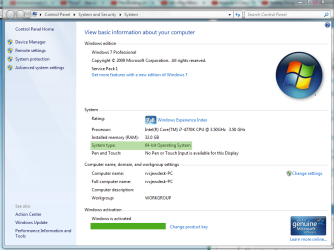
Tzonis can you show us a screen of this screen it should show x64 here.
 

Attachments

  • specs.png
    specs.png
    56.3 KB · Views: 1

My Computer My Computer

At a glance

10 Pro x64Ryzen 9 3900X64GB(4x16GB) DDR4EVGA 1080ti FTW3
Computer type
PC/Desktop
Computer Manufacturer/Model Number
Custom
OS
10 Pro x64
CPU
Ryzen 9 3900X
Motherboard
Asrock x370 Tachi
Memory
64GB(4x16GB) DDR4
Graphics Card(s)
EVGA 1080ti FTW3
Sound Card
ASUS Xonar Essence STX (V4 Bursons), ODAC rev B, NFB-11, O2
Monitor(s) Displays
3xASUS PB278Q/R, Optoma HD142X
Screen Resolution
3x1440p, 1080p
Hard Drives
512GB 850 EVO(OS, Programs)
4TB (Movies)
3TB (Downloads)
3TB (Programs)
1TB HDD (Games)
2x6TB R1 (videos)
PSU
AX760
Case
Fractal Define R5
Cooling
NH-D15S
Keyboard
Massdrop Ctrl with Box Navy's
Mouse
G903, Alioth XXL Mat
Internet Speed
280/40
Antivirus
MBAM, ESET
Browser
Canary 64 Bit
Other Info
I also own a Thinkpad P50 Xeon 4K, X220T, X1C5
After following the advice and suggestions already offered by other members and posting the outcome, here are a few things to consider:

The most common cause of this is misidentifying the bit depth of the OS.
MSDN said:
Physical Memory Limits: Windows 7

The following table specifies the limits on physical memory for Windows 7.

Version.....................Limit on X86.....Limit on X64
Windows 7 Ultimate..............4 GB.....192 GB
Windows 7 Enterprise............4 GB.....192 GB
Windows 7 Professional.........4 GB.....192 GB
Windows 7 Home Premium....4 GB.......16 GB
Windows 7 Home Basic..........4 GB........8 GB
Windows 7 Starter................2 GB........N/A

You posted screen shots of Speccy, but a PUBLISHED snapshot provides a more complete picture.
Please follow this tutorial to provide the current operating environment of your machine.
http://www.sevenforums.com/tutorials/311593-speccy-publish-snapshot-your-system-specs.html

The other common cause is dual channel - memory sticks are not matched.
If I found the correct Mobo, you only have memory two slots - is this correct?
ASUS P7H55-M LE Specs
View attachment 341056

ASUS P7H55-M LE Manual & Document
Version: E5956
Description: P7H55-M LE/LX User's Manual (English)
File Size: 1.46 MBytes
update 2010/12/06
Download P7H55-M_LE/E5956_P7H55-M_LE_Series.zip from Global

If resetting BIOS to defaults
and trying different memory configurations
A=2GB B=4GB
A=4GB B=2GB
and verifying Windows bit-depth is 64-bits

If those don't help, the worst thing is that you have faster 4GB of memory. I did not cross check your memory to the Mobo specs.

Run with the new 4GB stick in slot A and nothing in memory slot B.
When you have the inclination and your budget allows, purchase a 2nd identical 4GB stick and install it in your machine.

Continue trouble shooting with other members.

http://speccy.piriform.com/results/meTJMTzvPzGkHosSI10PjR2

Yes, I've got 2 memory slots as I've already mentioned in my previous posts.
And as I've said cpu-z and my system overall recognises only slot 1 for some strange reason.
Thanks for your help though @Slartybart
 

My Computer My Computer

At a glance

Windows 7 Home Premium 64bitIntel Core i5 760 @ 2.80GHz4 gb2047MB NVIDIA GeForce GT 640 (Gigabyte) 29 °C
Computer type
PC/Desktop
OS
Windows 7 Home Premium 64bit
CPU
Intel Core i5 760 @ 2.80GHz
Motherboard
ASUSTeK Computer INC. P7H55-M LE (LGA1156)
Memory
4 gb
Graphics Card(s)
2047MB NVIDIA GeForce GT 640 (Gigabyte) 29 °C
Sound Card
NVIDIA High Definition Audio
Screen Resolution
1280X768
Antivirus
avast!
Browser
Google Chrome
64bit.png

@rvcjew
 

My Computer My Computer

At a glance

Windows 7 Home Premium 64bitIntel Core i5 760 @ 2.80GHz4 gb2047MB NVIDIA GeForce GT 640 (Gigabyte) 29 °C
Computer type
PC/Desktop
OS
Windows 7 Home Premium 64bit
CPU
Intel Core i5 760 @ 2.80GHz
Motherboard
ASUSTeK Computer INC. P7H55-M LE (LGA1156)
Memory
4 gb
Graphics Card(s)
2047MB NVIDIA GeForce GT 640 (Gigabyte) 29 °C
Sound Card
NVIDIA High Definition Audio
Screen Resolution
1280X768
Antivirus
avast!
Browser
Google Chrome
After following the advice and suggestions already offered by other members and posting the outcome, here are a few things to consider:

The most common cause of this is misidentifying the bit depth of the OS.
MSDN said:
Physical Memory Limits: Windows 7

The following table specifies the limits on physical memory for Windows 7.

Version.....................Limit on X86.....Limit on X64
Windows 7 Ultimate..............4 GB.....192 GB
Windows 7 Enterprise............4 GB.....192 GB
Windows 7 Professional.........4 GB.....192 GB
Windows 7 Home Premium....4 GB.......16 GB
Windows 7 Home Basic..........4 GB........8 GB
Windows 7 Starter................2 GB........N/A

You posted screen shots of Speccy, but a PUBLISHED snapshot provides a more complete picture.
Please follow this tutorial to provide the current operating environment of your machine.
http://www.sevenforums.com/tutorials/311593-speccy-publish-snapshot-your-system-specs.html

The other common cause is dual channel - memory sticks are not matched.
If I found the correct Mobo, you only have memory two slots - is this correct?
ASUS P7H55-M LE Specs
View attachment 341056

ASUS P7H55-M LE Manual & Document
Version: E5956
Description: P7H55-M LE/LX User's Manual (English)
File Size: 1.46 MBytes
update 2010/12/06
Download P7H55-M_LE/E5956_P7H55-M_LE_Series.zip from Global

If resetting BIOS to defaults
and trying different memory configurations
A=2GB B=4GB
A=4GB B=2GB
and verifying Windows bit-depth is 64-bits

If those don't help, the worst thing is that you have faster 4GB of memory. I did not cross check your memory to the Mobo specs.

Run with the new 4GB stick in slot A and nothing in memory slot B.
When you have the inclination and your budget allows, purchase a 2nd identical 4GB stick and install it in your machine.

Continue trouble shooting with other members.

http://speccy.piriform.com/results/meTJMTzvPzGkHosSI10PjR2

Yes, I've got 2 memory slots as I've already mentioned in my previous posts.
And as I've said cpu-z and my system overall recognises only slot 1 for some strange reason.
Thanks for your help though @Slartybart

Saw your pic and yeah its certainly 64 bit now when you say overall do you mean that if you use only one stick in the second slot then it does not see it at all? if so that leans to hardware failure and your mobo is RMA at that point.
 

My Computer My Computer

At a glance

10 Pro x64Ryzen 9 3900X64GB(4x16GB) DDR4EVGA 1080ti FTW3
Computer type
PC/Desktop
Computer Manufacturer/Model Number
Custom
OS
10 Pro x64
CPU
Ryzen 9 3900X
Motherboard
Asrock x370 Tachi
Memory
64GB(4x16GB) DDR4
Graphics Card(s)
EVGA 1080ti FTW3
Sound Card
ASUS Xonar Essence STX (V4 Bursons), ODAC rev B, NFB-11, O2
Monitor(s) Displays
3xASUS PB278Q/R, Optoma HD142X
Screen Resolution
3x1440p, 1080p
Hard Drives
512GB 850 EVO(OS, Programs)
4TB (Movies)
3TB (Downloads)
3TB (Programs)
1TB HDD (Games)
2x6TB R1 (videos)
PSU
AX760
Case
Fractal Define R5
Cooling
NH-D15S
Keyboard
Massdrop Ctrl with Box Navy's
Mouse
G903, Alioth XXL Mat
Internet Speed
280/40
Antivirus
MBAM, ESET
Browser
Canary 64 Bit
Other Info
I also own a Thinkpad P50 Xeon 4K, X220T, X1C5
Speccy sees 2 slots and 6GB...

RAM
Memory slots
Total memory slots: 2
Used memory slots: 2
Free memory slots: 0

Memory
Type: DDR3
Size: 6144 MBytes
Channels #: Single
DRAM Frequency: 666,5 MHz
CAS# Latency (CL): 9 clocks
RAS# to CAS# Delay (tRCD): 9 clocks
RAS# Precharge (tRP): 9 clocks
Cycle Time (tRAS): 24 clocks
Command Rate (CR): 2T
Physical Memory
Memory Usage: 49 %
Total Physical: 3,96 GB
Available Physical: 2,02 GB
Total Virtual: 7,92 GB
Available Virtual: 5,85 GB
SPD
Number Of SPD Modules: 2
Slot #1
Type: DDR3
Size: 4096 MBytes
Manufacturer: Team Group Inc.
Max Bandwidth: PC3-12800 (800 MHz)
Part Number: Team-Elite-1600
Week/year: 39 / 14
Timing table
JEDEC #1
Frequency: 381,0 MHz
CAS# Latency: 5,0
RAS# To CAS#: 5
RAS# Precharge: 5
tRAS: 14
tRC: 19
Voltage: 1,500 V
JEDEC #2
Frequency: 457,1 MHz
CAS# Latency: 6,0
RAS# To CAS#: 6
RAS# Precharge: 6
tRAS: 16
tRC: 22
Voltage: 1,500 V
JEDEC #3
Frequency: 533,3 MHz
CAS# Latency: 7,0
RAS# To CAS#: 7
RAS# Precharge: 7
tRAS: 19
tRC: 26
Voltage: 1,500 V
JEDEC #4
Frequency: 609,5 MHz
CAS# Latency: 8,0
RAS# To CAS#: 8
RAS# Precharge: 8
tRAS: 22
tRC: 30
Voltage: 1,500 V
JEDEC #5
Frequency: 685,7 MHz
CAS# Latency: 9,0
RAS# To CAS#: 9
RAS# Precharge: 9
tRAS: 24
tRC: 33
Voltage: 1,500 V
JEDEC #6
Frequency: 761,9 MHz
CAS# Latency: 10,0
RAS# To CAS#: 10
RAS# Precharge: 10
tRAS: 27
tRC: 37
Voltage: 1,500 V
JEDEC #7
Frequency: 838,1 MHz
CAS# Latency: 11,0
RAS# To CAS#: 11
RAS# Precharge: 11
tRAS: 30
tRC: 41
Voltage: 1,500 V
Slot #2
Type: DDR3
Size: 2048 MBytes
Manufacturer: Kingston
Max Bandwidth: PC3-10700 (667 MHz)
Part Number: 9905471-001.A01LF
Serial Number: 8B356C50
Week/year: 08 / 11
Timing table
JEDEC #1
Frequency: 457,1 MHz
CAS# Latency: 6,0
RAS# To CAS#: 6
RAS# Precharge: 6
tRAS: 17
tRC: 23
Voltage: 1,500 V
JEDEC #2
Frequency: 533,3 MHz
CAS# Latency: 7,0
RAS# To CAS#: 7
RAS# Precharge: 7
tRAS: 20
tRC: 27
Voltage: 1,500 V
JEDEC #3
Frequency: 609,5 MHz
CAS# Latency: 8,0
RAS# To CAS#: 8
RAS# Precharge: 8
tRAS: 22
tRC: 30
Voltage: 1,500 V
JEDEC #4
Frequency: 685,7 MHz
CAS# Latency: 9,0
RAS# To CAS#: 9
RAS# Precharge: 9
tRAS: 25
tRC: 34
Voltage: 1,500 V
 

My Computer My Computer

At a glance

x64 (6.3.9600) Win8.1 Pro & soon dual boot x6...AMD A6-3420M APU with Radeon(tm) HD Graphics6.00 GBAMD Radeon(TM) HD 6520G
Computer type
Laptop
Computer Manufacturer/Model Number
HP Pavilion dv6-6c10us
OS
x64 (6.3.9600) Win8.1 Pro & soon dual boot x64 (6.1.7601) Win7_SP1 HomePrem
CPU
AMD A6-3420M APU with Radeon(tm) HD Graphics
Motherboard
Hewlett-Packard 1805
Memory
6.00 GB
Graphics Card(s)
AMD Radeon(TM) HD 6520G
Sound Card
(1) AMD High Definition Audio Device (2) IDT High Definiti
Monitor(s) Displays
HP W2072a 20" LCD (1600 x 900) @ 60 Hz
Screen Resolution
1366 x 768 x 32 bits (4294967296 colors) @ 60 Hz
Hard Drives
ST640LM0 00 HM641JI SATA Disk Device
Keyboard
Logitech k520 wireless KB
Mouse
Logitech m320 wireless mouse (bundled with KB)
Internet Speed
15/5 | 54 MB Wireless 'n'
Antivirus
Realtime: Defender or Avast | On-demand: Malwarebytes, ESET
Browser
IE 11 on Win8, IE 10 on win 7
Other Info
Media: [Gimp, Audacity, VLC] || Comm: [WEmail 2012, Skype] || Productivity: [OpenOffice,| Textpad] || Utils: [Sysinternals, cCleaner, Speccy, Defraggler]
Hey guys , I just bought a 4 gb stick module and I kept one of my 2 gb sticks but even though both of them are installed , my pc recognises only 3.96 gb as usable.
Thing is that the 4 gb stick is "teamgroup 800 mhz" and the other one (2gb) is "kingston 667 mhz", so I was wondering if that could be the case.
I really want to to able to use all 6 gb, so what could be the problem?
Thanks in advance.

The speeds wouldn't make it unrecognizable, all it would cause is that 800mhz to run at 667 mhz and just making sure do you by any chance have the memory modules set up as dual channel memory because in order to get all you can out of your memory you have to have multiple sticks set in the right slots. Last thing if your not sure about the slots do you have your motherboard handbook?
 

My Computer My Computer

At a glance

Windows 7 pro 64bitIntel Core i5-3470 Ivy Bridge Quad-Core 3.2GHzG.SKILL Ripjaws Series 8GB SDRAM 1600 PC312800Nivida Geforce 600
Computer type
PC/Desktop
Computer Manufacturer/Model Number
custom build
OS
Windows 7 pro 64bit
CPU
Intel Core i5-3470 Ivy Bridge Quad-Core 3.2GHz
Motherboard
ASRock Z75 Pro3 LGA 1155 Intel Z75 HDMI SATA 6Gb/s USB 3.0 A
Memory
G.SKILL Ripjaws Series 8GB SDRAM 1600 PC312800
Graphics Card(s)
Nivida Geforce 600
Monitor(s) Displays
Two dell 27" displays
Screen Resolution
1280x768
Hard Drives
256 GB 3.5" seagate
500 GB 2.5" WD
Internet Speed
25/5
Antivirus
Microsoft securtiy essentials, advanced system care 8
Browser
Chrome
The speeds wouldn't cause it to be unrecognizable, all it would cause is the 800 mhz to run at 667 mhz. Have you made sure you have the memory modules set up in the correct slots?
 

My Computer My Computer

At a glance

Windows 7 pro 64bitIntel Core i5-3470 Ivy Bridge Quad-Core 3.2GHzG.SKILL Ripjaws Series 8GB SDRAM 1600 PC312800Nivida Geforce 600
Computer type
PC/Desktop
Computer Manufacturer/Model Number
custom build
OS
Windows 7 pro 64bit
CPU
Intel Core i5-3470 Ivy Bridge Quad-Core 3.2GHz
Motherboard
ASRock Z75 Pro3 LGA 1155 Intel Z75 HDMI SATA 6Gb/s USB 3.0 A
Memory
G.SKILL Ripjaws Series 8GB SDRAM 1600 PC312800
Graphics Card(s)
Nivida Geforce 600
Monitor(s) Displays
Two dell 27" displays
Screen Resolution
1280x768
Hard Drives
256 GB 3.5" seagate
500 GB 2.5" WD
Internet Speed
25/5
Antivirus
Microsoft securtiy essentials, advanced system care 8
Browser
Chrome

My Computer My Computer

At a glance

10 Pro x64Ryzen 9 3900X64GB(4x16GB) DDR4EVGA 1080ti FTW3
Computer type
PC/Desktop
Computer Manufacturer/Model Number
Custom
OS
10 Pro x64
CPU
Ryzen 9 3900X
Motherboard
Asrock x370 Tachi
Memory
64GB(4x16GB) DDR4
Graphics Card(s)
EVGA 1080ti FTW3
Sound Card
ASUS Xonar Essence STX (V4 Bursons), ODAC rev B, NFB-11, O2
Monitor(s) Displays
3xASUS PB278Q/R, Optoma HD142X
Screen Resolution
3x1440p, 1080p
Hard Drives
512GB 850 EVO(OS, Programs)
4TB (Movies)
3TB (Downloads)
3TB (Programs)
1TB HDD (Games)
2x6TB R1 (videos)
PSU
AX760
Case
Fractal Define R5
Cooling
NH-D15S
Keyboard
Massdrop Ctrl with Box Navy's
Mouse
G903, Alioth XXL Mat
Internet Speed
280/40
Antivirus
MBAM, ESET
Browser
Canary 64 Bit
Other Info
I also own a Thinkpad P50 Xeon 4K, X220T, X1C5

don't know what to do anymore about this..
 

My Computer My Computer

At a glance

Windows 7 Home Premium 64bitIntel Core i5 760 @ 2.80GHz4 gb2047MB NVIDIA GeForce GT 640 (Gigabyte) 29 °C
Computer type
PC/Desktop
OS
Windows 7 Home Premium 64bit
CPU
Intel Core i5 760 @ 2.80GHz
Motherboard
ASUSTeK Computer INC. P7H55-M LE (LGA1156)
Memory
4 gb
Graphics Card(s)
2047MB NVIDIA GeForce GT 640 (Gigabyte) 29 °C
Sound Card
NVIDIA High Definition Audio
Screen Resolution
1280X768
Antivirus
avast!
Browser
Google Chrome
Both system properties and Speccy report 6GB.
OnFiah! 6gb1.png

OnFiah!.png

I for one was chasing the wrong thing - memory not being recognized. All the memory is seen, it's just not all usable (per system properties).

You could try a clean startup to see if that frees up some memory.
OPTION ONE: http://www.sevenforums.com/tutorial...ation-conflicts-performing-clean-startup.html

If the system profile still reports the same memory conditions (6Gb, 3.9 usable) you can return to a normal startup by following OPTION THREE in the above tutorial.


I think there's a bigger issue though - your motherboard is reporting 128 degrees Celsius! (two utilities)

Layback tried to get you to address that but it isn't clear that anything was done.

.....
Try this;
take the side cover off the computer and
point a fan of good size blowing into the case and
monitor the temps.

If you mother board temp go down then you have a problem.
If the motherboard temp read the same in my opinion the updated bios are giving a false reading.

Go into your bios and let us know what the voltages are.
Make sure your bios are set to default.

What was the reason you flashed your bios?

If you decide to roll back your BIOS, you can. See Post #27 for the motherboard references. Please confirm that I linked to the correct page for your mobo.

Unfortunately, I can't tell what BIOS version you were running before - so if you know, please tell.

As rvcjew stated - the sensors might be wonky.

After thinking about this a little longer, I recalled that a previous version (1.24 ??) of Speccy reported high temps on some mother boards. Perhaps there's still a bug in v 1.26 for some boards. The fact that HWmonitor also reports the high temp, the same motherboard could cause another utility to report the same erroneous data.
It is apparently still recently being reported: https://www.google.com/search?q=asus+AND+speccy
You're running the latest Specyy 1.26.698 and that's good.
 

My Computer My Computer

At a glance

x64 (6.3.9600) Win8.1 Pro & soon dual boot x6...AMD A6-3420M APU with Radeon(tm) HD Graphics6.00 GBAMD Radeon(TM) HD 6520G
Computer type
Laptop
Computer Manufacturer/Model Number
HP Pavilion dv6-6c10us
OS
x64 (6.3.9600) Win8.1 Pro & soon dual boot x64 (6.1.7601) Win7_SP1 HomePrem
CPU
AMD A6-3420M APU with Radeon(tm) HD Graphics
Motherboard
Hewlett-Packard 1805
Memory
6.00 GB
Graphics Card(s)
AMD Radeon(TM) HD 6520G
Sound Card
(1) AMD High Definition Audio Device (2) IDT High Definiti
Monitor(s) Displays
HP W2072a 20" LCD (1600 x 900) @ 60 Hz
Screen Resolution
1366 x 768 x 32 bits (4294967296 colors) @ 60 Hz
Hard Drives
ST640LM0 00 HM641JI SATA Disk Device
Keyboard
Logitech k520 wireless KB
Mouse
Logitech m320 wireless mouse (bundled with KB)
Internet Speed
15/5 | 54 MB Wireless 'n'
Antivirus
Realtime: Defender or Avast | On-demand: Malwarebytes, ESET
Browser
IE 11 on Win8, IE 10 on win 7
Other Info
Media: [Gimp, Audacity, VLC] || Comm: [WEmail 2012, Skype] || Productivity: [OpenOffice,| Textpad] || Utils: [Sysinternals, cCleaner, Speccy, Defraggler]
Both system properties and Speccy report 6GB.
I for one was chasing the wrong thing - memory not being recognized. All the memory is seen, it's just not all usable (per system properties).

You could try a clean startup to see if that frees up some memory.
OPTION ONE: http://www.sevenforums.com/tutorial...ation-conflicts-performing-clean-startup.html

If the system profile still reports the same memory conditions (6Gb, 3.9 usable) you can return to a normal startup by following OPTION THREE in the above tutorial.


I think there's a bigger issue though - your motherboard is reporting 128 degrees Celsius! (two utilities)

Layback tried to get you to address that but it isn't clear that anything was done.

.....
Try this;
take the side cover off the computer and
point a fan of good size blowing into the case and
monitor the temps.

If you mother board temp go down then you have a problem.
If the motherboard temp read the same in my opinion the updated bios are giving a false reading.

Go into your bios and let us know what the voltages are.
Make sure your bios are set to default.

What was the reason you flashed your bios?

If you decide to roll back your BIOS, you can. See Post #27 for the motherboard references. Please confirm that I linked to the correct page for your mobo.

Unfortunately, I can't tell what BIOS version you were running before - so if you know, please tell.

As rvcjew stated - the sensors might be wonky.

After thinking about this a little longer, I recalled that a previous version (1.24 ??) of Speccy reported high temps on some mother boards. Perhaps there's still a bug in v 1.26 for some boards. The fact that HWmonitor also reports the high temp, the same motherboard could cause another utility to report the same erroneous data.
It is apparently still recently being reported: https://www.google.com/search?q=asus+AND+speccy
You're running the latest Specyy 1.26.698 and that's good.


alright mate, so I'll try the first option and I'll let you know.
 

My Computer My Computer

At a glance

Windows 7 Home Premium 64bitIntel Core i5 760 @ 2.80GHz4 gb2047MB NVIDIA GeForce GT 640 (Gigabyte) 29 °C
Computer type
PC/Desktop
OS
Windows 7 Home Premium 64bit
CPU
Intel Core i5 760 @ 2.80GHz
Motherboard
ASUSTeK Computer INC. P7H55-M LE (LGA1156)
Memory
4 gb
Graphics Card(s)
2047MB NVIDIA GeForce GT 640 (Gigabyte) 29 °C
Sound Card
NVIDIA High Definition Audio
Screen Resolution
1280X768
Antivirus
avast!
Browser
Google Chrome
Unfortunately, it still reports the same, so that didn't work.
 

My Computer My Computer

At a glance

Windows 7 Home Premium 64bitIntel Core i5 760 @ 2.80GHz4 gb2047MB NVIDIA GeForce GT 640 (Gigabyte) 29 °C
Computer type
PC/Desktop
OS
Windows 7 Home Premium 64bit
CPU
Intel Core i5 760 @ 2.80GHz
Motherboard
ASUSTeK Computer INC. P7H55-M LE (LGA1156)
Memory
4 gb
Graphics Card(s)
2047MB NVIDIA GeForce GT 640 (Gigabyte) 29 °C
Sound Card
NVIDIA High Definition Audio
Screen Resolution
1280X768
Antivirus
avast!
Browser
Google Chrome
Back
Top