64 Bit iTunes, not 64 Bit?

TehHerb

New member
Local time
11:08 PM
Messages
5
I downloaded the 64 Bit iTunes and quicktime package from apple, i installed it, its in the normal program files, not the x86 one. When i open it and look on taskmanager it still has the *32 thing next to it in processes? im assuming that means the process is running in 32 bit? Or am i wrong?

Thanks for any help ;)
 

My Computer

Computer Manufacturer/Model Number
Custom
OS
Windows 7 64-bit
CPU
Intel Q9550 @ 3.10GHz
Motherboard
Gigabyte X48-DQ6
Memory
4GB DDR2 1066MHz G.Skill
Graphics Card(s)
ATI Radeon HD 4870 X2
Monitor(s) Displays
LG Flatron W2252TQ (22Inch)
Hard Drives
1 TB Seagate
PSU
750W Thermaltake QFan
Case
Antec 1200
Cooling
Noctua NH-U12P
Keyboard
Logitech G-15
Mouse
Logitech MX Revolution
I downloaded the 64 Bit iTunes and quicktime package from apple, i installed it, its in the normal program files, not the x86 one. When i open it and look on taskmanager it still has the *32 thing next to it in processes? im assuming that means the process is running in 32 bit? Or am i wrong?

Thanks for any help ;)
64 bit programs install to "Program Files" 32 bit programs install to "Program Files (x86). But yes *32 in the process manager means 32 bit, however the program may have other 64 bit processes.
 

My Computer

OS
Win 7
Me too, I thought I got the wrong version but I did install the 64 version and in the task manager it shows itunes.exe *32 which make me feel so sad :cry:

Probably as TehHerb says itunes has some other processes which run under 64 bits environment but I don't think so because itunes installed under /program files (x86) or something similar.

Bye.
 

My Computer

OS
windows 7 64 bits
It would be the kernel drivers it installed, which by the way, is a completely stupid thing to do... Remember those BSOD from iTunes 8? Those were caused by the kernel drivers. The Zune software in compassion uses a user-land driver.
 

My Computer

Computer type
PC/Desktop
Computer Manufacturer/Model Number
Alienware Aurora ALX R4
OS
Windows 10 Pro (x64)
CPU
Intel Core i7-3930K (3.2GHz - 4.5GHz)
Motherboard
Alienware Aurora-R4 x79
Memory
4x Samsung 4GB PC3-12800 DDR3 (16GB 1600MHz)
Graphics Card(s)
Nvidia Geforce GTX 690
Sound Card
SteelSeries Siberia Elite
Monitor(s) Displays
Dell UltraSharp U3011
Screen Resolution
2560x1600
Hard Drives
Samsung 850 Pro 256 GB, Seagate 1TB Desktop Hybrid HDD, 2x Western Digital 4TB Green HDD
PSU
875W Some Dell PSU <.<
Case
Alienware Aurora ALX
Cooling
Custom Liquid Cooling (EK CPU & GPU blocks) dual EK 480RAD
Keyboard
Logitech G710+ Mechanical
Mouse
Logitech G700s
Internet Speed
Verizon Fios (50 mbps average)
Other Info
Server: Intel NUC D54250WYK: i5-4250U, 16GB, 256 GB mSATA, Windows Server 2012 R2
I downloaded the 64 Bit iTunes and quicktime package from apple, i installed it, its in the normal program files, not the x86 one. When i open it and look on taskmanager it still has the *32 thing next to it in processes? im assuming that means the process is running in 32 bit? Or am i wrong?

Thanks for any help ;)
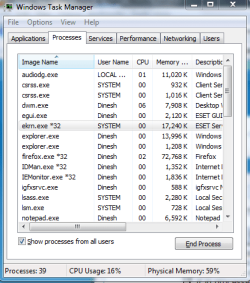
No it doesnt mean that the itunes x64 is not 64bit. If you try to install the 32bit Itunes, it will not install. Hence there is a 64bit version for x64 systems.
For example, in my case, i have installed 64bit ESET Smart Security antivirus. However, in the taskmgr, it shows ekrn.exe *32. That doesnt mean its not 64bit software.
Capture.PNG

Also, even if a 64bit program installs itself in Program Files(x86) folder, its still a 64bit compatible software. ;)
 

My Computer

Computer Manufacturer/Model Number
Samsung NP530U4B-S02IN
OS
Windows® 8 Pro (64-bit)
CPU
Intel® Core™ i5 Processor 2467M (1.60GHz, 3MB L3 Cache)
Motherboard
Samsung Electronics
Memory
6GB DDR3 System Memory at 1,333MHz (on BD 4GB + 2GB x 1)
Graphics Card(s)
AMD Radeon™ HD7550M 1GB DDR3 (Ext. Graphic)
Sound Card
Realtek High Definition Audio
Monitor(s) Displays
35.56cm (14.0) SuperBright 300nit HD LED Display
Screen Resolution
1366x768
Hard Drives
1TB S-ATA II Hard Drive (5400RPM) with ExpressCache 16GB SSD
Internet Speed
sucks
Antivirus
Microsoft Security Essentials
Browser
Google Chrome (Sync enabled)
i downloaded the 64 bit version of itunes and it wont install on my windows it lockes up at publishing something or other and then roles back
 

My Computer

OS
windows 7
Typical Apple

It simply means that they have adjusted the 32 bit version so it will install and run on a 64 bit machine. It is still a 32 bit app. You can expect no more from a company like Apple. These days they are worse than MS.
 

My Computer

OS
Win7 64
Back
Top