
SoapDodger
New member
Hi Guys, my laptop has just about pushed me to my limit now. I am losing patience lol and I am hoping someone can see something I've missed.
Problem:
Windows will start to lock up after about 2-10 minutes of use. Everything will stop responding and it becomes impossible to use.
Useful Specification:
I am using an Acer Aspire 5741, Intel I3 330M, 3GB RAM, 320GB Sata HDD, with on-board Graphics running Windows 7 Home Edition x64 (Currently OEM).
Troubleshooting Actions:
I have installed Ubuntu 64bit 12.04 Precise Penguin on a 50GB partition which is remarkably fast and bug free. I have been running it a few days for long hours at a time with no issues.
I have tried Windows 7 32bit OEM which was running fine after the Refresh (see History)
History:
[Refresh] The problem started after I got a Rootkit virus which completely killed windows.
I used the recovery disc's and it didn't solve the problem caused by the rootkit.
So I wiped the hard drive completely clean using diskpart, 'clean all' function.
I then installed 32bit W7 by accident.
After a couple of days when I realised I installed 32bit and not 64bit I made a new OEM disc of 64bit and installed that.
The problem above then arose.
(The 32bit disc was made the exact same way in the same week)
Tests Done:
I have done all the following tests, you will see the name of the test then the result;
Linux Memtestx86 - Fine
Avast Antivirus, full scan - Fine
Windows Defender Offline - Fine
Windows Hard drive check, 1st attempt - Fine
Windows Hard drive check, 2nd attempt - Freezes on part 4 of 5 at 12%.
Windows Hard drive check, 3rd attempt - Freezes on part 4 of 5 at 12%.
Windows sfc /scannow check - Fine
CoreTemp, run from the desktop - Averages 50 degrees centigrade.
CCleaner, Registry - Cleaned.
The memory is registering 2.7GB. The memory is using 1.35GB while Idle. It's usage does not increase when W7 crashes. Also when W7 crashes the CPU reads 0% Usage in Task manager. I cannot see any unwanted processes, nor are any abnormally large.
Extra Info:
The Windows 7 disc I have used was made using Windows built in ISO burner in another W7 laptop.
I used the same laptop to create my Ubuntu CD which has installed fine.
My thoughts:
Could this possibly be caused by a missing Acer driver due to the OEM install?
Was the rootkit not removed using diskpart?
If you have read this far, Thanks lol Hope you guys can see something I have missed.
Cheers, Dan.
Problem:
Windows will start to lock up after about 2-10 minutes of use. Everything will stop responding and it becomes impossible to use.
Useful Specification:
I am using an Acer Aspire 5741, Intel I3 330M, 3GB RAM, 320GB Sata HDD, with on-board Graphics running Windows 7 Home Edition x64 (Currently OEM).
Troubleshooting Actions:
I have installed Ubuntu 64bit 12.04 Precise Penguin on a 50GB partition which is remarkably fast and bug free. I have been running it a few days for long hours at a time with no issues.
I have tried Windows 7 32bit OEM which was running fine after the Refresh (see History)
History:
[Refresh] The problem started after I got a Rootkit virus which completely killed windows.
I used the recovery disc's and it didn't solve the problem caused by the rootkit.
So I wiped the hard drive completely clean using diskpart, 'clean all' function.
I then installed 32bit W7 by accident.
After a couple of days when I realised I installed 32bit and not 64bit I made a new OEM disc of 64bit and installed that.
The problem above then arose.
(The 32bit disc was made the exact same way in the same week)
Tests Done:
I have done all the following tests, you will see the name of the test then the result;
Linux Memtestx86 - Fine
Avast Antivirus, full scan - Fine
Windows Defender Offline - Fine
Windows Hard drive check, 1st attempt - Fine
Windows Hard drive check, 2nd attempt - Freezes on part 4 of 5 at 12%.
Windows Hard drive check, 3rd attempt - Freezes on part 4 of 5 at 12%.
Windows sfc /scannow check - Fine
CoreTemp, run from the desktop - Averages 50 degrees centigrade.
CCleaner, Registry - Cleaned.
The memory is registering 2.7GB. The memory is using 1.35GB while Idle. It's usage does not increase when W7 crashes. Also when W7 crashes the CPU reads 0% Usage in Task manager. I cannot see any unwanted processes, nor are any abnormally large.
Extra Info:
The Windows 7 disc I have used was made using Windows built in ISO burner in another W7 laptop.
I used the same laptop to create my Ubuntu CD which has installed fine.
My thoughts:
Could this possibly be caused by a missing Acer driver due to the OEM install?
Was the rootkit not removed using diskpart?
If you have read this far, Thanks lol Hope you guys can see something I have missed.
Cheers, Dan.
My Computer
- Computer Manufacturer/Model Number
- Acer Aspire 5741
- OS
- Windows 7 64 Bit Home Premium
- CPU
- i3 - 330M processor
- Memory
- 3GB
- Graphics Card(s)
- Intel HD Graphics
- Hard Drives
- 320GB NTFS Hiatachi Hard Drive
- Internet Speed
- 2MB tops
 - properties - tools - check for drive errors .. if your problem is still there download the LLF format tooll and you will make a reall cleaning of your disk, 3rd if you have the windows master disk you can erase your disk from format tool , if you put the linux program to run with your windows maybe change of you some registry files,
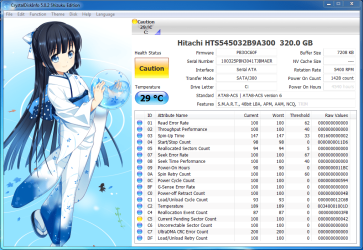
 Is that bad? lmao
