Solved Repair Install Compatibility Error:You can't upgrade 64-bit Windows...

For what I can see, the disk you're trying to use is not the same you did the reinstall some time ago.
As the Control panel\System image you posted has the CyberPower logo, you have used a CyberPower recovery disk.
As your current installation is 64 bits, the one you're trying to use (32Bits) it's not the same you have used to reinstall win 7.
Paul gave you a M$ link to download a Win 7 HP SP1 64 Bits iso file. Burn a DVD or make a USB boot able drive. If you don't know how to make a make a USB boot able drive, please ask.
When you do a Repair install with a M$ iso, it will ask for a key. The key should be on the COA sticker on the side of the case. If you don't find the key, you must retrieve the activation key. Also ask if you don't know how to do it.
 

My Computers My Computers

  • At a glance

    Windows 7 HP 64i5 6600K - 800MHz to 4200MHz4+4G GSkill DDR4 3000IG - Intel 530
    Computer type
    PC/Desktop
    Computer Manufacturer/Model Number
    custom build
    OS
    Windows 7 HP 64
    CPU
    i5 6600K - 800MHz to 4200MHz
    Motherboard
    GA-Z170-HD3P
    Memory
    4+4G GSkill DDR4 3000
    Graphics Card(s)
    IG - Intel 530
    Monitor(s) Displays
    Samsung 226BW
    Screen Resolution
    1680x1050
    Hard Drives
    (1) -1 SM951 – 128GB M.2 AHCI PCIe SSD drive for Windows 7 and Lubuntu
    (2) -1 WD SATA 3 - 1T for Data
    (3) -1 WD SATA 3 - 1T for backup
    PSU
    Thermaltake 450W TR2 gold
    Keyboard
    Old and good Chicony mechanical keyboard
    Mouse
    Logitech mX performance - 9 buttons (had to disable some)
    Internet Speed
    500Mb/s
    Browser
    Firefox 64
    Other Info
    TinyWall firewall
  • At a glance

    Windows 7 Proi7-4500U 800MHz to 3.0GHz(4+4)G DDR3 1600IG intel 4400 + NVIDIA GeForce GT 745M
    Computer type
    Laptop
    System Manufacturer/Model Number
    Asus Q550LF
    OS
    Windows 7 Pro
    CPU
    i7-4500U 800MHz to 3.0GHz
    Motherboard
    Asus Q550LF
    Memory
    (4+4)G DDR3 1600
    Graphics Card(s)
    IG intel 4400 + NVIDIA GeForce GT 745M
    Sound Card
    Realtek
    Monitor(s) Displays
    LG Display LP156WF4-SPH1
    Screen Resolution
    1920 x 1080
    Hard Drives
    BX500 120G SSD for Windows and programs +
    1T HDD for data
    Internet Speed
    500 Mb/s
    Browser
    Firefox
    Other Info
    TinyWall firewall
For what I can see, the disk you're trying to use is not the same you did the reinstall some time ago.
As the Control panel\System image you posted has the CyberPower logo, you have used a CyberPower recovery disk.
As your current installation is 64 bits, the one you're trying to use (32Bits) it's not the same you have used to reinstall win 7.
Paul gave you a M$ link to download a Win 7 HP SP1 64 Bits iso file. Burn a DVD or make a USB boot able drive. If you don't know how to make a make a USB boot able drive, please ask.
When you do a Repair install with a M$ iso, it will ask for a key. The key should be on the COA sticker on the side of the case. If you don't find the key, you must retrieve the activation key. Also ask if you don't know how to do it.


First, I appreciate everyone who is looking at this. I DL'd the iso you provided (Thanks!) and am not opposed to using it, and I ran Paul's batch (inserted), but this doesn't make sense:

View attachment Clean_Repair_edited.txt


Hmm, a recovery disc, eh.

So, I'm as certain as could be I did use this same disc to clean install back in september on a new harddrive, and I don't have usb with windows 7, so I must have used this disc.


Disc label says

"contains 64-bit software only." !!!
"Windows 7 Home Premium SP1"
it also does use the term, "Recovery media" on the label, but why does it say "contains 64-bit software only" if it's a 32bit disc and WinPE at that per dism ?!


When I attempted Repair Install, which I tried multiple times with the same compatibility error, I always only had the option to make a 64bit OS selection from the list and I selected Home Premium 64bit.

I ran dism multiple times with same results. I only have one CD/DVD drive, and no external drives connected!
 

My Computer My Computer

At a glance

Windows 7 Home Premium 64 bit.Intel(R) Core(TM) i5-2400 CPU @ 3.10GHz4.00 GBIntel(R) HD Graphics Family
Computer type
PC/Desktop
Computer Manufacturer/Model Number
System Builder (Cyberpower)
OS
Windows 7 Home Premium 64 bit.
CPU
Intel(R) Core(TM) i5-2400 CPU @ 3.10GHz
Motherboard
ASUSTeK Computer INC. P8H67-M LE
Memory
4.00 GB
Graphics Card(s)
Intel(R) HD Graphics Family
Sound Card
(1) Realtek High Definition Audio (2) Intel(R) Display Aud
Monitor(s) Displays
hp S2331
Screen Resolution
1920 X 1080
Hard Drives
(1) Hitachi HDS721010CLA332 ATA Device
(2) Hitachi HDS721010CLA332 ATA Device
(3) Multi Flash Reader USB Device
PSU
Corsair
Case
Apevia
Cooling
Intel fan (cpu); case fans.
Keyboard
Xtreme Gear
Mouse
Microsoft USB IntelliMouse Optical
Internet Speed
1.0 Gbps
Antivirus
Avast
Browser
Firefox Quantum
OK, so how could my system say 64bit in control panel yet, the disc is a recovery DVD only - and I used it to clean install.


sorry, this just doesn't make sense! Did I install a WinPE 64bit version from the DVD - yikes, I'm confused. No cause the disc shouldn't poll as 32bit?


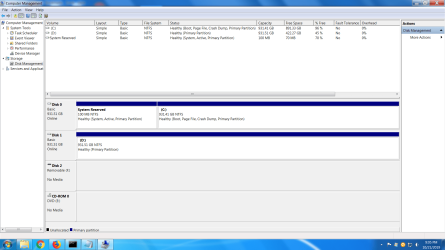
Here's Disk Management per request:

DiskManagement_screen.png
 

My Computer My Computer

At a glance

Windows 7 Home Premium 64 bit.Intel(R) Core(TM) i5-2400 CPU @ 3.10GHz4.00 GBIntel(R) HD Graphics Family
Computer type
PC/Desktop
Computer Manufacturer/Model Number
System Builder (Cyberpower)
OS
Windows 7 Home Premium 64 bit.
CPU
Intel(R) Core(TM) i5-2400 CPU @ 3.10GHz
Motherboard
ASUSTeK Computer INC. P8H67-M LE
Memory
4.00 GB
Graphics Card(s)
Intel(R) HD Graphics Family
Sound Card
(1) Realtek High Definition Audio (2) Intel(R) Display Aud
Monitor(s) Displays
hp S2331
Screen Resolution
1920 X 1080
Hard Drives
(1) Hitachi HDS721010CLA332 ATA Device
(2) Hitachi HDS721010CLA332 ATA Device
(3) Multi Flash Reader USB Device
PSU
Corsair
Case
Apevia
Cooling
Intel fan (cpu); case fans.
Keyboard
Xtreme Gear
Mouse
Microsoft USB IntelliMouse Optical
Internet Speed
1.0 Gbps
Antivirus
Avast
Browser
Firefox Quantum
You don't install WinPE.
WinPE is a small Windows OS on the installation disk that has a GUI to guide you on installation or repair.
Some OEM installation disk don't install Windows the way a M$ disk do. They recovery a disk image stored on the DVD. This kind of disk can't be used on a Repair installation.
Before you do a Repair install with the M$ disk, make a copy of your OEM SLP license so you can do a offline activation.
Use ABR
Explanation is here: oem-activation-license
 

My Computers My Computers

  • At a glance

    Windows 7 HP 64i5 6600K - 800MHz to 4200MHz4+4G GSkill DDR4 3000IG - Intel 530
    Computer type
    PC/Desktop
    Computer Manufacturer/Model Number
    custom build
    OS
    Windows 7 HP 64
    CPU
    i5 6600K - 800MHz to 4200MHz
    Motherboard
    GA-Z170-HD3P
    Memory
    4+4G GSkill DDR4 3000
    Graphics Card(s)
    IG - Intel 530
    Monitor(s) Displays
    Samsung 226BW
    Screen Resolution
    1680x1050
    Hard Drives
    (1) -1 SM951 – 128GB M.2 AHCI PCIe SSD drive for Windows 7 and Lubuntu
    (2) -1 WD SATA 3 - 1T for Data
    (3) -1 WD SATA 3 - 1T for backup
    PSU
    Thermaltake 450W TR2 gold
    Keyboard
    Old and good Chicony mechanical keyboard
    Mouse
    Logitech mX performance - 9 buttons (had to disable some)
    Internet Speed
    500Mb/s
    Browser
    Firefox 64
    Other Info
    TinyWall firewall
  • At a glance

    Windows 7 Proi7-4500U 800MHz to 3.0GHz(4+4)G DDR3 1600IG intel 4400 + NVIDIA GeForce GT 745M
    Computer type
    Laptop
    System Manufacturer/Model Number
    Asus Q550LF
    OS
    Windows 7 Pro
    CPU
    i7-4500U 800MHz to 3.0GHz
    Motherboard
    Asus Q550LF
    Memory
    (4+4)G DDR3 1600
    Graphics Card(s)
    IG intel 4400 + NVIDIA GeForce GT 745M
    Sound Card
    Realtek
    Monitor(s) Displays
    LG Display LP156WF4-SPH1
    Screen Resolution
    1920 x 1080
    Hard Drives
    BX500 120G SSD for Windows and programs +
    1T HDD for data
    Internet Speed
    500 Mb/s
    Browser
    Firefox
    Other Info
    TinyWall firewall
You don't install WinPE.
WinPE is a small Windows OS on the installation disk that has a GUI to guide you on installation or repair.
Some OEM installation disk don't install Windows the way a M$ disk do. They recovery a disk image stored on the DVD. This kind of disk can't be used on a Repair installation.
Before you do a Repair install with the M$ disk, make a copy of your OEM SLP license so you can do a offline activation.
Use ABR
Explanation is here: oem-activation-license


I Repair Installed successfully afaik so far.
I have my key, but I skipped entering license during install per tutorial at sevenforums.

Can I update WEI score before activation per tutorial with this install you gave me or will that feature only work after I activate with key?

Next is too install WU's hopefully, finally, which was my original problem. Was intending on using DISM++. Have to review.

Thanks!
 

My Computer My Computer

At a glance

Windows 7 Home Premium 64 bit.Intel(R) Core(TM) i5-2400 CPU @ 3.10GHz4.00 GBIntel(R) HD Graphics Family
Computer type
PC/Desktop
Computer Manufacturer/Model Number
System Builder (Cyberpower)
OS
Windows 7 Home Premium 64 bit.
CPU
Intel(R) Core(TM) i5-2400 CPU @ 3.10GHz
Motherboard
ASUSTeK Computer INC. P8H67-M LE
Memory
4.00 GB
Graphics Card(s)
Intel(R) HD Graphics Family
Sound Card
(1) Realtek High Definition Audio (2) Intel(R) Display Aud
Monitor(s) Displays
hp S2331
Screen Resolution
1920 X 1080
Hard Drives
(1) Hitachi HDS721010CLA332 ATA Device
(2) Hitachi HDS721010CLA332 ATA Device
(3) Multi Flash Reader USB Device
PSU
Corsair
Case
Apevia
Cooling
Intel fan (cpu); case fans.
Keyboard
Xtreme Gear
Mouse
Microsoft USB IntelliMouse Optical
Internet Speed
1.0 Gbps
Antivirus
Avast
Browser
Firefox Quantum
Also, do I have to reinstall MOBO drivers (dvd)?
Am confused about this. Thought I did.
 

My Computer My Computer

At a glance

Windows 7 Home Premium 64 bit.Intel(R) Core(TM) i5-2400 CPU @ 3.10GHz4.00 GBIntel(R) HD Graphics Family
Computer type
PC/Desktop
Computer Manufacturer/Model Number
System Builder (Cyberpower)
OS
Windows 7 Home Premium 64 bit.
CPU
Intel(R) Core(TM) i5-2400 CPU @ 3.10GHz
Motherboard
ASUSTeK Computer INC. P8H67-M LE
Memory
4.00 GB
Graphics Card(s)
Intel(R) HD Graphics Family
Sound Card
(1) Realtek High Definition Audio (2) Intel(R) Display Aud
Monitor(s) Displays
hp S2331
Screen Resolution
1920 X 1080
Hard Drives
(1) Hitachi HDS721010CLA332 ATA Device
(2) Hitachi HDS721010CLA332 ATA Device
(3) Multi Flash Reader USB Device
PSU
Corsair
Case
Apevia
Cooling
Intel fan (cpu); case fans.
Keyboard
Xtreme Gear
Mouse
Microsoft USB IntelliMouse Optical
Internet Speed
1.0 Gbps
Antivirus
Avast
Browser
Firefox Quantum
Cittizin7
Computer type
PC/Desktop
System Manufacturer/Model Number System Builder (Cyberpower)
OS Windows 7 Home Premium 64 bit.
CPU Intel(R) Core(TM) i5-2400 CPU @ 3.10GHz
Motherboard ASUSTeK Computer INC. P8H67-M LE
Memory 4.00 GB
Graphics Card Intel(R) HD Graphics Family
Sound Card (1) Realtek High Definition Audio (2) Intel(R) Display Aud
Monitor(s) Displays hp S2331
Screen Resolution 1920 X 1080
Keyboard Xtreme Gear
Mouse Microsoft USB IntelliMouse Optical
PSU Corsair
Case Apevia
Cooling Intel fan (cpu); case fans.
Hard Drives (1) Hitachi HDS721010CLA332 ATA Device (2) Hitachi HDS721010CLA332 ATA Device (3) Multi Flash Reader USB Device
Internet Speed 1.0 Gbps
Antivirus Avast
Browser Firefox Quantum

I have every Windows 7 8.1 & 10 ISO anyone needs.
32 or 64?
Is your copy Genuine?
MGADiag


I have every Windows 7 8.1 & 10 ISO anyone needs.
32 or 64?
Is your copy Genuine?
MGADiag
 

My Computer My Computer

At a glance

Win 10 x64, Linux Lite, Win 7 x64, BlackArch,...
Computer type
PC/Desktop
Computer Manufacturer/Model Number
HP Desktop & Compaq Laptop
OS
Win 10 x64, Linux Lite, Win 7 x64, BlackArch, & Kali
Hard Drives
Samsung 850 Pro 256Gb,
Hitachi HDD 1Tb,
Crucial MX SSD 250Gb
Segate 3Tb USB 3.0 Ext. Backup HDD
Internet Speed
150Mbps dn, 20Mbps up
Antivirus
Avast Free, Malwarebytes Anti-Exploit & Anti-Ransomware
Browser
Firefox, Chrome, Opera, & VPN
Hi Snick,

Is your copy Genuine?

The link for the Win 7 SP1 HP 64-bit ISO I posted in post #20 is GENUINE!

He has a Cyberpower OEM computer. It appears that he has re-installed the OS [as per the disk management screenshot] at some stage [NOT from the recovery/factory reset partition] and has therefore overwritten the recovery/factory reset partition that would of had the drivers specific for his OS build.

Megahertz07 advised him to do this to retrieve the OEM license key . . .

Before you do a Repair install with the M$ disk, make a copy of your OEM SLP license so you can do a offline activation.
Use ABR
Explanation is here: oem-activation-license

. . . but I am not sure if he did!
 

My Computer My Computer

At a glance

Win 7 HP SP1 64-bit Vista HB SP2 32-bit Linux...Intel(R) Pentium(R) CPU P6200 @ 2.13GHz4.00 GBIntel(R) Graphics Media Accelerator HD
Computer type
Laptop
Computer Manufacturer/Model Number
Fujitsu LIFEBOOK
OS
Win 7 HP SP1 64-bit Vista HB SP2 32-bit Linux Mint 18.3
CPU
Intel(R) Pentium(R) CPU P6200 @ 2.13GHz
Motherboard
FUJITSU FJNBB06
Memory
4.00 GB
Graphics Card(s)
Intel(R) Graphics Media Accelerator HD
Sound Card
[1] Realtek High Definition Audio [2] Intel(R) Display Audio
Screen Resolution
1366 x 768 x 32 bits (4294967296 colors) @ 59 Hz
Hard Drives
TOSHIBA MK5076GSX
Antivirus
AVG FREE
For the updates, use Simplix
To avoid telemetry and unnecessary updates, I have set Services - Windows Update - Manual. On WU page I have set it to Never check and monthly I install the Security ONLY updates. I then run WU manually to find updates for Office etc and decide witch one to install.

As an alternative, my suggestion is to set Services - Windows Update - Manual and on WU page set it to Never check.
Then run UpdatePack7R2
Simplix is a single file (750MB) that contain all updates since Win 7 released up to date. It has all security and non security updates without the trash (telemetry and tracking). Very good.
Then run WU manually to find updates for Office etc and decide witch one to install.

To uninstall the telemetry, run cmd file to uninstall those KB files.
kb_spy.cmd.txt
Rename it as KB_Spy.cmd and run it.
 

My Computers My Computers

  • At a glance

    Windows 7 HP 64i5 6600K - 800MHz to 4200MHz4+4G GSkill DDR4 3000IG - Intel 530
    Computer type
    PC/Desktop
    Computer Manufacturer/Model Number
    custom build
    OS
    Windows 7 HP 64
    CPU
    i5 6600K - 800MHz to 4200MHz
    Motherboard
    GA-Z170-HD3P
    Memory
    4+4G GSkill DDR4 3000
    Graphics Card(s)
    IG - Intel 530
    Monitor(s) Displays
    Samsung 226BW
    Screen Resolution
    1680x1050
    Hard Drives
    (1) -1 SM951 – 128GB M.2 AHCI PCIe SSD drive for Windows 7 and Lubuntu
    (2) -1 WD SATA 3 - 1T for Data
    (3) -1 WD SATA 3 - 1T for backup
    PSU
    Thermaltake 450W TR2 gold
    Keyboard
    Old and good Chicony mechanical keyboard
    Mouse
    Logitech mX performance - 9 buttons (had to disable some)
    Internet Speed
    500Mb/s
    Browser
    Firefox 64
    Other Info
    TinyWall firewall
  • At a glance

    Windows 7 Proi7-4500U 800MHz to 3.0GHz(4+4)G DDR3 1600IG intel 4400 + NVIDIA GeForce GT 745M
    Computer type
    Laptop
    System Manufacturer/Model Number
    Asus Q550LF
    OS
    Windows 7 Pro
    CPU
    i7-4500U 800MHz to 3.0GHz
    Motherboard
    Asus Q550LF
    Memory
    (4+4)G DDR3 1600
    Graphics Card(s)
    IG intel 4400 + NVIDIA GeForce GT 745M
    Sound Card
    Realtek
    Monitor(s) Displays
    LG Display LP156WF4-SPH1
    Screen Resolution
    1920 x 1080
    Hard Drives
    BX500 120G SSD for Windows and programs +
    1T HDD for data
    Internet Speed
    500 Mb/s
    Browser
    Firefox
    Other Info
    TinyWall firewall
Hi Snick,


The link for the Win 7 SP1 HP 64-bit ISO I posted in post #20 is GENUINE!

He has a Cyberpower OEM computer. It appears that he has re-installed the OS [as per the disk management screenshot] at some stage [NOT from the recovery/factory reset partition] and has therefore overwritten the recovery/factory reset partition that would of had the drivers specific for his OS build.

Megahertz07 advised him to do this to retrieve the OEM license key . . .


. . . but I am not sure if he did!


I did in fact use the Recovery DVD to clean install in Sept. As far as I can tell, I never had a recovery partition on my drive, cyberpower didn't set up my system that way. If I understand correctly, according to Megahertz07 (see post; don't know how to link to it.) the recovery "partition" is on the DVD itself! I never would have thought of that! But, the Cyberpower DVD isn't able to perform Repair Install so I needed a Setup Disc or to make one via iso as you mention - Whew!


And I've had me license key written down for this process and it's still visible on my pc tower! I used that raymond.cc program too just to be sure I was on the same page about all this license chicanery :)


I chose to wait to add key/activate per sevenforum tutorial until I updated Windows experience index.


I Activated Successfully.
 

My Computer My Computer

At a glance

Windows 7 Home Premium 64 bit.Intel(R) Core(TM) i5-2400 CPU @ 3.10GHz4.00 GBIntel(R) HD Graphics Family
Computer type
PC/Desktop
Computer Manufacturer/Model Number
System Builder (Cyberpower)
OS
Windows 7 Home Premium 64 bit.
CPU
Intel(R) Core(TM) i5-2400 CPU @ 3.10GHz
Motherboard
ASUSTeK Computer INC. P8H67-M LE
Memory
4.00 GB
Graphics Card(s)
Intel(R) HD Graphics Family
Sound Card
(1) Realtek High Definition Audio (2) Intel(R) Display Aud
Monitor(s) Displays
hp S2331
Screen Resolution
1920 X 1080
Hard Drives
(1) Hitachi HDS721010CLA332 ATA Device
(2) Hitachi HDS721010CLA332 ATA Device
(3) Multi Flash Reader USB Device
PSU
Corsair
Case
Apevia
Cooling
Intel fan (cpu); case fans.
Keyboard
Xtreme Gear
Mouse
Microsoft USB IntelliMouse Optical
Internet Speed
1.0 Gbps
Antivirus
Avast
Browser
Firefox Quantum
Finally I'm preparing to deal with WUs, but am reviewing Simplix vs DISM++ - fingers crossed!!!


Am going to image backup and restore point first.
 

My Computer My Computer

At a glance

Windows 7 Home Premium 64 bit.Intel(R) Core(TM) i5-2400 CPU @ 3.10GHz4.00 GBIntel(R) HD Graphics Family
Computer type
PC/Desktop
Computer Manufacturer/Model Number
System Builder (Cyberpower)
OS
Windows 7 Home Premium 64 bit.
CPU
Intel(R) Core(TM) i5-2400 CPU @ 3.10GHz
Motherboard
ASUSTeK Computer INC. P8H67-M LE
Memory
4.00 GB
Graphics Card(s)
Intel(R) HD Graphics Family
Sound Card
(1) Realtek High Definition Audio (2) Intel(R) Display Aud
Monitor(s) Displays
hp S2331
Screen Resolution
1920 X 1080
Hard Drives
(1) Hitachi HDS721010CLA332 ATA Device
(2) Hitachi HDS721010CLA332 ATA Device
(3) Multi Flash Reader USB Device
PSU
Corsair
Case
Apevia
Cooling
Intel fan (cpu); case fans.
Keyboard
Xtreme Gear
Mouse
Microsoft USB IntelliMouse Optical
Internet Speed
1.0 Gbps
Antivirus
Avast
Browser
Firefox Quantum

My Computer My Computer

At a glance

Win 7 HP SP1 64-bit Vista HB SP2 32-bit Linux...Intel(R) Pentium(R) CPU P6200 @ 2.13GHz4.00 GBIntel(R) Graphics Media Accelerator HD
Computer type
Laptop
Computer Manufacturer/Model Number
Fujitsu LIFEBOOK
OS
Win 7 HP SP1 64-bit Vista HB SP2 32-bit Linux Mint 18.3
CPU
Intel(R) Pentium(R) CPU P6200 @ 2.13GHz
Motherboard
FUJITSU FJNBB06
Memory
4.00 GB
Graphics Card(s)
Intel(R) Graphics Media Accelerator HD
Sound Card
[1] Realtek High Definition Audio [2] Intel(R) Display Audio
Screen Resolution
1366 x 768 x 32 bits (4294967296 colors) @ 59 Hz
Hard Drives
TOSHIBA MK5076GSX
Antivirus
AVG FREE

My Computer My Computer

At a glance

Windows 7 Home Premium 64 bit.Intel(R) Core(TM) i5-2400 CPU @ 3.10GHz4.00 GBIntel(R) HD Graphics Family
Computer type
PC/Desktop
Computer Manufacturer/Model Number
System Builder (Cyberpower)
OS
Windows 7 Home Premium 64 bit.
CPU
Intel(R) Core(TM) i5-2400 CPU @ 3.10GHz
Motherboard
ASUSTeK Computer INC. P8H67-M LE
Memory
4.00 GB
Graphics Card(s)
Intel(R) HD Graphics Family
Sound Card
(1) Realtek High Definition Audio (2) Intel(R) Display Aud
Monitor(s) Displays
hp S2331
Screen Resolution
1920 X 1080
Hard Drives
(1) Hitachi HDS721010CLA332 ATA Device
(2) Hitachi HDS721010CLA332 ATA Device
(3) Multi Flash Reader USB Device
PSU
Corsair
Case
Apevia
Cooling
Intel fan (cpu); case fans.
Keyboard
Xtreme Gear
Mouse
Microsoft USB IntelliMouse Optical
Internet Speed
1.0 Gbps
Antivirus
Avast
Browser
Firefox Quantum
For the updates, use Simplix
To avoid telemetry and unnecessary updates, I have set Services - Windows Update - Manual. On WU page I have set it to Never check and monthly I install the Security ONLY updates. I then run WU manually to find updates for Office etc and decide witch one to install.

As an alternative, my suggestion is to set Services - Windows Update - Manual and on WU page set it to Never check.
Then run UpdatePack7R2
Simplix is a single file (750MB) that contain all updates since Win 7 released up to date. It has all security and non security updates without the trash (telemetry and tracking). Very good.
Then run WU manually to find updates for Office etc and decide witch one to install.

To uninstall the telemetry, run cmd file to uninstall those KB files.
kb_spy.cmd.txt
Rename it as KB_Spy.cmd and run it.


Backups done.
Leaving one last post before I attempt these methods to make sure I am clear.


1. I like the suggestions you make on WU config, Megahertz07! I'm not sure I get the distinction between the two methods though.
-- Other than that, I have an idea about services and how to set to manual, but I don't have experience with the consequences. Need to restart after changing to manual? Anything else I should read up on before I mess with it? I'm paranoid enough now to to before and after restore points on this.


-- Anything I should know about running UpdatePack7R2-19.10.10.exe ? Is it fairly user friendly UI? Do I have to make selections that could be clarified? Any info is helpful.


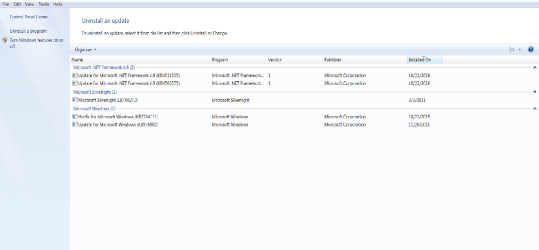
2. WUs currently installed (5) -- After Repair Install, I noticed some WU's even though I turn that off in Control Panel i.e. set to download but ask to install or whatever it is. I changed that to, Never. But the 5 installed did configure on restart.

-- Are these ok before I run simplix?

?? Do I run the telementry cmd after simplix?


The reason I post a screen shot of them is cause earlier Snick mentioned (I think) something about the significance of order of WUs among other issues. I want to make sure I am not setting myself up for problems I can avoid, right? I've made it this far.


Repair Install_WUsPostRepair.png
 

My Computer My Computer

At a glance

Windows 7 Home Premium 64 bit.Intel(R) Core(TM) i5-2400 CPU @ 3.10GHz4.00 GBIntel(R) HD Graphics Family
Computer type
PC/Desktop
Computer Manufacturer/Model Number
System Builder (Cyberpower)
OS
Windows 7 Home Premium 64 bit.
CPU
Intel(R) Core(TM) i5-2400 CPU @ 3.10GHz
Motherboard
ASUSTeK Computer INC. P8H67-M LE
Memory
4.00 GB
Graphics Card(s)
Intel(R) HD Graphics Family
Sound Card
(1) Realtek High Definition Audio (2) Intel(R) Display Aud
Monitor(s) Displays
hp S2331
Screen Resolution
1920 X 1080
Hard Drives
(1) Hitachi HDS721010CLA332 ATA Device
(2) Hitachi HDS721010CLA332 ATA Device
(3) Multi Flash Reader USB Device
PSU
Corsair
Case
Apevia
Cooling
Intel fan (cpu); case fans.
Keyboard
Xtreme Gear
Mouse
Microsoft USB IntelliMouse Optical
Internet Speed
1.0 Gbps
Antivirus
Avast
Browser
Firefox Quantum

My Computer My Computer

At a glance

Win 10 x64, Linux Lite, Win 7 x64, BlackArch,...
Computer type
PC/Desktop
Computer Manufacturer/Model Number
HP Desktop & Compaq Laptop
OS
Win 10 x64, Linux Lite, Win 7 x64, BlackArch, & Kali
Hard Drives
Samsung 850 Pro 256Gb,
Hitachi HDD 1Tb,
Crucial MX SSD 250Gb
Segate 3Tb USB 3.0 Ext. Backup HDD
Internet Speed
150Mbps dn, 20Mbps up
Antivirus
Avast Free, Malwarebytes Anti-Exploit & Anti-Ransomware
Browser
Firefox, Chrome, Opera, & VPN
- Run services.msc
- Go to Windows update. Double click and on startup select Manual.
- Open Control Panel\System and Security\Windows Update\Change settings. Select never check
 

My Computers My Computers

  • At a glance

    Windows 7 HP 64i5 6600K - 800MHz to 4200MHz4+4G GSkill DDR4 3000IG - Intel 530
    Computer type
    PC/Desktop
    Computer Manufacturer/Model Number
    custom build
    OS
    Windows 7 HP 64
    CPU
    i5 6600K - 800MHz to 4200MHz
    Motherboard
    GA-Z170-HD3P
    Memory
    4+4G GSkill DDR4 3000
    Graphics Card(s)
    IG - Intel 530
    Monitor(s) Displays
    Samsung 226BW
    Screen Resolution
    1680x1050
    Hard Drives
    (1) -1 SM951 – 128GB M.2 AHCI PCIe SSD drive for Windows 7 and Lubuntu
    (2) -1 WD SATA 3 - 1T for Data
    (3) -1 WD SATA 3 - 1T for backup
    PSU
    Thermaltake 450W TR2 gold
    Keyboard
    Old and good Chicony mechanical keyboard
    Mouse
    Logitech mX performance - 9 buttons (had to disable some)
    Internet Speed
    500Mb/s
    Browser
    Firefox 64
    Other Info
    TinyWall firewall
  • At a glance

    Windows 7 Proi7-4500U 800MHz to 3.0GHz(4+4)G DDR3 1600IG intel 4400 + NVIDIA GeForce GT 745M
    Computer type
    Laptop
    System Manufacturer/Model Number
    Asus Q550LF
    OS
    Windows 7 Pro
    CPU
    i7-4500U 800MHz to 3.0GHz
    Motherboard
    Asus Q550LF
    Memory
    (4+4)G DDR3 1600
    Graphics Card(s)
    IG intel 4400 + NVIDIA GeForce GT 745M
    Sound Card
    Realtek
    Monitor(s) Displays
    LG Display LP156WF4-SPH1
    Screen Resolution
    1920 x 1080
    Hard Drives
    BX500 120G SSD for Windows and programs +
    1T HDD for data
    Internet Speed
    500 Mb/s
    Browser
    Firefox
    Other Info
    TinyWall firewall
- Run services.msc
- Go to Windows update. Double click and on startup select Manual.
- Open Control Panel\System and Security\Windows Update\Change settings. Select never check


Ok, Set.


The reason I posted the snapshot of my currently installed updates is cause it looks like they were carried over from before the Repair Install although, there was configuration screen after a restart I did. (after the Repair) So i'm not sure when those updates came through.


I will proceed with your WU instruction above - am hoping the hotfix I see doesn't interfere with the process for example.


Other than that, do I have to run the telemetry cmd after UpdatePack7R2-19.10.10.exe method? You suggest this file already has telemetry trash removed.


Thanks!
 

My Computer My Computer

At a glance

Windows 7 Home Premium 64 bit.Intel(R) Core(TM) i5-2400 CPU @ 3.10GHz4.00 GBIntel(R) HD Graphics Family
Computer type
PC/Desktop
Computer Manufacturer/Model Number
System Builder (Cyberpower)
OS
Windows 7 Home Premium 64 bit.
CPU
Intel(R) Core(TM) i5-2400 CPU @ 3.10GHz
Motherboard
ASUSTeK Computer INC. P8H67-M LE
Memory
4.00 GB
Graphics Card(s)
Intel(R) HD Graphics Family
Sound Card
(1) Realtek High Definition Audio (2) Intel(R) Display Aud
Monitor(s) Displays
hp S2331
Screen Resolution
1920 X 1080
Hard Drives
(1) Hitachi HDS721010CLA332 ATA Device
(2) Hitachi HDS721010CLA332 ATA Device
(3) Multi Flash Reader USB Device
PSU
Corsair
Case
Apevia
Cooling
Intel fan (cpu); case fans.
Keyboard
Xtreme Gear
Mouse
Microsoft USB IntelliMouse Optical
Internet Speed
1.0 Gbps
Antivirus
Avast
Browser
Firefox Quantum
Hi Cittizin7,

The reason I posted the snapshot of my currently installed updates is cause it looks like they were carried over from before the Repair Install although, there was configuration screen after a restart I did. (after the Repair) So i'm not sure when those updates came through.

No, they were not carried over from the pre-repair install. They are part of the ISO!

Other than that, do I have to run the telemetry cmd after UpdatePack7R2-19.10.10.exe method? You suggest this file already has telemetry trash removed.

Yes, although if you use DISM++ or SIMPLIX, they are already excluded from them!

I hope this helps!
 

My Computer My Computer

At a glance

Win 7 HP SP1 64-bit Vista HB SP2 32-bit Linux...Intel(R) Pentium(R) CPU P6200 @ 2.13GHz4.00 GBIntel(R) Graphics Media Accelerator HD
Computer type
Laptop
Computer Manufacturer/Model Number
Fujitsu LIFEBOOK
OS
Win 7 HP SP1 64-bit Vista HB SP2 32-bit Linux Mint 18.3
CPU
Intel(R) Pentium(R) CPU P6200 @ 2.13GHz
Motherboard
FUJITSU FJNBB06
Memory
4.00 GB
Graphics Card(s)
Intel(R) Graphics Media Accelerator HD
Sound Card
[1] Realtek High Definition Audio [2] Intel(R) Display Audio
Screen Resolution
1366 x 768 x 32 bits (4294967296 colors) @ 59 Hz
Hard Drives
TOSHIBA MK5076GSX
Antivirus
AVG FREE

My Computer My Computer

At a glance

Windows 7 Home Premium 64 bit.Intel(R) Core(TM) i5-2400 CPU @ 3.10GHz4.00 GBIntel(R) HD Graphics Family
Computer type
PC/Desktop
Computer Manufacturer/Model Number
System Builder (Cyberpower)
OS
Windows 7 Home Premium 64 bit.
CPU
Intel(R) Core(TM) i5-2400 CPU @ 3.10GHz
Motherboard
ASUSTeK Computer INC. P8H67-M LE
Memory
4.00 GB
Graphics Card(s)
Intel(R) HD Graphics Family
Sound Card
(1) Realtek High Definition Audio (2) Intel(R) Display Aud
Monitor(s) Displays
hp S2331
Screen Resolution
1920 X 1080
Hard Drives
(1) Hitachi HDS721010CLA332 ATA Device
(2) Hitachi HDS721010CLA332 ATA Device
(3) Multi Flash Reader USB Device
PSU
Corsair
Case
Apevia
Cooling
Intel fan (cpu); case fans.
Keyboard
Xtreme Gear
Mouse
Microsoft USB IntelliMouse Optical
Internet Speed
1.0 Gbps
Antivirus
Avast
Browser
Firefox Quantum
40 posts
:rolleyes:
:doh:
 

My Computer My Computer

At a glance

Win 10 x64, Linux Lite, Win 7 x64, BlackArch,...
Computer type
PC/Desktop
Computer Manufacturer/Model Number
HP Desktop & Compaq Laptop
OS
Win 10 x64, Linux Lite, Win 7 x64, BlackArch, & Kali
Hard Drives
Samsung 850 Pro 256Gb,
Hitachi HDD 1Tb,
Crucial MX SSD 250Gb
Segate 3Tb USB 3.0 Ext. Backup HDD
Internet Speed
150Mbps dn, 20Mbps up
Antivirus
Avast Free, Malwarebytes Anti-Exploit & Anti-Ransomware
Browser
Firefox, Chrome, Opera, & VPN
Back
Top