64bit ultimate won't boot

Danthevan

New member
Local time
12:46 PM
Messages
16
Hi all,

Running a home built system on win7 64 bit ultimate (anytime upgrade from student edition), 8gb ram, amd phenom x2 processor on a gigabyte board.

Been running sweet for just over a year, then a couple of weeks ago, i had a stick of ram pack up on me (took a while to find the problem, but that is what it was).
Just before xmas i booted it up and everything looked ok apart from itunes, which had updated to version 11 on the previous boot. when in itunes, all the song data was missing, no titles, artwork, or anything, although the songs played ok.
Thought i'd try a reboot, and thats when windows decided to so a scan of the hard drive. Came up with a few bad files and sectors, which it moved and fixed itself. But now it will not boot.
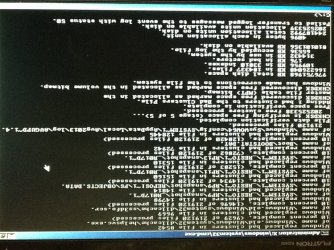
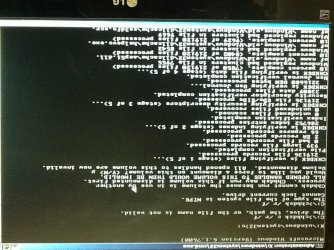
Have tried all the repair options available, ran chkdsk but nothing is working. (Couple of screen pics from the ipad attached (hopefully)). Have no restore point, and never done a backup as the pc is only used in my music room.
I'm thinking it's probably a drive error, so have another drive on it's way. My plan is to install the new drive with a fresh copy of windows, and use the existing drive as a slave and hopefully pull data off of it.

Does this sound like the right way to do it or am i missing something obvious?
 

Attachments
  • image.jpg
    image.jpg
    120.9 KB · Views: 17

My Computer My Computer

OS
Windows 7 64bit ultimate, xp pro 32bit, win 8 pro 32bit
CPU
AMD phenom black 3.2ghz
Motherboard
Gigabyte
Memory
8gb corsair ddr3
Graphics Card(s)
Onboard
Sound Card
External Alesis Multimix
Monitor(s) Displays
LG
Hard Drives
2 x 1tb Western Digital sata6
Internet Speed
60mb
This is the other shot........ Seems the ipad wants you to turn your monitor upside down to view it :mad:
 

Attachments

  • image.jpg
    image.jpg
    135.1 KB · Views: 12

My Computer My Computer

OS
Windows 7 64bit ultimate, xp pro 32bit, win 8 pro 32bit
CPU
AMD phenom black 3.2ghz
Motherboard
Gigabyte
Memory
8gb corsair ddr3
Graphics Card(s)
Onboard
Sound Card
External Alesis Multimix
Monitor(s) Displays
LG
Hard Drives
2 x 1tb Western Digital sata6
Internet Speed
60mb
Yes the attachment is there, its upside down though xD

it sounds to me when it fixed the bad sectors it might have corrupted some core windows files or the boot.mbr stopping the os from booting, do you have a recovery cd? insert that and click start up repair, it should replace missing files with the ones on disk.
 

My Computer My Computer

Computer Manufacturer/Model Number
CGR Watsonator Custom rig
OS
Genuine Windows 7 Home Premium x64
CPU
AMG Athlon II X2 255 3.1/2MB/2000MHz 45nm AM3
Motherboard
Gigabyte GA-MA78LMT-S2 AM3, 760G, Ultra Durable 3, M-ATX
Memory
2X 4GB Kingston DDR3 1066MHz @ 1600MHz Dual Channel
Graphics Card(s)
HIS HD Radeon 7770 GHz Edition iCooler Core: 1000MHz
Sound Card
Genius Sound Maker Value 5.1
Monitor(s) Displays
Dell E2311H DVI/VGA 5ms response, 1080p
Screen Resolution
1920x1080 @ 60Hz
Hard Drives
Western Digital Caviar Blue 500GB 16MB Cache 7200rpm SATA III
PSU
Cooler Master eXtreme Power Plus 700w
Case
Lian-Li PC-6010 With Side Window
Cooling
Aywun A4 80mm fan
Keyboard
Logitech K120 Wired Keyboard
Mouse
Logitech K120 Wired Mouse
Internet Speed
802.11N 300Mbps+ ADSL2+ Max 12.12Mbps
Other Info
Speakers: Logitech LS21 2.1 Satellites + Sub woofer

AMD Catalyst 12.11 BETA
Linksys x2000 Dual Band Wireless N 300Mbps ADSL2+
LiteON CD/DVD Player


GAME PERFORMANCE:
Battlefield 3: 41 FPS Ultra 1x AA @ 1980x1080
Mass Effect 2 and 3: 60 FPS Highest 4x AA @ 1920x1080
Counter Strike Source (and other Valve games):
300 FPS (max FPS in game) Highest settings 8x AA 16x AF @ 1920x1080!!!
No recovery cd, but have the original windows dvd.
Ive tried a startup repair, but it says windows cannot fix the problem. It lets me send an error report but thats it.
 

My Computer My Computer

OS
Windows 7 64bit ultimate, xp pro 32bit, win 8 pro 32bit
CPU
AMD phenom black 3.2ghz
Motherboard
Gigabyte
Memory
8gb corsair ddr3
Graphics Card(s)
Onboard
Sound Card
External Alesis Multimix
Monitor(s) Displays
LG
Hard Drives
2 x 1tb Western Digital sata6
Internet Speed
60mb
In addition test the HD condition using the maker's HD Diagnostic extended CD scan.

If it passes then as suggested the Disk Check probably scrambled some important files. If they can't be repaired by everything suggested for OS repair in Troubleshooting Windows 7 Failure to Start then see what data you can rescue if needed and either run Factory Recovery or get the superior Clean Reinstall linked.

Start with the data rescue if required in Step 9 first.
 
No recovery cd, but have the original windows dvd.
Ive tried a startup repair, but it says windows cannot fix the problem. It lets me send an error report but thats it.

hmmm beats me, did you try startup repair on the original disk? (there is an option to repair your computer where it says install windows.)

Im sure the startup repair on the disk is better at providing a fix since it has the files that may be corrupt or deleted.
 

My Computer My Computer

Computer Manufacturer/Model Number
CGR Watsonator Custom rig
OS
Genuine Windows 7 Home Premium x64
CPU
AMG Athlon II X2 255 3.1/2MB/2000MHz 45nm AM3
Motherboard
Gigabyte GA-MA78LMT-S2 AM3, 760G, Ultra Durable 3, M-ATX
Memory
2X 4GB Kingston DDR3 1066MHz @ 1600MHz Dual Channel
Graphics Card(s)
HIS HD Radeon 7770 GHz Edition iCooler Core: 1000MHz
Sound Card
Genius Sound Maker Value 5.1
Monitor(s) Displays
Dell E2311H DVI/VGA 5ms response, 1080p
Screen Resolution
1920x1080 @ 60Hz
Hard Drives
Western Digital Caviar Blue 500GB 16MB Cache 7200rpm SATA III
PSU
Cooler Master eXtreme Power Plus 700w
Case
Lian-Li PC-6010 With Side Window
Cooling
Aywun A4 80mm fan
Keyboard
Logitech K120 Wired Keyboard
Mouse
Logitech K120 Wired Mouse
Internet Speed
802.11N 300Mbps+ ADSL2+ Max 12.12Mbps
Other Info
Speakers: Logitech LS21 2.1 Satellites + Sub woofer

AMD Catalyst 12.11 BETA
Linksys x2000 Dual Band Wireless N 300Mbps ADSL2+
LiteON CD/DVD Player


GAME PERFORMANCE:
Battlefield 3: 41 FPS Ultra 1x AA @ 1980x1080
Mass Effect 2 and 3: 60 FPS Highest 4x AA @ 1920x1080
Counter Strike Source (and other Valve games):
300 FPS (max FPS in game) Highest settings 8x AA 16x AF @ 1920x1080!!!
Yep, tried everything that suggests it will fix things! Even tried doing an "upgrade" install but it wouldn't let me do that.
Just wondering if its a horrific virus on there somewhere?
 

My Computer My Computer

OS
Windows 7 64bit ultimate, xp pro 32bit, win 8 pro 32bit
CPU
AMD phenom black 3.2ghz
Motherboard
Gigabyte
Memory
8gb corsair ddr3
Graphics Card(s)
Onboard
Sound Card
External Alesis Multimix
Monitor(s) Displays
LG
Hard Drives
2 x 1tb Western Digital sata6
Internet Speed
60mb
Well, did you start with the disinfection steps at the top of tutorial? Then you would know.

If Disk Check repaired a sector with key operating system files then it may be scrambled beyond repair. The best you can do is try SFC from booted DVD or Repair CD, then try the boot repairs to see if you can jump start it.
 
I'll give that a go in the morning Greg and update you with the results
Thanks
 

My Computer My Computer

OS
Windows 7 64bit ultimate, xp pro 32bit, win 8 pro 32bit
CPU
AMD phenom black 3.2ghz
Motherboard
Gigabyte
Memory
8gb corsair ddr3
Graphics Card(s)
Onboard
Sound Card
External Alesis Multimix
Monitor(s) Displays
LG
Hard Drives
2 x 1tb Western Digital sata6
Internet Speed
60mb
Ok, ran defender offline, no problems found and antivirus defs up to date.
Just trying the hdd test now, basic scan was ok, but doing a deep scan now it has come up with 1 error so far (although until it finishes i dont know what it is)
If all is ok with the drive, will try sfc again and see what happens......
 

My Computer My Computer

OS
Windows 7 64bit ultimate, xp pro 32bit, win 8 pro 32bit
CPU
AMD phenom black 3.2ghz
Motherboard
Gigabyte
Memory
8gb corsair ddr3
Graphics Card(s)
Onboard
Sound Card
External Alesis Multimix
Monitor(s) Displays
LG
Hard Drives
2 x 1tb Western Digital sata6
Internet Speed
60mb
Now 86 errors and still only 55% done........ Looks like ordering that new drive was a good idea afterall!
 

My Computer My Computer

OS
Windows 7 64bit ultimate, xp pro 32bit, win 8 pro 32bit
CPU
AMD phenom black 3.2ghz
Motherboard
Gigabyte
Memory
8gb corsair ddr3
Graphics Card(s)
Onboard
Sound Card
External Alesis Multimix
Monitor(s) Displays
LG
Hard Drives
2 x 1tb Western Digital sata6
Internet Speed
60mb
Right, drive scan finished and found 86 errors. Didn't show me what the errors were, but saved them to an error log....... Which i cannot access (access denied)
Startup repair ran, and found no problems, booted it up, and straight back into "windows cannot start run startup repair"
Ran statup repair again, and windows cant fix the error.
Run sfc which rewrote some files, rebooted and back to the startup repair.
Running sfc again as i type..........

Ok, finished.
"Windows resource protection found corrupt files but was unable to fix some of them. Details are included in the CBS.Log windir\logs\cbs\cbs.log."
Try to open the log, but get access is denied.

Any ideas?
 

My Computer My Computer

OS
Windows 7 64bit ultimate, xp pro 32bit, win 8 pro 32bit
CPU
AMD phenom black 3.2ghz
Motherboard
Gigabyte
Memory
8gb corsair ddr3
Graphics Card(s)
Onboard
Sound Card
External Alesis Multimix
Monitor(s) Displays
LG
Hard Drives
2 x 1tb Western Digital sata6
Internet Speed
60mb
Which drive scan found 86 errors? If this was HD Diagnostics scan for your HD make then replace the HD.
 
Yeah, was the segate utility.
I can see all the files on the drive (well, all the folders that are important to me) so im hoping once i get the new drive plugged in and loaded with windows, i'll be able to drag the important bits over to the new drive.
Luckilly this is one of my rarely used pc's and nothing is really critical on it. Sods law it's the only one without carbonite or backups done on it.
What do you think the chances are of the drive being totally scrap? Will a few bad sectors be picked up on install if i put xp on it? Have a couple of programs that will only run on xp.
 

My Computer My Computer

OS
Windows 7 64bit ultimate, xp pro 32bit, win 8 pro 32bit
CPU
AMD phenom black 3.2ghz
Motherboard
Gigabyte
Memory
8gb corsair ddr3
Graphics Card(s)
Onboard
Sound Card
External Alesis Multimix
Monitor(s) Displays
LG
Hard Drives
2 x 1tb Western Digital sata6
Internet Speed
60mb
There is a step for rescuiing your files from boot in the troubleshooting tutorial.

You can try the maker's HD extended repair scan to see if it can repair it, followed by Disk Check. But I would not rely on the HD again if it still finds errors. A full format might quarantine the bad sectors.
 
Well, whacked the new drive in a managed to save everything from the old drive :D

One slight user error problem....... I thought i'd use the old drive to put xp/windows 8 on, so whacked in my xp disc, chose the drive to format .............. Yep, you guessed it, the wrong drive! :o

Just going back through it all again and dragging everything across, then will unplug the new drive before attempting to stick xp on :rolleyes:

Thanks to all that tried to help!
 

My Computer My Computer

OS
Windows 7 64bit ultimate, xp pro 32bit, win 8 pro 32bit
CPU
AMD phenom black 3.2ghz
Motherboard
Gigabyte
Memory
8gb corsair ddr3
Graphics Card(s)
Onboard
Sound Card
External Alesis Multimix
Monitor(s) Displays
LG
Hard Drives
2 x 1tb Western Digital sata6
Internet Speed
60mb
Back
Top