64x OS running 86x programs?

kaisterkai

New member
Member
Local time
5:42 PM
Messages
45
Good day

I just want to ask, it is possible for a 64x OS to run 86x programs right? Because at the current moment I'm facing with a BSOD problem.. And I'm hopping that it's something to do with the drivers and nothing with the software that I installed..

but I just want to confirm that 86x programs WORKS with a 64x OS.. RIGHT? Like it won't corrupt the OS or damage anything?

Thanks
 

My Computer

OS
Window 7 x64 Ultimate
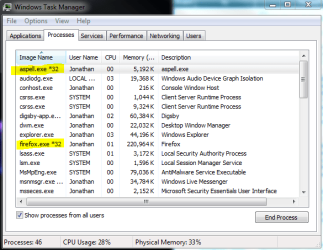
Yes and no. Any true x86 program will work in a x64 system. However, just because it runs on a x86 system does not mean it is x86. x86 systems will also run 16-bit programs, which x64 does not support.

You can check what type of program it is, in Task Manager. Here is a snip of my processes list on an x64 system.

Edit: forgot to mention, we have an excellent BSOD team on SF. See this post: http://www.sevenforums.com/crash-lockup-debug-how/34900-1-novice-how-ask-help-bsod-problem.html

Edit #2: I see your BSOD post now.
 

Attachments

  • Capture.PNG
    Capture.PNG
    68 KB · Views: 46

My Computer

Computer Manufacturer/Model Number
Custom
OS
Windows 7 Professional x64
CPU
Intel i7 2600K OC'd @ 4620 MHz
Motherboard
Asus P8Z68-V Pro
Memory
16GB GSkill Sniper 2133 Mhz (4x4GB)
Graphics Card(s)
EVGA GeForce GTX 480 SuperClocked+
Sound Card
Realtek High Definition Audio
Monitor(s) Displays
2x Acer S273HLbmii 27"
Screen Resolution
2 x 1920x1080
Hard Drives
64GB Crucial M4 SSD

Storage: Hitachi 1TB 5400RPM, Samsung 1.5TB 5400RPM
PSU
Corsair HW Series 750w (modular)
Case
Cooler Master HAF 932 Advanced Blue Edition
Cooling
CM Hyper 212+ CPU cooler, 3x 230mm + 1x 140mm case fans
Keyboard
Logitech MK320 (wireless)
Mouse
Logitech MK320 (wireless)
Internet Speed
30 Mb/s : 2 Mb/s
I see..

Wow.. there is alot on my computer that is running 32x...

Thanks ^ ^
 

My Computer

OS
Window 7 x64 Ultimate
You're welcome. :)

I'd say most of the programs installed on x64 systems today are x86. With each new program release, this percentage goes down.
 

My Computer

Computer Manufacturer/Model Number
Custom
OS
Windows 7 Professional x64
CPU
Intel i7 2600K OC'd @ 4620 MHz
Motherboard
Asus P8Z68-V Pro
Memory
16GB GSkill Sniper 2133 Mhz (4x4GB)
Graphics Card(s)
EVGA GeForce GTX 480 SuperClocked+
Sound Card
Realtek High Definition Audio
Monitor(s) Displays
2x Acer S273HLbmii 27"
Screen Resolution
2 x 1920x1080
Hard Drives
64GB Crucial M4 SSD

Storage: Hitachi 1TB 5400RPM, Samsung 1.5TB 5400RPM
PSU
Corsair HW Series 750w (modular)
Case
Cooler Master HAF 932 Advanced Blue Edition
Cooling
CM Hyper 212+ CPU cooler, 3x 230mm + 1x 140mm case fans
Keyboard
Logitech MK320 (wireless)
Mouse
Logitech MK320 (wireless)
Internet Speed
30 Mb/s : 2 Mb/s
I see.. Yeah I actually heard about people saying that 64x is going to take over... As I know that window 7 is the only OS that is going to have 32x... any one after this won't have x32..

but google crhome is 32x... But it doesn't really matter does it?
 

My Computer

OS
Window 7 x64 Ultimate
64-bit programs can make better use of x64 hardware, leading to faster, more efficient programs.

As for the rumors the Windows 7 will be the last OS to support x86 programs, don't put much stock into them. The truth is, no one knows. That is just speculation at this point.

If you are interested, I suggest checking out our sister site for the OS we know nothing about: Windows 8 Forums
 

My Computer

Computer Manufacturer/Model Number
Custom
OS
Windows 7 Professional x64
CPU
Intel i7 2600K OC'd @ 4620 MHz
Motherboard
Asus P8Z68-V Pro
Memory
16GB GSkill Sniper 2133 Mhz (4x4GB)
Graphics Card(s)
EVGA GeForce GTX 480 SuperClocked+
Sound Card
Realtek High Definition Audio
Monitor(s) Displays
2x Acer S273HLbmii 27"
Screen Resolution
2 x 1920x1080
Hard Drives
64GB Crucial M4 SSD

Storage: Hitachi 1TB 5400RPM, Samsung 1.5TB 5400RPM
PSU
Corsair HW Series 750w (modular)
Case
Cooler Master HAF 932 Advanced Blue Edition
Cooling
CM Hyper 212+ CPU cooler, 3x 230mm + 1x 140mm case fans
Keyboard
Logitech MK320 (wireless)
Mouse
Logitech MK320 (wireless)
Internet Speed
30 Mb/s : 2 Mb/s
I see.. wow.. they kind of start on the next OS already..

mm..

Anyway, but there is another thing that I want to ask, at the moment, I'm running 64x with 2GB ram, but it doesn't give me the FULL 2GB, only 1.8GB, but the reason for me to have installed 64x was because it said to give FULL amount of ram... But then I heard from a friend that it only applied when you have 4GB + ram.. Is that correct?
 

My Computer

OS
Window 7 x64 Ultimate
The truth is, you don't need to be running a 64-bit OS unless you have 4GB+ of RAM. 32-bit can recognize up to 4GB, but in practice, you will only get 3.4 or so.

If it's not too inconvenient, I recommend installing a 32-bit OS, to save resources. Not a big deal...

I suspect that the RAM you are not seeing is taken up by system devices, such as onboard video card, etc. This is normal, and nothing can be or needs to be done about it.
 

My Computer

Computer Manufacturer/Model Number
Custom
OS
Windows 7 Professional x64
CPU
Intel i7 2600K OC'd @ 4620 MHz
Motherboard
Asus P8Z68-V Pro
Memory
16GB GSkill Sniper 2133 Mhz (4x4GB)
Graphics Card(s)
EVGA GeForce GTX 480 SuperClocked+
Sound Card
Realtek High Definition Audio
Monitor(s) Displays
2x Acer S273HLbmii 27"
Screen Resolution
2 x 1920x1080
Hard Drives
64GB Crucial M4 SSD

Storage: Hitachi 1TB 5400RPM, Samsung 1.5TB 5400RPM
PSU
Corsair HW Series 750w (modular)
Case
Cooler Master HAF 932 Advanced Blue Edition
Cooling
CM Hyper 212+ CPU cooler, 3x 230mm + 1x 140mm case fans
Keyboard
Logitech MK320 (wireless)
Mouse
Logitech MK320 (wireless)
Internet Speed
30 Mb/s : 2 Mb/s
I see.. wow.. they kind of start on the next OS already..

mm..

Anyway, but there is another thing that I want to ask, at the moment, I'm running 64x with 2GB ram, but it doesn't give me the FULL 2GB, only 1.8GB, but the reason for me to have installed 64x was because it said to give FULL amount of ram... But then I heard from a friend that it only applied when you have 4GB + ram.. Is that correct?

The other thing that comes into play is marketing doesn't count Gigabytes the way we do. If you have 2000 MB they call it 2 GB when it's only 2000 MB. To have 2 GB you need 2048 MB. Likewise they call 4.34 GB DVD discs "DVD5". In fact this Quad core I'm on is the first PC that actually says the number of GB that was sold to me. It says 8 GB ram in My Computer properties. Every other machine if I had a GB ram(according to the ad where I bought the machine) it was really about 1000 MB. They just use the highest number they can pump it up to. Like "16x DVD burns" when only the peak speed at the very end of the burn hits 16x etc..

Since you have a 64 bit OS it should be able to map the memory for the devices outside the 2 GB area of your physical ram. That's probably the real amount of physical memory in the system.

(I could be wrong. I'm not a system builder.. but I know with 4 GB systems the OS can "see" the entire 4 GB because the address space taken up by video and other memory mapped devices can be added on above the 4 GB mark.. since the OS can address greater than 4 GB... if that makes sense. A real hardware guy can explain it better.) :)
 

My Computer

Computer Manufacturer/Model Number
HP Media Center
OS
Windows 7 32 bit
CPU
AMD 5200+ dual core
Memory
2 GB
Graphics Card(s)
NVidia GeForce 6150SE 128 MB
Monitor(s) Displays
CRT
Screen Resolution
1280x1024
Hard Drives
500 GB Sata internal :

SIIG USB 3.0 docking stations w/WD Caviar Black 6 Gb/s drives
Keyboard
PS/2
Mouse
PS/2 Wheel Mouse
Other Info
SIIG USB 3.0 PCIexpress card.
I'm pretty confused lol...

But I think I catch on to what you're trying to say..

Thanks ^ ^
 

My Computer

OS
Window 7 x64 Ultimate
I'm pretty confused lol...

But I think I catch on to what you're trying to say..

Thanks ^ ^

iow, a 32 bit CPU and OS can only address 4 GB. Any hw mapped into that space has to take it away from physical ram(if you happened to have 4 GB.) But since you can address more than that with 64 bit CPU and OS, you can map the physical memory address to a logical memory address that's outside the 4 GB... leaving all 4 GB for your programs and OS to use.

Actually the old 386 can really map more than 4 GB of ram, but nobody wants to bother using the segment descriptor table. They just set 'em all to 0 and use flat 32 bit addressing. I forget what the limit is if you used the descriptor tables... tetrabytes or something. If you're really curious you could probably find the spec on Intel site somewhere. I don't want to have to dust off my old 386 book. It's like, way too dusty to pick up!! :)
 

My Computer

Computer Manufacturer/Model Number
HP Media Center
OS
Windows 7 32 bit
CPU
AMD 5200+ dual core
Memory
2 GB
Graphics Card(s)
NVidia GeForce 6150SE 128 MB
Monitor(s) Displays
CRT
Screen Resolution
1280x1024
Hard Drives
500 GB Sata internal :

SIIG USB 3.0 docking stations w/WD Caviar Black 6 Gb/s drives
Keyboard
PS/2
Mouse
PS/2 Wheel Mouse
Other Info
SIIG USB 3.0 PCIexpress card.
The truth is, you don't need to be running a 64-bit OS unless you have 4GB+ of RAM. 32-bit can recognize up to 4GB, but in practice, you will only get 3.4 or so.

If it's not too inconvenient, I recommend installing a 32-bit OS, to save resources. Not a big deal...

I suspect that the RAM you are not seeing is taken up by system devices, such as onboard video card, etc. This is normal, and nothing can be or needs to be done about it.

So does that mean, after I get a GPU, it will show 4GB again?

I was thinking about 64x, because I know eventually I'll have to go there.. Because at the moment, nothing is bigger than 2GB (Well 4GB ram is just too expensive... ) But later on, it's going to come down... SO eventually everyone is going to go above 4GB ram...

That's what I thought.. ^ ^
 

My Computer

OS
Window 7 x64 Ultimate
I'm pretty confused lol...

But I think I catch on to what you're trying to say..

Thanks ^ ^

iow, a 32 bit CPU and OS can only address 4 GB. Any hw mapped into that space has to take it away from physical ram(if you happened to have 4 GB.) But since you can address more than that with 64 bit CPU and OS, you can map the physical memory address to a logical memory address that's outside the 4 GB... leaving all 4 GB for your programs and OS to use.

Actually the old 386 can really map more than 4 GB of ram, but nobody wants to bother using the segment descriptor table. They just set 'em all to 0 and use flat 32 bit addressing. I forget what the limit is if you used the descriptor tables... tetrabytes or something. If you're really curious you could probably find the spec on Intel site somewhere. I don't want to have to dust off my old 386 book. It's like, way too dusty to pick up!! :)

OK, I think I understand now... But anyway.. it's jsut 32x can only use 4GB max, 64x is more..

And there is some more other things lol..

THanks!
 

My Computer

OS
Window 7 x64 Ultimate
The truth is, you don't need to be running a 64-bit OS unless you have 4GB+ of RAM. 32-bit can recognize up to 4GB, but in practice, you will only get 3.4 or so.

If it's not too inconvenient, I recommend installing a 32-bit OS, to save resources. Not a big deal...

I suspect that the RAM you are not seeing is taken up by system devices, such as onboard video card, etc. This is normal, and nothing can be or needs to be done about it.

Respectfully I would just add more RAM then doing a re-load way too much work. Plus it is better to stick with x64 that is the wave of the future and there will be less and less x86 software produced. In fact there is now software that ONLY comes in x64.
 

My Computer

Computer type
PC/Desktop
Computer Manufacturer/Model Number
Dell OP7010
OS
Windows 7 Enterprise (x64); Windows Server 2008 R2 (x64)
Memory
16GB
Monitor(s) Displays
4 Dell 24" LCD
Screen Resolution
1280x1024
Keyboard
Dell
Mouse
Dell Optical
Internet Speed
40meg
Yep. As soon as places like Best Buy started selling systems off the shelf with 4+ GB ram and 64 bit OS already on, the handwriting was on the wall. Only thing now is we hobbyist programmers need easy to use free 64 bit compilers. I mean stuff that spits out stand-alone 64 bit exe programs that don't need a sandbox to run. Once we get that there'll be an explosion of native 64 bit freebies.

(I know there's Lazarus but as a long time Delphi programmer, it just doesn't feel the same to me. A free C++ with gui form designer IDE that produced stand-alone exe 64 bit programs would kick ass.)
 

My Computer

Computer Manufacturer/Model Number
HP Media Center
OS
Windows 7 32 bit
CPU
AMD 5200+ dual core
Memory
2 GB
Graphics Card(s)
NVidia GeForce 6150SE 128 MB
Monitor(s) Displays
CRT
Screen Resolution
1280x1024
Hard Drives
500 GB Sata internal :

SIIG USB 3.0 docking stations w/WD Caviar Black 6 Gb/s drives
Keyboard
PS/2
Mouse
PS/2 Wheel Mouse
Other Info
SIIG USB 3.0 PCIexpress card.
Yep. As soon as places like Best Buy started selling systems off the shelf with 4+ GB ram and 64 bit OS already on, the handwriting was on the wall. Only thing now is we hobbyist programmers need easy to use free 64 bit compilers. I mean stuff that spits out stand-alone 64 bit exe programs that don't need a sandbox to run. Once we get that there'll be an explosion of native 64 bit freebies.

(I know there's Lazarus but as a long time Delphi programmer, it just doesn't feel the same to me. A free C++ with gui form designer IDE that produced stand-alone exe 64 bit programs would kick ass.)

+1 :)
 

My Computer

Computer type
PC/Desktop
Computer Manufacturer/Model Number
Dell OP7010
OS
Windows 7 Enterprise (x64); Windows Server 2008 R2 (x64)
Memory
16GB
Monitor(s) Displays
4 Dell 24" LCD
Screen Resolution
1280x1024
Keyboard
Dell
Mouse
Dell Optical
Internet Speed
40meg
The truth is, you don't need to be running a 64-bit OS unless you have 4GB+ of RAM. 32-bit can recognize up to 4GB, but in practice, you will only get 3.4 or so.

If it's not too inconvenient, I recommend installing a 32-bit OS, to save resources. Not a big deal...

I suspect that the RAM you are not seeing is taken up by system devices, such as onboard video card, etc. This is normal, and nothing can be or needs to be done about it.

Respectfully I would just add more RAM then doing a re-load way too much work. Plus it is better to stick with x64 that is the wave of the future and there will be less and less x86 software produced. In fact there is now software that ONLY comes in x64.


Yeah, that's what I had in mind... But anyway... Well it's probably still going to be a while, because you know MS is still trying to kill XP, let alone Vista and the x86 and 64x.. so it's going to be a mission and a half to get everything sorted out before they go onto all 64x in window 8...

But anyway.. I think staying on 64x will be better in some way.. ^ ^
 

My Computer

OS
Window 7 x64 Ultimate
@kaisterkai, Keep in mind if your onboard video card uses some of your installed RAM it won't matter weather you are running 32bit or 64 bit, it will still be subtracted from your usable RAM. The video card is reserving it for it's own personal use. If you had a dedicated Video card with it's own on board RAM you would see your full 2 gigs or RAM. Well almost, there would still probably be a little bit reserved by the system but it would be close.
 

My Computer

Computer type
PC/Desktop
Computer Manufacturer/Model Number
Home Built
OS
Windows 10 Education 64 bit
CPU
AMD Phenom II X4 980 Black Edition Deneb 3.7GHz
Motherboard
Asus M4N68T-M V2 µATX Motherboard
Memory
8GB 4GBx2 Kingston PC10600 DDR3 1333 Memory
Graphics Card(s)
Zotac NVIDIA Geforce GT640 2 Gig DDR3 PCIe
Sound Card
VIA VT1708s High Definition Audio 8-channel Onboard
Monitor(s) Displays
22" LG E2242 1080p and 2 19" I-INC AG191D
Screen Resolution
1280x1024 - 1920x1080 - 1280x1024
Hard Drives
Crucial M100 256 GB SSD and 500 GB WD Blue SATA
PSU
Thermaltake TR 620
Case
Power Up Black ATX Mid-Tower Case
Cooling
Stock heatsink and fan
Keyboard
Logitech Wireless K350 Wave
Mouse
Logitech Wireless M570 Trackman Wheel
Internet Speed
80 Mbps Down 30 Mbps Up
Antivirus
Windows Defender
Browser
Internet Explorer 11
Other Info
HP DVD1040e Lightscribe - External USB2
Yeah, I see, because I just got myself a graphics card, and it says that there is 2GB well 1.9GB on the bios screen.. I guess upgrading to 4GB would make things even better..

But anyway.. I just want to ask another thing, what is virtual ram? I heard increasing your virtual ram can increase your computer speed... But then why don't we just use ready boost?
 

My Computer

OS
Window 7 x64 Ultimate
The more RAM the better. :D
Virtual RAM is your pagefile, and you could overide the default settings and increase it if you wanted too. IMHO windows does a good job of managing it on it's own and I don't mess with it.
 

My Computer

Computer type
PC/Desktop
Computer Manufacturer/Model Number
Home Built
OS
Windows 10 Education 64 bit
CPU
AMD Phenom II X4 980 Black Edition Deneb 3.7GHz
Motherboard
Asus M4N68T-M V2 µATX Motherboard
Memory
8GB 4GBx2 Kingston PC10600 DDR3 1333 Memory
Graphics Card(s)
Zotac NVIDIA Geforce GT640 2 Gig DDR3 PCIe
Sound Card
VIA VT1708s High Definition Audio 8-channel Onboard
Monitor(s) Displays
22" LG E2242 1080p and 2 19" I-INC AG191D
Screen Resolution
1280x1024 - 1920x1080 - 1280x1024
Hard Drives
Crucial M100 256 GB SSD and 500 GB WD Blue SATA
PSU
Thermaltake TR 620
Case
Power Up Black ATX Mid-Tower Case
Cooling
Stock heatsink and fan
Keyboard
Logitech Wireless K350 Wave
Mouse
Logitech Wireless M570 Trackman Wheel
Internet Speed
80 Mbps Down 30 Mbps Up
Antivirus
Windows Defender
Browser
Internet Explorer 11
Other Info
HP DVD1040e Lightscribe - External USB2
Back
Top