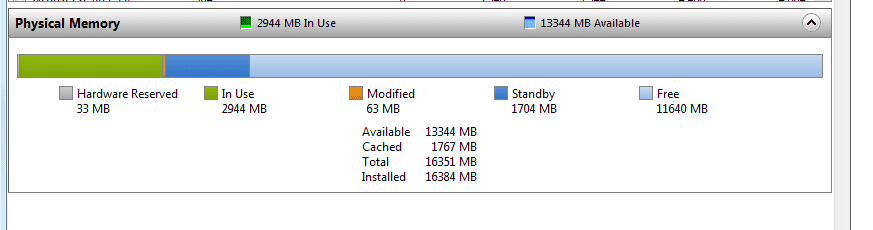
Pardon my lack of language recognition skills but I can't read Spanish? That said,
1- Looks like you don't have service pack 1 installed
2- though it's "normal", it's normal under these exceptions, which you shouldn't have...
This is expected behavior on computers that are running Windows 7. The reduction in available system memory depends on the configuration of the following:
- The devices that are installed in the computer and the memory that is reserved by those devices
- The ability of the motherboard to handle memory
- The System BIOS version and settings
- The version of Windows 7 that is installed (For example, Windows 7 Starter Edition only supports 2 GB of installed memory.)
- Other system settings
The devices that are installed in the computer and the memory that is reserved by those devices - If for example you had a 32-bit OS, and say a 1 gig video card, that would apply. On a 64-bit OS, this much shouldn't be taken up as you don't have enough memory to require that much of a reserve.
The ability of the motherboard to handle memory - This could very well be your issue. If the MB isn't capable of handling or mapping that much memory (6gig) you'd be limited to what it can handle. I've seen this issue reported a lot on AMD boards, especially older ones. How to solve it eludes me.
The System BIOS version and settings - If the BIOS settings for the memory aren't configured correctly it could affect the amount of memory available, as well as it's performance.
The version of Windows 7 that is installed (For example, Windows 7 Starter Edition only supports 2 GB of installed memory.) - Self explanatory, but the other example is a 32-bit that only supports 4 gig of memory, but you have 6 installed. Only a max of 4 would be available minus the video memory described above.
Other system settings - Perhaps you some how changed your Boot advanced options.... Run, "msconfig" (without quotes), Boot, Advanced Options... make sure "Maximum Memory" box is un-checked
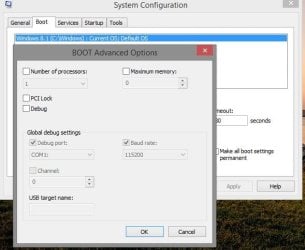
You could also see this post...
-
http://www.sevenforums.com/performa...-memory-but-1-74-gb-usable-4.html#post1650067 and this...
http://www.sevenforums.com/performance-maintenance/120721-3-gigs-ram-4-a-2.html#post1040474
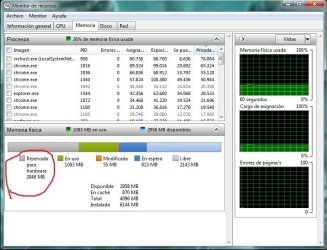
At any rate your image showing 2 gig of "reserved memory" is a bit too much. Something's wrong.
Please see the links I provided.
And you should start by installing service pack 1
Let us know