6GB DDR3 Ram Installed BUT only 2.75 USABLE?!

isogamer

New member
Local time
11:49 AM
Messages
4
Okay so i have a Quad core x6850 Intel CPU, EVGA 280GTX GPU CARD.

Now i installed window 7 x86 bit version ULTIMATE. And i have 6GB DDR3 RAM INSTALLED INTO MY geforce Nforce 790i motherboard. Now the problem is that in Windows 7 it shows "Installed Memory: 6.00GB (2.75 GB Useable)". But in Bios it shows me that 6gigs in installed.

Now does that mean it is WIN 7 that is just reading my DDR3 RAM WRONG? But i am still getting the full performance for all of my 6GB DDR 3 RAM? Since my bios is reading all of the 6GB RAM?

Also i tried doing what other forums indiated i should be doing like type config and check mark or uncheck mark MAX MEMORY. Tried doing that, but noting happened.

Now the only thats left and i am having confusion with is, some people are saying i should Enable Memory remapping in bios? I have a nforce 790i motherboard, and i can't find that exactly in my bios mode. Is there any other way to fix this problem? Please HELP! THANKS!
 

My Computer My Computer

At a glance

windows 7 ultimateintel q6850x6gb ddr3280gtx
OS
windows 7 ultimate
CPU
intel q6850x
Motherboard
nforce 790i
Memory
6gb ddr3
Graphics Card(s)
280gtx
PSU
astec 1000watt
Cooling
cool master v10
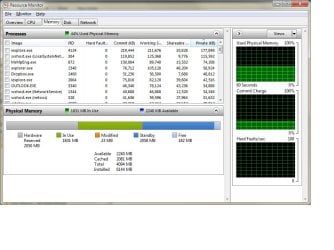
6GB is outside of the 4GB limit for x86 so you will never be able to get all of it. Just for the sake of information, open Resource monitor (Start > type "resource") Then head to memory and then Physical. I bet it has a giant gray block of Hardware Reserved. You'll need to find out how to do Memory Remapping to solve that.
 

My Computer My Computer

At a glance

Windows 10 Pro (x64)Intel Core i7-3930K (3.2GHz - 4.5GHz)4x Samsung 4GB PC3-12800 DDR3 (16GB 1600MHz)Nvidia Geforce GTX 690
Computer type
PC/Desktop
Computer Manufacturer/Model Number
Alienware Aurora ALX R4
OS
Windows 10 Pro (x64)
CPU
Intel Core i7-3930K (3.2GHz - 4.5GHz)
Motherboard
Alienware Aurora-R4 x79
Memory
4x Samsung 4GB PC3-12800 DDR3 (16GB 1600MHz)
Graphics Card(s)
Nvidia Geforce GTX 690
Sound Card
SteelSeries Siberia Elite
Monitor(s) Displays
Dell UltraSharp U3011
Screen Resolution
2560x1600
Hard Drives
Samsung 850 Pro 256 GB, Seagate 1TB Desktop Hybrid HDD, 2x Western Digital 4TB Green HDD
PSU
875W Some Dell PSU <.<
Case
Alienware Aurora ALX
Cooling
Custom Liquid Cooling (EK CPU & GPU blocks) dual EK 480RAD
Keyboard
Logitech G710+ Mechanical
Mouse
Logitech G700s
Internet Speed
Verizon Fios (50 mbps average)
Other Info
Server: Intel NUC D54250WYK: i5-4250U, 16GB, 256 GB mSATA, Windows Server 2012 R2
Okay so i have a Quad core x6850 Intel CPU, EVGA 280GTX GPU CARD.

Now i installed window 7 x86 bit version ULTIMATE. And i have 6GB DDR3 RAM INSTALLED INTO MY geforce Nforce 790i motherboard. Now the problem is that in Windows 7 it shows "Installed Memory: 6.00GB (2.75 GB Useable)". But in Bios it shows me that 6gigs in installed.

Now does that mean it is WIN 7 that is just reading my DDR3 RAM WRONG? But i am still getting the full performance for all of my 6GB DDR 3 RAM? Since my bios is reading all of the 6GB RAM?

Also i tried doing what other forums indiated i should be doing like type config and check mark or uncheck mark MAX MEMORY. Tried doing that, but noting happened.

Now the only thats left and i am having confusion with is, some people are saying i should Enable Memory remapping in bios? I have a nforce 790i motherboard, and i can't find that exactly in my bios mode. Is there any other way to fix this problem? Please HELP! THANKS!

Hi IG and welcome

32 bit can only address 4 gigs, and access 3.3. the rest of the missing is probably video. 64 bit can access it all

Hope this helps

Ken J+
 

My Computer My Computer

At a glance

Win 8 Release candidate 8400[email protected]4 gigsNvidia 9600M
Computer Manufacturer/Model Number
HP Pavillion dv-7 1005 Tx
OS
Win 8 Release candidate 8400
CPU
[email protected]
Memory
4 gigs
Graphics Card(s)
Nvidia 9600M
Sound Card
HD built-in
Monitor(s) Displays
17" Wxga
Screen Resolution
1440x900
Cooling
none
Internet Speed
45Mb down 5Mb up
You say x86? Isn't that 32-bit, limiting you to somewhere under 3.5 GB.

Probably entirely normal.
 

My Computer My Computer

At a glance

Windows 7 Home Premium SP1, 64-bitIntel Skylake i5-6600K, not overclocked8 GB HyperX DDR4-2666 (2 x 4 GB)none; graphics are integrated on CPU
Computer type
PC/Desktop
Computer Manufacturer/Model Number
Ignatz Special; 4 speed manual gearbox; factory air conditioning; one of one
OS
Windows 7 Home Premium SP1, 64-bit
CPU
Intel Skylake i5-6600K, not overclocked
Motherboard
AsRock Z170M Extreme 4, micro ATX
Memory
8 GB HyperX DDR4-2666 (2 x 4 GB)
Graphics Card(s)
none; graphics are integrated on CPU
Sound Card
onboard: Realtek ALC1150; external: USB Behringer UF0-202
Monitor(s) Displays
Dell S2340M 23 inch IPS
Screen Resolution
1600 x 900
Hard Drives
System: Crucial MX100 series SSD, 128 GB;
Data: Samsung Spinpoint 103SJ, 1 TB;
Backup: WD Caviar Green WD30EZRX-00D8PB0, 3 TB
PSU
Rosewill SilentNight 500 watt fanless, semi-modular
Case
Antec Solo II
Cooling
Noctua NH-U12S; Noctua F12 intake, Noctua S12A exhaust
Keyboard
Microsoft 200 6JH-00001 USB
Mouse
Dell or Microsoft optical wired; USB
Antivirus
Microsoft Security Essentials and Malwarebytes Premium
Browser
Pale Moon
Other Info
All fans PWM; speeds at idle: CPU circa 500 rpm; intake circa 600 rpm; exhaust circa 600 rpm; CPU temps 27 idle and 47 C load in a warm room (27 C/81 F) when running Intel Extreme Tuning Utility stress test.
You will have to install x64 to use all your memory.
 

My Computer My Computer

At a glance

Windows 7 Ultimate x64 | Windows XP Pro x86 |...AMD Athlon 64 X2 Dual Core 5200 2.7 GHz3G RAMATI HD Radeon 4670
Computer Manufacturer/Model Number
Started out as an AST180
OS
Windows 7 Ultimate x64 | Windows XP Pro x86 | Windows Vista Ultimate x86
CPU
AMD Athlon 64 X2 Dual Core 5200 2.7 GHz
Motherboard
Acer EM61SM/EM61PM
Memory
3G RAM
Graphics Card(s)
ATI HD Radeon 4670
Screen Resolution
1280x1024
Hard Drives
Western Digital Caviar Black WD1001FALS 1TB 7200 RPM 32MB Cache, 160 GB Seagate
PSU
Corsair 450VX 450W
Keyboard
Microsoft Media Pro 3000
Mouse
Logitech MX310
As everyone else has said, you are using a 32 bit operating system, which means that you will NEVER see more than 3.5 gigs.

~Lordbob
 

My Computer My Computer

At a glance

Windows 7 Ultimate x64, Mint 9Intel i5-2500k2x 4Gb Corsair VENGEANCE DDR3-1600NVidia GeForce N260GTX Twin Frozr
Computer Manufacturer/Model Number
Hera
OS
Windows 7 Ultimate x64, Mint 9
CPU
Intel i5-2500k
Motherboard
ASUS P8P67 Pro
Memory
2x 4Gb Corsair VENGEANCE DDR3-1600
Graphics Card(s)
NVidia GeForce N260GTX Twin Frozr
Sound Card
Realtek HD OnBoard Audio
Monitor(s) Displays
ASUS 24" Monitor
Screen Resolution
1920x1080
Hard Drives
G.SKILL Phoenix Series 60GB SATA II MLC Internal Solid State Drive (SSD)
SAMSUNG Spinpoint F3R 1TB 7200 RPM 32MB Cache SATA II
PSU
Cooler Master Real Power Pro 750W
Case
Cooler Master Haf 932
Cooling
Fans
Keyboard
Razer Tarantula
Mouse
Razer Lachesis
Internet Speed
not fast enough
...Now i installed window 7 x86 bit....

Just confirming you're going to have to install 64-bit (aka x64). Doing x86 (32-bit) is going to cause what you're seeing due to its limitations.
 

My Computer My Computer

At a glance

Windows7
OS
Windows7
You are all correct.....x86 vs x64 memory limitations.

Just to highjack this alittle...
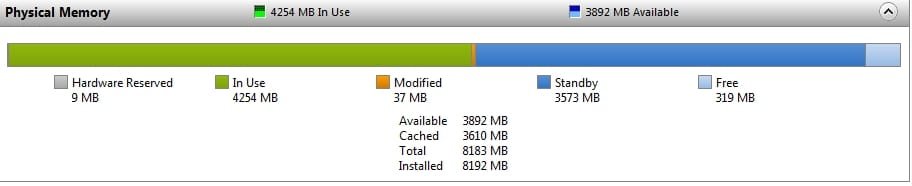
I looked at mine and noticed "resource" showes

Total 4094
INstalled 6144

I have triple chanell memroy installed also, in a Gigabyte 1366 board.

Is this proper?
 

Attachments

  • Resource.jpg
    Resource.jpg
    83.6 KB · Views: 934

My Computer My Computer

At a glance

WIN7Intel i7 9206GB DDR3 Triple ChannelNvidia 250 GTS
Computer Manufacturer/Model Number
Bumpus Did it!
OS
WIN7
CPU
Intel i7 920
Motherboard
Gigabyte EX58-UDR
Memory
6GB DDR3 Triple Channel
Graphics Card(s)
Nvidia 250 GTS
Sound Card
Realtek onboard
Monitor(s) Displays
Samsung 192n & 204b
Hard Drives
37gb WD Velociraptors (2) Raid 1 -
Seagate SATAII 1 tb -
WD SATAII 1tb -
WD SATAII Green 1.5tb
PSU
OCZ ModXStream Pro 600W
Case
Lian-Li V1000
Cooling
3 x 120mm
Keyboard
crap
Mouse
MS Intelimouse
Internet Speed
Uverse 12mbps
Other Info
TV (via Slingbox), Data backup & game box.

Hope it never blows up ;)
thank you all of your quick replies. Really helps me. Okay so i clicked on resources and went to physical memory. And it does show me that 6GIGS OF RAM is installed. But under hardware reserved the big grey memory block it shows me about 3330mb block reserved. Is there any way of enabling that? I guess that is how you enable memory remapping?
 

My Computer My Computer

At a glance

windows 7 ultimateintel q6850x6gb ddr3280gtx
OS
windows 7 ultimate
CPU
intel q6850x
Motherboard
nforce 790i
Memory
6gb ddr3
Graphics Card(s)
280gtx
PSU
astec 1000watt
Cooling
cool master v10
Also there is no way i can enable the memory remapping in bios? For my nforce 790i motherboard? I really don't want to reinstall Windows 7 x64bit version because i have soo much data that i need to back up in order to do that.
 

My Computer My Computer

At a glance

windows 7 ultimateintel q6850x6gb ddr3280gtx
OS
windows 7 ultimate
CPU
intel q6850x
Motherboard
nforce 790i
Memory
6gb ddr3
Graphics Card(s)
280gtx
PSU
astec 1000watt
Cooling
cool master v10
It would depend on entirely which company is making your Motherboard. They have to add the option somewhere into the BIOS. I would start there and banging there email servers with request to implement Memory Remapping.
 

My Computer My Computer

At a glance

Windows 10 Pro (x64)Intel Core i7-3930K (3.2GHz - 4.5GHz)4x Samsung 4GB PC3-12800 DDR3 (16GB 1600MHz)Nvidia Geforce GTX 690
Computer type
PC/Desktop
Computer Manufacturer/Model Number
Alienware Aurora ALX R4
OS
Windows 10 Pro (x64)
CPU
Intel Core i7-3930K (3.2GHz - 4.5GHz)
Motherboard
Alienware Aurora-R4 x79
Memory
4x Samsung 4GB PC3-12800 DDR3 (16GB 1600MHz)
Graphics Card(s)
Nvidia Geforce GTX 690
Sound Card
SteelSeries Siberia Elite
Monitor(s) Displays
Dell UltraSharp U3011
Screen Resolution
2560x1600
Hard Drives
Samsung 850 Pro 256 GB, Seagate 1TB Desktop Hybrid HDD, 2x Western Digital 4TB Green HDD
PSU
875W Some Dell PSU <.<
Case
Alienware Aurora ALX
Cooling
Custom Liquid Cooling (EK CPU & GPU blocks) dual EK 480RAD
Keyboard
Logitech G710+ Mechanical
Mouse
Logitech G700s
Internet Speed
Verizon Fios (50 mbps average)
Other Info
Server: Intel NUC D54250WYK: i5-4250U, 16GB, 256 GB mSATA, Windows Server 2012 R2
Also there is no way i can enable the memory remapping in bios? For my nforce 790i motherboard? I really don't want to reinstall Windows 7 x64bit version because i have soo much data that i need to back up in order to do that.

If you desire Windows 7 to fully utilize the RAM under 6GB not used by BIOS, you'll need the x64 install, as others have said.

I had 4GB of RAM under Windows XP x32 and could only use a bit over 3GB. For my new i5-750 system and ASUS P7P55D motherboard, I decided to move up a bit and go with 8GB of RAM.

As a test, a quick install of Windows 7 x32 Home Edition could not access any more RAM than Windows XP x32 was able to access.

See the attached image for what Windows 7 x64 now shows in the Resource Monitor.

- wader
 

Attachments

  • Windows_7_x64_8GB.jpg
    Windows_7_x64_8GB.jpg
    16.2 KB · Views: 563

My Computer My Computer

At a glance

Windows 7 Home Premium x64Intel i5-7508GB Corsair XMS3 DDR3 1333 (PC3 10666) Dual C...ASUS ENGTX260
OS
Windows 7 Home Premium x64
CPU
Intel i5-750
Motherboard
ASUS P7P55D
Memory
8GB Corsair XMS3 DDR3 1333 (PC3 10666) Dual Channel
Graphics Card(s)
ASUS ENGTX260
Sound Card
Sound Blaster X-Fi XtremeGamer Fatal1ty Professional
Monitor(s) Displays
Samsung 940Be
Screen Resolution
1280x1024
Hard Drives
Hitachi 150GB (system)
Hitachi 1TB
WD 1TB
PSU
Antec Earthwatts 650W ATX
Case
Antec mid-tower
Cooling
Antec fans
Keyboard
Old IBM
Mouse
Wacom Intuos 2
Internet Speed
cable
There are 32 bit operating systems that support PAE (physical address extension), which gives the ability to address more than 4GB.

XP, Vista, and Windows 7 aren't OSes that support PAE. That's independent of any motherboard. X64 is your only practical choice. That will require a clean install, and re-installing all applications.

Sorry 'bout that.
 

My Computer My Computer

At a glance

Windows 7 Pro X64 SP1Intel Core I7-3930k16 GB Gskill DDR3-2133eVGA GTX680
Computer Manufacturer/Model Number
homegrown
OS
Windows 7 Pro X64 SP1
CPU
Intel Core I7-3930k
Motherboard
Asus P9X79 Pro
Memory
16 GB Gskill DDR3-2133
Graphics Card(s)
eVGA GTX680
Sound Card
Creative X-Fi Titanium
Monitor(s) Displays
As PA246Q
Screen Resolution
1920 X 1200
Hard Drives
Corsair Force GT, 120 GB
WDC 1.5TB Caviar Black
PSU
PCP&C Silencer 750 Crossfire
Case
Silverstone FT02
Cooling
Noctua NH-D14
Keyboard
cheap Logitech USB
Mouse
Microsoft Intellimouse Explorer (old optical) USB
Internet Speed
6Mb cable
Other Info
Pioneer BDR-205
Samsung SH-203B
Monsoon 5.1 speakers
XP, Vista, and Windows 7 aren't OSes that support PAE.

No, that is not true at all. To use DEP (Data Execution Prevention), PAE on the processor must be on and supported. Decause DEP address memory outside of the 32 bit limit so every DEP (hardware) enabled computer has PAE already on. You can in fact get more memory then whats allowed by circumventing licensing restrictions.
 

My Computer My Computer

At a glance

Windows 10 Pro (x64)Intel Core i7-3930K (3.2GHz - 4.5GHz)4x Samsung 4GB PC3-12800 DDR3 (16GB 1600MHz)Nvidia Geforce GTX 690
Computer type
PC/Desktop
Computer Manufacturer/Model Number
Alienware Aurora ALX R4
OS
Windows 10 Pro (x64)
CPU
Intel Core i7-3930K (3.2GHz - 4.5GHz)
Motherboard
Alienware Aurora-R4 x79
Memory
4x Samsung 4GB PC3-12800 DDR3 (16GB 1600MHz)
Graphics Card(s)
Nvidia Geforce GTX 690
Sound Card
SteelSeries Siberia Elite
Monitor(s) Displays
Dell UltraSharp U3011
Screen Resolution
2560x1600
Hard Drives
Samsung 850 Pro 256 GB, Seagate 1TB Desktop Hybrid HDD, 2x Western Digital 4TB Green HDD
PSU
875W Some Dell PSU <.<
Case
Alienware Aurora ALX
Cooling
Custom Liquid Cooling (EK CPU & GPU blocks) dual EK 480RAD
Keyboard
Logitech G710+ Mechanical
Mouse
Logitech G700s
Internet Speed
Verizon Fios (50 mbps average)
Other Info
Server: Intel NUC D54250WYK: i5-4250U, 16GB, 256 GB mSATA, Windows Server 2012 R2
hi okay so you are saying using the (Data Execution Prevention) software can help me to enable and allow me to use all the remaning ram that i have left?

Also installing x64 bit shouldn't matter that much right? for the Intel quadcore 6850 cpu extreme that i have? I usually thought x64bit is ment for AMD cpus.
 

My Computer My Computer

At a glance

windows 7 ultimateintel q6850x6gb ddr3280gtx
OS
windows 7 ultimate
CPU
intel q6850x
Motherboard
nforce 790i
Memory
6gb ddr3
Graphics Card(s)
280gtx
PSU
astec 1000watt
Cooling
cool master v10
Also installing x64 bit shouldn't matter that much right? for the Intel quadcore 6850 cpu extreme that i have? I usually thought x64bit is ment for AMD cpus.

Actually, the only requirement that changes between x86 (32bits) and x64 (64bits) is the RAM.

32bits > Min 1GB
64bits > Min 2GB

Also, where did you get that false statement? 64-bits CPU started with the Pentium 4 Extreme Edition. See this page for more info : List of Intel microprocessors - Wikipedia, the free encyclopedia
But, yeah, AMD were the first one to release to the public 64-bits CPUs.
 

My Computer My Computer

At a glance

Windows 10 Professional 64-bitRyzen 9 5900XG.Skill 3600Mhz CL16 16GB × 4EVGA GeForce RTX 3070 Ti FTW3 Ultra Gaming
Computer type
PC/Desktop
Computer Manufacturer/Model Number
Custom build
OS
Windows 10 Professional 64-bit
CPU
Ryzen 9 5900X
Motherboard
Gigabyte X570 Aorus Master
Memory
G.Skill 3600Mhz CL16 16GB × 4
Graphics Card(s)
EVGA GeForce RTX 3070 Ti FTW3 Ultra Gaming
Sound Card
On-board
Monitor(s) Displays
Dell Alienware AW3418DW
Screen Resolution
3440x1440
Hard Drives
1×Sabrent Rocket 4 Plus 2TB nvme SSD (System, internal)
2x4TB Western Digital Blue (Internal)
1x4TB HDST 7200RPM (Internal)
PSU
Seasonic Focus Plus 850W Platinum
Case
Corsair 680X
Cooling
Stock fans + 3× Corsair QL120, Corsair H100i Platinum
Keyboard
Logitech K350
Mouse
Logitech M510
Internet Speed
120Mbits dl - 20Mbits up
Antivirus
ESET NOD32 Antivirus
Browser
Firefox (latest version)
Other Info
Headphones : Audio-Technica ATH-M50x
Scanner : Canon Canoscan LiDE 220 + Plustek OptiBook 4800
i have the same moherboard and chipset with 4 gig memory installed on a windows7 pro. 64 bit and have the exact same problem!!!!!

Loosenut
7
 

My Computer My Computer

At a glance

windows 7intel Q9550 2.83 Mhz4 gig ddr3 2000 mhz2 xfx nvidia Black edition 512 ram in sli mode
Computer Manufacturer/Model Number
Custom Built By..... Hart-Attack-Computing
OS
windows 7
CPU
intel Q9550 2.83 Mhz
Motherboard
evga ftw sli
Memory
4 gig ddr3 2000 mhz
Graphics Card(s)
2 xfx nvidia Black edition 512 ram in sli mode
Monitor(s) Displays
Acer 24" flatpanel & Acer 23" Flat panel won in bf2 raffle
Screen Resolution
1920x1080
Hard Drives
Western Digital Raptor 10,000 rpm 300 gig.
PSU
1000 watt
Case
apeva
Cooling
4 case fans
Keyboard
Logitech g15
Mouse
Logitech g5
Internet Speed
20 mbps

My Computer My Computer

At a glance

Windows 7Q95504GB Dual ChannelATI HD-3450
Computer Manufacturer/Model Number
I Built That Sucker :)
OS
Windows 7
CPU
Q9550
Motherboard
ASUS P5Q-Pro
Memory
4GB Dual Channel
Graphics Card(s)
ATI HD-3450
Sound Card
Motherboard
Monitor(s) Displays
Dual 24" :D
Screen Resolution
1920x1200
Hard Drives
3x320GB SATA Hitachi on RAID-0 :D:D
Internet Speed
22Mbps
I really don't want to reinstall Windows 7 x64bit version because i have soo much data that i need to back up in order to do that.
That's why you do the proper planning and research ahead of time. The memory limits of x86 OSes have been considered common knowledge in the computing field for about 5 years now, since the debate was raging on between XP and XP x64. I'm surprised someone would know enough to build a nice, top end system, and not understand they'd need an x64 OS to handle it all.....which acts as a segway to...

The fact is, if you want to use all of your memory, you need to run a 64 bit OS. Backing up your data, reinstalling the OS, and restoring your data is a very simple straightforward process that is FAR less painful than people make it out to be. Besides...wouldn't it be worth it, to be able to take full advantage of your system?

Your current setup is akin to put skateboard wheels on a new BMW M3. It's capable of so much more, but one simple incorrect decision is holding back the entire system.
 

My Computer My Computer

At a glance

Windows 7 Ultimate x64 SP1Intel Core i7-260012 GB Patriot Extreme DDR3-1333Nvidia GTX 470
OS
Windows 7 Ultimate x64 SP1
CPU
Intel Core i7-2600
Motherboard
Gigabyte GA-P67A-UD3P-B3
Memory
12 GB Patriot Extreme DDR3-1333
Graphics Card(s)
Nvidia GTX 470
Monitor(s) Displays
Dell UltraSharp 2209WA
Hard Drives
OCZ Agility3 240 GB, WD5001AALS, WD7501AALS
PSU
OCZ ModStream 700W
Case
CoolerMaster HAF 912 Advanced
Cooling
CoolerMaster Hyper 212 Plus
As a general warning...DO NOT FOLLOW THIS GUIDE.

Enabling PAE can and likely will cause far greater issues with your system's drivers and stability. It really isn't a hard concept for people to understand, but there's no software trick to break the memory limit that exists in 32 bit OSes. This topic has literally been beaten to death on several other forum boards, and it is sad that there are still some who won't accept the findings. If you want to use 4 GB or more memory, you run an x64 OS. That's the only way.

PAE is meant for server OSes to enable 36 bit usage in some cases. It is not meant for a desktop, client PC, and likely will cause serious issues. if you want to use all your memory, do it the right way.
 

My Computer My Computer

At a glance

Windows 7 Ultimate x64 SP1Intel Core i7-260012 GB Patriot Extreme DDR3-1333Nvidia GTX 470
OS
Windows 7 Ultimate x64 SP1
CPU
Intel Core i7-2600
Motherboard
Gigabyte GA-P67A-UD3P-B3
Memory
12 GB Patriot Extreme DDR3-1333
Graphics Card(s)
Nvidia GTX 470
Monitor(s) Displays
Dell UltraSharp 2209WA
Hard Drives
OCZ Agility3 240 GB, WD5001AALS, WD7501AALS
PSU
OCZ ModStream 700W
Case
CoolerMaster HAF 912 Advanced
Cooling
CoolerMaster Hyper 212 Plus
Back
Top