3 GB installed but only 1GB usable.

Grandpa Ubu

New member
Local time
9:22 AM
Messages
8
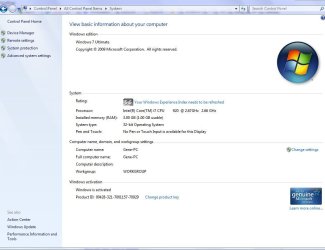
I just built a new system and decided to try out Windows 7. Everything is just amazing but I do have 1 problem. I have 3 GB memory installed and 7 recognizes this but says only 1GB is usable.

My system is basically.

i7 Quad 920
Gibabyte EX58-UD4P Motherboard
3GB DDR3 Corsair Memory
ATI Radon HD4670 1G DDR3 Graphics Card
Soundblaster Platinum Sound Card
Seagate SATA Barracuda 500GB 7200 RPM HD with drivers from 3/10/09

I am using the Windows 7 RC 7100 with all updates.

I have seen many places here and around that talks about 32bit only using 3 gb ram...I get that but nowhere talking about using less when that much is installed.

I did see something about Video cards using up memory...I thought that was why I bought a 1gb card in the first place..I thought it had its own ram....I don't understand why it uses my memory.

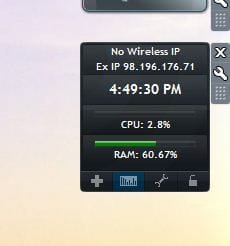
As you can see my memory usage is extremely high because of this and I am afraid of doing anything.

Also, I tried the x64 version and it only used showed 3gb and 2 usable.

Any suggestions?

Thanks for your suggestion..

Grandpa
 

Attachments
  • Processes.JPG
    Processes.JPG
    32.9 KB · Views: 509
  • Services.JPG
    Services.JPG
    131.5 KB · Views: 438
  • System.JPG
    System.JPG
    59.3 KB · Views: 1,607
  • Usage.JPG
    Usage.JPG
    13.9 KB · Views: 9,493
Last edited:

My Computer My Computer

At a glance

windows 7 RC 7100
OS
windows 7 RC 7100
when you boot have you ran the MEMORY Diagnostics.?
What did it say?
Have your swapped memory modules around?
Does your video card access RAM for use?
 
Don't know how to run memory diagonstics...I'll see what I can find out
No But I will switch them
How would I find out about the video card?
 

My Computer My Computer

At a glance

windows 7 RC 7100
OS
windows 7 RC 7100
did you check the settings in BIOS?
 

My Computer My Computer

At a glance

Win 8 Release candidate 8400[email protected]4 gigsNvidia 9600M
Computer Manufacturer/Model Number
HP Pavillion dv-7 1005 Tx
OS
Win 8 Release candidate 8400
CPU
[email protected]
Memory
4 gigs
Graphics Card(s)
Nvidia 9600M
Sound Card
HD built-in
Monitor(s) Displays
17" Wxga
Screen Resolution
1440x900
Cooling
none
Internet Speed
45Mb down 5Mb up
did you check the settings in BIOS?

What setting in bios you mean....I did have to turn up the voltage to 1.6 v to run the memory at rated 1600 speed....that is only setting I see in bios
 

My Computer My Computer

At a glance

windows 7 RC 7100
OS
windows 7 RC 7100
Don't know how to run memory diagonstics...I'll see what I can find out
No But I will switch them
How would I find out about the video card?

Switching does nothing and mem test said no problems...it did not give me a report when I logged in though.

Cant find info on graphics card using memory yet
 

My Computer My Computer

At a glance

windows 7 RC 7100
OS
windows 7 RC 7100
Normally there is a setting to "Auto detect memory". which I'm sure your BIOS does... since your post shows 3GB : 1 usable.
Memory diagnostics, will run a gamot of tests on your memory chips to make sure they are 100%. which is located under Admin tools.

some times different manufactures set there mobos to access RAM at different times. which only makes so much usable by the system.
I think that is adjustable in the BIOS under memory. your manual should tell you how to check or adjust.
some references to same problem:
Code:
  [URL="http://forums.techguy.org/windows-vista-7/681442-how-adjust-shared-video-memory.html"][U][SIZE=4][COLOR=#2200cc][B]how to adjust[/B] shared video [B]memory[/B] - Tech Support Guy Forums[/COLOR][/SIZE][/U][/URL] 
2 posts - 2 authors - Last post: Feb 10, 2008
[B]how to adjust[/B] shared video [B]memory[/B]. i have vista, p5n32-sli deluxe mobo, 3.4 pentium d 4gb ram (2.8 [B]usable[/B] 32bit) nvidia 8800ultra, [B]...[/B]
[COLOR=#008000]forums.techguy.org/windows-vista-7/681442-how-[B]adjust[/B]-shared-video-[B]memory[/B].html[/COLOR]

Code:
   [URL="http://support.microsoft.com/kb/321363"][U][SIZE=4][COLOR=#2200cc][B]How to adjust memory[/B] usage by using configuration options in SQL [B]...[/B][/COLOR][/SIZE][/U][/URL] Explains two configuration options that you can use to establish upper and lower limits to the amount of [B]memory[/B] (buffer pool) used by the SQL Server [B]...[/B]
[COLOR=#008000]support.microsoft.com/kb/321363[/COLOR]
 
usually this is because you are using a 32 bit OS...
and im pretty sure the cause is you graphics card...
if you see your wei then click on view detailed performace information
you can see how much really your GPU is taking out the 4gb total usuable ram
try to find the 64 bit version and install that one....
it should give you access to all that ram...
 

My Computer My Computer

At a glance

Windows 7 Ult x64(x2), HomePrem x32(x4), Serv...Turion X2 ultra (oh well came with laptop)/P4...OCZ Dual Channel 4GB kit/ 1gb Dual ChannelHD 3200 graphics /GMA x3100 (yay for intergra...
Computer Manufacturer/Model Number
Tx2500z Tablet Pc/Homemade Server
OS
Windows 7 Ult x64(x2), HomePrem x32(x4), Server 08 (+VM), 08 R2 (VM) , SuSe 11.2 (VM), XP 32 (VM)
CPU
Turion X2 ultra (oh well came with laptop)/P4 @3.2 (yes P4)
Motherboard
IDK HP Motherboard / Intel DG965SS
Memory
OCZ Dual Channel 4GB kit/ 1gb Dual Channel
Graphics Card(s)
HD 3200 graphics /GMA x3100 (yay for intergrated!!)
Sound Card
Realtek HD Audio(mic working, well sort of)/Siig IC-70012
Monitor(s) Displays
built-in Hp 12" laptop screen/ Acer 19"
Screen Resolution
1280x800 /1440x900
Cooling
All Air Cooled
Mouse
Logi MX Rev. /MS Wheel Optical 1.1A /Logitech Optical Mouse
Internet Speed
College baby but its still routed through vpn to 1536k...
Other Info
love my wacom pen and pressure sensitivity...
wished it worked in 7, SUSE for that matter though
Hello Grandpa Ubu,

Welcome to Seven Forums.

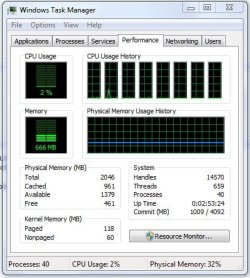
Have you had a look at the performance tab in task manager (ctrl+shift+esc).

Gary
 

My Computer My Computer

At a glance

Vista Ult 64 bit Seven Ult RTM x64Intel Core2 Quad Q6600 2.40 gigahertzCrucial Ballistix 4x2GB PC2 6400NVIDIA GeForce 8600 GTS 256 MB
Computer Manufacturer/Model Number
Dell XPS420
OS
Vista Ult 64 bit Seven Ult RTM x64
CPU
Intel Core2 Quad Q6600 2.40 gigahertz
Memory
Crucial Ballistix 4x2GB PC2 6400
Graphics Card(s)
NVIDIA GeForce 8600 GTS 256 MB
Sound Card
Creative SB X-Fi audio
Monitor(s) Displays
HP w2207 + HPvs15
Screen Resolution
1680x1050 + 1024x768
Hard Drives
2-WD5000AAKS-500 GB
WD5000AAV-500 GB external
Keyboard
Microsoft Comfort Curve
Mouse
MX Revolution
Other Info
Wacom Intuos 2 Graphics Tablet
Experience Index=5.5
32 bit ram limit

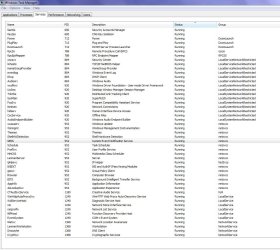
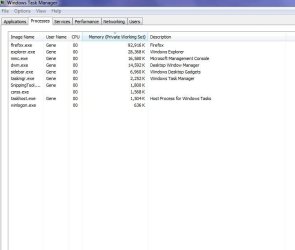
I think 32 bit w7 can recognize memory up to 3.5 gigs and 64 bit 8 gigs. Ubu is using a separate graphics card with its own memory so since his system is seeing the full memory and his photos show very little mem usage for every thing exept firefox (98 meg) I would like to see whats using up 2.5 gigs of ram and the suggestions about running an independant memory test to see if it is working and what is using it are right on. I defer to the experts but offer whatever help I can give.

K
 

My Computer My Computer

At a glance

Win 8 Release candidate 8400[email protected]4 gigsNvidia 9600M
Computer Manufacturer/Model Number
HP Pavillion dv-7 1005 Tx
OS
Win 8 Release candidate 8400
CPU
[email protected]
Memory
4 gigs
Graphics Card(s)
Nvidia 9600M
Sound Card
HD built-in
Monitor(s) Displays
17" Wxga
Screen Resolution
1440x900
Cooling
none
Internet Speed
45Mb down 5Mb up
:o Well supposedly drivers are kinda important.....go figure:o I thought I had installed the W7 driver but I checked the date and ver and found out it was in fact a Vista driver ...so I installed the Win 7 drivers and now I have 2 G usable now...I opened almost everything on my computer and even Battlefield 2142 at the same time.....only used about 40% memory...so I have recovered 1 gb of the 2 gb that was lost....

Now I'm gonna try to find the last Gig....

Thanks guys for all your help and suggestions......

Snuffy...thanks for the links...I'll check them out...
 

My Computer My Computer

At a glance

windows 7 RC 7100
OS
windows 7 RC 7100
bios settings

sorry I forgot to ask if there is a setting in bios for "OS installation" or something similiar? On some systems to keep the mobo and OS most compatible the bios will only use 1 gig while installing an OS. Let me see if I can gleen some info abt the mobo from the mfr web page.

ken
 

My Computer My Computer

At a glance

Win 8 Release candidate 8400[email protected]4 gigsNvidia 9600M
Computer Manufacturer/Model Number
HP Pavillion dv-7 1005 Tx
OS
Win 8 Release candidate 8400
CPU
[email protected]
Memory
4 gigs
Graphics Card(s)
Nvidia 9600M
Sound Card
HD built-in
Monitor(s) Displays
17" Wxga
Screen Resolution
1440x900
Cooling
none
Internet Speed
45Mb down 5Mb up
Windows isn't stealing your memory. First, the 3gB is visible to your computer, so it's there. Windows does stuff in the background (in addition to everything that's running in the foreground) - so it's eating some memory just by running.

If you open up Task Manager (right click on the Task Bar to get to it) and sum the memory usage in the Processes tab (with the "Show processes for all users" selected, you'll see most of what's being used.

Then go to the Performance tab of Task Manager and you'll see a description labelled Physical Memory - that'll show the Total, Cached, Available, and Free

Here's a description of the stuff in Windows 2000 Server Task Manger (I can't locate a more recent link): Task Manager It describes all but the "Free" entry under Physical Memory

*******************************************
32bit client OS's (not server OS's) can only see 4gB of physical memory addresses. Some hardware leaps in front of the line and reserves some of this address space for itself. This means that Windows (being 2nd in line) may not get all of the physical memory addresses that it needs for your memory.

For example, if you have 4gB of RAM, and your hardware claims 1gB of address space, there's only 3gB of address space left for your RAM. You can have a gazillion gB of RAM installed - but if there's only 3gB of address space available, that's all that Windows will be able to see/use (BTW - Windows changed the display in Vista SP1 so you'll see installed RAM rather than usable RAM).

NOTE: This is physical memory, and is not related to the /3gb switch for virtual memory

The only way around this limitation is to remove the hardware that's doing it. IME the biggest culprit here is the video card - so you can remove the video card to remove the restriction, but then you won't be able to see anything! :)

*******************************************
Virtual memory bears no direct relation to physical memory (that we can see). The Windows Memory Manager sub-system manages the swapping of memory between virtual memory and physical memory by swapping stuff in and out of physical memory and the pagefile.

Each process in Windows 32 bit client OS's is limited to 4gB. 2gB are reserved for kernel-level activity, and 2gB are reserved for user-level activity.

So, if you've got 50 processes running, then you've got 200gB of virtual memory address space reserved for those processes (they may not all be used).

You can switch the 2gB/2gB thing to 1gB/3gB only under these circumstances:
- the /3gB or PAE switch must be enabled in Windows
- the application that's using this MUST BE PAE AWARE. If it's not, then nothing will change.
 

My Computer My Computer

At a glance

Win7 x64 + x86Intel i7 920, other Intel chips, and the Atom...12 gB; 4 gB Lenovo; 1 gB Samsung netbookATI 4870
Computer Manufacturer/Model Number
Home built (x64), Lenovo x61s Tablet, Samsung Netbook
OS
Win7 x64 + x86
CPU
Intel i7 920, other Intel chips, and the Atom in the netbook
Motherboard
Asus P6T Deluxe
Memory
12 gB; 4 gB Lenovo; 1 gB Samsung netbook
Graphics Card(s)
ATI 4870
Sound Card
Yes, I have one of these
Monitor(s) Displays
32" Sharp Aquos TV
Screen Resolution
800x600 - I have vision issues
Hard Drives
4 - 150 gB Velociraptors in RAID 5
Promise controller
PSU
1000 watt (can't recall the brand)
Case
Antec 300
Cooling
Big honking cooler that was rated highly at Toms Hardware
Keyboard
Microsoft Natural
Mouse
Logitech Trackman
Internet Speed
Cable
Other Info
GeekSquad UPS
CyberPower UPS
DLink DNS-323 NAS (2 tB)
Netgear wireless router as an access point
Netgear wired router FSV-318
Home network consists of
4 desktop computers (2 Vista, 2 Win7)
1 netbook (Win7)
4 laptop computers (XP, 2-Vista, Win7)
Wii and XBox 360
Your motherboard uses Scalable ability to both 3 way CrossFireX and 3 way SLI support for ultimate graphics performance.
If your using SLI configuration, (a SLI configuration also removes an amount of ram equivalent to that of your Video cards) then your 1GB Video card accesses 1GB Memory for max video. (per the mobo settings.) now you only have 2GB usable.
You might also expand the task manager to show all processes. Then you can add up memory used per process.

checking you mobo specs it says it is very specific on how memory modules are inserted.
According to Intel spec definition that XMP DIMMs and DDR3-1600 above are supported for one DIMM per channel only
(Nore2)
When enabling Dual Channel mode with 2 memory modules, be sure to install them in the DDR3_1 and DDR3_3 sockets
(Note3)
When enabling 3 Channel mode with 3 memory modules, be sure to install them in the DDR3_1, DDR3_3 and DDR3_5 sockets
When enabling 3 Channel mode with 4 memory modules, be sure to install them in the DDR3_1, DDR3_2, DDR3_3 and DDR3_5 sockets
(Note1)
might make a BIG Difference.
 
Last edited:
WOW...the response here is amazing....Let me go through everything....

GARY...attached is a pic of Task Manager....Its showing the 2 g now after my driver update. As you can see this update reduced my usage from 60+ % to 25% or so....

ZigZag....mem test showed good

Usasma....Thats good info to check out...I'll do that...great information for future reference as well

Snuffy....I have me memory in 1,3,5....I only have one video card but using 1Gb for video makes sense due to it being a HD card....I'll look into this as well

Guys, again, your response is nothing short of amazing...thanks for everything...I'll check everything and report back to you...


Thanks again,

Grandpa
 

Attachments

  • WTM.JPG
    WTM.JPG
    46.3 KB · Views: 144
Last edited:

My Computer My Computer

At a glance

windows 7 RC 7100
OS
windows 7 RC 7100
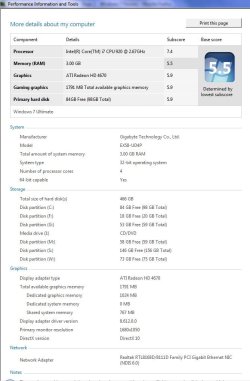
Darkassain....attached is my WEI....this memory should be scoring higher than this. I did find out in my bios that my voltage profile was back to 1.5 v and I adjusted it to the 1.65 v the memory calls for and it placed it to the true 1600 speed in the bios now...

It does appear that 767mb is shared system memory but I'm not sure if this is the missing ram so I'm not sure if this is what you were talking about

Thanks

Grandpa
 

Attachments

  • wei.JPG
    wei.JPG
    68.6 KB · Views: 438

My Computer My Computer

At a glance

windows 7 RC 7100
OS
windows 7 RC 7100
I'm thinking it's the BIOS. Second option to look at is how the RAM is installed and in what slots. Snuffy and usasma are on the right track. CPUID will show you what's recognized by Windows but unless the BIOS sees it, Windows never will. If you still can't see all your RAM, it might simply be a bad chip or slot.

1.6v into your chip is a little hot. I'd check temps on the NorthBridge and make sure you're not cooking it. If it's higher than 50-60c, you're pushing it for 24/7 and that will cause your RAM to fail - and possibly fry your board.
 

My Computer My Computer

At a glance

Windows 7 Home Premium x64Intel QX9650 Extreme 4.0 GHz8GB (4x2) Corsair Dominator DDR32x Radeon R390X [8GB]
Computer type
PC/Desktop
Computer Manufacturer/Model Number
Custom Build/Mod
OS
Windows 7 Home Premium x64
CPU
Intel QX9650 Extreme 4.0 GHz
Motherboard
ASUS Rampage Extreme Rev2
Memory
8GB (4x2) Corsair Dominator DDR3
Graphics Card(s)
2x Radeon R390X [8GB]
Sound Card
SupremeFX X-Fi
Monitor(s) Displays
Dell 2408WFP 26" Panel
Screen Resolution
1920x1200
Hard Drives
4x WD 2TB (8TB+ Total)
2x Crucial SSD 128GB (RAID-0)
1x LG Blu-ray read/write
1x Phillips LightScribe DVD read/write
PSU
Corsair HX1000
Case
CoolerMaster - Cosmos S
Cooling
Custom Liquid - 320mm rad w/ 3x 80mm fans, CPU/NB/SB Blocks
Keyboard
Logitech Illuminater Pro
Mouse
Logitech
Internet Speed
Fractional T1 - 125Mbps
Antivirus
ESET Security Suite / Microsoft Security Essentials
Browser
Cyberfox Intel x64
Other Info
OC'd to 5.0GHz @ 44c under full load
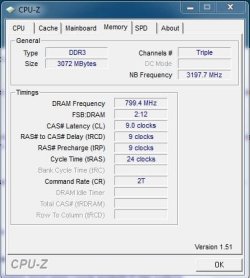
From Stoneage...thanks for the suggestion of CPUZ...great tool even if I done understand everything...attached are shots..3 g is showing and running but the freq appears to be off. My bios is showing 1600 mhz and CPUZ is showing only 800mhz.

Cpt Zero....attached is the memory voltages for the memory. I have the TR3X3G1600C9. It calls for 1.65v

I am gonna check with corsair as well but the system and bios both seem to be registering 3 gb.

Thanks guys.
 

Attachments

  • memory.JPG
    memory.JPG
    34.3 KB · Views: 64
  • mem2.JPG
    mem2.JPG
    40.3 KB · Views: 53
  • corsair.JPG
    corsair.JPG
    52.1 KB · Views: 62

My Computer My Computer

At a glance

windows 7 RC 7100
OS
windows 7 RC 7100
Hi,

Enter into the bios setup when you start your PC, probably it is to press `Del' or ctrl A, look out for the message on the screen, scan all the tab shown in the bios, it would be in advanced bios feature, look for the RAM installed in all the channels, there may be four channels for RAM, otherwise remove all but one and add one bye one, look into the bios, if it doesn't detect all of your RAM, then get the RAM physically checked into some other PC.
 

My Computer My Computer

At a glance

windows 7INTEL P4 2.80Ghz (HYPER-THREADING)3 GB (KINGSTON)ONBORAD - Intel(R)82915G/GV/910 GL Express Ch...
Computer Manufacturer/Model Number
WIPRO-Supergenius
OS
windows 7
CPU
INTEL P4 2.80Ghz (HYPER-THREADING)
Motherboard
INTEL - 915 GAG
Memory
3 GB (KINGSTON)
Graphics Card(s)
ONBORAD - Intel(R)82915G/GV/910 GL Express Chipset
Sound Card
ONBOARD - Microsoft HD Audio 6.1.7000.0
Monitor(s) Displays
Samsung - 15 inch CRT Monitor .28 dot pitch
Screen Resolution
1024 x 768 60 Hz refresh rate
Hard Drives
Maxtor - 6E040L0 ATA - 80 GB and WDC WD5000KS-00MNBO - ATA - 500 GB
PSU
Normal S.M.P.S.
Case
ATX Cabinet
Cooling
Three Fans - 1. SMPS Fan, Processor Fan and Cabinet FAN
Keyboard
104 Kesy Membrane Keyboard
Mouse
Wipro Scroll Mouse (Ball Mouse)
Internet Speed
Upto 2 MB - B.S.N.L. DATAONE
Other Info
Moser Baer DH-20A4P ATA DVD-Writer. One Internal 56 kbps Modem.
Back
Top