6GB memory (2GB usable)

Lief

New member
Local time
1:56 PM
Messages
8
I had 6GB memory installed, but it shows that only 2GB is usable. After i turn off my computer and take off the memory then put them back on then it shows that 6GB(5.50GB usable). I'm using windows 7 x64 bit OS. Can any one help me out plz?
 

My Computer

Computer Manufacturer/Model Number
windows
OS
window 7 x64 bit
CPU
i7 930 2.80GHz
Motherboard
gigabyte GA-X58A-UD3R
Memory
6GB
Graphics Card(s)
ATI HD 5850
Sound Card
shared sound card
If it is staying at about 5.5GB available that sounds about right.

The missing half a Gigabyte is reserved for various pieces of Hardware to use.

Oli
 

My Computer

Computer Manufacturer/Model Number
Apple MacBook 5,1
OS
Windows 7 Profesional x86, Mac OS X 10.6 Snow Leopard
CPU
Intel Core 2 Duo 2.4Ghz
Memory
4GB DDR3
Graphics Card(s)
Nvidia 9400m
Monitor(s) Displays
13.3" Internal + 22" DVI + 21.5" USB
Screen Resolution
1280x800 + 1920x1080 + 1920x1080
Hard Drives
Internal SATA 2.5" 500GB (395GB Mac HFS+, 105GB Windows NTFS)
2.48TB RAID consisting of 5 disks (HFS+)
Case
Aluminium Unibody
Keyboard
Apple Late 2009 Wireless Keyboard (US)
Mouse
Apple Magic Mouse
Internet Speed
6.33Mb/s up. 0.36Mb/s down.
Other Info
Harman Kardon Soundsticks II Speakers
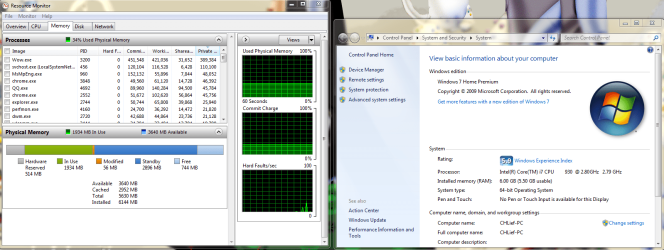
Have a look into Resource Manager > Memory tab. That will show you how much is reserved for H/W (the leftmost gray area).
 

My Computer

Computer Manufacturer/Model Number
HP, Dell, Gateway, Toshiba - 4 laptops and 2 desktops
OS
Vista, Windows7, Mint Mate, Zorin, Windows 8
CPU
from 1.6GHz Duo to i7
Monitor(s) Displays
2x HP w2207
Hard Drives
5x HDD, 7x SSD, 12x Externals
Keyboard
with trackball - no mices
Mouse
Trackball mice
Internet Speed
DSL 6000
there u go, only 514 Mb is reserved for H/W
 

Attachments

  • QQ?????.png
    QQ?????.png
    105.7 KB · Views: 820

My Computer

Computer Manufacturer/Model Number
windows
OS
window 7 x64 bit
CPU
i7 930 2.80GHz
Motherboard
gigabyte GA-X58A-UD3R
Memory
6GB
Graphics Card(s)
ATI HD 5850
Sound Card
shared sound card
So is that problem solved or have I missed something?

Oli
 

My Computer

Computer Manufacturer/Model Number
Apple MacBook 5,1
OS
Windows 7 Profesional x86, Mac OS X 10.6 Snow Leopard
CPU
Intel Core 2 Duo 2.4Ghz
Memory
4GB DDR3
Graphics Card(s)
Nvidia 9400m
Monitor(s) Displays
13.3" Internal + 22" DVI + 21.5" USB
Screen Resolution
1280x800 + 1920x1080 + 1920x1080
Hard Drives
Internal SATA 2.5" 500GB (395GB Mac HFS+, 105GB Windows NTFS)
2.48TB RAID consisting of 5 disks (HFS+)
Case
Aluminium Unibody
Keyboard
Apple Late 2009 Wireless Keyboard (US)
Mouse
Apple Magic Mouse
Internet Speed
6.33Mb/s up. 0.36Mb/s down.
Other Info
Harman Kardon Soundsticks II Speakers
If it is staying at about 5.5GB available that sounds about right.

The missing half a Gigabyte is reserved for various pieces of Hardware to use.

Oli

yeah, the problem is that, it doesnt stay at 5.50GB. It always shows 6GB (2GB usable) after i turn on my comp, then i have to turn off my comp then give the memory a touch or a push and restart my comp, then the memory goes 5.50GB usable.
 

My Computer

Computer Manufacturer/Model Number
windows
OS
window 7 x64 bit
CPU
i7 930 2.80GHz
Motherboard
gigabyte GA-X58A-UD3R
Memory
6GB
Graphics Card(s)
ATI HD 5850
Sound Card
shared sound card
Post a screenshot of resource manager when it says there is only 2GB available.

Oli
 

My Computer

Computer Manufacturer/Model Number
Apple MacBook 5,1
OS
Windows 7 Profesional x86, Mac OS X 10.6 Snow Leopard
CPU
Intel Core 2 Duo 2.4Ghz
Memory
4GB DDR3
Graphics Card(s)
Nvidia 9400m
Monitor(s) Displays
13.3" Internal + 22" DVI + 21.5" USB
Screen Resolution
1280x800 + 1920x1080 + 1920x1080
Hard Drives
Internal SATA 2.5" 500GB (395GB Mac HFS+, 105GB Windows NTFS)
2.48TB RAID consisting of 5 disks (HFS+)
Case
Aluminium Unibody
Keyboard
Apple Late 2009 Wireless Keyboard (US)
Mouse
Apple Magic Mouse
Internet Speed
6.33Mb/s up. 0.36Mb/s down.
Other Info
Harman Kardon Soundsticks II Speakers
Post a screenshot of resource manager when it says there is only 2GB available.

Oli
Yes, that's what we would need to look at. Maybe the BIOS plays an act on you.
 

My Computer

Computer Manufacturer/Model Number
HP, Dell, Gateway, Toshiba - 4 laptops and 2 desktops
OS
Vista, Windows7, Mint Mate, Zorin, Windows 8
CPU
from 1.6GHz Duo to i7
Monitor(s) Displays
2x HP w2207
Hard Drives
5x HDD, 7x SSD, 12x Externals
Keyboard
with trackball - no mices
Mouse
Trackball mice
Internet Speed
DSL 6000
Post a screenshot of resource manager when it says there is only 2GB available.

Oli

i can't get the screenshot of resource manager when it says there is only 2GB available, cause this weird thing only happens the next day when i turn on my computer. i shutdown and restarted my computer for a couple of time it still says 5.50GB usable, but it probably will turn to 2GB usable by tomorrow morning.
 

My Computer

Computer Manufacturer/Model Number
windows
OS
window 7 x64 bit
CPU
i7 930 2.80GHz
Motherboard
gigabyte GA-X58A-UD3R
Memory
6GB
Graphics Card(s)
ATI HD 5850
Sound Card
shared sound card
Post a screenshot of resource manager when it says there is only 2GB available.

Oli

i can't get the screenshot of resource manager when it says there is only 2GB available, cause this weird thing only happens the next day when i turn on my computer. i shutdown and restarted my computer for a couple of time it still says 5.50GB usable, but it probably will turn to 2GB usable by tomorrow morning.
Well, no problem. We'll wait until tomorrow.
 

My Computer

Computer Manufacturer/Model Number
HP, Dell, Gateway, Toshiba - 4 laptops and 2 desktops
OS
Vista, Windows7, Mint Mate, Zorin, Windows 8
CPU
from 1.6GHz Duo to i7
Monitor(s) Displays
2x HP w2207
Hard Drives
5x HDD, 7x SSD, 12x Externals
Keyboard
with trackball - no mices
Mouse
Trackball mice
Internet Speed
DSL 6000
Post a screenshot of resource manager when it says there is only 2GB available.

Oli

i can't get the screenshot of resource manager when it says there is only 2GB available, cause this weird thing only happens the next day when i turn on my computer. i shutdown and restarted my computer for a couple of time it still says 5.50GB usable, but it probably will turn to 2GB usable by tomorrow morning.
Well, no problem. We'll wait until tomorrow.

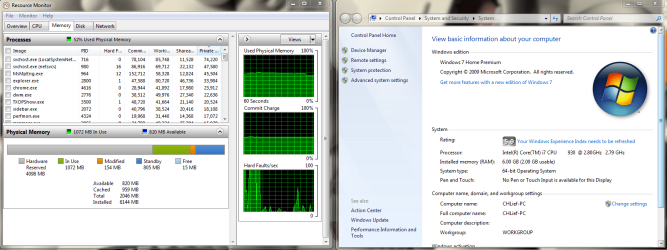
yeah, it turns to 2GB usable again, theres the screenshot.
 

Attachments

  • QQ?????2.png
    QQ?????2.png
    96.8 KB · Views: 447

My Computer

Computer Manufacturer/Model Number
windows
OS
window 7 x64 bit
CPU
i7 930 2.80GHz
Motherboard
gigabyte GA-X58A-UD3R
Memory
6GB
Graphics Card(s)
ATI HD 5850
Sound Card
shared sound card
Post a screenshot of resource manager when it says there is only 2GB available.

Oli

i can't get the screenshot of resource manager when it says there is only 2GB available, cause this weird thing only happens the next day when i turn on my computer. i shutdown and restarted my computer for a couple of time it still says 5.50GB usable, but it probably will turn to 2GB usable by tomorrow morning.
Well, no problem. We'll wait until tomorrow.
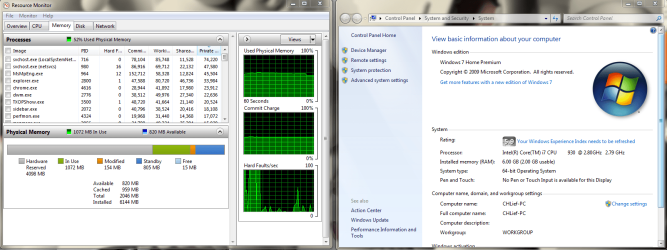
it turns to 2GB usable again, there the screen shot,
 

Attachments

  • QQ?????2.png
    QQ?????2.png
    96.8 KB · Views: 83

My Computer

Computer Manufacturer/Model Number
windows
OS
window 7 x64 bit
CPU
i7 930 2.80GHz
Motherboard
gigabyte GA-X58A-UD3R
Memory
6GB
Graphics Card(s)
ATI HD 5850
Sound Card
shared sound card
Well, the reporting is correct. But I wonder how your hardware could possibly use those 4GBs - that does not sound right. I would contact the PC manufacturer and ask them. One reason could be that there is something wrong with your BIOS and you need to flash a newer (or older) version.
 

My Computer

Computer Manufacturer/Model Number
HP, Dell, Gateway, Toshiba - 4 laptops and 2 desktops
OS
Vista, Windows7, Mint Mate, Zorin, Windows 8
CPU
from 1.6GHz Duo to i7
Monitor(s) Displays
2x HP w2207
Hard Drives
5x HDD, 7x SSD, 12x Externals
Keyboard
with trackball - no mices
Mouse
Trackball mice
Internet Speed
DSL 6000
Well, the reporting is correct. But I wonder how your hardware could possibly use those 4GBs - that does not sound right. I would contact the PC manufacturer and ask them. One reason could be that there is something wrong with your BIOS and you need to flash a newer (or older) version.

ok, thank you very much, and just let me know what should i do.
 

My Computer

Computer Manufacturer/Model Number
windows
OS
window 7 x64 bit
CPU
i7 930 2.80GHz
Motherboard
gigabyte GA-X58A-UD3R
Memory
6GB
Graphics Card(s)
ATI HD 5850
Sound Card
shared sound card
As I suggested, call the manufacturer as a first step. Regarding BIOS issues they would know better than us.
 

My Computer

Computer Manufacturer/Model Number
HP, Dell, Gateway, Toshiba - 4 laptops and 2 desktops
OS
Vista, Windows7, Mint Mate, Zorin, Windows 8
CPU
from 1.6GHz Duo to i7
Monitor(s) Displays
2x HP w2207
Hard Drives
5x HDD, 7x SSD, 12x Externals
Keyboard
with trackball - no mices
Mouse
Trackball mice
Internet Speed
DSL 6000

My Computer

Computer Manufacturer/Model Number
Apple MacBook 5,1
OS
Windows 7 Profesional x86, Mac OS X 10.6 Snow Leopard
CPU
Intel Core 2 Duo 2.4Ghz
Memory
4GB DDR3
Graphics Card(s)
Nvidia 9400m
Monitor(s) Displays
13.3" Internal + 22" DVI + 21.5" USB
Screen Resolution
1280x800 + 1920x1080 + 1920x1080
Hard Drives
Internal SATA 2.5" 500GB (395GB Mac HFS+, 105GB Windows NTFS)
2.48TB RAID consisting of 5 disks (HFS+)
Case
Aluminium Unibody
Keyboard
Apple Late 2009 Wireless Keyboard (US)
Mouse
Apple Magic Mouse
Internet Speed
6.33Mb/s up. 0.36Mb/s down.
Other Info
Harman Kardon Soundsticks II Speakers
I just checked for possable BIOS updates for your mother board and found that the last BIOS update was release less than a month a go with the tag 'Enhanced memory compatibility' .

If you do need to flash your BIOS all the upgrade/downgrade firmware is available to download at GA-X58A-UD3R (rev. 1.0) - GIGABYTE - Support&Download - Motherboard - BIOS.

Oli


Quick reminder concerning the above: If you've Overclocked and/or made significant changes to the system comfiguratin in the Bios, then ensure the Bios is cleared and re~set to the default configuration before proceeding with the Flash.
 

My Computer

Computer Manufacturer/Model Number
Home Built
OS
Windows 7 (x64)
CPU
Intel Core i7 960 @ 3.8GHz (3.2GHz stock)
Motherboard
EVGA E758 X-58
Memory
6GB OCZ DDR3 1600
Graphics Card(s)
Powercolor AX5870 (ATI 5870 w/improved cooling)
Sound Card
Omega Claro+
Monitor(s) Displays
1. Acer P243W (24") 2. Samsung T260 HD HDMI HDTV/Monitor
Screen Resolution
1920 x 1200 x 2
Hard Drives
(1) 128GB Kingston SNVP325-S2 SSD for OS/Games
(2) 500GB WD Caviar Black - Storage
PSU
Corsair CMPSU-850HX
Case
Lian Li PC-K60WB
Cooling
Thermalright Venemous-X
Keyboard
Microsoft Natural keyboard 4000
Mouse
Microsoft Sidewinder
Internet Speed
Cable
Other Info
165 bclk, 23 Multi
If it is staying at about 5.5GB available that sounds about right.

The missing half a Gigabyte is reserved for various pieces of Hardware to use.

Oli

yeah, the problem is that, it doesnt stay at 5.50GB. It always shows 6GB (2GB usable) after i turn on my comp, then i have to turn off my comp then give the memory a touch or a push and restart my comp, then the memory goes 5.50GB usable.

Ahhhh... so this is actually a hardware problem...

Take out your memory modules. On the strips themselves, clean the gold edge connectors with a soft pencil eraser... then brush with a paint brush to get the little rubber bits out. On the sockets... spray them with rubbing alcohol (aka contact cleaner) and clean gently with a soft toothbrush.

When you put your memory back in press very firmly to make sure the locking clips snap into place on both ends of each stick. Wiggle side to side slightly with your finger to make certain they are seated...

Now what do you get?
 

My Computer

Computer Manufacturer/Model Number
Homebrew
OS
XP Pro SP3 X86 / Win7 Pro X86
CPU
Amd 64 x2 4200 (2.4ghz)
Motherboard
Asus M2N-MX SE Plus
Memory
Kingston DDR2 800 2gb
Graphics Card(s)
Nvidia GF-8400
Sound Card
Realtek on Motherboard
Monitor(s) Displays
Acer x-193bw
Screen Resolution
1440 x 900
Hard Drives
Western Digital 500g
PSU
350watt In-Win
Case
In-Win
Cooling
Air
Keyboard
yes
Mouse
yes
Internet Speed
5mpbs
Other Info
Also ASRock ION 330 as HTPC (on XP).
Acer Aspire as GP netbook (on XP).
Well, the reporting is correct. But I wonder how your hardware could possibly use those 4GBs - that does not sound right. I would contact the PC manufacturer and ask them. One reason could be that there is something wrong with your BIOS and you need to flash a newer (or older) version.

Most likely it's detecting all memory strips SPD but getting r/w errors during POST scanning so it flags it as unuseable.

From his description of how it comes back with a finger's touch, this sounds for all the world like a bad connection... probably just some dirt that got into the wrong places.
 

My Computer

Computer Manufacturer/Model Number
Homebrew
OS
XP Pro SP3 X86 / Win7 Pro X86
CPU
Amd 64 x2 4200 (2.4ghz)
Motherboard
Asus M2N-MX SE Plus
Memory
Kingston DDR2 800 2gb
Graphics Card(s)
Nvidia GF-8400
Sound Card
Realtek on Motherboard
Monitor(s) Displays
Acer x-193bw
Screen Resolution
1440 x 900
Hard Drives
Western Digital 500g
PSU
350watt In-Win
Case
In-Win
Cooling
Air
Keyboard
yes
Mouse
yes
Internet Speed
5mpbs
Other Info
Also ASRock ION 330 as HTPC (on XP).
Acer Aspire as GP netbook (on XP).
Well, the reporting is correct. But I wonder how your hardware could possibly use those 4GBs - that does not sound right. I would contact the PC manufacturer and ask them. One reason could be that there is something wrong with your BIOS and you need to flash a newer (or older) version.

Most likely it's detecting all memory strips SPD but getting r/w errors during POST scanning so it flags it as unuseable.

From his description of how it comes back with a finger's touch, this sounds for all the world like a bad connection... probably just some dirt that got into the wrong places.

ok, ill try that, thank you
 

My Computer

Computer Manufacturer/Model Number
windows
OS
window 7 x64 bit
CPU
i7 930 2.80GHz
Motherboard
gigabyte GA-X58A-UD3R
Memory
6GB
Graphics Card(s)
ATI HD 5850
Sound Card
shared sound card
Back
Top