6TB HDD - a disaster

I kinda figured it out, i am using it as GPT just one partition and i can see it along with my mbr second hdd all together, so im ok with that for now, but i dont think i can use the 6tb hdd ONLY on my pc with windows 7 x64 or can i normally do so ?
 

My Computer My Computer

Computer type
PC/Desktop
OS
windows 7 ultimate x64 sp1
CPU
Intel 7700k
Motherboard
Gigabyte z270x gaming 7
Memory
2x8gb Trident Z 3200mhz
Graphics Card(s)
Gigabyte Aorus Extreme 1080ti
Hard Drives
WD gold 6tb
Antivirus
Avira
Browser
Firefox
Welcome to the Forum.

You have a Kaby Lake computer that has a UEFI BIOS.
You can only clone boot able drives of same type of disk (MBR to MBR or GPT to GPT)
- Is the OS disk a Legacy - MBR or EFI - GPT?

Yes the OS disk is legacy, mbr
 

My Computer My Computer

Computer type
PC/Desktop
OS
windows 7 ultimate x64 sp1
CPU
Intel 7700k
Motherboard
Gigabyte z270x gaming 7
Memory
2x8gb Trident Z 3200mhz
Graphics Card(s)
Gigabyte Aorus Extreme 1080ti
Hard Drives
WD gold 6tb
Antivirus
Avira
Browser
Firefox

My Computers My Computers

System One System Two

  • Computer type
    PC/Desktop
    Computer Manufacturer/Model Number
    custom build
    OS
    Windows 7 HP 64
    CPU
    i5 6600K - 800MHz to 4200MHz
    Motherboard
    GA-Z170-HD3P
    Memory
    4+4G GSkill DDR4 3000
    Graphics Card(s)
    IG - Intel 530
    Monitor(s) Displays
    Samsung 226BW
    Screen Resolution
    1680x1050
    Hard Drives
    (1) -1 SM951 – 128GB M.2 AHCI PCIe SSD drive for Windows 7 and Lubuntu
    (2) -1 WD SATA 3 - 1T for Data
    (3) -1 WD SATA 3 - 1T for backup
    PSU
    Thermaltake 450W TR2 gold
    Keyboard
    Old and good Chicony mechanical keyboard
    Mouse
    Logitech mX performance - 9 buttons (had to disable some)
    Internet Speed
    500Mb/s
    Browser
    Firefox 64
    Other Info
    TinyWall firewall
  • Computer type
    Laptop
    System Manufacturer/Model Number
    Asus Q550LF
    OS
    Windows 7 Pro
    CPU
    i7-4500U 800MHz to 3.0GHz
    Motherboard
    Asus Q550LF
    Memory
    (4+4)G DDR3 1600
    Graphics Card(s)
    IG intel 4400 + NVIDIA GeForce GT 745M
    Sound Card
    Realtek
    Monitor(s) Displays
    LG Display LP156WF4-SPH1
    Screen Resolution
    1920 x 1080
    Hard Drives
    BX500 120G SSD for Windows and programs +
    1T HDD for data
    Internet Speed
    500 Mb/s
    Browser
    Firefox
    Other Info
    TinyWall firewall
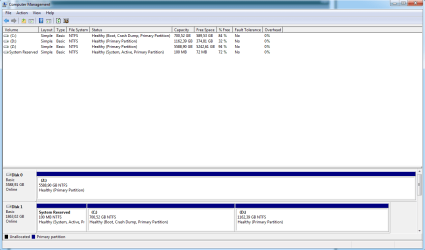
Here it is:


asdsadsadasdasdasd.png


Thank you
 

My Computer My Computer

Computer type
PC/Desktop
OS
windows 7 ultimate x64 sp1
CPU
Intel 7700k
Motherboard
Gigabyte z270x gaming 7
Memory
2x8gb Trident Z 3200mhz
Graphics Card(s)
Gigabyte Aorus Extreme 1080ti
Hard Drives
WD gold 6tb
Antivirus
Avira
Browser
Firefox
The disk 0 has only one 6T partition (Z:) so it must be a GPT disk and has some data on it (360G).
401817d1511434715-6tb-hdd-disaster-dman.jpg


If you want to use it as data Only partition you can leave as it is or split in more (any size) partitions.

If you want to have it as a boot able disk with win 7 there are two options:
Fist, backup all data on the F: disk to another disk as disk 0 will be formatted.
A) Leave the disk as GPT and reinstall Win 7 and all programs. Detach disk 1 from MB (unplug the power cable). Start the computer, press F12 to launch the boot menu and choose Win 7 installation disk as UEFI, go to install - advanced, delete all partitions - Create new. It will create 3 partitions
- UEFI - 100M - Fat32 (for the UEFI boot loader)
- M$ reserved - 120M - RAW (for bit locker decryption tool)
- Big NTFS - For windows and data.
Install win 7 on the Big NTFS. After installation you can shrink C: and create other partitions with no limit size.

B) Clone the disk 1 on disk 0.
Download and install Macrium Software | Macrium Reflect Free for Home use (leave the email blank).
Run Macrium Reflect and select disk clone (disk 1 to disk 0).
On the new disk, set:
System Reserved as 100M
C: big as you wish but smaller than 2.2T
D: big as you wish but smaller than 2.2T
It will convert disk 0 to MBR and clone.
When you finish cloning, detach disk 1 from MB (unplug the power cable) and boot from disk 0.
Open disk manager and you will see a unallocated space. You can create a new partition on it but the size is limited to 2.2T

You have a wonderful computer.
If I were you, I would buy a small SSD (128G) to have windows and programs and use the HDD's for data only(can be MBR or GPT). A SSD is 6 times faster than a HDD. It will boot in ~20 seconds and open programs at a blink on an eye.
You will have the speed of a SSD and the space of a HDD at low cost.
I have one of these. So far so good.
PNY CS900 120GB 2.5" SATA III INTERNAL Solid State Drive (SSD) - SSD7CS900-120-RB - Newegg.com

 

My Computers My Computers

System One System Two

  • Computer type
    PC/Desktop
    Computer Manufacturer/Model Number
    custom build
    OS
    Windows 7 HP 64
    CPU
    i5 6600K - 800MHz to 4200MHz
    Motherboard
    GA-Z170-HD3P
    Memory
    4+4G GSkill DDR4 3000
    Graphics Card(s)
    IG - Intel 530
    Monitor(s) Displays
    Samsung 226BW
    Screen Resolution
    1680x1050
    Hard Drives
    (1) -1 SM951 – 128GB M.2 AHCI PCIe SSD drive for Windows 7 and Lubuntu
    (2) -1 WD SATA 3 - 1T for Data
    (3) -1 WD SATA 3 - 1T for backup
    PSU
    Thermaltake 450W TR2 gold
    Keyboard
    Old and good Chicony mechanical keyboard
    Mouse
    Logitech mX performance - 9 buttons (had to disable some)
    Internet Speed
    500Mb/s
    Browser
    Firefox 64
    Other Info
    TinyWall firewall
  • Computer type
    Laptop
    System Manufacturer/Model Number
    Asus Q550LF
    OS
    Windows 7 Pro
    CPU
    i7-4500U 800MHz to 3.0GHz
    Motherboard
    Asus Q550LF
    Memory
    (4+4)G DDR3 1600
    Graphics Card(s)
    IG intel 4400 + NVIDIA GeForce GT 745M
    Sound Card
    Realtek
    Monitor(s) Displays
    LG Display LP156WF4-SPH1
    Screen Resolution
    1920 x 1080
    Hard Drives
    BX500 120G SSD for Windows and programs +
    1T HDD for data
    Internet Speed
    500 Mb/s
    Browser
    Firefox
    Other Info
    TinyWall firewall
Those are some good ideas,

At first after unpacking the drive i saw that it has 2 unallocated space parts,and i thought i could split them somehow,only the first i could split but the second,no matter if it was win7 built in part manager or diskpart partitikn making or multitool or even gparted i couldnt unless converted to gpt.

I tried at first easeus cloning but it didnt register my hdd as bootable at all,yes there was a third part(unallocated) but the drive didnt boot at all even after changing to uefi the controllers.

I will try tomorrow the macrium software you mentioned,my goalkriginally was to have again 2 partitions, 1.2tb system and rest for games,movies etc,but it can be only gpt,at the moment i have adapted it with gpt as a "third partition" so to speak but will definately try that tomorrow!

And thank you for the kind words for my system,though having lots of provlems with the 1080ti willbe switching to vega or radeon 7 asap,other than that i would preffer intel optane instead of a big pen drive ssd in my system,yes it will speed up my loadings but at the cost of reliability and durability,an hdd always outlives at least 2 pc's even under heavy use(editing,gaming,large file copy/paste constantly), i simply dont trust ssd's,besides i do loads of read/write activity on system drive every day,i cant risk my whole work and projects one day waking up to seemy ssd is dead and cant boot to save my work for just some loading times,i would preffer more fps in games for example :)
 

My Computer My Computer

Computer type
PC/Desktop
OS
windows 7 ultimate x64 sp1
CPU
Intel 7700k
Motherboard
Gigabyte z270x gaming 7
Memory
2x8gb Trident Z 3200mhz
Graphics Card(s)
Gigabyte Aorus Extreme 1080ti
Hard Drives
WD gold 6tb
Antivirus
Avira
Browser
Firefox
MBR Partitions can define a disk drive capacity up to 2.2TB

For a 6 TB single disk that is initialized by using MBR, Windows can create partitions up to the first 2 TB. However, the remaining capacity cannot be addressed and, therefore, cannot be used.

If you want to use the full capacity of that disk, you need to use gpt.

windows-support-for-hard-disks-that-are-larger-than-2-tb
 

My Computers My Computers

System One System Two

  • Computer type
    PC/Desktop
    OS
    7 X64
    CPU
    i5 8400
    Motherboard
    gigabyte b365m ds3h
    Memory
    2x8gb 3200mhz
    Hard Drives
    various
    PSU
    pure power 11 400w cm
    Case
    Coolermaster
    Cooling
    cryorig m9i
  • Computer type
    PC/Desktop
    OS
    7x64
    CPU
    g5400
    Motherboard
    ga b365m ds3h
    Memory
    8gb ddr4 2400
    PSU
    xfx pro 450w
Yes i am aware of that,but what about megaherz's cloning idea ? Wouldnt that work? I mean if i can choose how to extend the target partitions when im about to clone,lets say i choose 1tb system drive,2.2tb d drive,after the cloning process i should be left with another 2.2tb partition unallocated which i should be able to make into a third partition?
Thank you
 

My Computer My Computer

Computer type
PC/Desktop
OS
windows 7 ultimate x64 sp1
CPU
Intel 7700k
Motherboard
Gigabyte z270x gaming 7
Memory
2x8gb Trident Z 3200mhz
Graphics Card(s)
Gigabyte Aorus Extreme 1080ti
Hard Drives
WD gold 6tb
Antivirus
Avira
Browser
Firefox
Wouldnt that work?
No.


Paragon used to do software that faked a second mbr so windows treat the one disk as 2 disks.

MBR:

Windows can create partitions up to the first 2 TB. However, the remaining capacity cannot be addressed and, therefore, cannot be used.
 
Last edited:

My Computers My Computers

System One System Two

  • Computer type
    PC/Desktop
    OS
    7 X64
    CPU
    i5 8400
    Motherboard
    gigabyte b365m ds3h
    Memory
    2x8gb 3200mhz
    Hard Drives
    various
    PSU
    pure power 11 400w cm
    Case
    Coolermaster
    Cooling
    cryorig m9i
  • Computer type
    PC/Desktop
    OS
    7x64
    CPU
    g5400
    Motherboard
    ga b365m ds3h
    Memory
    8gb ddr4 2400
    PSU
    xfx pro 450w
Yes, SIW2 is right and I was wrong. You can't use more than 2TB on a MBR disk. So you must convert the disk from MBR to GPT to use all the 6TB capacity. I don't think you can easily clone your boot able MBR HDD to the GPT HDD as the boot loader on a GPT disk is on a Fat32 100M partition.
If it's possible, SIW2 is the one to guide you.

I have been using SSDs since 2011 and never had any disk failure. I would say that they are more reliable than a mechanic HDD. I have used 2.5" SSDs and one M.2 PCIe AHCI SSD.
I have a small (GPT) M.2 PCi SSD (128G) for windows&Programs and Linux. I use my HDD (GPT) (WD Gold) for data only.

You can install Win 7 for windows&Programs (MBR or GPT) on a 2.5" SSDs or on a M.2 MVMe and use your GPT HDD for data only.

I have moved C:\users from the SSD to the HDD (using Kari tutorial). All temporary files are now on the HDD.
393064d1477237723-installing-ssd-dell-xps-8700-a-my_tree.jpg]
 
Last edited:

My Computers My Computers

System One System Two

  • Computer type
    PC/Desktop
    Computer Manufacturer/Model Number
    custom build
    OS
    Windows 7 HP 64
    CPU
    i5 6600K - 800MHz to 4200MHz
    Motherboard
    GA-Z170-HD3P
    Memory
    4+4G GSkill DDR4 3000
    Graphics Card(s)
    IG - Intel 530
    Monitor(s) Displays
    Samsung 226BW
    Screen Resolution
    1680x1050
    Hard Drives
    (1) -1 SM951 – 128GB M.2 AHCI PCIe SSD drive for Windows 7 and Lubuntu
    (2) -1 WD SATA 3 - 1T for Data
    (3) -1 WD SATA 3 - 1T for backup
    PSU
    Thermaltake 450W TR2 gold
    Keyboard
    Old and good Chicony mechanical keyboard
    Mouse
    Logitech mX performance - 9 buttons (had to disable some)
    Internet Speed
    500Mb/s
    Browser
    Firefox 64
    Other Info
    TinyWall firewall
  • Computer type
    Laptop
    System Manufacturer/Model Number
    Asus Q550LF
    OS
    Windows 7 Pro
    CPU
    i7-4500U 800MHz to 3.0GHz
    Motherboard
    Asus Q550LF
    Memory
    (4+4)G DDR3 1600
    Graphics Card(s)
    IG intel 4400 + NVIDIA GeForce GT 745M
    Sound Card
    Realtek
    Monitor(s) Displays
    LG Display LP156WF4-SPH1
    Screen Resolution
    1920 x 1080
    Hard Drives
    BX500 120G SSD for Windows and programs +
    1T HDD for data
    Internet Speed
    500 Mb/s
    Browser
    Firefox
    Other Info
    TinyWall firewall
Back
Top