7 Home Premium in-place setup cancels itself, cannot sfc nor wupdate

1. Do step 2 or 3 below depending on what installation Media you are using.

2. If using a Retail 64-bit Windows 7 Installation DVD
A) Insert the DVD, restart the computer, and go to step 4 below.
3. If using a 64-bit Windows 7 Installation USB Flash Drive with UEFI
A) If you have not already, you will need to create a Windows 7 installation bootable USB flash drive for UEFI from either a Windows 7 installation ISO or DVD.

B) Connect the USB, restart the computer, and go to step 4 below.​
So if my USB bootable DVD-R boots via UEFI then I have to image it onto some other kind of device, then.
 
Last edited:

My Computer My Computer

At a glance

Windows 7 Home Premium 64bitIntel i5-2557M 1.7 GHzDDR3 1333 MHz SDRAM, OnBoard Memory GBIntegrated Intel® HD Graphics 3000 (Core i3/i...
Computer type
Laptop
Computer Manufacturer/Model Number
ASUS
OS
Windows 7 Home Premium 64bit
CPU
Intel i5-2557M 1.7 GHz
Motherboard
Intel® QS67 Express Chipset
Memory
DDR3 1333 MHz SDRAM, OnBoard Memory GB
Graphics Card(s)
Integrated Intel® HD Graphics 3000 (Core i3/i5/i7)
Hard Drives
128GB RPM SSD and external (USB) DVD-R
Antivirus
Avira
Browser
Firefox v20, IE 9 (64)
Try booting the disk now to see if there is UEFI entry for it in the BIOS Boot Menu, which should have a shortcut key to use. On most Asus' this is F8 pressed when you see the first BIOS screen.

I haven't heard that a USB DVD drive needs any special settings, but Theog would know for sure.
 
Okay, I finally did a clean install using all the little bits and pieces of your various howtos that were relevant for me, and without which I'm sure it would have been even worse. It took about one full day, and I'm missing lots of settings stuff but am up and running for the most part.

I still get a resource protection message when attempting to run SFC, one of the primary reasons for which I voluntarily walked into this Hell. Oh, well.

Fortunately my WEI score is still 5.5 - it has not lowered. And I have far more space available to me now since the Recovery partition was blown away.

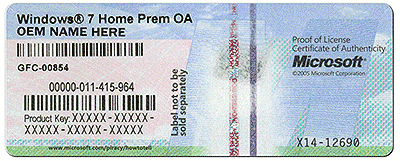
I need to revalidate within 30 days now. I thought I could use my Product Key for that. It would have been extremely useful if the Microsoft techsupport dude that I uselessly, needlessly paid $160 for - or somebody here at 7forums - could have told me about that. If there's a sticker anywhere it's not in any of the user manual documents I can still lay my hands on.

I used a custom slipstream disk. Still, the first WU update contained 64 items. After a reboot, it wanted to grab another 6 items I think? one of which was IE v10. Its installation keeps failing and sending me to a web page that tells me to run Windows Update to collect prerequisite patches and dictionaries and hotfixes.

I don't really care too much about IE v10 so I guess at some point I can see if hiding it will restore Windows Update to a semblance of normal operation.

I very much appreciate the sincere attempts from several members here, especially Noel - who spent hours trying to engineer a fix for my WU-damaged component store.

On balance I am just slightly worse off than where I started out, mostly for wear and tear upon my self.

But thanks very much for trying. And if someone can tell me what to expect since I have become invalidated, that might be helpful.
 

My Computer My Computer

At a glance

Windows 7 Home Premium 64bitIntel i5-2557M 1.7 GHzDDR3 1333 MHz SDRAM, OnBoard Memory GBIntegrated Intel® HD Graphics 3000 (Core i3/i...
Computer type
Laptop
Computer Manufacturer/Model Number
ASUS
OS
Windows 7 Home Premium 64bit
CPU
Intel i5-2557M 1.7 GHz
Motherboard
Intel® QS67 Express Chipset
Memory
DDR3 1333 MHz SDRAM, OnBoard Memory GB
Graphics Card(s)
Integrated Intel® HD Graphics 3000 (Core i3/i5/i7)
Hard Drives
128GB RPM SSD and external (USB) DVD-R
Antivirus
Avira
Browser
Firefox v20, IE 9 (64)
You can most certainly use your Product Key to clean reinstall. All you needed to do is ask us. If it was rejected then most times it is because a character was inputted incorrectly - an 8 looks a lot like a B.

I would call back MS Customer Service and tell them you were given misinformation by one of their employees and ask for a refund, or get the documentation for the key you purchased to use elsewhere since all retail keys can migrate wherever you want, only OEM is tied to the same mobo.

Hopefully you found the tips in Clean Reinstall - Factory OEM Windows 7 which are same for retail and have resulted in nothing but positive reviews from those who stick with the steps and get a perfect install.

If you used the Downloads updater in TEST -Update 7 installation media - Windows 7 Help Forums with SIW2's preset Updates file which should have loaded into it then there should be no more than a couple of updates. Weren't there about 50 each of Security and Non-Security Updates downloaded as I recall?

I would like to help you sort out the problems you describe because frankly in four years here since before Win7 was released, having helped in countless thousands of installs under every condition and circumstance imaginable, I have never seen a result like you report.
 
No, Validation looks for a much longer string than my Product ID Key - which begins with zeroes and apparently the Validation/Sticker code is all cap letters key does not.
 
Last edited:

My Computer My Computer

At a glance

Windows 7 Home Premium 64bitIntel i5-2557M 1.7 GHzDDR3 1333 MHz SDRAM, OnBoard Memory GBIntegrated Intel® HD Graphics 3000 (Core i3/i...
Computer type
Laptop
Computer Manufacturer/Model Number
ASUS
OS
Windows 7 Home Premium 64bit
CPU
Intel i5-2557M 1.7 GHz
Motherboard
Intel® QS67 Express Chipset
Memory
DDR3 1333 MHz SDRAM, OnBoard Memory GB
Graphics Card(s)
Integrated Intel® HD Graphics 3000 (Core i3/i5/i7)
Hard Drives
128GB RPM SSD and external (USB) DVD-R
Antivirus
Avira
Browser
Firefox v20, IE 9 (64)
Not the Product ID. As shown in a picture in Clean Reinstall you use the Product Key which is 25 alphanumeric digits. On Factory OEM it is stuck to the machine, on Retail it is on a package insert.

coa-stickers.gif

Did you say that you called MS or connected to their Activation phone agent and were not told this? Did you tell them you had a retail or OEM copy and they didn't ask you for Product Key, and not ID? Why were you charged $160 if you told them you have a retail or OEM license you want to use?
 
I have an Ultrabook. It has no stickers. The fee MS charged me was for tech support. I took your advice and asked for a refund. So, I can't sfc. But then the only reason I felt the need to do so was to repair my OS installation. So I don't care. But I want to validate, because I guess everything will pretty much stop working in 30 days.
 

My Computer My Computer

At a glance

Windows 7 Home Premium 64bitIntel i5-2557M 1.7 GHzDDR3 1333 MHz SDRAM, OnBoard Memory GBIntegrated Intel® HD Graphics 3000 (Core i3/i...
Computer type
Laptop
Computer Manufacturer/Model Number
ASUS
OS
Windows 7 Home Premium 64bit
CPU
Intel i5-2557M 1.7 GHz
Motherboard
Intel® QS67 Express Chipset
Memory
DDR3 1333 MHz SDRAM, OnBoard Memory GB
Graphics Card(s)
Integrated Intel® HD Graphics 3000 (Core i3/i5/i7)
Hard Drives
128GB RPM SSD and external (USB) DVD-R
Antivirus
Avira
Browser
Firefox v20, IE 9 (64)
You have an HP Ultrabook that came preinstalled with Win7 Home Premium 64 bit, correct?

This should have the COA sticker with Product Key on the underside. I've never seen an HP notebook that didn't, but look under the battery which is possible.

The only way SFC wouldn't work after reinstalling is if something was in the ISO. Did you use a fresh ISO to slipstream drivers into?

Another possibility is if you didn't delete all partitions and create new, or in such a case where something is passing through like that (which couldn't conceivably be hardware-relate) I would wipe the HD with Diskpart Clean Command.

After all Updates were complete, what drivers were still missing in Device Manager?

How is overall performance?
 
Asus. The case is blank solid brushed aluminum without stickers. I think there's a sticker on the quickstart manual as opposed to the other manual I can find, which has not one. The ISO I used was the one provided to me by the MS tech, Mr. Kryvyjduyfykysksosatvi -- Jimmy Kryvyjduyfykysksosatvi. I followed instructions here, among which were explicit steps to delete every partition. And as I stated performance is unchanged (5.5 score) but I lost all my ad filters. And other files I'd come to rely upon but neglected to add to whatever MS now calls its file & settings transfer wizard. (I think they stopped using the W word.)

I might still have whatever document the sticker was affixed to, so now I'm tearing apart my home looking for that.
 
Last edited:

My Computer My Computer

At a glance

Windows 7 Home Premium 64bitIntel i5-2557M 1.7 GHzDDR3 1333 MHz SDRAM, OnBoard Memory GBIntegrated Intel® HD Graphics 3000 (Core i3/i...
Computer type
Laptop
Computer Manufacturer/Model Number
ASUS
OS
Windows 7 Home Premium 64bit
CPU
Intel i5-2557M 1.7 GHz
Motherboard
Intel® QS67 Express Chipset
Memory
DDR3 1333 MHz SDRAM, OnBoard Memory GB
Graphics Card(s)
Integrated Intel® HD Graphics 3000 (Core i3/i5/i7)
Hard Drives
128GB RPM SSD and external (USB) DVD-R
Antivirus
Avira
Browser
Firefox v20, IE 9 (64)
Judge performance by how it performs, not the meaningless WEI score which no one here pays attention to.

You'll have to add back your browser settings and add-ons. This is best since settings can be a corruption path.

I don't remember a case before where a COA sticker was not present somewhere on the PC. I would ask Asus tech support. You might have to order Recovery Disks which will auto-activate with the SLP factory activation in order to use the license which came with it.

Please let me know if there is anything you've encountered not already warned about in Clean Reinstall - Factory OEM Windows 7 like the COA sticker which is pictured so you could confirm it first. I try to include everything that one possibly needs to know in advance there.
 
I tried to make a list beforehand of all the things I'd lose. I lost some recent passwords that the previous browser had cached but which were not included in an export. I lost router and DNS settings that I forgot to write down but which were easily recoverable. I lost many, many pieces of shareware - text-editor/IDE's, SSH clients. All of which, I guess, were expendable.

Performance was never much of a problem, and I'm not as overwhelmed as others appear to think I ought to be, about any improvements to it.

What exactly is going to happen in the likely event that I'm unable to find the sticker?

It was absolutely never affixed to my hardware. There are little stickers on the inside beneath the keyboard for intel CORE™i5 and Windows®7 but nothing unit-specific. Sorry if that's hard to believe, but the unbroken plainness of the "Zenbook" design is evidently an intended part of its charm.
 

My Computer My Computer

At a glance

Windows 7 Home Premium 64bitIntel i5-2557M 1.7 GHzDDR3 1333 MHz SDRAM, OnBoard Memory GBIntegrated Intel® HD Graphics 3000 (Core i3/i...
Computer type
Laptop
Computer Manufacturer/Model Number
ASUS
OS
Windows 7 Home Premium 64bit
CPU
Intel i5-2557M 1.7 GHz
Motherboard
Intel® QS67 Express Chipset
Memory
DDR3 1333 MHz SDRAM, OnBoard Memory GB
Graphics Card(s)
Integrated Intel® HD Graphics 3000 (Core i3/i5/i7)
Hard Drives
128GB RPM SSD and external (USB) DVD-R
Antivirus
Avira
Browser
Firefox v20, IE 9 (64)
This link says Zenbook COA sticker is on the power brick: http://www.anandtech.com/show/4984/asus-zenbook-ux21-teardown

DSC_4482_575px.jpg


It's required by MS to have the COA sticker attached to any PC that comes with pre-installed Win7 so that users have the ability to change to the Product Key in MS Activation servers without being reliant on the factory SLP mass-activation it comes with. So they would surely know where to find the sticker if you'll contact Tech Support.

What router and DNS settings are needed during Clean Reinstall? I've not heard of any. Is this specific to the way you set up your router, as normally Win7 connects to modem or router quite easily when driver is loaded.
 
WOW!! There it is!!!!!

You're AMAZING!
 

My Computer My Computer

At a glance

Windows 7 Home Premium 64bitIntel i5-2557M 1.7 GHzDDR3 1333 MHz SDRAM, OnBoard Memory GBIntegrated Intel® HD Graphics 3000 (Core i3/i...
Computer type
Laptop
Computer Manufacturer/Model Number
ASUS
OS
Windows 7 Home Premium 64bit
CPU
Intel i5-2557M 1.7 GHz
Motherboard
Intel® QS67 Express Chipset
Memory
DDR3 1333 MHz SDRAM, OnBoard Memory GB
Graphics Card(s)
Integrated Intel® HD Graphics 3000 (Core i3/i5/i7)
Hard Drives
128GB RPM SSD and external (USB) DVD-R
Antivirus
Avira
Browser
Firefox v20, IE 9 (64)
Maybe after I validate sfc will work. Will let you know.
 

My Computer My Computer

At a glance

Windows 7 Home Premium 64bitIntel i5-2557M 1.7 GHzDDR3 1333 MHz SDRAM, OnBoard Memory GBIntegrated Intel® HD Graphics 3000 (Core i3/i...
Computer type
Laptop
Computer Manufacturer/Model Number
ASUS
OS
Windows 7 Home Premium 64bit
CPU
Intel i5-2557M 1.7 GHz
Motherboard
Intel® QS67 Express Chipset
Memory
DDR3 1333 MHz SDRAM, OnBoard Memory GB
Graphics Card(s)
Integrated Intel® HD Graphics 3000 (Core i3/i5/i7)
Hard Drives
128GB RPM SSD and external (USB) DVD-R
Antivirus
Avira
Browser
Firefox v20, IE 9 (64)
What router and DNS settings are needed during Clean Reinstall? I've not heard of any. Is this specific to the way you set up your router, as normally Win7 connects to modem or router quite easily when driver is loaded.
No, my network is needed only before and after Clean Reinstalls. Although I was unable to get the non-steamlined hotfixes until after I restored the network. That was easy for me. Router login credentials are particularly key. I also don't have a removable or observable NIC. So those are a couple things worth putting on a save-list for me, next time.

But I really lost very little that I can't rebuild or replace, that I've yet noticed.
 

My Computer My Computer

At a glance

Windows 7 Home Premium 64bitIntel i5-2557M 1.7 GHzDDR3 1333 MHz SDRAM, OnBoard Memory GBIntegrated Intel® HD Graphics 3000 (Core i3/i...
Computer type
Laptop
Computer Manufacturer/Model Number
ASUS
OS
Windows 7 Home Premium 64bit
CPU
Intel i5-2557M 1.7 GHz
Motherboard
Intel® QS67 Express Chipset
Memory
DDR3 1333 MHz SDRAM, OnBoard Memory GB
Graphics Card(s)
Integrated Intel® HD Graphics 3000 (Core i3/i5/i7)
Hard Drives
128GB RPM SSD and external (USB) DVD-R
Antivirus
Avira
Browser
Firefox v20, IE 9 (64)
Windows and Windows Update keep telling me they have a new update for my network adapter but three tries at installing it cause my network to break. More critically, I have a couple other new surprises related to my Clean Reinstall.

First, revalidation does appear to have been crucial to success at running SFC! Although the volume had not been marked dirty, there does seem to be a secret Microsoft F.U. Bit that was set in order to present the inexplicable Windows Resource Protection message on each prior attempt to run it.

The other critical surprise: My brandspanking new Clean Reinstall notwithstanding, an sfc /verifyonly returns:
Code:
Beginning system scan.  This process will take some time.

Beginning verification phase of system scan.
Verification 100% complete.

Windows Resource Protection found integrity violations. Details are included in the CBS.Log windir\Logs\CBS\CBS.log. For example C:\Windows\Logs\CBS\CBS.log
So, first, is there anything that I can/should try before running an sfc /scannow? And, how could this happen (almost) immediately after a Clean Reinstall? Windows Update appears to have broken my machine yet again by attempting to overwrite my good network adapter driver with a corrupt one.
 

My Computer My Computer

At a glance

Windows 7 Home Premium 64bitIntel i5-2557M 1.7 GHzDDR3 1333 MHz SDRAM, OnBoard Memory GBIntegrated Intel® HD Graphics 3000 (Core i3/i...
Computer type
Laptop
Computer Manufacturer/Model Number
ASUS
OS
Windows 7 Home Premium 64bit
CPU
Intel i5-2557M 1.7 GHz
Motherboard
Intel® QS67 Express Chipset
Memory
DDR3 1333 MHz SDRAM, OnBoard Memory GB
Graphics Card(s)
Integrated Intel® HD Graphics 3000 (Core i3/i5/i7)
Hard Drives
128GB RPM SSD and external (USB) DVD-R
Antivirus
Avira
Browser
Firefox v20, IE 9 (64)
If the Update won't work roll it back in Device Manager or Installed Updates, then hide it in Windows Updates.

See if there's a driver update manually on the PC or Device's Support Downloads webpage.

It's not really possible to find SFC violations on a brand new install unless the installer ISO was obtained from a questionable source, or something was installed or tweaked after reinstall.

Where did the ISO come from that you slipstreamed? If there's any question I'd do it over with the latest ISO from Clean Reinstall - Factory OEM Windows 7. Since you strangely had 64 updates after slipstreaming using SIW2's tool, I'd make sure that you extract and load into Windows Downloader windows-7-x64-x86-UpdateLists.zip
This time I'd wipe the HD first with Diskpart Clean Command
 
Sorry I should have said that I had already rolled it back, thus allowing me to make the previous post.


I USED THE CD YOU PEOPLE TOLD ME TO MAKE.


If the SFC complaint means that something is "corrupt" it was due to the one out of 70+ updates I did subsequently - that Windows Update did - which failed.

I'm done for the day; will check back tomorrow.

Thanks.
 

My Computer My Computer

At a glance

Windows 7 Home Premium 64bitIntel i5-2557M 1.7 GHzDDR3 1333 MHz SDRAM, OnBoard Memory GBIntegrated Intel® HD Graphics 3000 (Core i3/i...
Computer type
Laptop
Computer Manufacturer/Model Number
ASUS
OS
Windows 7 Home Premium 64bit
CPU
Intel i5-2557M 1.7 GHz
Motherboard
Intel® QS67 Express Chipset
Memory
DDR3 1333 MHz SDRAM, OnBoard Memory GB
Graphics Card(s)
Integrated Intel® HD Graphics 3000 (Core i3/i5/i7)
Hard Drives
128GB RPM SSD and external (USB) DVD-R
Antivirus
Avira
Browser
Firefox v20, IE 9 (64)
Before going to bed I decided to let sfc run with /scannow instead of /verifyonly. It found integrity errors (again, most likely the oem's non-whql nic driver), and displayed a message indicating those errors would be fixed on reboot.

I did another reboot; I did another scannow.
Code:
Microsoft Windows [Version 6.1.7601]
Copyright (c) 2009 Microsoft Corporation.  All rights reserved.

C:\Windows\system32>sfc /scannow

Beginning system scan.  This process will take some time.

Beginning verification phase of system scan.
Verification 100% complete.

Windows Resource Protection did not find any integrity violations.

C:\Windows\system32>
 

My Computer My Computer

At a glance

Windows 7 Home Premium 64bitIntel i5-2557M 1.7 GHzDDR3 1333 MHz SDRAM, OnBoard Memory GBIntegrated Intel® HD Graphics 3000 (Core i3/i...
Computer type
Laptop
Computer Manufacturer/Model Number
ASUS
OS
Windows 7 Home Premium 64bit
CPU
Intel i5-2557M 1.7 GHz
Motherboard
Intel® QS67 Express Chipset
Memory
DDR3 1333 MHz SDRAM, OnBoard Memory GB
Graphics Card(s)
Integrated Intel® HD Graphics 3000 (Core i3/i5/i7)
Hard Drives
128GB RPM SSD and external (USB) DVD-R
Antivirus
Avira
Browser
Firefox v20, IE 9 (64)
Sounds good. :thumbsup:

Take your time installing programs to monitor performance between each. Watch for more Updates and make sure all Important and Optional are done, after enabling Automatically get recommended drivers and updates for your hardware (Step 3)

Stick with the tools and methods in Clean Reinstall and you'll keep a perfect install.

Let us know how it pans out.

After it's set up at the point where you feel you have the best performance, save a Win7 backup image so you never have to reinstall again.
 
Back
Top