7 HP x64 - Startup Repair Loop, NoRootCause - two Win7versions on PC

kalle009

New member
Local time
11:18 PM
Messages
11
Good evening,


since this afternoon and without any obvious reason, my PC has the "startup Repair Loop" problem, that is well described in many forums, as i learned.
I spent 4 hours now trying out the recommendations given in this forum (thread on "
7 HP x64 - Startup Repair Loop, NoRootCause") and others, that is, all options from the repair manager, chkdsk, the "Bootrec-manouevres", correcting the files manually as, for example, eplained in "https://www.deskdecode.com/startup-repair-cannot-repair-this-computer-automatically/"
etc.

Needless to say that nothing worked.


Here is the peculiarity: I have an older, still running version of Win7 on another drive on the same computer.
So I can access all the windows files of the drive that I used for booting and where the currently damaged version is installed at. Including the folder windows32/config, that is used in one of the ways to try to repair the thing.


So I could relatively easily save all personal files and install a new version over again. The thing is that I have a lot of programms installed and things personalized in the Win7 version that is not booting.


Now here comes my question: Is it of any advantage that I can access all files of the not-booting windows-version from the older windows version and can I do any repair by that? And how? Do you give me a chance? Or do I have do re-install anyway?


Thanks a lot for any helpful comment!!:-)
 

My Computer My Computer

At a glance

Windows 7 64 bit Home Premium
Computer type
PC/Desktop
OS
Windows 7 64 bit Home Premium
Hi kalle009, welcome to Seven Forums,

So I could relatively easily save all personal files and install a new version over again. The thing is that I have a lot of programms installed and things personalized in the Win7 version that is not booting.

Now here comes my question: Is it of any advantage that I can access all files of the not-booting windows-version from the older windows version and can I do any repair by that? Or do I have do re-install anyway?

Some questions!

[1] Have you installed any new hardware, software or updates prior to this happening?
[2] Have you got an installation disk?
[3] Are there any restore points that you could try?
[4] Can you get into Safe Mode?
[5] Have you got a recent system image that you could use?

One option, depending on the answers above, could possibly be a repair install. A repair install differs from a clean install in the fact that it ONLY replaces the corrupted OS with a new fresh copy. This means that ALL your User Accounts, Folders, Files, Documents, Pictures, Music, Videos, Data Files, Icons, and any installed programs are left intact. It does however, delete ALL the Window updates, and can affect, sounds, services, visual effect settings and device drivers by re-setting them to default. You cannot do a repair install at boot, in Safe Mode, using a system repair disk, or using an integrated Windows update disk. Basically, this process can ONLY be performed from within the LIVE OS.

I hope this helps!
 
Last edited:

My Computer My Computer

At a glance

Win 7 HP SP1 64-bit Vista HB SP2 32-bit Linux...Intel(R) Pentium(R) CPU P6200 @ 2.13GHz4.00 GBIntel(R) Graphics Media Accelerator HD
Computer type
Laptop
Computer Manufacturer/Model Number
Fujitsu LIFEBOOK
OS
Win 7 HP SP1 64-bit Vista HB SP2 32-bit Linux Mint 18.3
CPU
Intel(R) Pentium(R) CPU P6200 @ 2.13GHz
Motherboard
FUJITSU FJNBB06
Memory
4.00 GB
Graphics Card(s)
Intel(R) Graphics Media Accelerator HD
Sound Card
[1] Realtek High Definition Audio [2] Intel(R) Display Audio
Screen Resolution
1366 x 768 x 32 bits (4294967296 colors) @ 59 Hz
Hard Drives
TOSHIBA MK5076GSX
Antivirus
AVG FREE
Wow,
that is what I would call a super-sonic answer!
Thank you Paul!!


With regard to your questions:


[1] Have you installed any new hardware, software or updates prior to this happening?
- No new installations, no updates that I were aware of. Just a "hard day" for the PC with many office programs, statistic programm, lots of pds, firefox tabs, opened. After restarting after lunch it all of a sudden did not boot anymore.

[2] Have you got an installation disk?
- yes, I do have the original one.

[3] Are there any restore points that you could try?

- no, no points available

[4] Can you get into Safe Mode?

- no. I if I do it with "command prompt", it always stops at .../drivers/classpnp.sys and then restarts.

[5] Have you got a recent system image that you could use?
- no:(


I read about the repair install (I think that is what people also call an "In-place upgrade" !?)
But from what I understood and from what you are saying, therefore I must have the windows running, that is to say the booting must have been successful. In my situation I am unable to boot the windows version that I am interested in but can only access the drive from another - older, uninteresting - Win7 version from another drive on the same PC.So, to my understanding, the repair install would not work for me.

I hoped that somebody would knew a small repair file to insert at the right place in one of the windows folders and makes everything whole again :sarc:

Thanks a lot anyway!!
 

My Computer My Computer

At a glance

Windows 7 64 bit Home Premium
Computer type
PC/Desktop
OS
Windows 7 64 bit Home Premium
Hi kalle009, does the installation disk boot?
 

My Computer My Computer

At a glance

Win 7 HP SP1 64-bit Vista HB SP2 32-bit Linux...Intel(R) Pentium(R) CPU P6200 @ 2.13GHz4.00 GBIntel(R) Graphics Media Accelerator HD
Computer type
Laptop
Computer Manufacturer/Model Number
Fujitsu LIFEBOOK
OS
Win 7 HP SP1 64-bit Vista HB SP2 32-bit Linux Mint 18.3
CPU
Intel(R) Pentium(R) CPU P6200 @ 2.13GHz
Motherboard
FUJITSU FJNBB06
Memory
4.00 GB
Graphics Card(s)
Intel(R) Graphics Media Accelerator HD
Sound Card
[1] Realtek High Definition Audio [2] Intel(R) Display Audio
Screen Resolution
1366 x 768 x 32 bits (4294967296 colors) @ 59 Hz
Hard Drives
TOSHIBA MK5076GSX
Antivirus
AVG FREE
Hi kalle009,

Seeing you can access the un-bootable OS drive [from another Win 7 OS version on the same PC], can you not copy all of your files etc to an external HDD or USB? That way, you can then do a clean install!

If this is not possible, then I can post two other alternatives for you!

I hope this helps!
 

My Computer My Computer

At a glance

Win 7 HP SP1 64-bit Vista HB SP2 32-bit Linux...Intel(R) Pentium(R) CPU P6200 @ 2.13GHz4.00 GBIntel(R) Graphics Media Accelerator HD
Computer type
Laptop
Computer Manufacturer/Model Number
Fujitsu LIFEBOOK
OS
Win 7 HP SP1 64-bit Vista HB SP2 32-bit Linux Mint 18.3
CPU
Intel(R) Pentium(R) CPU P6200 @ 2.13GHz
Motherboard
FUJITSU FJNBB06
Memory
4.00 GB
Graphics Card(s)
Intel(R) Graphics Media Accelerator HD
Sound Card
[1] Realtek High Definition Audio [2] Intel(R) Display Audio
Screen Resolution
1366 x 768 x 32 bits (4294967296 colors) @ 59 Hz
Hard Drives
TOSHIBA MK5076GSX
Antivirus
AVG FREE
Hi Paul,


yes, I could do a clean install.

It just would mean a lot of backupping before, a lot of retrieving, installing and customizing many programs, with probably some losses (of some calendar file or something, that I would't know where to find the archive) etc.
And all of it a a moment where I am supposed to finish a scientific paper because of an approaching deadline.
That is why I am interested in an quick and/or elegant solution of making the actual version boot again.


With respect to your prior question - yes, the install CD is booting. I am getting to the point where I am asked to "install now" which I want to avoid for the above mentioned reasons or where I can get to the repair options, which I have all tried since they are the same as the ones offered you at the boot failure.


So YES I would be interested in the alternative options!


Best regards,
kalle009
 

My Computer My Computer

At a glance

Windows 7 64 bit Home Premium
Computer type
PC/Desktop
OS
Windows 7 64 bit Home Premium
Hi kalle009,

With respect to your prior question - yes, the install CD is booting. I am getting to the point where I am asked to "install now" which I want to avoid for the above mentioned reasons, or where I can get to the repair options, which I have all tried since they are the same as the ones offered you at the boot failure.

It is a shame that you can't get to it to run Startup Repair!

Unfortunately, if you cannot run CHKDSK [Check Disk] or SFC [System File Checker], it is a bit difficult to find a resolution to the booting problem!

So YES, I would be interested in the alternative options!

Unfortunately, the two solutions I had in mind were to enable you to access the un-bootable OS drive and recover your data!

Yes, I could do a clean install.

If it comes to that, then I can post the procedure that will get Win 7 installed and fully upated quite quickly!

I hope this helps!
 

My Computer My Computer

At a glance

Win 7 HP SP1 64-bit Vista HB SP2 32-bit Linux...Intel(R) Pentium(R) CPU P6200 @ 2.13GHz4.00 GBIntel(R) Graphics Media Accelerator HD
Computer type
Laptop
Computer Manufacturer/Model Number
Fujitsu LIFEBOOK
OS
Win 7 HP SP1 64-bit Vista HB SP2 32-bit Linux Mint 18.3
CPU
Intel(R) Pentium(R) CPU P6200 @ 2.13GHz
Motherboard
FUJITSU FJNBB06
Memory
4.00 GB
Graphics Card(s)
Intel(R) Graphics Media Accelerator HD
Sound Card
[1] Realtek High Definition Audio [2] Intel(R) Display Audio
Screen Resolution
1366 x 768 x 32 bits (4294967296 colors) @ 59 Hz
Hard Drives
TOSHIBA MK5076GSX
Antivirus
AVG FREE
Hi Paul,


I was able to run start-up repair. And did it repeatedly in between. The "link" from the repair options from the install-CD is the same start-up repair that is offered you by windows right away when it notices that it is not booting.
Only when it failed several times was when I started to try the more "advanced" options like the Bootrec-commands and afterwards the manual file correction as, for example, eplained in "https://www.deskdecode.com/startup-repair-cannot-repair-this-computer-automatically/"
None of this worked. Start-up repair always saying either that it could not find a problem or that it could not repair the problem.


I also ran chkdisk on the "damaged" drive from the old windows version, and it did indeed repair some files on that drive. But it also did not help.


So I think I finally have to re-install. Not the end of the world for me but some unexpected delay...

I'll sleep over it now and do that tomorrow.


Thank you anyway for the quick and attentive comments!!!:thumbsup:
 

My Computer My Computer

At a glance

Windows 7 64 bit Home Premium
Computer type
PC/Desktop
OS
Windows 7 64 bit Home Premium
Hi kalle009,

I also ran chkdisk on the "damaged" drive from the old windows version, and it did indeed repair some files on that drive. But it also did not help.

So you weren't able to run SFC [System File Checker] then?

If you could boot into Safe Mode [probably F8], you could go into the Startup tab in msconfig and disable all the startup items to see if that helps! It would also be interesting to see what settings you have got in the General tab as well, because the options there are Normal Startup, Diagnostic Startup, and Selective Startup!

I hope this helps!
 

My Computer My Computer

At a glance

Win 7 HP SP1 64-bit Vista HB SP2 32-bit Linux...Intel(R) Pentium(R) CPU P6200 @ 2.13GHz4.00 GBIntel(R) Graphics Media Accelerator HD
Computer type
Laptop
Computer Manufacturer/Model Number
Fujitsu LIFEBOOK
OS
Win 7 HP SP1 64-bit Vista HB SP2 32-bit Linux Mint 18.3
CPU
Intel(R) Pentium(R) CPU P6200 @ 2.13GHz
Motherboard
FUJITSU FJNBB06
Memory
4.00 GB
Graphics Card(s)
Intel(R) Graphics Media Accelerator HD
Sound Card
[1] Realtek High Definition Audio [2] Intel(R) Display Audio
Screen Resolution
1366 x 768 x 32 bits (4294967296 colors) @ 59 Hz
Hard Drives
TOSHIBA MK5076GSX
Antivirus
AVG FREE
I have an older, still running version of Win7 on another drive on the same computer.
So I can access all the windows files of the drive that I used for booting and where the currently damaged version is


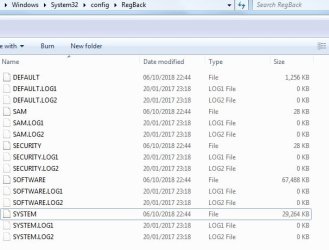
Have a look in windows\system32\config\regback on the damaged version.

If it contains registry hives Default,Security,Sam,Software,System,then you can use them to replace the hives in windows\system32\config

You can often get away with just replacing the System hive, but I suggest replacing them all.


REGBACK.jpg
 

My Computers My Computers

  • At a glance

    7 X64i5 84002x8gb 3200mhz
    Computer type
    PC/Desktop
    OS
    7 X64
    CPU
    i5 8400
    Motherboard
    gigabyte b365m ds3h
    Memory
    2x8gb 3200mhz
    Hard Drives
    various
    PSU
    pure power 11 400w cm
    Case
    Coolermaster
    Cooling
    cryorig m9i
  • At a glance

    7x64g54008gb ddr4 2400
    Computer type
    PC/Desktop
    OS
    7x64
    CPU
    g5400
    Motherboard
    ga b365m ds3h
    Memory
    8gb ddr4 2400
    PSU
    xfx pro 450w
Hi SIW2,

Have a look in windows\system32\config\regback on the damaged version.

If it contains registry hives Default,Security,Sam,Software,System,then you can use them to replace the hives in windows\system32\config

You can often get away with just replacing the System hive, but I suggest replacing them all.

You learn something new everyday!

I suppose that this is only possible in this sort of situation, where you have also got another working OS on another drive attached to the same computer?

Thanks .
 

My Computer My Computer

At a glance

Win 7 HP SP1 64-bit Vista HB SP2 32-bit Linux...Intel(R) Pentium(R) CPU P6200 @ 2.13GHz4.00 GBIntel(R) Graphics Media Accelerator HD
Computer type
Laptop
Computer Manufacturer/Model Number
Fujitsu LIFEBOOK
OS
Win 7 HP SP1 64-bit Vista HB SP2 32-bit Linux Mint 18.3
CPU
Intel(R) Pentium(R) CPU P6200 @ 2.13GHz
Motherboard
FUJITSU FJNBB06
Memory
4.00 GB
Graphics Card(s)
Intel(R) Graphics Media Accelerator HD
Sound Card
[1] Realtek High Definition Audio [2] Intel(R) Display Audio
Screen Resolution
1366 x 768 x 32 bits (4294967296 colors) @ 59 Hz
Hard Drives
TOSHIBA MK5076GSX
Antivirus
AVG FREE
I suppose that this is only possible in this sort of situation, where you have also got another working OS on another drive attached to the same computer?


You can use winpe to do it. Just made a new version - completely rebuilt
17514x64-v9.iso
 
Last edited:

My Computers My Computers

  • At a glance

    7 X64i5 84002x8gb 3200mhz
    Computer type
    PC/Desktop
    OS
    7 X64
    CPU
    i5 8400
    Motherboard
    gigabyte b365m ds3h
    Memory
    2x8gb 3200mhz
    Hard Drives
    various
    PSU
    pure power 11 400w cm
    Case
    Coolermaster
    Cooling
    cryorig m9i
  • At a glance

    7x64g54008gb ddr4 2400
    Computer type
    PC/Desktop
    OS
    7x64
    CPU
    g5400
    Motherboard
    ga b365m ds3h
    Memory
    8gb ddr4 2400
    PSU
    xfx pro 450w

My Computer My Computer

At a glance

Win 7 HP SP1 64-bit Vista HB SP2 32-bit Linux...Intel(R) Pentium(R) CPU P6200 @ 2.13GHz4.00 GBIntel(R) Graphics Media Accelerator HD
Computer type
Laptop
Computer Manufacturer/Model Number
Fujitsu LIFEBOOK
OS
Win 7 HP SP1 64-bit Vista HB SP2 32-bit Linux Mint 18.3
CPU
Intel(R) Pentium(R) CPU P6200 @ 2.13GHz
Motherboard
FUJITSU FJNBB06
Memory
4.00 GB
Graphics Card(s)
Intel(R) Graphics Media Accelerator HD
Sound Card
[1] Realtek High Definition Audio [2] Intel(R) Display Audio
Screen Resolution
1366 x 768 x 32 bits (4294967296 colors) @ 59 Hz
Hard Drives
TOSHIBA MK5076GSX
Antivirus
AVG FREE
Switched to using Fernando's modded intel usb3 drivers
17514x64-v9.iso
 
Last edited:

My Computers My Computers

  • At a glance

    7 X64i5 84002x8gb 3200mhz
    Computer type
    PC/Desktop
    OS
    7 X64
    CPU
    i5 8400
    Motherboard
    gigabyte b365m ds3h
    Memory
    2x8gb 3200mhz
    Hard Drives
    various
    PSU
    pure power 11 400w cm
    Case
    Coolermaster
    Cooling
    cryorig m9i
  • At a glance

    7x64g54008gb ddr4 2400
    Computer type
    PC/Desktop
    OS
    7x64
    CPU
    g5400
    Motherboard
    ga b365m ds3h
    Memory
    8gb ddr4 2400
    PSU
    xfx pro 450w
Hi SIW2,
thank you! I tried that. It seems the same thing that you can do in the command window start can be opened as part of the Windows repair options, as, for example, explained as solution 3 in "https://www.deskdecode.com/startup-repair-cannot-repair-this-computer-automatically/"
Indeed, I did find the backup folder needed for that in windows\system32\config\


But it did not work.

Than I had the most clever idea to copy these files from the currently running win7-version. It would not let my copy because they were currently "active". So I had the brilliant idea to make a copy of THESE files, so they would not be active and then copy them into the damaged version's folder as you suggested. That did not work either.

Paul: I cannot get into the safe mode but what I was able do ist to boot with command prompt. So what happens is that it always stops at reading the drivers/classpnp.sys. It stops a moment and then shuts down.

So I started to look for a solution for that problem. The first advice I found was to disconnect any unnecessary hardware and run checkdisk over and over 3-5 times, not only ones. Then try to run SFC also.


Thats what I will try next step this evening. I'll keep you updated if I find out anything.
Thanks!
 

My Computer My Computer

At a glance

Windows 7 64 bit Home Premium
Computer type
PC/Desktop
OS
Windows 7 64 bit Home Premium
From the healthy win 7 disk, do a check disk
Open a CMD window and type:
chkdsk x: /f (replace x: by the drive letters on the target disk)
 

My Computers My Computers

  • At a glance

    Windows 7 HP 64i5 6600K - 800MHz to 4200MHz4+4G GSkill DDR4 3000IG - Intel 530
    Computer type
    PC/Desktop
    Computer Manufacturer/Model Number
    custom build
    OS
    Windows 7 HP 64
    CPU
    i5 6600K - 800MHz to 4200MHz
    Motherboard
    GA-Z170-HD3P
    Memory
    4+4G GSkill DDR4 3000
    Graphics Card(s)
    IG - Intel 530
    Monitor(s) Displays
    Samsung 226BW
    Screen Resolution
    1680x1050
    Hard Drives
    (1) -1 SM951 – 128GB M.2 AHCI PCIe SSD drive for Windows 7 and Lubuntu
    (2) -1 WD SATA 3 - 1T for Data
    (3) -1 WD SATA 3 - 1T for backup
    PSU
    Thermaltake 450W TR2 gold
    Keyboard
    Old and good Chicony mechanical keyboard
    Mouse
    Logitech mX performance - 9 buttons (had to disable some)
    Internet Speed
    500Mb/s
    Browser
    Firefox 64
    Other Info
    TinyWall firewall
  • At a glance

    Windows 7 Proi7-4500U 800MHz to 3.0GHz(4+4)G DDR3 1600IG intel 4400 + NVIDIA GeForce GT 745M
    Computer type
    Laptop
    System Manufacturer/Model Number
    Asus Q550LF
    OS
    Windows 7 Pro
    CPU
    i7-4500U 800MHz to 3.0GHz
    Motherboard
    Asus Q550LF
    Memory
    (4+4)G DDR3 1600
    Graphics Card(s)
    IG intel 4400 + NVIDIA GeForce GT 745M
    Sound Card
    Realtek
    Monitor(s) Displays
    LG Display LP156WF4-SPH1
    Screen Resolution
    1920 x 1080
    Hard Drives
    BX500 120G SSD for Windows and programs +
    1T HDD for data
    Internet Speed
    500 Mb/s
    Browser
    Firefox
    Other Info
    TinyWall firewall
Thank you Megahertz!


I tried that - with administrator properties. No error found.
I tried sfc from there - did not work.
Also tried every other command suggested in threads - rename etc.


I then was focussing on the threads that treated the issue that when booting in the command-prompt mode,booting would always stop at the driver "pnpclass.sys"


According to many threats I should remove all not needed hardware since it might be a hardware problem.
Did that but no effect. In my situation I do not think that it is a hardware problem since all hardware is working correctly using the old Win7 version on the other drive.


So after trying some promising ideas that I could find in the internet, I haven't advanced and I think soon I'll give up and do a clean re-install.


Best regards
kalle009
 

My Computer My Computer

At a glance

Windows 7 64 bit Home Premium
Computer type
PC/Desktop
OS
Windows 7 64 bit Home Premium
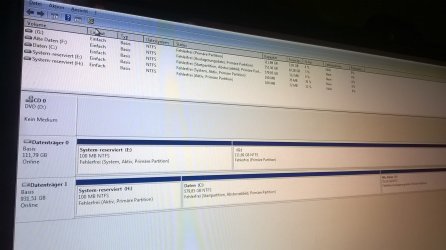
From the the healthy win 7 disk, open disk management (C:\Windows\System32\diskmgmt.msc), expand the window, expand the columns so we can read them and with the sniping tool take a snapshot of the whole window.
Place it here as an attachment. Use the paper clip on the answer window - browse to the file - upload.
 

My Computers My Computers

  • At a glance

    Windows 7 HP 64i5 6600K - 800MHz to 4200MHz4+4G GSkill DDR4 3000IG - Intel 530
    Computer type
    PC/Desktop
    Computer Manufacturer/Model Number
    custom build
    OS
    Windows 7 HP 64
    CPU
    i5 6600K - 800MHz to 4200MHz
    Motherboard
    GA-Z170-HD3P
    Memory
    4+4G GSkill DDR4 3000
    Graphics Card(s)
    IG - Intel 530
    Monitor(s) Displays
    Samsung 226BW
    Screen Resolution
    1680x1050
    Hard Drives
    (1) -1 SM951 – 128GB M.2 AHCI PCIe SSD drive for Windows 7 and Lubuntu
    (2) -1 WD SATA 3 - 1T for Data
    (3) -1 WD SATA 3 - 1T for backup
    PSU
    Thermaltake 450W TR2 gold
    Keyboard
    Old and good Chicony mechanical keyboard
    Mouse
    Logitech mX performance - 9 buttons (had to disable some)
    Internet Speed
    500Mb/s
    Browser
    Firefox 64
    Other Info
    TinyWall firewall
  • At a glance

    Windows 7 Proi7-4500U 800MHz to 3.0GHz(4+4)G DDR3 1600IG intel 4400 + NVIDIA GeForce GT 745M
    Computer type
    Laptop
    System Manufacturer/Model Number
    Asus Q550LF
    OS
    Windows 7 Pro
    CPU
    i7-4500U 800MHz to 3.0GHz
    Motherboard
    Asus Q550LF
    Memory
    (4+4)G DDR3 1600
    Graphics Card(s)
    IG intel 4400 + NVIDIA GeForce GT 745M
    Sound Card
    Realtek
    Monitor(s) Displays
    LG Display LP156WF4-SPH1
    Screen Resolution
    1920 x 1080
    Hard Drives
    BX500 120G SSD for Windows and programs +
    1T HDD for data
    Internet Speed
    500 Mb/s
    Browser
    Firefox
    Other Info
    TinyWall firewall
Hello Megahertz,


attached you can see the screenshot, I hope this picture will do.
It is in German, but should be understandable equally.
As you can see, I have 2 drives: the one ("Datenträger 0") with E: and G: which is the SSD with the broken windows version.
Then the magnetic old HDD ("Datenträger 1"), with H: C: and F:, where, luckily, the old Win7 installation was left and is running now -veery slowly and noisy- but permitting me access to the data and to the SSD drive

"Fehlerfrei" below the disk letters means "without problems/errors".
That's where I am, without really knowing where to look for the boot error in the SSD drive, having tried most of the suggestions I could find in the forums.


Best regards
kalle009
 

Attachments

  • WP_20181021_010.jpg
    WP_20181021_010.jpg
    397.7 KB · Views: 1

My Computer My Computer

At a glance

Windows 7 64 bit Home Premium
Computer type
PC/Desktop
OS
Windows 7 64 bit Home Premium
Why didn't you use the snipping tool (%windir%\system32\SnippingTool.exe) to take the snapshot?

As you have two boot able disks:
- Shutdown
- Detach the HDD ("Datenträger 1")
- Boot from the Win 7 installation disk, go to repair and do a start up repair.
- Don't attach the HDD and try to boot from the SSD
- Report
 

My Computers My Computers

  • At a glance

    Windows 7 HP 64i5 6600K - 800MHz to 4200MHz4+4G GSkill DDR4 3000IG - Intel 530
    Computer type
    PC/Desktop
    Computer Manufacturer/Model Number
    custom build
    OS
    Windows 7 HP 64
    CPU
    i5 6600K - 800MHz to 4200MHz
    Motherboard
    GA-Z170-HD3P
    Memory
    4+4G GSkill DDR4 3000
    Graphics Card(s)
    IG - Intel 530
    Monitor(s) Displays
    Samsung 226BW
    Screen Resolution
    1680x1050
    Hard Drives
    (1) -1 SM951 – 128GB M.2 AHCI PCIe SSD drive for Windows 7 and Lubuntu
    (2) -1 WD SATA 3 - 1T for Data
    (3) -1 WD SATA 3 - 1T for backup
    PSU
    Thermaltake 450W TR2 gold
    Keyboard
    Old and good Chicony mechanical keyboard
    Mouse
    Logitech mX performance - 9 buttons (had to disable some)
    Internet Speed
    500Mb/s
    Browser
    Firefox 64
    Other Info
    TinyWall firewall
  • At a glance

    Windows 7 Proi7-4500U 800MHz to 3.0GHz(4+4)G DDR3 1600IG intel 4400 + NVIDIA GeForce GT 745M
    Computer type
    Laptop
    System Manufacturer/Model Number
    Asus Q550LF
    OS
    Windows 7 Pro
    CPU
    i7-4500U 800MHz to 3.0GHz
    Motherboard
    Asus Q550LF
    Memory
    (4+4)G DDR3 1600
    Graphics Card(s)
    IG intel 4400 + NVIDIA GeForce GT 745M
    Sound Card
    Realtek
    Monitor(s) Displays
    LG Display LP156WF4-SPH1
    Screen Resolution
    1920 x 1080
    Hard Drives
    BX500 120G SSD for Windows and programs +
    1T HDD for data
    Internet Speed
    500 Mb/s
    Browser
    Firefox
    Other Info
    TinyWall firewall
Back
Top