7000 to 7068, saving pictures

FreakyFerret

Masochistic Tech
Pro User
VIP
Local time
2:15 PM
Messages
139
Location
south Louisiana
So 7068 doesn't have all the backgrounds and user icons and such that 7000 had. Where are they on the computer? I'd lke to save them for use in later builds before I put on 7068, but I can't find where they're at.
 

My Computer My Computer

At a glance

Windows 7Pentium D 2.664 gigs DDR2BFG nVidia 8600 GT OC
Computer Manufacturer/Model Number
Custom
OS
Windows 7
CPU
Pentium D 2.66
Motherboard
Asus P5ND2-SLi
Memory
4 gigs DDR2
Graphics Card(s)
BFG nVidia 8600 GT OC
Sound Card
nForce 4 (realtek)
Monitor(s) Displays
Samsung 204B
Screen Resolution
1600x1200
Hard Drives
Western Digital Raptor 150
Western Digital 320 (both SATA)
PSU
BFG 600 watt
Cooling
fan
Keyboard
MS Natural
Mouse
MS Sidewinder
Internet Speed
10 mb
I think it has the same images just lots extra. Anyway, you'll find the wallpapers in c:\windows\web\wallpapers, the themes in c:\windows\resouces\themes and the user images in c:\windows\winsxs & search for 'usertile'. This should help.

Don't forget the rep :)
 

My Computer My Computer

At a glance

Windows 7 Ultimate x64AMD Sempron Dual Core3GBNVIDIA GeForce 6150SE nForce 430
Computer Manufacturer/Model Number
Compaq Desktop
OS
Windows 7 Ultimate x64
CPU
AMD Sempron Dual Core
Memory
3GB
Graphics Card(s)
NVIDIA GeForce 6150SE nForce 430
Screen Resolution
1024x768
Hard Drives
150GB Sata
User pictures are located at "C:\ProgramData\Microsoft\User Account Pictures\Default Pictures"
 

My Computer My Computer

At a glance

Win 7
OS
Win 7
LOL, there's that too. I was looking in [Users]. Shame on me
 

My Computer My Computer

At a glance

Windows 7 Ultimate x64AMD Sempron Dual Core3GBNVIDIA GeForce 6150SE nForce 430
Computer Manufacturer/Model Number
Compaq Desktop
OS
Windows 7 Ultimate x64
CPU
AMD Sempron Dual Core
Memory
3GB
Graphics Card(s)
NVIDIA GeForce 6150SE nForce 430
Screen Resolution
1024x768
Hard Drives
150GB Sata
Thanks! (and repped you both :D )

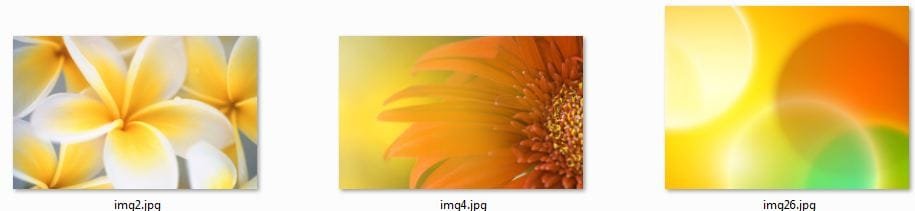
Orbital Shark, I can confirm the pictures in 7000 are not in 7068. I had an install of each side by side (well, remote desktopped) and went through all those folders. The pictures in 7000 were not in 7068, and there were some really nice pictures in 7000. I've attached 3 examples below which one of my users really loves to use with a yellow aero UI. (Never mind, not attaching the actual files since they're probably copyright. Going to just snipping tool a thumbnail of them.) Also my favorite user icon, the gold fish, is definitely missing in 7068.
 

Attachments

  • YellowBack7000.JPG
    YellowBack7000.JPG
    24.9 KB · Views: 26

My Computer My Computer

At a glance

Windows 7Pentium D 2.664 gigs DDR2BFG nVidia 8600 GT OC
Computer Manufacturer/Model Number
Custom
OS
Windows 7
CPU
Pentium D 2.66
Motherboard
Asus P5ND2-SLi
Memory
4 gigs DDR2
Graphics Card(s)
BFG nVidia 8600 GT OC
Sound Card
nForce 4 (realtek)
Monitor(s) Displays
Samsung 204B
Screen Resolution
1600x1200
Hard Drives
Western Digital Raptor 150
Western Digital 320 (both SATA)
PSU
BFG 600 watt
Cooling
fan
Keyboard
MS Natural
Mouse
MS Sidewinder
Internet Speed
10 mb
You're very welcome & thanx for the rep :D
 

My Computer My Computer

At a glance

Windows 7 Ultimate x64AMD Sempron Dual Core3GBNVIDIA GeForce 6150SE nForce 430
Computer Manufacturer/Model Number
Compaq Desktop
OS
Windows 7 Ultimate x64
CPU
AMD Sempron Dual Core
Memory
3GB
Graphics Card(s)
NVIDIA GeForce 6150SE nForce 430
Screen Resolution
1024x768
Hard Drives
150GB Sata
Also, the country themes are in C:\Windows\Globalization\MCT
 

My Computer My Computer

At a glance

Windows 7 Ultimate x64AMD FX-81208gb (4x2gb) DDR3 1600mHzAMD 7850 2gb
Computer type
PC/Desktop
Computer Manufacturer/Model Number
twah
OS
Windows 7 Ultimate x64
CPU
AMD FX-8120
Motherboard
Biostar TA990FXE
Memory
8gb (4x2gb) DDR3 1600mHz
Graphics Card(s)
AMD 7850 2gb
Monitor(s) Displays
27"
Screen Resolution
1920x1080
Hard Drives
1TB HDD + 128GB SSD
Back
Top