Solved 90 seconds to wake up. Is that normal.

RknRusty

New member
Power User
Local time
9:46 PM
Messages
118
Location
South Carolina Midlands
I have my desktop computer with Win7 HP 32 with 3Gb RAM set to sleep after 4 hours of inactivity. When I wake it up it always takes 90 seconds of heavy CPU usage before it is usable for all practical purposes. The usage always involves one of the svchost.exe. files. The amount of time doesn't vary, no change over the past 2 years.
I was just wondering if it's common. Does everyones windows 7 desktop system do this?
 

My Computer My Computer

Computer type
PC/Desktop
Computer Manufacturer/Model Number
eMachines ET1810-03 (Acer) - single user
OS
Windows 7 Home Premium - always up to date
CPU
Intel E2210 2.2Ghz
Motherboard
(OEM) ECS MCP73VT-PM with AMI BIOS R01-A3 (4-29-2009)
Memory
3Gb DDR2
Graphics Card(s)
NVIDIA GeForce 7050/610I GPU
Sound Card
Realtek ALC888/1200 8-channel HD integrated
Monitor(s) Displays
AOC 22" LED
Screen Resolution
1920 x 1080
Hard Drives
Internal - Seagate 320Gb SATA; External - Western Digital 320Gb USB (3.5" internal drive inside a RocketFish USB enclosure)
Keyboard
Wireless
Mouse
Logitech M705 laser wireless
Internet Speed
TWC Cable Broadband ~ 15 Mbps Down/1 Mbps Up
Antivirus
NIS
Browser
Chrome
Other Info
Microsoft Office 2007, incl Outlook SP3; Netgear router; ubee modem
All of my Windows systems have done this, since XP. I never use sleep because a boot only takes 20 seconds.

Curious to see what others have experienced though
 

My Computer My Computer

OS
Windows 7
Me too. I haven't thought to time a boot. Funny considering how many people worry so much about that.
 

My Computer My Computer

Computer type
PC/Desktop
Computer Manufacturer/Model Number
eMachines ET1810-03 (Acer) - single user
OS
Windows 7 Home Premium - always up to date
CPU
Intel E2210 2.2Ghz
Motherboard
(OEM) ECS MCP73VT-PM with AMI BIOS R01-A3 (4-29-2009)
Memory
3Gb DDR2
Graphics Card(s)
NVIDIA GeForce 7050/610I GPU
Sound Card
Realtek ALC888/1200 8-channel HD integrated
Monitor(s) Displays
AOC 22" LED
Screen Resolution
1920 x 1080
Hard Drives
Internal - Seagate 320Gb SATA; External - Western Digital 320Gb USB (3.5" internal drive inside a RocketFish USB enclosure)
Keyboard
Wireless
Mouse
Logitech M705 laser wireless
Internet Speed
TWC Cable Broadband ~ 15 Mbps Down/1 Mbps Up
Antivirus
NIS
Browser
Chrome
Other Info
Microsoft Office 2007, incl Outlook SP3; Netgear router; ubee modem
I haven't experienced that so far. Something has got to be wrong with svchost.exe. I've recently reinstalled my Windows, partially because of that process, there were a lot of them running simultaneously, covering my RAM down (affordably, but still it was annoying). Now it's fine.

I do not say that you should reinstall your OS but consider that as a last option :)
 

My Computer My Computer

OS
Windows 7 Professional x64
CPU
Intel Core i5-2500K @ 3.30Ghz (Overclocked to 4.50Ghz)
Motherboard
ASUS P8P67
Memory
G.Skill DDR3 8GB /1600 KIT
Graphics Card(s)
ASUS Geforce GTX 560 @ 1GB (Slightly overclocked)
Sound Card
ASUS Xonar DX
Monitor(s) Displays
2x Samsung Syncmaster BX2331
Screen Resolution
2x 1920x1080
Hard Drives
SSD: OCZ Agility 3 @ 60GB (Primary Drive);
HDD: Western Digital Caviar Black @ 1TB
PSU
GIGABYTE Superb 720
Case
Nexus version1 Silent System
Cooling
Built-in + Corsair Air Series A70 (CPU)
Keyboard
Logitech K120
Mouse
Razer Imperator
Internet Speed
~120 Mbps DL
I haven't experienced that so far. Something has got to be wrong with svchost.exe. I've recently reinstalled my Windows, partially because of that process, there were a lot of them running simultaneously, covering my RAM down (affordably, but still it was annoying). Now it's fine.

I do not say that you should reinstall your OS but consider that as a last option :)

You can run the command "tasklist /SVC" to see what services each svchost.exe contains. The only one that should be taking up any memory should be the one with AppMgmt in the services list and it shouldn't take that much.
 

My Computer My Computer

OS
Windows 7
I have both my XP and 7 PCs set to sleep after about 45 minutes of inactivity and neither one takes more than about 5 seconds to reawaken.

It is not normal for the systems to take that long to reawaken and become usable. I'd say 15 seconds should be the max.
 

My Computer My Computer

Computer Manufacturer/Model Number
hp pavilion 6680t
OS
win 7 home premium 64 bit
CPU
core i5 760
Motherboard
iona (from MSI)
Memory
6 gb
Graphics Card(s)
ati 5450
Sound Card
real tek 888
Last edited:

My Computer My Computer

Computer type
PC/Desktop
Computer Manufacturer/Model Number
Home Built Desktop By DataTech
OS
Windows 7 Ultimate X64 SP1
CPU
Intel i5-2550K, Differing ~4.4-4.8GHz No built in GPU
Motherboard
ASUS P8Z68-V PRO/GEN3
Memory
16GB G.Skill Sniper 1866MHz @ 2133MHz 2x8GB
Graphics Card(s)
ASUS GTX650TIB-DC2OC-2GD5, (650TI Boost)
Sound Card
Onboard Realtek 5-1
Monitor(s) Displays
Samsung P2570HD
Screen Resolution
1920x1080
Hard Drives
Samsung 840 Pro 256GB SSD for OS, 500GB Seagate Constellation (Enterprise drive) for Data
PSU
Corsair HX650W
Case
Inwin Dragon Rider
Cooling
Hyper 212 EVO w/two Noctua fans, push-pull, @1300 RPM
Keyboard
E-Z Eyes, bright yellow keys with large characters
Mouse
steelseries SENSEI Laser Pro Gaming
Internet Speed
48-51Mbs Mbs down, 11 Mbs up Xfinity Cable
Antivirus
Norton Internet Security 2013
Browser
IE 10, Opera, Pale Moon if needed
Other Info
4 case fans, LG BluRay-RE, ASUS DVD-RW, Mr. Fusion power supply, 1.21 gigawatts.
This sounds more like Hibernate times.

+1 ^

Sleep saves your desktop to RAM and puts the computer in a low power mode so waking is very fast.
Hibernate saves your desktop to a file on the hard disk and turns the computer OFF, so you actually need to restart to start working again.

However you do need to think about the settings before deciding. If you are using a laptop on battery power then hibernate is the correct setting for you, and waiting for the computer to restart is better than running the battery down.

From MS:
Sleep is a power-saving state that allows a computer to quickly resume full-power operation (typically within several seconds) when you want to start working again. Putting your computer into the sleep state is like pausing a DVD player—the computer immediately stops what it’s doing and is ready to start again when you want to resume working.

Hibernation is a power-saving state designed primarily for laptops. While sleep puts your work and settings in memory and draws a small amount of power, hibernation puts your open documents and programs on your hard disk, and then turns off your computer. Of all the power-saving states in Windows, hibernation uses the least amount of power. On a laptop, use hibernation when you know that you won't use your laptop for an extended period and won't have an opportunity to charge the battery during that time.

Hybrid sleep is designed primarily for desktop computers. Hybrid sleep is a combination of sleep and hibernate—it puts any open documents and programs in memory and on your hard disk, and then puts your computer into a low-power state so that you can quickly resume your work. That way, if a power failure occurs, Windows can restore your work from your hard disk. When hybrid sleep is turned on, putting your computer into sleep automatically puts your computer into hybrid sleep. Hybrid sleep is typically turned on by default on desktop computers.
 

My Computer My Computer

Computer type
PC/Desktop
Computer Manufacturer/Model Number
Home Built - Jan 2013
OS
Windows 7 64 Bit Home Premium SP1
CPU
i7-3820
Motherboard
Asus P9X79-PRO - Bios 4608
Memory
GSkill F3-14900CL9Q - 16GB
Graphics Card(s)
EVGA GeForce GTX660 - Driver 352.86
Sound Card
On board Realtek ALC898
Monitor(s) Displays
Acer S271HL
Screen Resolution
1920 x 1080
Hard Drives
#1- Samsung 840 Pro Series
#2- Western Digital WD1002FAEX Sata3 Black
#3- Western Digital WD1002FAEX Sata3 Black
PSU
Corsair CMPSU-850TX-V2 - 850 watt (by Seasonic)
Case
Corsair Obsidian 550D
Cooling
Standard 3 120mm case fans, Cooler Master Hyper 212 EVO
Keyboard
MS KC-0405
Mouse
Intellimouse 5-button
Internet Speed
56 Mbits/Sec (on a good day)
Antivirus
Avast & Malwarebytes
Browser
Firefox
Other Info
Asus DVD - DRW-24B1ST 24X
Sleep should work fine with Win7. I set all my installs to sleep at 30 and Hibernate at an hour.

In the rarest cases, there are problems which are normally resolved by updating the Display driver.

If not, I next check the Diagnostics-Performance log for what's happening at sleep or wake time once it's logged: troubleshooting steps

Next try the clean boot by turning off all Startup items in msconfig or CCLeaner>Tools except AV and gadgets. Next in msconfig>Services choose "Hide all MS Services" to see what's running without your knowledge, uncheck it, then check back in both locations for programs which turn themselves back on to turn them off in their Preferences or Uninstall them. You now have a clean boot.

Finally use the tool which the Pro's use to trace these issues which will present a multi-dimensional chart of your Resume to see what's hanging. If needed the top expert on this and author of the trace Cluberti will consult on your trace results: http://www.sevenforums.com/tutorial...up-shutdown-sleep-hibernate-reboot-trace.html
 
Last edited:
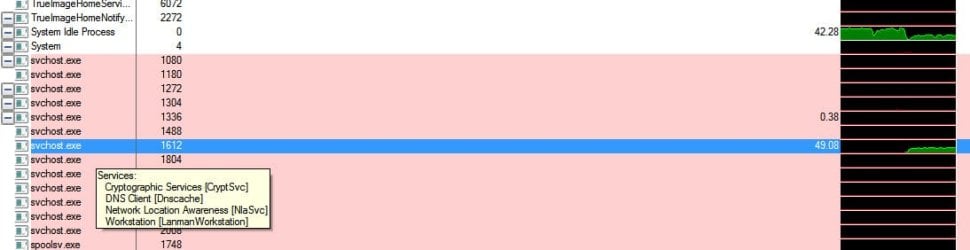
This is the service host that seems to be involved. In this picture it's at 49% usage, but it gets worse. It's always the only service showing usage during this time

Servicehost.jpg

Thanks for the replies. I'll get a chance to read it all more closely this evening and try some of your suggestions.

Rusty
 

My Computer My Computer

Computer type
PC/Desktop
Computer Manufacturer/Model Number
eMachines ET1810-03 (Acer) - single user
OS
Windows 7 Home Premium - always up to date
CPU
Intel E2210 2.2Ghz
Motherboard
(OEM) ECS MCP73VT-PM with AMI BIOS R01-A3 (4-29-2009)
Memory
3Gb DDR2
Graphics Card(s)
NVIDIA GeForce 7050/610I GPU
Sound Card
Realtek ALC888/1200 8-channel HD integrated
Monitor(s) Displays
AOC 22" LED
Screen Resolution
1920 x 1080
Hard Drives
Internal - Seagate 320Gb SATA; External - Western Digital 320Gb USB (3.5" internal drive inside a RocketFish USB enclosure)
Keyboard
Wireless
Mouse
Logitech M705 laser wireless
Internet Speed
TWC Cable Broadband ~ 15 Mbps Down/1 Mbps Up
Antivirus
NIS
Browser
Chrome
Other Info
Microsoft Office 2007, incl Outlook SP3; Netgear router; ubee modem
Back
Top