Is that normal ????

folk

New member
Local time
1:44 PM
Messages
10
Location
Iraq
Hello:)
I have an "Acer laptop Extensa 5235 " with 2 GHz processor , 1GB RAM and 512 monitor .
On C I have XP and actually it is so perfect .
but on E .... theer is "the great 7" and it is also the most perfect .
The problem is when I open Task manager , I see the "memory is 800~900~700" is that normal or dangerous or what ?
Very thanks for every little help.
 

My Computer

Computer type
Laptop
Computer Manufacturer/Model Number
acer
OS
Windows 7 Ultimate 64-bit SP1
CPU
Intel Core i3 3210M @ 2.50GH Ivy Bridge 22nm Technolo
Motherboard
Acer EA50_HC_CR (U3E1)
Memory
4.00GB Single-Channel DDR3 @ 798MHz (11-11-11-28)
Graphics Card(s)
NVIDIA GeForce 710M (Acer Incorporated)
Sound Card
Realtek High Definition Audio
Monitor(s) Displays
Mobile Intel(R) 4 Series Express Chipset
Screen Resolution
1366x768
Hard Drives
466GB Seagate ST9500325AS (SATA)
Well you didn't really tell us a whole lot, like what version of 7. I assume those numbers are in megabytes and they are seen under Windows 7. 1GB is the bare minimum for 32bit, and half of what you need for 64bit. If you're using 32bit, its a little high in my opinion. If its 64bit, then the person who sold you that computer is an idiot, and the numbers aren't surprising at all.
 

My Computer

Computer type
Laptop
Computer Manufacturer/Model Number
Toshiba P775-S7100
OS
Windows 7 Professional SP1 64-bit
CPU
Intel Core i5-2450M @2.5 GHz
Memory
6 GB DDR3 1333MHz
Graphics Card(s)
Intel HD 3000
Monitor(s) Displays
Built-in 17.3" LED; 22" Insignia NS-L22Q-10A
Screen Resolution
1600x900; 1360x768
Hard Drives
750 GB Hitachi
1TB Seagate FreeAgent External
Internet Speed
Verizon DSL Speed(Down/Up): 3360 Kbps / 800 Kbps
Antivirus
MSE and MBAM Pro
Browser
IE10
Hello:)
I have an "Acer laptop Extensa 5235 " with 2 GHz processor , 1GB RAM and 512 monitor .
On C I have XP and actually it is so perfect .
but on E .... theer is "the great 7" and it is also the most perfect .
The problem is when I open Task manager , I see the "memory is 800~900~700" is that normal or dangerous or what ?
Very thanks for every little help.

Please fill out the "My System Specs" so that we can be of more assistance. I use Speccy.

You will definitely benefit from increases the amount of ram in your system. 2 GB is, in my opinion, the minimum when using Win7. I increased the ram in my laptop to 4 GB.

SPECCY- System Information Tool
http://www.piriform.com/speccy

Operating System, CPU and Temp, Ram, Motherboard, Graphics, Hard Drives, Optical Drives, Audio, Peripherals, Network info.
Simply put—this is the best and it’s free!
 

My Computer

Computer Manufacturer/Model Number
Toshiba Satellite S875D-S7239 laptop
OS
MS Windows 7 Ultimate SP1 64-bit
CPU
AMD A10-4600M
Motherboard
AMD Pumori (Socket FT1)
Memory
6.00 GB Dual-Channel DDR3 @ 798MHz (11-11-12-28)
Graphics Card(s)
AMD Radeon HD 7660G
Sound Card
High Definition Audio Device
Monitor(s) Displays
Generic PnP Monitor (1600x900@60Hz)
Screen Resolution
1600x900@60Hz
Hard Drives
SSD 119GB Corsair CSSD-V128GB2 ATA Device
Keyboard
Standard PS/2 Keyboard
Mouse
HP Wireless Optical Mobile Mouse Model FHA-3410
Internet Speed
What the local pub, local coffee shop offers.
Other Info
Optical Drive:MATSHITA BD-CMB UJ160B ATA Device


Also have an Asus ha1002xp netbook with Win 7 Ultimate installed.
Thanks for everything . I think you were asking for this >>>>

Operating System
MS Windows 7 Ultimate 32-bit
CPU
Intel Celeron 900 @ 2.20GHz 40 °C
Penryn 45nm Technology
RAM
1.0GB Single-Channel DDR3 @ 399MHz (6-6-6-15)
Motherboard
Acer BA50-MV (U2E1)
Graphics
Generic PnP Monitor @ 1366x768
Mobile Intel(R) 4 Series Express Chipset Family
Hard Drives
156GB Western Digital WDC WD1600BEVT-22ZCT0 ATA Device (IDE) 44 °C
Optical Drives
Optiarc DVD RW AD-7580S ATA Device
Audio
High Definition Audio Device
 

My Computer

Computer type
Laptop
Computer Manufacturer/Model Number
acer
OS
Windows 7 Ultimate 64-bit SP1
CPU
Intel Core i3 3210M @ 2.50GH Ivy Bridge 22nm Technolo
Motherboard
Acer EA50_HC_CR (U3E1)
Memory
4.00GB Single-Channel DDR3 @ 798MHz (11-11-11-28)
Graphics Card(s)
NVIDIA GeForce 710M (Acer Incorporated)
Sound Card
Realtek High Definition Audio
Monitor(s) Displays
Mobile Intel(R) 4 Series Express Chipset
Screen Resolution
1366x768
Hard Drives
466GB Seagate ST9500325AS (SATA)
Okay, now go to your User CP (link is at the top of this page) and put that info into you system specs. Then we can see what they are no matter where you post on the site. It will save us from having to ask you every time you have a problem.
 

My Computer

Computer type
Laptop
Computer Manufacturer/Model Number
Toshiba P775-S7100
OS
Windows 7 Professional SP1 64-bit
CPU
Intel Core i5-2450M @2.5 GHz
Memory
6 GB DDR3 1333MHz
Graphics Card(s)
Intel HD 3000
Monitor(s) Displays
Built-in 17.3" LED; 22" Insignia NS-L22Q-10A
Screen Resolution
1600x900; 1360x768
Hard Drives
750 GB Hitachi
1TB Seagate FreeAgent External
Internet Speed
Verizon DSL Speed(Down/Up): 3360 Kbps / 800 Kbps
Antivirus
MSE and MBAM Pro
Browser
IE10
folk,
A good place to put that info is in "My System Specs" so that anytime you post we have that info available.
 

My Computer

Computer Manufacturer/Model Number
Toshiba Satellite S875D-S7239 laptop
OS
MS Windows 7 Ultimate SP1 64-bit
CPU
AMD A10-4600M
Motherboard
AMD Pumori (Socket FT1)
Memory
6.00 GB Dual-Channel DDR3 @ 798MHz (11-11-12-28)
Graphics Card(s)
AMD Radeon HD 7660G
Sound Card
High Definition Audio Device
Monitor(s) Displays
Generic PnP Monitor (1600x900@60Hz)
Screen Resolution
1600x900@60Hz
Hard Drives
SSD 119GB Corsair CSSD-V128GB2 ATA Device
Keyboard
Standard PS/2 Keyboard
Mouse
HP Wireless Optical Mobile Mouse Model FHA-3410
Internet Speed
What the local pub, local coffee shop offers.
Other Info
Optical Drive:MATSHITA BD-CMB UJ160B ATA Device


Also have an Asus ha1002xp netbook with Win 7 Ultimate installed.
Thanks a lot
 

My Computer

Computer type
Laptop
Computer Manufacturer/Model Number
acer
OS
Windows 7 Ultimate 64-bit SP1
CPU
Intel Core i3 3210M @ 2.50GH Ivy Bridge 22nm Technolo
Motherboard
Acer EA50_HC_CR (U3E1)
Memory
4.00GB Single-Channel DDR3 @ 798MHz (11-11-11-28)
Graphics Card(s)
NVIDIA GeForce 710M (Acer Incorporated)
Sound Card
Realtek High Definition Audio
Monitor(s) Displays
Mobile Intel(R) 4 Series Express Chipset
Screen Resolution
1366x768
Hard Drives
466GB Seagate ST9500325AS (SATA)
Sorry for the delay. I'm a little busy with other people at the moment. You RAM speed sounds off, so I'm going to get a second opinion from someone. 1GB isn't much, so we can see what we can do to lower then the RAM usage in a bit.
 

My Computer

Computer type
Laptop
Computer Manufacturer/Model Number
Toshiba P775-S7100
OS
Windows 7 Professional SP1 64-bit
CPU
Intel Core i5-2450M @2.5 GHz
Memory
6 GB DDR3 1333MHz
Graphics Card(s)
Intel HD 3000
Monitor(s) Displays
Built-in 17.3" LED; 22" Insignia NS-L22Q-10A
Screen Resolution
1600x900; 1360x768
Hard Drives
750 GB Hitachi
1TB Seagate FreeAgent External
Internet Speed
Verizon DSL Speed(Down/Up): 3360 Kbps / 800 Kbps
Antivirus
MSE and MBAM Pro
Browser
IE10
Your memory usage is fine. Until you actually get a high amount of hard faults, do not concern yourself with memory usage.
 

My Computer

Computer type
PC/Desktop
Computer Manufacturer/Model Number
Alienware Aurora ALX R4
OS
Windows 10 Pro (x64)
CPU
Intel Core i7-3930K (3.2GHz - 4.5GHz)
Motherboard
Alienware Aurora-R4 x79
Memory
4x Samsung 4GB PC3-12800 DDR3 (16GB 1600MHz)
Graphics Card(s)
Nvidia Geforce GTX 690
Sound Card
SteelSeries Siberia Elite
Monitor(s) Displays
Dell UltraSharp U3011
Screen Resolution
2560x1600
Hard Drives
Samsung 850 Pro 256 GB, Seagate 1TB Desktop Hybrid HDD, 2x Western Digital 4TB Green HDD
PSU
875W Some Dell PSU <.<
Case
Alienware Aurora ALX
Cooling
Custom Liquid Cooling (EK CPU & GPU blocks) dual EK 480RAD
Keyboard
Logitech G710+ Mechanical
Mouse
Logitech G700s
Internet Speed
Verizon Fios (50 mbps average)
Other Info
Server: Intel NUC D54250WYK: i5-4250U, 16GB, 256 GB mSATA, Windows Server 2012 R2
Can I instill 64bit instead of 32bit ?
 

My Computer

Computer type
Laptop
Computer Manufacturer/Model Number
acer
OS
Windows 7 Ultimate 64-bit SP1
CPU
Intel Core i3 3210M @ 2.50GH Ivy Bridge 22nm Technolo
Motherboard
Acer EA50_HC_CR (U3E1)
Memory
4.00GB Single-Channel DDR3 @ 798MHz (11-11-11-28)
Graphics Card(s)
NVIDIA GeForce 710M (Acer Incorporated)
Sound Card
Realtek High Definition Audio
Monitor(s) Displays
Mobile Intel(R) 4 Series Express Chipset
Screen Resolution
1366x768
Hard Drives
466GB Seagate ST9500325AS (SATA)
That means "the memory usage" is not a problem
 

My Computer

Computer type
Laptop
Computer Manufacturer/Model Number
acer
OS
Windows 7 Ultimate 64-bit SP1
CPU
Intel Core i3 3210M @ 2.50GH Ivy Bridge 22nm Technolo
Motherboard
Acer EA50_HC_CR (U3E1)
Memory
4.00GB Single-Channel DDR3 @ 798MHz (11-11-11-28)
Graphics Card(s)
NVIDIA GeForce 710M (Acer Incorporated)
Sound Card
Realtek High Definition Audio
Monitor(s) Displays
Mobile Intel(R) 4 Series Express Chipset
Screen Resolution
1366x768
Hard Drives
466GB Seagate ST9500325AS (SATA)
I still think its high. You definitely can't install 64bit unless you have at least 2GB of RAM. I still think the timing with your ram is off, but I'm waiting to hear from someone else first.
 

My Computer

Computer type
Laptop
Computer Manufacturer/Model Number
Toshiba P775-S7100
OS
Windows 7 Professional SP1 64-bit
CPU
Intel Core i5-2450M @2.5 GHz
Memory
6 GB DDR3 1333MHz
Graphics Card(s)
Intel HD 3000
Monitor(s) Displays
Built-in 17.3" LED; 22" Insignia NS-L22Q-10A
Screen Resolution
1600x900; 1360x768
Hard Drives
750 GB Hitachi
1TB Seagate FreeAgent External
Internet Speed
Verizon DSL Speed(Down/Up): 3360 Kbps / 800 Kbps
Antivirus
MSE and MBAM Pro
Browser
IE10
Your memory frequency is fine. It looks as though you have DDR3-800, which is the lowest frequency for DDR3 modules. If you multiply the 399MHz that you stated above by 2 you get 798MT/s, which is near enough 800.

See DDR3 SDRAM - Wikipedia, the free encyclopedia for an explanation.
 

My Computer

Computer type
PC/Desktop
Computer Manufacturer/Model Number
Dwarf Dwf/11/2012 r09/2013
OS
Windows 8.1 Pro RTM x64
CPU
Intel Core-i5-3570K 4-core @ 3.4GHz (Ivy Bridge) (OC 4.4GHz)
Motherboard
ASRock Z77 Extreme4-M
Memory
4 x 4GB DDR3-1600 Corsair Vengeance CMZ8GX3M2A1600C9B (16GB)
Graphics Card(s)
MSI GeForce GTX770 Gaming OC 2GB
Sound Card
Realtek High Definition on board solution (ALC 898)
Monitor(s) Displays
ViewSonic VA1912w Widescreen (VGA)
Screen Resolution
1440x900
Hard Drives
OCZ Agility 3 SSD 120GB SATA III x2 (RAID 0)
Samsung HD501LJ 500GB SATA II x2
Hitachi HDS721010CLA332 1TB SATA II
Iomega 1.5TB Ext USB 2.0
WD 2.0TB Ext USB 3.0
PSU
XFX Pro Series 850W Semi-Modular
Case
Gigabyte IF233
Cooling
1 x 120mm Front Inlet 1 x 120mm Rear Exhaust
Keyboard
Microsoft Comfort Curve Keyboard 3000 (USB)
Mouse
Microsoft Comfort Mouse 3000 for Business (USB)
Internet Speed
NetGear DG834Gv3 ADSL Modem/Router (Ethernet) ~4.0 Mb/s (O2)
Antivirus
Avast! 8.0.1497
Browser
IE 11
Other Info
Optical Drive: HL-DT-ST BD-RE BH10LS30 SATA Bluray
Lexmark S305 Printer/Scanner/Copier (USB)
WEI Score: 8.1/8.1/8.5/8.5/8.25
Asus Eee PC 1011PX Netbook (Windows 7 x86 Starter)
Okay. Thanks for the info dwarf. Just wanted to be sure.

You might be able to free up some RAM by going to msconfig (type it in the the start menu's search bar) and going to the start-up tab. Untick any programs you don't need at start-up. Generally in things by intel, MS, and your antivirus need to be left on. The rest is up to you. You can also go to services, and turn off Superfetch, Tablet PC Input Service (if you don't have a touch screen) and Indexing.
 

My Computer

Computer type
Laptop
Computer Manufacturer/Model Number
Toshiba P775-S7100
OS
Windows 7 Professional SP1 64-bit
CPU
Intel Core i5-2450M @2.5 GHz
Memory
6 GB DDR3 1333MHz
Graphics Card(s)
Intel HD 3000
Monitor(s) Displays
Built-in 17.3" LED; 22" Insignia NS-L22Q-10A
Screen Resolution
1600x900; 1360x768
Hard Drives
750 GB Hitachi
1TB Seagate FreeAgent External
Internet Speed
Verizon DSL Speed(Down/Up): 3360 Kbps / 800 Kbps
Antivirus
MSE and MBAM Pro
Browser
IE10
thats a poor lantency but like the above post that is normal for that ram unless it was enhanced to be much faster

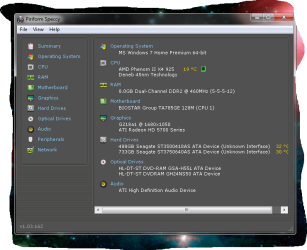
if you want a increase you need to change the ram alltogether to a more faster style ddr3 with a lower latency im using ddr2 but this is a example of that program that was suggested speccy
 

Attachments

  • speccy  shot.png
    speccy shot.png
    39.3 KB · Views: 12

My Computer

Computer type
PC/Desktop
Computer Manufacturer/Model Number
CoreI7-6700K MrFingerIII Special Builds
OS
Windows 10 Home Premium 64bit sp1
CPU
Intel I7-6700K @ 4.6 Ghz 1.344 volts everyday OC
Motherboard
Asrock Fatality K6 Z170 Socket 1151
Memory
32GB G-Skill TridentZ 3200mhz 16-18-18-38 DDR4
Graphics Card(s)
Sli Gigabyte Windforce GTX 980 G1
Sound Card
AC97 Creative Rage Tactic 3D Headphones Bluetooth
Monitor(s) Displays
27" Asus ROG Swift PG278Q G-Sync 48" Vizio Smart HD TV
Screen Resolution
2560x1440p 27"- 48" Currently Gaming at 2560x1440p Res 2K
Hard Drives
250GB Samsung Evo840SSD Seagate baracuda 500 GB WD Mybook 500Gb 1TB Seagate Barracuda
PSU
HX1050w Corsair Silver 80plus certified crosfire/sli
Case
Enthod Pro Full Tower
Cooling
Corsair H110i GT 280 mm High Performance WaterBlock
Keyboard
Logitech wireless keyboard
Mouse
Logitech wireless mouse
Internet Speed
Cox Cable 100+ mb
Antivirus
WebRoot Spysweeper with Antivirus
Browser
IE-10, Chrome, Opera
Other Info
My Other Rig is a AMD FX8320E @4.6Ghz 16GB Ballistic Sport Ram
Mobo Asrock Fatality 990FX 120GB OCZ SSD 1TB Seagate Barracuda Corsair H75 Cooling PSU Corsair CX750
GPU GTX Gigabyte 970G1
Back
Top