91 Processes right after startup???? help.

emnasty600

New member
Local time
7:43 PM
Messages
40
Hey guys. I've noticed lately that my computer hasn't been as fast as before. So I took a peek at task manager to see if theres much memory being taken up. about 1.71 Gb is being used up ( I am running 7 and have 6 Gb total). It says about 21% so im not worried. But for processes it is at 91 right after start up. I went to msconfig and have about 7 or 8 options selected that start up when the pc starts up. Any idea whats going on? Thanks.
 

My Computer My Computer

At a glance

Windows 7 Home Premium x64i56 GigsATI 6370 512MB Dedicated
Computer Manufacturer/Model Number
HP R7-4285DX
OS
Windows 7 Home Premium x64
CPU
i5
Memory
6 Gigs
Graphics Card(s)
ATI 6370 512MB Dedicated
Hard Drives
640G
Case
Aluminum
Memory usage is not a problem, ignore it.
The problem is you have so much crap starting up with the computer.
Either, uninstall those applications you do not need or remove them from start up.
 

My Computer My Computer

At a glance

Windows 10 Pro (x64)Intel Core i7-3930K (3.2GHz - 4.5GHz)4x Samsung 4GB PC3-12800 DDR3 (16GB 1600MHz)Nvidia Geforce GTX 690
Computer type
PC/Desktop
Computer Manufacturer/Model Number
Alienware Aurora ALX R4
OS
Windows 10 Pro (x64)
CPU
Intel Core i7-3930K (3.2GHz - 4.5GHz)
Motherboard
Alienware Aurora-R4 x79
Memory
4x Samsung 4GB PC3-12800 DDR3 (16GB 1600MHz)
Graphics Card(s)
Nvidia Geforce GTX 690
Sound Card
SteelSeries Siberia Elite
Monitor(s) Displays
Dell UltraSharp U3011
Screen Resolution
2560x1600
Hard Drives
Samsung 850 Pro 256 GB, Seagate 1TB Desktop Hybrid HDD, 2x Western Digital 4TB Green HDD
PSU
875W Some Dell PSU <.<
Case
Alienware Aurora ALX
Cooling
Custom Liquid Cooling (EK CPU & GPU blocks) dual EK 480RAD
Keyboard
Logitech G710+ Mechanical
Mouse
Logitech G700s
Internet Speed
Verizon Fios (50 mbps average)
Other Info
Server: Intel NUC D54250WYK: i5-4250U, 16GB, 256 GB mSATA, Windows Server 2012 R2

My Computer My Computer

At a glance

Windows 10 Pro X64Intel Quad Core i7-4770 @ 3.4Ghz16.0GB PC3-12800 DDR3 SDRAM 1600 MHzIntel Integrated HD Graphics
Computer type
PC/Desktop
Computer Manufacturer/Model Number
Lenovo IdeaCenter 450
OS
Windows 10 Pro X64
CPU
Intel Quad Core i7-4770 @ 3.4Ghz
Memory
16.0GB PC3-12800 DDR3 SDRAM 1600 MHz
Graphics Card(s)
Intel Integrated HD Graphics
Sound Card
Realtek HD Audio
Monitor(s) Displays
HP 22" LCD
Screen Resolution
1680 x 1050
Hard Drives
250GB Samsung EVO SATA-3 SSD
2TB Seagate ST2000DM001 SATA-2
1.5TB Seagate ST3150041AS SATA
Keyboard
Dell USB
Mouse
Lenovo USB
Internet Speed
Cable via Road Runner 3MB Upload, 30MB Download
Antivirus
Windows Defender, MBAM Pro, MBAE
Browser
Seamonkey
Other Info
UEFI/GPT
PLDS DVD-RW DH16AERSH
91 is a bit high. 50 to 60 would be within the norm. And as the guys said, reduce the startups to those you really want. There are very few you really need - unless you put them there.

I find WinPatrol ( BillP Studios - WinPatrol ) the easiest tool to manage the startups. Just disable them, you can always reenable if you change your mind. If you are not sure, post a picture of the WinPatrol startup tab and we'll have a look.
 

My Computer My Computer

At a glance

Vista, Windows7, Mint Mate, Zorin, Windows 8from 1.6GHz Duo to i7
Computer Manufacturer/Model Number
HP, Dell, Gateway, Toshiba - 4 laptops and 2 desktops
OS
Vista, Windows7, Mint Mate, Zorin, Windows 8
CPU
from 1.6GHz Duo to i7
Monitor(s) Displays
2x HP w2207
Hard Drives
5x HDD, 7x SSD, 12x Externals
Keyboard
with trackball - no mices
Mouse
Trackball mice
Internet Speed
DSL 6000
Try Soluto.
Quite interesting software, gives a lot of feedback about processes starting in the system (hidden ones especially).
Gives detailed statistics - how long each process takes to boot, percentage of total boot time, gives recommendations and statistics what other users did.
 

My Computer My Computer

At a glance

Windows 8.1 ; Windows 7 x86 (Dec2008-Jan2013)
Computer type
PC/Desktop
OS
Windows 8.1 ; Windows 7 x86 (Dec2008-Jan2013)
Other Info
"The scale icon at the top right of a post or tutorial is how you can give rep to the member."
Alright thanks guys. I've opened up maconfig and deselected almost all but 7-8 one being wifi and such. But I'm not home right now so once I get a chance I'll download winpatrol and take a screen shot for you. Thanks a lot guys. To attach a photo should I zip it or use a host such as photobucket?
 

My Computer My Computer

At a glance

Windows 7 Home Premium x64i56 GigsATI 6370 512MB Dedicated
Computer Manufacturer/Model Number
HP R7-4285DX
OS
Windows 7 Home Premium x64
CPU
i5
Memory
6 Gigs
Graphics Card(s)
ATI 6370 512MB Dedicated
Hard Drives
640G
Case
Aluminum
Just use the paperclip in the posting window. Then you can upload the snip.
 

My Computer My Computer

At a glance

Vista, Windows7, Mint Mate, Zorin, Windows 8from 1.6GHz Duo to i7
Computer Manufacturer/Model Number
HP, Dell, Gateway, Toshiba - 4 laptops and 2 desktops
OS
Vista, Windows7, Mint Mate, Zorin, Windows 8
CPU
from 1.6GHz Duo to i7
Monitor(s) Displays
2x HP w2207
Hard Drives
5x HDD, 7x SSD, 12x Externals
Keyboard
with trackball - no mices
Mouse
Trackball mice
Internet Speed
DSL 6000
Why do you need WinPatrol to take a screen shot? You do it with the Snipping Tool that comes with Win 7. Click start, type snip then click on Snipping Tool.
 

My Computer My Computer

At a glance

Windows 10 Pro X64Intel Quad Core i7-4770 @ 3.4Ghz16.0GB PC3-12800 DDR3 SDRAM 1600 MHzIntel Integrated HD Graphics
Computer type
PC/Desktop
Computer Manufacturer/Model Number
Lenovo IdeaCenter 450
OS
Windows 10 Pro X64
CPU
Intel Quad Core i7-4770 @ 3.4Ghz
Memory
16.0GB PC3-12800 DDR3 SDRAM 1600 MHz
Graphics Card(s)
Intel Integrated HD Graphics
Sound Card
Realtek HD Audio
Monitor(s) Displays
HP 22" LCD
Screen Resolution
1680 x 1050
Hard Drives
250GB Samsung EVO SATA-3 SSD
2TB Seagate ST2000DM001 SATA-2
1.5TB Seagate ST3150041AS SATA
Keyboard
Dell USB
Mouse
Lenovo USB
Internet Speed
Cable via Road Runner 3MB Upload, 30MB Download
Antivirus
Windows Defender, MBAM Pro, MBAE
Browser
Seamonkey
Other Info
UEFI/GPT
PLDS DVD-RW DH16AERSH
Why do you need WinPatrol to take a screen shot? You do it with the Snipping Tool that comes with Win 7. Click start, type snip then click on Snipping Tool.
i don't need winpatrol for the screenshot. Winpatrol can easily manage the startups - it is easier than the little msconfig window. For snipping I use Jing or Faststone Capture anyhow.
 

My Computer My Computer

At a glance

Vista, Windows7, Mint Mate, Zorin, Windows 8from 1.6GHz Duo to i7
Computer Manufacturer/Model Number
HP, Dell, Gateway, Toshiba - 4 laptops and 2 desktops
OS
Vista, Windows7, Mint Mate, Zorin, Windows 8
CPU
from 1.6GHz Duo to i7
Monitor(s) Displays
2x HP w2207
Hard Drives
5x HDD, 7x SSD, 12x Externals
Keyboard
with trackball - no mices
Mouse
Trackball mice
Internet Speed
DSL 6000
Capture.PNG
 

My Computer My Computer

At a glance

Windows 7 Home Premium x64i56 GigsATI 6370 512MB Dedicated
Computer Manufacturer/Model Number
HP R7-4285DX
OS
Windows 7 Home Premium x64
CPU
i5
Memory
6 Gigs
Graphics Card(s)
ATI 6370 512MB Dedicated
Hard Drives
640G
Case
Aluminum
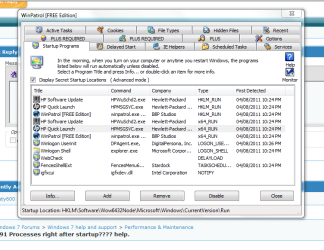
thats what i have for start ups, i still dotn understand how that could possibly be running 91 processes
 

My Computer My Computer

At a glance

Windows 7 Home Premium x64i56 GigsATI 6370 512MB Dedicated
Computer Manufacturer/Model Number
HP R7-4285DX
OS
Windows 7 Home Premium x64
CPU
i5
Memory
6 Gigs
Graphics Card(s)
ATI 6370 512MB Dedicated
Hard Drives
640G
Case
Aluminum
snip1.PNG

snip2.PNG

snip3.PNG
 

My Computer My Computer

At a glance

Windows 7 Home Premium x64i56 GigsATI 6370 512MB Dedicated
Computer Manufacturer/Model Number
HP R7-4285DX
OS
Windows 7 Home Premium x64
CPU
i5
Memory
6 Gigs
Graphics Card(s)
ATI 6370 512MB Dedicated
Hard Drives
640G
Case
Aluminum
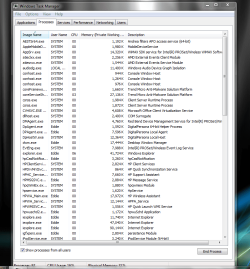
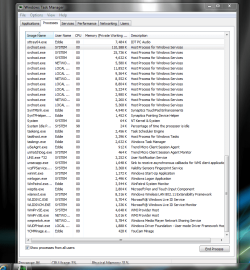
this is what task manager gives me. Thanks for the look guys. Please let me know whats with all this garbage? I never deleted the restore partition that came with the laptop and im tempted to just bring the computer back to how it was out of the box although its not even 3 months old. its a hp dv7-4285dx. what do you guys think?
 

My Computer My Computer

At a glance

Windows 7 Home Premium x64i56 GigsATI 6370 512MB Dedicated
Computer Manufacturer/Model Number
HP R7-4285DX
OS
Windows 7 Home Premium x64
CPU
i5
Memory
6 Gigs
Graphics Card(s)
ATI 6370 512MB Dedicated
Hard Drives
640G
Case
Aluminum
You could kill a few right away with most of the HP stuff.

Anything that is an 'updater'

All Apple processes , ipodservice, bonjour etc

The webcam software, lightscribe
 

My Computer My Computer

At a glance

8 Pro x64i7 3770K 4.6GHz16GB G.Skill Trident X 2666mhzx2 EVGA 780 Ti Superclocked SLI
Computer type
PC/Desktop
Computer Manufacturer/Model Number
Systems by SmartEyeball
OS
8 Pro x64
CPU
i7 3770K 4.6GHz
Motherboard
ASUS P8Z77 WS
Memory
16GB G.Skill Trident X 2666mhz
Graphics Card(s)
x2 EVGA 780 Ti Superclocked SLI
Sound Card
SB X-FI Surround 5.1 PRO USB / ATH-AD900 Headphones
Monitor(s) Displays
x3 Dell U2410 / 58" Samsung
Screen Resolution
5760*1200/ 1920*1200
Hard Drives
2x Intel 520 240GB (RAID 0) * 2x WD Caviar Blacks 2TB (RAID 0) * 2TB WD Caviar Black * Sony Optirac DVD
PSU
Silverstone Strider Evolution 1200W
Case
Thermaltake Level 10 GT Snow Edition
Cooling
Noctua NH-D14
Keyboard
Topre Realforce // Ducky Shine MX Black // Filco Ninja TKL
Mouse
Thermaltake Theron (Highly Recommended) + Razer Imperator
Antivirus
MSE
Browser
IE, FF, WaterFox
Other Info
GT Extreme V2 Sim Racing Cockpit + 40" LCD and K/B Mouse stand ▼
Fanatec CSR Elite Wheel + Clubsport V1 Pedals + CSR shifter/7G-H ▼Saitek X52 Pro ▼ TrackIR 5 Pro
Buttkicker v2 Seat Rumbler with Dedicated 5.1 and Sub Woofer attached to frame ▼
=
Bloody Big Grin
Thanks Smart, but that only brought me down to 81. I still think I'm too high.
 

My Computer My Computer

At a glance

Windows 7 Home Premium x64i56 GigsATI 6370 512MB Dedicated
Computer Manufacturer/Model Number
HP R7-4285DX
OS
Windows 7 Home Premium x64
CPU
i5
Memory
6 Gigs
Graphics Card(s)
ATI 6370 512MB Dedicated
Hard Drives
640G
Case
Aluminum
Thanks Smart, but that only brought me down to 81. I still think I'm too high.


yeah, you are still a little high...I was checking mine and was at 61 i would be running 59 with out steam and IE9 open even less if i closed a few tray icons .

Are you useing apps with multi resourse useage sometimes antivirus or some security software does this with multiple task it has to run in order to protect
 

My Computer My Computer

At a glance

Windows 10 Home Premium 64bit sp1Intel I7-6700K @ 4.6 Ghz 1.344 volts everyday OC32GB G-Skill TridentZ 3200mhz 16-18-18-38 DDR4Sli Gigabyte Windforce GTX 980 G1
Computer type
PC/Desktop
Computer Manufacturer/Model Number
CoreI7-6700K MrFingerIII Special Builds
OS
Windows 10 Home Premium 64bit sp1
CPU
Intel I7-6700K @ 4.6 Ghz 1.344 volts everyday OC
Motherboard
Asrock Fatality K6 Z170 Socket 1151
Memory
32GB G-Skill TridentZ 3200mhz 16-18-18-38 DDR4
Graphics Card(s)
Sli Gigabyte Windforce GTX 980 G1
Sound Card
AC97 Creative Rage Tactic 3D Headphones Bluetooth
Monitor(s) Displays
27" Asus ROG Swift PG278Q G-Sync 48" Vizio Smart HD TV
Screen Resolution
2560x1440p 27"- 48" Currently Gaming at 2560x1440p Res 2K
Hard Drives
250GB Samsung Evo840SSD Seagate baracuda 500 GB WD Mybook 500Gb 1TB Seagate Barracuda
PSU
HX1050w Corsair Silver 80plus certified crosfire/sli
Case
Enthod Pro Full Tower
Cooling
Corsair H110i GT 280 mm High Performance WaterBlock
Keyboard
Logitech wireless keyboard
Mouse
Logitech wireless mouse
Internet Speed
Cox Cable 100+ mb
Antivirus
WebRoot Spysweeper with Antivirus
Browser
IE-10, Chrome, Opera
Other Info
My Other Rig is a AMD FX8320E @4.6Ghz 16GB Ballistic Sport Ram
Mobo Asrock Fatality 990FX 120GB OCZ SSD 1TB Seagate Barracuda Corsair H75 Cooling PSU Corsair CX750
GPU GTX Gigabyte 970G1
It's a start :)

(What you are seeing is what is commonly called "Bloatware" - companies like HP are renowned for it. The vast majority of services simply aren't needed.

It may also be a good idea to keep a list of what you are disabling *in case* something you regularly use stops working how you like it.

Most of the below should still function, but only open when/if needed. Also, a lot of these can only be disabled by disabling the service itself using services.msc

Andea Filter process (mic related)
SmartMenu.exe (Hp media related)
psiservice-2 (Corel related)
digitalpersona (* finger print scanner related * )
igxfpers.exe (Intel graphics related - not need to be run at startup)
IDT PC audio (audio driver system tray)
 

My Computer My Computer

At a glance

8 Pro x64i7 3770K 4.6GHz16GB G.Skill Trident X 2666mhzx2 EVGA 780 Ti Superclocked SLI
Computer type
PC/Desktop
Computer Manufacturer/Model Number
Systems by SmartEyeball
OS
8 Pro x64
CPU
i7 3770K 4.6GHz
Motherboard
ASUS P8Z77 WS
Memory
16GB G.Skill Trident X 2666mhz
Graphics Card(s)
x2 EVGA 780 Ti Superclocked SLI
Sound Card
SB X-FI Surround 5.1 PRO USB / ATH-AD900 Headphones
Monitor(s) Displays
x3 Dell U2410 / 58" Samsung
Screen Resolution
5760*1200/ 1920*1200
Hard Drives
2x Intel 520 240GB (RAID 0) * 2x WD Caviar Blacks 2TB (RAID 0) * 2TB WD Caviar Black * Sony Optirac DVD
PSU
Silverstone Strider Evolution 1200W
Case
Thermaltake Level 10 GT Snow Edition
Cooling
Noctua NH-D14
Keyboard
Topre Realforce // Ducky Shine MX Black // Filco Ninja TKL
Mouse
Thermaltake Theron (Highly Recommended) + Razer Imperator
Antivirus
MSE
Browser
IE, FF, WaterFox
Other Info
GT Extreme V2 Sim Racing Cockpit + 40" LCD and K/B Mouse stand ▼
Fanatec CSR Elite Wheel + Clubsport V1 Pedals + CSR shifter/7G-H ▼Saitek X52 Pro ▼ TrackIR 5 Pro
Buttkicker v2 Seat Rumbler with Dedicated 5.1 and Sub Woofer attached to frame ▼
=
Bloody Big Grin
Just got a chance to look at your startups. Other than Stardock you can disable everything - even WinPatrol, although it provides additional protection. Read the documentation and judge for yourself.
 

My Computer My Computer

At a glance

Vista, Windows7, Mint Mate, Zorin, Windows 8from 1.6GHz Duo to i7
Computer Manufacturer/Model Number
HP, Dell, Gateway, Toshiba - 4 laptops and 2 desktops
OS
Vista, Windows7, Mint Mate, Zorin, Windows 8
CPU
from 1.6GHz Duo to i7
Monitor(s) Displays
2x HP w2207
Hard Drives
5x HDD, 7x SSD, 12x Externals
Keyboard
with trackball - no mices
Mouse
Trackball mice
Internet Speed
DSL 6000
I somewhat figured out the problem. On almost all my programs I had automatic updates and every feature and operation on so I think that's the problem. Some things were just not starting for scamps the go recovery manager didn't start I had to do it by restart. I ended up backing up my music videos and documents on an external and restored the computer back to out f the box. I'm going to follow the the thread here on the forums for "hp out of the box set up guide" and "optimizing your computer" threads. Thanks slot for the help.
 

My Computer My Computer

At a glance

Windows 7 Home Premium x64i56 GigsATI 6370 512MB Dedicated
Computer Manufacturer/Model Number
HP R7-4285DX
OS
Windows 7 Home Premium x64
CPU
i5
Memory
6 Gigs
Graphics Card(s)
ATI 6370 512MB Dedicated
Hard Drives
640G
Case
Aluminum
alright so i restore back to the out of the box condition, but now there are 92 processes upon start up! it has to be HP bloatware, tomorrow night im going to go through the out of the box thread and see if i can get rid of all this garbage.
 

My Computer My Computer

At a glance

Windows 7 Home Premium x64i56 GigsATI 6370 512MB Dedicated
Computer Manufacturer/Model Number
HP R7-4285DX
OS
Windows 7 Home Premium x64
CPU
i5
Memory
6 Gigs
Graphics Card(s)
ATI 6370 512MB Dedicated
Hard Drives
640G
Case
Aluminum
Back
Top