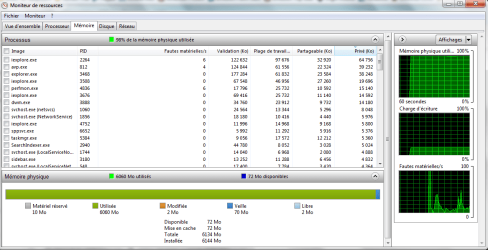
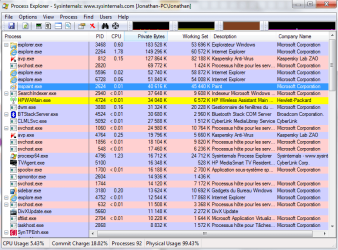
99% physical memory 6GB ram help!

pilot2009

New member
Local time
5:17 AM
Messages
4
Hello

I run on 7 home premium 64bit 6gb ram and lately, my physical memory usage has skyrocketed to 99% for an unknown reason and my laptop is now unbelievably slow... It started out about a week ago and I haven't changed anything in my computer for this to happen(at least not that I can think of). I tried to find the answer on the net, but nothing. I ran a full scan with Kaspersky internet security 2011, malwarebytes' Anti-Malware, Ccleaner, speedupmyPC, but apart from cookies and temporary internet files, nothing was wrong. Tried to kill a few processes here and there but before I break anything I want to have a second opinion ;) Here are some screenshots of ressource monitor and process exp.

Thanks for your help

Jonathan

p.s. sorry for that french writing if you need me to translate anything just ask ;)
 

Attachments

  • ressource monitor.png
    ressource monitor.png
    39.1 KB · Views: 167
  • cpu.png
    cpu.png
    44.3 KB · Views: 128
  • private bytes.png
    private bytes.png
    46.2 KB · Views: 111

My Computer My Computer

Computer Manufacturer/Model Number
HP Pavilion dv7 Notebook PC
OS
Windows 7 Home premium 64bit
CPU
Intel Core i5 M 430 2.27GHz
Memory
6.00 Gb
Monitor(s) Displays
17"
Hard Drives
Local C: 578 GB
Recovery D: 17.2 Gb
HP-TOOLS E: 99.3 Mb
Can you please run task manager and select the processes tab ( Right click Windows Task Bar>Select "Start Task Manager" ), expand it fully to include system tasks, and stretch it to reveal everything, hopefully it will all fit, and take a screenshot and reply here. If you can please arrange the task manager by memory usage.

It's probably not necessary I already suspect a serious memory leak that isn't being shown, but just to be sure.
 

My Computer My Computer

Computer Manufacturer/Model Number
HPE-112y Custom + Custom Build
OS
HP Win7 Pro x64 | Custom Win7 Pro x64
CPU
HP PhII X4 965 Black Ed. 3.4Ghz | PhII X6 1100T 3.3/3.7
Motherboard
OEM HP | ASUS Crosshair IV Extreme 890FX
Memory
8GB DDR3 1333 OC Black Edition x2
Graphics Card(s)
HP XFX Radeon HD4890 1GB | AMD Radeon HD 6990
Sound Card
Realtek 7.1 Digital HDMI x2
Monitor(s) Displays
HP 20" 1680x1050 LCD | Samsung 23" 2ms 1920x1200 LED
Screen Resolution
1680x1050 + 1920x1200 & HDTV for Gaming/TV
Hard Drives
1TB WD "Green" 5,400 RPM SCSI W/ AMD RAID/Xpert
Custom 2x 128GB OCZ Enyo SSD
PSU
Thermaltake Black Widow 850watt Modular x2
Case
HP HPE- 112y OEM Modded | Custom Xclio A380S
Cooling
HP Antec120mm | Custom Antec 360mm/250mm/200mm/120mm
Keyboard
HP G15 | G19
Mouse
G500 x2
Internet Speed
15mb down, 2mb up
Other Info
2x DVD-RAM | 2x BD-ROM
here it is!
thanks!
 

Attachments

  • memoire.png
    memoire.png
    30.8 KB · Views: 197

My Computer My Computer

Computer Manufacturer/Model Number
HP Pavilion dv7 Notebook PC
OS
Windows 7 Home premium 64bit
CPU
Intel Core i5 M 430 2.27GHz
Memory
6.00 Gb
Monitor(s) Displays
17"
Hard Drives
Local C: 578 GB
Recovery D: 17.2 Gb
HP-TOOLS E: 99.3 Mb
I had this exact same issue a few weeks ago.

I always felt that the error reared it's ugly head whenever I was viewing a folder that contained alot of .avi .mkv files. Does the problem occur for you in a similar situation?

Initially I found that if I ended the 'Explorer' Process that would resume my computer into a useable state. However it gets a bit tedious doing this constantly.

Therefore, I have a question. Have you installed the DIVX PLAYER application? I remember that once I had successfully removed this piece of software, my computer has never (touch wood) repeated the problem. My Computer has been on for many days now and I have constantly browsed through my folders that contain 70+ .avi/.mkv files.

My theory was that there was a memory leak caused by divx player in trying to render an image for the avi and mkv thumbnails.

I hope that this situation sounds familiar to you and you have the divx player installed. To remove the Divx player, I downloaded a 30 day trial of REVO uninstaller. That found the Divx player files and removed them successfully.
 

My Computer My Computer

OS
Windows 7 Ultimate
I had this exact same issue a few weeks ago...

Yes it does happen when I go through .mkv files. I'm uninstalling it right now and I'll see what it does in a few days. If I don't post anything, then it's fixed ;)

Thanks!
 

My Computer My Computer

Computer Manufacturer/Model Number
HP Pavilion dv7 Notebook PC
OS
Windows 7 Home premium 64bit
CPU
Intel Core i5 M 430 2.27GHz
Memory
6.00 Gb
Monitor(s) Displays
17"
Hard Drives
Local C: 578 GB
Recovery D: 17.2 Gb
HP-TOOLS E: 99.3 Mb
Fingers crossed Pilot, though post something even if it is fixed so the thread can be marked as Solved. Always useful in the future for anyone with a similar problem. I always google any problems I have with 'solved' included.
 

My Computer My Computer

OS
Windows 7 Ultimate
It still happens!

I have deleted divx when suggested by Mrmacca...and up to now the issue was fixed. I had stopped going through my .mkv movies for a while, and now that I do it again, I still get 99% physical memory usage...help!!!
 

My Computer My Computer

Computer Manufacturer/Model Number
HP Pavilion dv7 Notebook PC
OS
Windows 7 Home premium 64bit
CPU
Intel Core i5 M 430 2.27GHz
Memory
6.00 Gb
Monitor(s) Displays
17"
Hard Drives
Local C: 578 GB
Recovery D: 17.2 Gb
HP-TOOLS E: 99.3 Mb
Back
Top