A clock interrupt was not received by a secondary processor

dvsone1440

New member
Local time
8:12 AM
Messages
9
New to building computers... Managed to get it together and works really well.. right up until it doesn't.

I am an architect and built a computer for modeling and rendering. The modeling program I use is a 32 bit program, so I wanted to overclock as clock speed makes a huge difference in the modeling program usability. The computer works great, but.. Its been shutting down on me every few days. Typically when rendering (Maxwell render) and it is using all the cores 100%.

I currently have it overclocked only with the tpu switch.. 4.1ghz

The components are asus p9x79/ intel i7 3930/ corsair dominator 32gb/ corsair 850w 80+/ corsair h100i radiator/ nvidia quadro 4000 / samsung pro 500gb.
Temperatures are very stable.. 73 c was the highest I saw in the 8 hr stress test. I have the latest asus bios installed. Windows 7 64 bit.
I installed aida 64 and get no error messages after running it for 8 hrs.

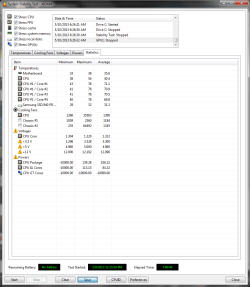
The one strange thing I noticed was in the power tab it mostly a straightish line graph but every once and a while drops off precipitously. The Power minimums all read -10000.

Again I really don't know what I am doing so hoping to get some ideas of where to start. Googling around there does not seem to be any solutions to this crash that I can find.
 

My Computer My Computer

Computer type
PC/Desktop
OS
Pennsylvania
Here is the aida 64 test and my administrative event log
 

Attachments

  • stabilitytest4.png
    stabilitytest4.png
    35 KB · Views: 7
  • eventlog.txt
    eventlog.txt
    125.2 KB · Views: 0

My Computer My Computer

Computer type
PC/Desktop
OS
Pennsylvania
Have you checked your Quadro's GPU temperature while rendering? Maxwell rendering is maybe more stressful than aida64. Try running at a milder OC (3.7 GHz) and see if the issue still persists.
 

My Computer My Computer

Computer type
Laptop
Computer Manufacturer/Model Number
Dell Optiplex SX270, Lenovo Z470
OS
Windows 7 Professional x64 SP1
CPU
Intel® Pentium® 4 @ 2.26 GHz, Intel Core i7-2670QM @ 2.20 GH
Motherboard
Dell, Lenovo
Memory
512MB Dual channel DDR SDRAM @ 400MHz 2.5-3-3-7, 8 GB DDR3
Graphics Card(s)
Intel 82865G, Nvidia GeForce 520M Graphics
Sound Card
SoundMax Integrated Audio, Integrated HD Audio
Monitor(s) Displays
LG W1952
Screen Resolution
1440x900, 1366 x 768
Hard Drives
40 GB 2.5" IDE 4200 RPM HDD, 500 GB 5400 RPM Sata 1.5 + 32 GB SSD
PSU
Dell 145 Watt, Lenovo 120 Watt Power Adapter
Case
Optiplex SX270 Small Form Factor, Laptop
Cooling
Dell Proprietary Air Cooling, Stock laptop cooling
Keyboard
Dell SK-8125 USB Keyboard
Mouse
Dell PS/2 2 button ball mouse with wheel scroll
Internet Speed
300 Mbit down / 20 Mbps up Time Warner Cable
Antivirus
MSE, Malwarebytes Scanner
Browser
Internet (Aizawa) Explorer 11
Other Info
Running Windows Server 2012 Datacenter on a virtual machine to run Metro Apps.
how do you check the GPU temps?
 

My Computer My Computer

Computer type
PC/Desktop
OS
Pennsylvania
Download GPU-Z from this link and report your GPU temps and usage while rendering.
 

My Computer My Computer

Computer type
Laptop
Computer Manufacturer/Model Number
Dell Optiplex SX270, Lenovo Z470
OS
Windows 7 Professional x64 SP1
CPU
Intel® Pentium® 4 @ 2.26 GHz, Intel Core i7-2670QM @ 2.20 GH
Motherboard
Dell, Lenovo
Memory
512MB Dual channel DDR SDRAM @ 400MHz 2.5-3-3-7, 8 GB DDR3
Graphics Card(s)
Intel 82865G, Nvidia GeForce 520M Graphics
Sound Card
SoundMax Integrated Audio, Integrated HD Audio
Monitor(s) Displays
LG W1952
Screen Resolution
1440x900, 1366 x 768
Hard Drives
40 GB 2.5" IDE 4200 RPM HDD, 500 GB 5400 RPM Sata 1.5 + 32 GB SSD
PSU
Dell 145 Watt, Lenovo 120 Watt Power Adapter
Case
Optiplex SX270 Small Form Factor, Laptop
Cooling
Dell Proprietary Air Cooling, Stock laptop cooling
Keyboard
Dell SK-8125 USB Keyboard
Mouse
Dell PS/2 2 button ball mouse with wheel scroll
Internet Speed
300 Mbit down / 20 Mbps up Time Warner Cable
Antivirus
MSE, Malwarebytes Scanner
Browser
Internet (Aizawa) Explorer 11
Other Info
Running Windows Server 2012 Datacenter on a virtual machine to run Metro Apps.
while rendering they seem fine. 63 was the max. I then opened my modeling program as well and pushed it and it got up around 77
 

My Computer My Computer

Computer type
PC/Desktop
OS
Pennsylvania

My Computer My Computer

Computer type
Laptop
Computer Manufacturer/Model Number
Dell Optiplex SX270, Lenovo Z470
OS
Windows 7 Professional x64 SP1
CPU
Intel® Pentium® 4 @ 2.26 GHz, Intel Core i7-2670QM @ 2.20 GH
Motherboard
Dell, Lenovo
Memory
512MB Dual channel DDR SDRAM @ 400MHz 2.5-3-3-7, 8 GB DDR3
Graphics Card(s)
Intel 82865G, Nvidia GeForce 520M Graphics
Sound Card
SoundMax Integrated Audio, Integrated HD Audio
Monitor(s) Displays
LG W1952
Screen Resolution
1440x900, 1366 x 768
Hard Drives
40 GB 2.5" IDE 4200 RPM HDD, 500 GB 5400 RPM Sata 1.5 + 32 GB SSD
PSU
Dell 145 Watt, Lenovo 120 Watt Power Adapter
Case
Optiplex SX270 Small Form Factor, Laptop
Cooling
Dell Proprietary Air Cooling, Stock laptop cooling
Keyboard
Dell SK-8125 USB Keyboard
Mouse
Dell PS/2 2 button ball mouse with wheel scroll
Internet Speed
300 Mbit down / 20 Mbps up Time Warner Cable
Antivirus
MSE, Malwarebytes Scanner
Browser
Internet (Aizawa) Explorer 11
Other Info
Running Windows Server 2012 Datacenter on a virtual machine to run Metro Apps.
I have not tried those. I have run AIDA64 system stability test for a day and am now running one called LinX that I read about. Both have run with no errors or crashes. CPU temps maxing out at 58 degrees c. GPU temps maxed out at 77.
Regarding that I noticed that the GPU fan is only running at 40% but do not have the performance tab to adjust the fan in my NVIDIA driver. Is there a way to get that or is it in the bios somewhere?

I will try those next... are you saying I should run the Prime 95 for a day and then run the Furmark for 20 minutes while Prime 95 is still running?
 

My Computer My Computer

Computer type
PC/Desktop
OS
Pennsylvania
Yes. Prime95 and Furmark running together will make any system slow to a crawl, but if your CPU survives Prime95 for 1 day, your OC can be considered stable. For Furmark, usually 20 minutes of stress test will yield the highest GPU temperature, and if you see some throttling while running Furmark, your GPU is overheating and it could be the reason for your computer shutting down. To control GPU fans, use MSI afterburner, but I don't know if MSI Afterburner supports Nvidia Quadro GPUs.

As for the dump files, I don't know how to analyze it and let's hope that someone in the BSOD forum section can take a look at it.
 

My Computer My Computer

Computer type
Laptop
Computer Manufacturer/Model Number
Dell Optiplex SX270, Lenovo Z470
OS
Windows 7 Professional x64 SP1
CPU
Intel® Pentium® 4 @ 2.26 GHz, Intel Core i7-2670QM @ 2.20 GH
Motherboard
Dell, Lenovo
Memory
512MB Dual channel DDR SDRAM @ 400MHz 2.5-3-3-7, 8 GB DDR3
Graphics Card(s)
Intel 82865G, Nvidia GeForce 520M Graphics
Sound Card
SoundMax Integrated Audio, Integrated HD Audio
Monitor(s) Displays
LG W1952
Screen Resolution
1440x900, 1366 x 768
Hard Drives
40 GB 2.5" IDE 4200 RPM HDD, 500 GB 5400 RPM Sata 1.5 + 32 GB SSD
PSU
Dell 145 Watt, Lenovo 120 Watt Power Adapter
Case
Optiplex SX270 Small Form Factor, Laptop
Cooling
Dell Proprietary Air Cooling, Stock laptop cooling
Keyboard
Dell SK-8125 USB Keyboard
Mouse
Dell PS/2 2 button ball mouse with wheel scroll
Internet Speed
300 Mbit down / 20 Mbps up Time Warner Cable
Antivirus
MSE, Malwarebytes Scanner
Browser
Internet (Aizawa) Explorer 11
Other Info
Running Windows Server 2012 Datacenter on a virtual machine to run Metro Apps.
I ran Prime 95 overnight and just did the furmark for 20 minutes. No crashes or errors except I did get an asus warning that +12 volts was at 15something. Went away to fast to read fully.
CPU was below 70c and GPU was around 81c pretty steady through the 20 minute furmark test that was running concurrently with Prime 95.
 

My Computer My Computer

Computer type
PC/Desktop
OS
Pennsylvania
I ran Prime 95 overnight and just did the furmark for 20 minutes. No crashes or errors except I did get an asus warning that +12 volts was at 15something. Went away to fast to read fully.
CPU was below 70c and GPU was around 81c pretty steady through the 20 minute furmark test that was running concurrently with Prime 95.
 

My Computer My Computer

Computer type
PC/Desktop
OS
Pennsylvania
Well, CPU and GPU is fine. Maybe your PSU sometimes can't occasionally handle full load for extended times. If you have the resources, you can try using another 850 watt or higher PSU and see if shutting down problem still persists.
 

My Computer My Computer

Computer type
Laptop
Computer Manufacturer/Model Number
Dell Optiplex SX270, Lenovo Z470
OS
Windows 7 Professional x64 SP1
CPU
Intel® Pentium® 4 @ 2.26 GHz, Intel Core i7-2670QM @ 2.20 GH
Motherboard
Dell, Lenovo
Memory
512MB Dual channel DDR SDRAM @ 400MHz 2.5-3-3-7, 8 GB DDR3
Graphics Card(s)
Intel 82865G, Nvidia GeForce 520M Graphics
Sound Card
SoundMax Integrated Audio, Integrated HD Audio
Monitor(s) Displays
LG W1952
Screen Resolution
1440x900, 1366 x 768
Hard Drives
40 GB 2.5" IDE 4200 RPM HDD, 500 GB 5400 RPM Sata 1.5 + 32 GB SSD
PSU
Dell 145 Watt, Lenovo 120 Watt Power Adapter
Case
Optiplex SX270 Small Form Factor, Laptop
Cooling
Dell Proprietary Air Cooling, Stock laptop cooling
Keyboard
Dell SK-8125 USB Keyboard
Mouse
Dell PS/2 2 button ball mouse with wheel scroll
Internet Speed
300 Mbit down / 20 Mbps up Time Warner Cable
Antivirus
MSE, Malwarebytes Scanner
Browser
Internet (Aizawa) Explorer 11
Other Info
Running Windows Server 2012 Datacenter on a virtual machine to run Metro Apps.
Code:
[COLOR="red"]BugCheck 1000007E[/COLOR], {[COLOR="SeaGreen"]ffffffffc0000005[/COLOR], fffff880018c83b8, fffff8800d1915e8, fffff8800d190e40}

Probably caused by : [COLOR="Red"]pctNdisLW64.sys[/COLOR] ( pctNdisLW64+9cb8 )

Code:
Usual causes:  Insufficient disk space, Device driver, Video card, BIOS, Breakpoint with no debugger attached, Hardware incompatibility, Faulty system service, Memory, 3rd party remote control

It appears that a thread raised an exception which couldn't be handled, more specifically, the exception appears to be a driver raising a NULL_DEREFERENCE, this is caused when a pointer points to a valid memory address with the value of Null.

Code:
2: kd> [COLOR="seagreen"]!error ffffffffc0000005[/COLOR]
Error code: (NTSTATUS) 0xc0000005 (3221225477) - The instruction at 0x%08lx referenced memory at 0x%08lx. The memory could not be %s.

It seems there is some memory access violations, this is usually caused by drivers referencing invalid memory addresses.

Code:
2: kd> [COLOR="seagreen"]lmvm pctNdisLW64[/COLOR]
start             end                 module name
fffff880`045c8000 fffff880`045de000   pctNdisLW64 T (no symbols)           
    Loaded symbol image file: pctNdisLW64.sys
    Image path: \SystemRoot\system32\DRIVERS\pctNdisLW64.sys
    Image name: pctNdisLW64.sys
    Timestamp:        [COLOR="Red"]Wed Sep 19 04:36:27 2012[/COLOR] (50593DBB)
    CheckSum:         0001A9C0
    ImageSize:        00016000
    Translations:     0000.04b0 0000.04e4 0409.04b0 0409.04e4

pctndislw64.sys seems to be part of the program called PC Tools NDIS 6 LightWeight Filter, either update the program from the program support page, or completely remove the program using - Revo Uninstaller Pro - Uninstall Software, Remove Programs easily, Forced Uninstall, Leftovers Uninstaller

Code:
2: kd> [COLOR="SeaGreen"]lmvm AE2500w764[/COLOR]
start             end                 module name
fffff880`12c66000 fffff880`12d9d000   AE2500w764 T (no symbols)           
    Loaded symbol image file: AE2500w764.sys
    Image path: \SystemRoot\system32\DRIVERS\AE2500w764.sys
    Image name: AE2500w764.sys
    Timestamp:        [COLOR="Red"]Tue Mar 29 01:22:08 2011[/COLOR] (4D912630)
    CheckSum:         0013392A
    ImageSize:        00137000
    Translations:     0000.04b0 0000.04e4 0409.04b0 0409.04e4

Your Linksys Network Adapter WiFi driver seems to be rather outdated, and may be a potential cause, please update the driver from here:
 

My Computer My Computer

Computer type
Laptop
This is very helpful, thank you..

The only think I can think for the first one is that I was using splashtop the last time it bluescreened.

The second one is there anything I can do to avoid this? I have an SSD is that still worth defragmenting?

The PC tools is my virus software and is up to date. I think I am going to uninstall it and try something else. Any recommendations? Never have found one that I like or that does not cause problems like this.

Believe it or not that is the latest driver they have on their website. I think I will find a new adaptor.

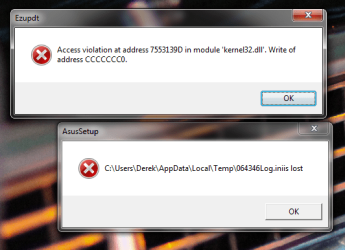
I also just got these two error messages pop up when I rebooted. See attached.

Thanks again.
D
 

Attachments

  • Untitled-1.png
    Untitled-1.png
    47.3 KB · Views: 3

My Computer My Computer

Computer type
PC/Desktop
OS
Pennsylvania
Almost everyone recommends using this combination found here:

Install and perform full scans with:
   Information
Remember to install the free version of Malwarebytes not the free trail; untick the free trial box during installation. MSE is the most lightweight and compatible with the Windows 7 operating system

You can also view this thread for a complete free and lightweight security protection combination:
You could also use this on-demand scanner, in addition to having MSE as your real-time protection program and Malwarebytes as another on-demand scanner.
 

My Computer My Computer

Computer type
Laptop
kernel32.dll is part of the Windows Memory Management, and is loaded into a protected address space, which User Mode programs aren't able to access.

It seems that a program, most probably, the ones mentioned in my first post have been trying to access the same address space where the kernel32.dll is located.
 

My Computer My Computer

Computer type
Laptop
Back
Top