A couple questions

etsnsm

New member
Local time
9:38 AM
Messages
31
1. I made 3 partitions, one which includes my windows/system32 files.
Therefore, I have 3 partitions that include C:, D:, and E:.
C: Is the one with my system32 files.
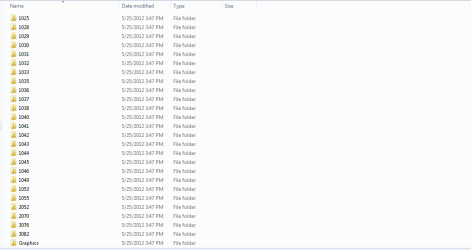
D: is the one that include all my files and games in. The problem i'm having is that within my D: file, that won't delete. I'm going to link a picture of it into this post. I tried deleting it via command prompt with the del /f /s /q /a, while taking ownership of it, but the access was still denied. I've right clicked it and tried to make sure that all the security bypasses were made by allowing myself privileges to delete it, but no use. How do I go about doing this?

2.I currently have the Asus z68 vpro, and I was wondering if lucid virtu is something worth activating? As far as I know, I understand that the mechanics include switching from the onboard graphics to my actual graphics card, depending on what i'm doing.
Is it worth activating? It looks kind of complicated to get started? If so, what kind of drivers would I need?

3. Is there a way where I can add programs to my "Control panel uninstall" section? I say this because I've transfered game files from a USB over to my harddrive, and it doesn't show up there :(

Edit: For question number one, while trying to delete the file via cmd, I saw something that said eula.rtf. I'm not sure what that means.
 

Attachments
  • Capture.PNG
    Capture.PNG
    7.2 KB · Views: 20
Last edited:

My Computer

OS
Windows 7 Ultimate x64
CPU
i5 2500k 3.3GHZ
Motherboard
Asus Z68 v-pro
Memory
CMZ8GX3M2A1600C9
Graphics Card(s)
Nvidia GTX 560 Ti
Monitor(s) Displays
Asus VE228H
Screen Resolution
1920*1080
Hard Drives
ST1000DM003-9YN162
HL-DT-ST-DVDRWBD GBC-H20N
PSU
Corsair 600W
Case
Antec 100 hundred
Cooling
Fan on Processor, two in front, one on the top side.
Keyboard
Razer blackwidow
Mouse
Razer deathadder
etsnsm,

Let's go at this one and only one problem at a time.

For problem #1, did I miss what you are trying to delete?

Also to make sure that we understand your disk layout,, then we need following:

HOW TO POST A SNAPSHOT OF DISK MANAGEMENT DISPLAY
Run disk management:
WIN |
type DISKMGMT.MSC | ENTER
This method gives you a display without the unneeded navigation pane.
WIN=key with Microsoft logo on top.


Maximize the output of Disk Management:
ALT-Spacebar
key combo | X key (selects Maximize) |
Drag the field separators (such as between Status and Capacity) to show entire field.


Make a snapshot:
WIN |
type SNIPPING | ENTER | New
Drag the cursor around the area you want to snip.
File | Save as | select save location and name | Save


Post the snapshot:
Post a File or Screenshot in Seven Forums
 

My Computer

Computer Manufacturer/Model Number
Toshiba Satellite S875D-S7239 laptop
OS
MS Windows 7 Ultimate SP1 64-bit
CPU
AMD A10-4600M
Motherboard
AMD Pumori (Socket FT1)
Memory
6.00 GB Dual-Channel DDR3 @ 798MHz (11-11-12-28)
Graphics Card(s)
AMD Radeon HD 7660G
Sound Card
High Definition Audio Device
Monitor(s) Displays
Generic PnP Monitor (1600x900@60Hz)
Screen Resolution
1600x900@60Hz
Hard Drives
SSD 119GB Corsair CSSD-V128GB2 ATA Device
Keyboard
Standard PS/2 Keyboard
Mouse
HP Wireless Optical Mobile Mouse Model FHA-3410
Internet Speed
What the local pub, local coffee shop offers.
Other Info
Optical Drive:MATSHITA BD-CMB UJ160B ATA Device


Also have an Asus ha1002xp netbook with Win 7 Ultimate installed.
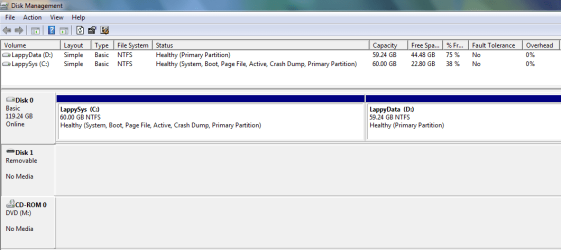
I didn't quite understand what you mean't by Maximize the output of the Disk Management, but here's the best I got from it.
 

Attachments

  • Capture.PNG
    Capture.PNG
    9.8 KB · Views: 27

My Computer

OS
Windows 7 Ultimate x64
CPU
i5 2500k 3.3GHZ
Motherboard
Asus Z68 v-pro
Memory
CMZ8GX3M2A1600C9
Graphics Card(s)
Nvidia GTX 560 Ti
Monitor(s) Displays
Asus VE228H
Screen Resolution
1920*1080
Hard Drives
ST1000DM003-9YN162
HL-DT-ST-DVDRWBD GBC-H20N
PSU
Corsair 600W
Case
Antec 100 hundred
Cooling
Fan on Processor, two in front, one on the top side.
Keyboard
Razer blackwidow
Mouse
Razer deathadder
Code:
[B][U][COLOR=red]aximize[/COLOR] the output of Disk Management:
 [/U][B]ALT-Spacebar[/B][/B] key combo | [B]X[/B] key (selects Ma[B]x[/B]imize) |
 [B][COLOR=#00B050]Drag the field separators[/COLOR] [/B](such as between [B][COLOR=#E36C0A]Status and Capacity[/COLOR][/B]) to show entire field.

Which part of that do you not understand?
 

My Computer

Computer Manufacturer/Model Number
Toshiba Satellite S875D-S7239 laptop
OS
MS Windows 7 Ultimate SP1 64-bit
CPU
AMD A10-4600M
Motherboard
AMD Pumori (Socket FT1)
Memory
6.00 GB Dual-Channel DDR3 @ 798MHz (11-11-12-28)
Graphics Card(s)
AMD Radeon HD 7660G
Sound Card
High Definition Audio Device
Monitor(s) Displays
Generic PnP Monitor (1600x900@60Hz)
Screen Resolution
1600x900@60Hz
Hard Drives
SSD 119GB Corsair CSSD-V128GB2 ATA Device
Keyboard
Standard PS/2 Keyboard
Mouse
HP Wireless Optical Mobile Mouse Model FHA-3410
Internet Speed
What the local pub, local coffee shop offers.
Other Info
Optical Drive:MATSHITA BD-CMB UJ160B ATA Device


Also have an Asus ha1002xp netbook with Win 7 Ultimate installed.
The wording made it confusing.
Either way, I've posted the snapshot within the previous post
 

My Computer

OS
Windows 7 Ultimate x64
CPU
i5 2500k 3.3GHZ
Motherboard
Asus Z68 v-pro
Memory
CMZ8GX3M2A1600C9
Graphics Card(s)
Nvidia GTX 560 Ti
Monitor(s) Displays
Asus VE228H
Screen Resolution
1920*1080
Hard Drives
ST1000DM003-9YN162
HL-DT-ST-DVDRWBD GBC-H20N
PSU
Corsair 600W
Case
Antec 100 hundred
Cooling
Fan on Processor, two in front, one on the top side.
Keyboard
Razer blackwidow
Mouse
Razer deathadder
We've seen multiple unsolvable permissioning problems when moving User folders to another partition, as well as Win7 backup imaging viewing those other partitions as System to include in image. For this reason it's now generally recommend to simply copy your User folders to another partition and then link them by rightclicking to add to the relevant Library - Include a Folder - Windows 7 Forums. This avoids these problems.

What was the reason you installed programs to another partition? These write registry keys which integrate themselves into the OS so they should be kept on the OS partition and included in its backup image.

To add programs to Control Panel to be able to Uninstall them, you need to Install them correctly. Running a game from an old Programs File folder is not correct even if it works.
 
This is first time I have seen a HD volume assigned the letter A: and named (C:) that was system, active, and boot and also another HD volume assigned C: and named (E:). I guess it works??

TJG :)
 

My Computer

Computer Manufacturer/Model Number
Dell Dimension E510
OS
Windows 7 Home Premium 32bits
CPU
Intel Pentium 4 521
Motherboard
Dell Inc. ORD203
Memory
DDR2 4096MBytes
Graphics Card(s)
ATI Radeon HD 2400 Series
Sound Card
On-Board Sigma Tel High Definition Audio
Monitor(s) Displays
Dell ST2210 1920x1080x60 hertz
Hard Drives
320 SATA
500 SATA
PSU
Antec 430 Watts
Case
Dell
Cooling
Standard Fans
The wording made it confusing.
Either way, I've posted the snapshot within the previous post

Please include the maximized snapshot in your next post. Always include fresh material in a fresh post.

thanks,
karl
 

My Computer

Computer Manufacturer/Model Number
Toshiba Satellite S875D-S7239 laptop
OS
MS Windows 7 Ultimate SP1 64-bit
CPU
AMD A10-4600M
Motherboard
AMD Pumori (Socket FT1)
Memory
6.00 GB Dual-Channel DDR3 @ 798MHz (11-11-12-28)
Graphics Card(s)
AMD Radeon HD 7660G
Sound Card
High Definition Audio Device
Monitor(s) Displays
Generic PnP Monitor (1600x900@60Hz)
Screen Resolution
1600x900@60Hz
Hard Drives
SSD 119GB Corsair CSSD-V128GB2 ATA Device
Keyboard
Standard PS/2 Keyboard
Mouse
HP Wireless Optical Mobile Mouse Model FHA-3410
Internet Speed
What the local pub, local coffee shop offers.
Other Info
Optical Drive:MATSHITA BD-CMB UJ160B ATA Device


Also have an Asus ha1002xp netbook with Win 7 Ultimate installed.
1. I made 3 partitions, one which includes my windows/system32 files.
Therefore, I have 3 partitions that include C:, D:, and E:.
C: Is the one with my system32 files.
D: is the one that include all my files and games in. The problem i'm having is that within my D: file, that won't delete. I'm going to link a picture of it into this post. I tried deleting it via command prompt with the del /f /s /q /a, while taking ownership of it, but the access was still denied. I've right clicked it and tried to make sure that all the security bypasses were made by allowing myself privileges to delete it, but no use. How do I go about doing this? Edit:

For question number one, while trying to delete the file via cmd, I saw something that said eula.rtf. I'm not sure what that means.

Try doing a disk error check on it. It should pick up any files that are corrupted and un-deletable.


2.I currently have the Asus z68 vpro, and I was wondering if lucid virtu is something worth activating? As far as I know, I understand that the mechanics include switching from the onboard graphics to my actual graphics card, depending on what i'm doing.
Is it worth activating? It looks kind of complicated to get started? If so, what kind of drivers would I need?

I would say only if you are using a laptop would this be useful as the onboard will use less energy and lengthen your batterylife (or if your power goes out and you are on a UPS) otherwise I wouldn't think this as useful. I might be wrong.(probably am)

3. Is there a way where I can add programs to my "Control panel uninstall" section? I say this because I've transfered game files from a USB over to my harddrive, and it doesn't show up there :(

To add programs to Control Panel to be able to Uninstall them, you need to Install them correctly. Running a game from an old Programs File folder is not correct even if it works.

^^^^ Exactly... Programs should not be installed by moving folders to and from a drive. I don't know if these games are working for you in that capacity or not, but I would suggest re-installing the games instead of moving them. Same for uninstalling. Always go through an un-installer instead of deleting folders. As for your question, only re-installing them will put them in that list as they are not right now actually installed.


Code:
[B][U][COLOR=red]aximize[/COLOR] the output of Disk Management:[/U][/B]
[B][B]ALT-Spacebar[/B][/B] key combo | [B]X[/B] key (selects Ma[B]x[/B]imize) |
 [B][COLOR=#00b050]Drag the field separators[/COLOR] [/B](such as between [B][COLOR=#e36c0a]Status and Capacity[/COLOR][/B]) to show entire field.

Which part of that do you not understand?

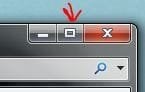
Using the Alt-Key and the Spacebar opens up the Top menu of the window. Then X-key will Maximize it. I have never done this this way (good info though). I usually just click on this thingy:
 

Attachments

  • Capture.JPG
    Capture.JPG
    9.9 KB · Views: 84
Last edited:

My Computer

Computer type
Laptop
Computer Manufacturer/Model Number
ASUS G60-RBBX05
OS
Win7 Home Premium 64x
CPU
Intel Core 2 Duo P7450 / 2.13 GHz (2.29 with Extreme Turbo)
Memory
4 GB PC-6400 Hyundai (2X2) at 800Mhz
Graphics Card(s)
NVIDIA GeForce GTX 260M 1GB DDR3 VRAM
Monitor(s) Displays
16" LED Backlit
Screen Resolution
1366 x 768 on laptop 1600x1050 max res on 22" external mon
Hard Drives
OCZ Agility 3 60GB SSD / 320 GB - Serial ATA-150 - 7200 rpm
PSU
6-cell Lithium ion { lasts 1.5 hours }
Case
ASUS G60 Laptop
Keyboard
Chicklet type back-lit (white light) keyboard
Mouse
Logitech G9 Laser Mouse 3200dpi and 1000 reports per minute
Internet Speed
Comcast 8.60mb/s up - 3.11mb/s down
Antivirus
MSE
Browser
Firefox
Other Info
General mid-budget gaming Comp. Low batterylife - High FrameRates - currently overheating problems :(

2nd Rig: Case: Rosewill BLACKHAWK Gaming ATX Mid Tower Computer Case

Mobo: GIGABYTE GA-990FXA-UD3
CPU: AMD FX-6200 Zambezi 3.8GHz (4.1GHz Turbo)
Heatsink: COOLER MASTER V8 CPU Cooler
RAM: Patriot Viper 3 8GB (2 x 4GB) 240-Pin DDR3 SDRAM 1866 (PC3 15000)
GPU: SAPPHIRE Radeon HD 6850 1GB 2
This is first time I have seen a HD volume assigned the letter A: and named (C:) that was system, active, and boot and also another HD volume assigned C: and named (E:). I guess it works??

TJG :)

I also don't understand this....
I would suggest renaming them

A: System B: Data and C: What_ever_you_are_using_this_for

Or even better, correct the drive letters so your first drive is C: System

How to change drive letter assignments in Windows XP (for XP but should work the same in win7)

Lol should have just stuck to that.
 
Last edited:

My Computer

Computer type
Laptop
Computer Manufacturer/Model Number
ASUS G60-RBBX05
OS
Win7 Home Premium 64x
CPU
Intel Core 2 Duo P7450 / 2.13 GHz (2.29 with Extreme Turbo)
Memory
4 GB PC-6400 Hyundai (2X2) at 800Mhz
Graphics Card(s)
NVIDIA GeForce GTX 260M 1GB DDR3 VRAM
Monitor(s) Displays
16" LED Backlit
Screen Resolution
1366 x 768 on laptop 1600x1050 max res on 22" external mon
Hard Drives
OCZ Agility 3 60GB SSD / 320 GB - Serial ATA-150 - 7200 rpm
PSU
6-cell Lithium ion { lasts 1.5 hours }
Case
ASUS G60 Laptop
Keyboard
Chicklet type back-lit (white light) keyboard
Mouse
Logitech G9 Laser Mouse 3200dpi and 1000 reports per minute
Internet Speed
Comcast 8.60mb/s up - 3.11mb/s down
Antivirus
MSE
Browser
Firefox
Other Info
General mid-budget gaming Comp. Low batterylife - High FrameRates - currently overheating problems :(

2nd Rig: Case: Rosewill BLACKHAWK Gaming ATX Mid Tower Computer Case

Mobo: GIGABYTE GA-990FXA-UD3
CPU: AMD FX-6200 Zambezi 3.8GHz (4.1GHz Turbo)
Heatsink: COOLER MASTER V8 CPU Cooler
RAM: Patriot Viper 3 8GB (2 x 4GB) 240-Pin DDR3 SDRAM 1866 (PC3 15000)
GPU: SAPPHIRE Radeon HD 6850 1GB 2
Definitely do not use the lettter A or the letter B.

I always reassign my optical drive to M so that my disk drive letters are consecutive.

This is from my laptop. The arrangement is not cast in stone since for the purposes of testing, I may create, merge, delete partitions.

Toshiba Laptop Disks.PNG
 

My Computer

Computer Manufacturer/Model Number
Toshiba Satellite S875D-S7239 laptop
OS
MS Windows 7 Ultimate SP1 64-bit
CPU
AMD A10-4600M
Motherboard
AMD Pumori (Socket FT1)
Memory
6.00 GB Dual-Channel DDR3 @ 798MHz (11-11-12-28)
Graphics Card(s)
AMD Radeon HD 7660G
Sound Card
High Definition Audio Device
Monitor(s) Displays
Generic PnP Monitor (1600x900@60Hz)
Screen Resolution
1600x900@60Hz
Hard Drives
SSD 119GB Corsair CSSD-V128GB2 ATA Device
Keyboard
Standard PS/2 Keyboard
Mouse
HP Wireless Optical Mobile Mouse Model FHA-3410
Internet Speed
What the local pub, local coffee shop offers.
Other Info
Optical Drive:MATSHITA BD-CMB UJ160B ATA Device


Also have an Asus ha1002xp netbook with Win 7 Ultimate installed.
OP has labeled his partitions A, B, C which is too easy to confuse with the Drive letters.

Rightclick on each drive in Computer to change the label in the box given.
 
This is first time I have seen a HD volume assigned the letter A: and named (C:) that was system, active, and boot and also another HD volume assigned C: and named (E:). I
I think it's the other way around.

The C: partition is named A:
The D: partition is named B:
The E: partition is named C:
There is 531.42 GB unallocated at the end of the HD
There is 101 MB unallocated at the beginning of the HD

System and Active are on the C: partition (named A)
There is unallocated space (nothing) where System normally is

I sort of understand why - if Windows listed partitions by letter first.... but nope it lists partitions alphabetically by name. I used to do a naming convention c) OS| d) data e) develop | g) Backup - only for a sorted view of my partitions.

I think etsnsm might have to repair the installation - fix System and C: - where System is the active and system part, C: is the boot, page, crash part.

What say ye all?
 

My Computer

Computer type
Laptop
Computer Manufacturer/Model Number
HP Pavilion dv6-6c10us
OS
x64 (6.3.9600) Win8.1 Pro & soon dual boot x64 (6.1.7601) Win7_SP1 HomePrem
CPU
AMD A6-3420M APU with Radeon(tm) HD Graphics
Motherboard
Hewlett-Packard 1805
Memory
6.00 GB
Graphics Card(s)
AMD Radeon(TM) HD 6520G
Sound Card
(1) AMD High Definition Audio Device (2) IDT High Definiti
Monitor(s) Displays
HP W2072a 20" LCD (1600 x 900) @ 60 Hz
Screen Resolution
1366 x 768 x 32 bits (4294967296 colors) @ 60 Hz
Hard Drives
ST640LM0 00 HM641JI SATA Disk Device
Keyboard
Logitech k520 wireless KB
Mouse
Logitech m320 wireless mouse (bundled with KB)
Internet Speed
15/5 | 54 MB Wireless 'n'
Antivirus
Realtime: Defender or Avast | On-demand: Malwarebytes, ESET
Browser
IE 11 on Win8, IE 10 on win 7
Other Info
Media: [Gimp, Audacity, VLC] || Comm: [WEmail 2012, Skype] || Productivity: [OpenOffice,| Textpad] || Utils: [Sysinternals, cCleaner, Speccy, Defraggler]
Apparently during reinstall or repair the System boot files were moved onto C from System Reserved. But it's not worth the trouble or risk to move it back unless he needs SysReserved for Bitlocker or Dual Booting.

As stated earlier the problems with permissioning on D likely stem from data and programs being run from there, including programs that were never reinstalled.

To avoid problems, only data should be linked from another partition, and to avoid problems I would only copy the User folders there and then link them to related Library - Include a Folder - Windows 7 Forums.
 
@gregrocker: Ok, you're da repair man. I'll defer to your judgement. Plus you beat me to recognizing the naming convention =:>
The only caveat is that etsnsm won't be able to shrink (or grow?) the C: drive with System on it.
Apparently during reinstall or repair the System boot files were moved onto C from System Reserved. But it's not worth the trouble or risk to move it back unless he needs SysReserved for Bitlocker or Dual Booting......
@etsnsm: eula.rtf is the End User Licesnse Agreement. I'm not sure if there was a problem deleting it or if it popped up - if it was a pop-up then something was being executed.
etsnsm said:
Edit: For question number one, while trying to delete the file via cmd, I saw something that said eula.rtf. I'm not sure what that means.
@etsnsm: What does .....all my files mean. Is this data from another machine or is it data that you've created since. What I'm really asking is - did you move the normal location for your Document, Pictures, Music, Video, etc to your D drive or are they new folders that you created especially for holding data.

Secondly, are the games still on the USB? If so, leave them there as backup. Once you identify how you use the "all my files" on D, someone can let you know the best way to manage the data. GregRocker already provided one method, a very good suggestion. I'm thinking that if the data on D is just storage, then you could move it to your profile folders, format D and reorg per Greg. Don't format D until you've put your data someplace safe.

As far as putting the game in Control Panel to uninstall - not worth the trouble, better to clean up what you have and install them properly.
etsnsm said:
D: is the one that include all my files and games in. The problem I'm having is that within my D: file, that won't delete......
...tried deleting it via command prompt with the del /f /s /q /a, while taking ownership of it, but the access was still denied.
I've right clicked it and tried to make sure that all the security bypasses were made by allowing myself privileges to delete it, but no use....

3. Is there a way where I can add programs to my "Control panel uninstall" section? I say this because I've transferred game files from a USB over to my hard drive...
 

My Computer

Computer type
Laptop
Computer Manufacturer/Model Number
HP Pavilion dv6-6c10us
OS
x64 (6.3.9600) Win8.1 Pro & soon dual boot x64 (6.1.7601) Win7_SP1 HomePrem
CPU
AMD A6-3420M APU with Radeon(tm) HD Graphics
Motherboard
Hewlett-Packard 1805
Memory
6.00 GB
Graphics Card(s)
AMD Radeon(TM) HD 6520G
Sound Card
(1) AMD High Definition Audio Device (2) IDT High Definiti
Monitor(s) Displays
HP W2072a 20" LCD (1600 x 900) @ 60 Hz
Screen Resolution
1366 x 768 x 32 bits (4294967296 colors) @ 60 Hz
Hard Drives
ST640LM0 00 HM641JI SATA Disk Device
Keyboard
Logitech k520 wireless KB
Mouse
Logitech m320 wireless mouse (bundled with KB)
Internet Speed
15/5 | 54 MB Wireless 'n'
Antivirus
Realtime: Defender or Avast | On-demand: Malwarebytes, ESET
Browser
IE 11 on Win8, IE 10 on win 7
Other Info
Media: [Gimp, Audacity, VLC] || Comm: [WEmail 2012, Skype] || Productivity: [OpenOffice,| Textpad] || Utils: [Sysinternals, cCleaner, Speccy, Defraggler]
Back
Top