A Cure To Windows !

terry1996

New member
Local time
7:44 PM
Messages
30
Hello people , I'm looking for some info and i though to ask here.
So the question is : What i need , how i will , to connect to computers to same network? A full tutorial video link will be a pleasure *_*
And something else, When i am trying to a computer to network it's asking for a name and password what is that? How i can setup my own ?

Thanks in advance, all answers are accepted.
 

My Computer

Computer type
Laptop
Computer Manufacturer/Model Number
Acer
OS
Windows 7 Ultimate x64
CPU
Intel(R) Core(TM) i5-4200U CPU @ 1.60GHz 2.30GHz
Motherboard
Acer Aspire E1-572G
Memory
4,00GB RAM
Graphics Card(s)
AMD RADEON GRAPHICS HD 8750m
Hard Drives
TOSHIBA MQ01ABD075 (698 GB)
Antivirus
Avast
Browser
Google Chrome

My Computer

Computer type
PC/Desktop
Computer Manufacturer/Model Number
ASUS X550ZE
OS
Windows 7 Home Premium 64-BIT
CPU
AMD A8 7200P
Motherboard
N/A
Memory
8GB 1600mhz
Graphics Card(s)
Radeon R5 (APU) + Radeon R5 M230 2GB Dual Graphics
Sound Card
Realtek ALC269 with SonicMaster
Monitor(s) Displays
Laptop Display
Screen Resolution
1920 x 1080 @60hz
Hard Drives
WDC WD50 00LPVX-80V0TT0 (500GB)
PSU
Laptop Charger
Mouse
ARMAGGEDON TEXTRON SCORPION 7
Internet Speed
100 mbps DOWN / 50 mbps UP
Antivirus
Windows Defender
Browser
Mozzila FireFox, Valve Steam in-game internet browser
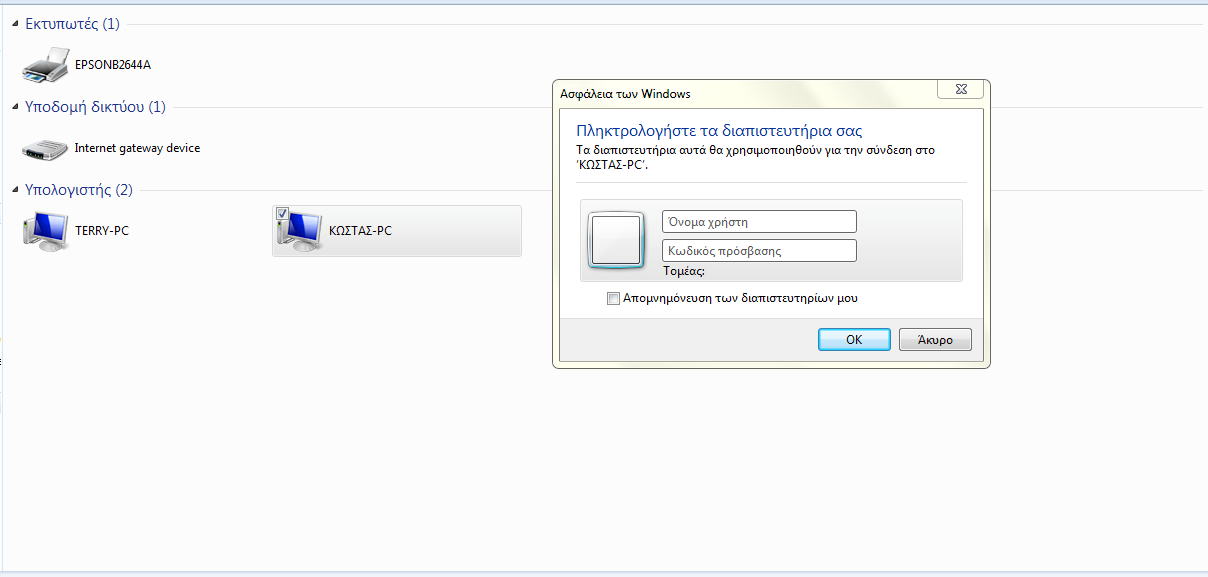
Already done ,a window pops up when i press to enter that computer and asks for name and password, i try name : admin and pass :admin but nothing . Is there any way to setup it ?
 

My Computer

Computer type
Laptop
Computer Manufacturer/Model Number
Acer
OS
Windows 7 Ultimate x64
CPU
Intel(R) Core(TM) i5-4200U CPU @ 1.60GHz 2.30GHz
Motherboard
Acer Aspire E1-572G
Memory
4,00GB RAM
Graphics Card(s)
AMD RADEON GRAPHICS HD 8750m
Hard Drives
TOSHIBA MQ01ABD075 (698 GB)
Antivirus
Avast
Browser
Google Chrome

My Computer

Computer type
PC/Desktop
Computer Manufacturer/Model Number
Dell optiplex 740
OS
Win 7 Home Premium SP1 32 bit
CPU
AMD Athlon 64 X2 5000B
Motherboard
Dell Inc. 0YP696 (Socket M2 )
Memory
4.00 GB Dual-Channel DDR2 @ 370MHz (6-6-6-18)
Graphics Card(s)
Acer E181H (1366x768@60Hz) 64MB GeForce 6150 LE (Dell)
Sound Card
SigmaTel High Definition Audio CODEC
Monitor(s) Displays
Acer E181H (1366x768@60Hz) 64MB GeForce 6150 LE (Dell)
Hard Drives
699GB Seagate ST375064 0NS SCSI Disk Device (ATA)
Case
Mini tower
Internet Speed
Ping 36 ms, Download 57.71 mbps , Upload 11.79mbps
Antivirus
Free Avast. Pro paid Mbam , Free Sas
Browser
Palemoon .
So, i want to setup a connection between my laptop and my desktop computer. I found a tutorial in youtube saying how i can do that , so i follow that . I did these stes:
a) Find IP
b) Enable desktop's to accept connections
Worked actually these steps but i get this
BizPbGF.png


I don't know what to put there .
 

My Computer

Computer type
Laptop
Computer Manufacturer/Model Number
Acer
OS
Windows 7 Ultimate x64
CPU
Intel(R) Core(TM) i5-4200U CPU @ 1.60GHz 2.30GHz
Motherboard
Acer Aspire E1-572G
Memory
4,00GB RAM
Graphics Card(s)
AMD RADEON GRAPHICS HD 8750m
Hard Drives
TOSHIBA MQ01ABD075 (698 GB)
Antivirus
Avast
Browser
Google Chrome
I doubt many of us speak Greek, can you translate what the popup is asking for?

The best way to do it is to join both computers to the same Homegroup.

1. Make sure that the network is set to "Home" at both computers (not Work or Public).
2. On one of them create a homegroup, write the password down.
3. Join the other computer to the homegroup, use the same password.

Done
 

My Computer

Computer type
PC/Desktop
OS
Windows 7 Pro
Are both computers running at least Win 7? A Homegroup can only be setup with Win 7 or Win 8 computers. In other words, XP or Vista computers cannot join a Homegroup.

Greek or not, the popup is asking for a userid and password. If the computer you are trying to connect to is a Win 8 computer using a MS account, try entering the MS account credentials.

Have you Shared any folders on either computer?
 

My Computer

Computer type
PC/Desktop
Computer Manufacturer/Model Number
Home Built desktop, Dell G15 5511 Gaming laptop,MS Surface Pro 7 tablet
OS
W10 Pro desktop, W11 laptop, W11 Pro tablet (all 64-bit)
CPU
3.7Ghz 8700K i7, i7-11800H, i7-1065G7
Motherboard
ASUS TUF Z370-Pro Gaming in desktop
Memory
16G desktop, 16G laptop, 4G tablet
Graphics Card(s)
AMD Radeon RX580, RTX 3060, Intel Iris Plus
Sound Card
High Definition Audio (Built-in to mobo)
Monitor(s) Displays
Samsung U32J59 32" (2x), 15.6", 12"
Screen Resolution
3840x2160, 3840x2160, 1920x1080, 2160x1440
Hard Drives
500G SSD for OS; 2T, 10T & 15T HDDs for Data on Desktop, 1TB SSD laptop, 128G SSD tablet.
PSU
Corsair CX 750M
Case
Antec 100
Cooling
CM 212+
Keyboard
IBM Model M - used continuously since 1986
Mouse
Microsoft Pro IntelliMouse
Internet Speed
400M down 8M up
Antivirus
Windows Defender
Browser
FireFox
Other Info
Built my first computer (8Mhz 8088cpu, 640K RAM, 20MB HDD, 2 360K floppy drives) in 1985 and have been building them for myself, relatives and friends ever since.
Pardon me for butting in, but the popup asking for id and password you get when you are in windows explorer / network / computer name and click on the hard drive letter of that computer. see image
Capture1.JPG

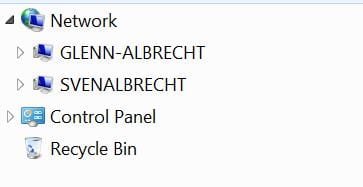
If you want to get to the other computer you need to go to windows explorer/ home group and click on the computer name there. It then will bring up the libraries. See image
Capture2.JPG

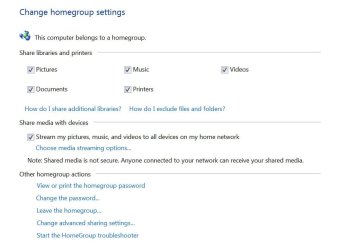
To setup the homrgroup, go to control panel and click on homegroup and follow the directions.
Once it is set up, you can find out the password by clicking on “ view or print homegroup password” .then go to the other computer and join the homegroup and put in the password you got from the first computer. See image.
Capture3.JPG

Hope this helped

Sven
 

My Computer

Computer type
PC/Desktop
Computer Manufacturer/Model Number
Custom Build
OS
windows 7 ultimate x64
CPU
AMD FX 6 CORE PROCESSOR
Memory
16 GB
Graphics Card(s)
on MB
Sound Card
on MB
Monitor(s) Displays
Acer
Screen Resolution
1920x1080
Hard Drives
Seagate ( C:\)
Case
mini tower
Keyboard
Logitech wireless
Mouse
Logitech wireless
Antivirus
MSE
Browser
IE11
I don't know what to put there .

Did you try putting the user name and password of the "greek" computer account in the popup?

Keep in mind that your user name is not necessary the same as what's displayed at logon.

Go Control Panel > Administrative Tools > Computer Management > Users

make sure you are using "Name" rather than "Full Name" when logging on remotely.
 

My Computer

Computer type
PC/Desktop
OS
Windows 7 Pro
Hello again mates. Let me give you some more info

Both computers running Windows 7 Ultimate x64 . Both computers have shared folders to the hole network not in the homegroup . Both computers using a printer from network .

And i don't have a password to add in the box because i never used a password in my computer. Is this logic guys? Since microsoft windows have their own program to connect to computer to local network i wont use another program ...

I will test it again in a few hours with homegroup and i will give a feedback.

And something else i wanna share my hard drive in network , i went to properties then share blah blah blah did it fine ,but when i am going to another computer and trying to enter that hard drive gives me an error >.< Picture will come in some hours . Thanks a lot people!!
 

My Computer

Computer type
Laptop
Computer Manufacturer/Model Number
Acer
OS
Windows 7 Ultimate x64
CPU
Intel(R) Core(TM) i5-4200U CPU @ 1.60GHz 2.30GHz
Motherboard
Acer Aspire E1-572G
Memory
4,00GB RAM
Graphics Card(s)
AMD RADEON GRAPHICS HD 8750m
Hard Drives
TOSHIBA MQ01ABD075 (698 GB)
Antivirus
Avast
Browser
Google Chrome

My Computer

Computer type
Laptop
Computer Manufacturer/Model Number
HP Pavilion dv6-6c10us
OS
x64 (6.3.9600) Win8.1 Pro & soon dual boot x64 (6.1.7601) Win7_SP1 HomePrem
CPU
AMD A6-3420M APU with Radeon(tm) HD Graphics
Motherboard
Hewlett-Packard 1805
Memory
6.00 GB
Graphics Card(s)
AMD Radeon(TM) HD 6520G
Sound Card
(1) AMD High Definition Audio Device (2) IDT High Definiti
Monitor(s) Displays
HP W2072a 20" LCD (1600 x 900) @ 60 Hz
Screen Resolution
1366 x 768 x 32 bits (4294967296 colors) @ 60 Hz
Hard Drives
ST640LM0 00 HM641JI SATA Disk Device
Keyboard
Logitech k520 wireless KB
Mouse
Logitech m320 wireless mouse (bundled with KB)
Internet Speed
15/5 | 54 MB Wireless 'n'
Antivirus
Realtime: Defender or Avast | On-demand: Malwarebytes, ESET
Browser
IE 11 on Win8, IE 10 on win 7
Other Info
Media: [Gimp, Audacity, VLC] || Comm: [WEmail 2012, Skype] || Productivity: [OpenOffice,| Textpad] || Utils: [Sysinternals, cCleaner, Speccy, Defraggler]
Back
Top