A Desktop Shortcut Organizer

Porkchops007

New member
Local time
2:33 AM
Messages
8
Is there any program that can organize selected desktop shortcuts into a sliding row (Or something similar to that). A picture of my desktop is in the attached files. I want that top bar of games to be in a row like they are but so I can click a left and right arrow to slide through them so they don't take up all of the space.
 

Attachments
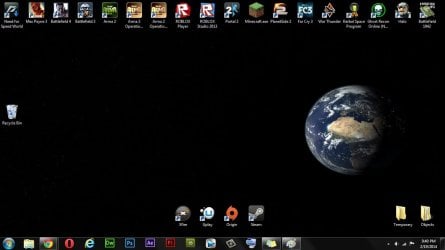
  • desktop.jpg
    desktop.jpg
    64.5 KB · Views: 3

My Computer My Computer

Computer type
PC/Desktop
Computer Manufacturer/Model Number
Custom Build (By Me)
OS
Windows 7 Home Premium x64
CPU
AMD FX-8350
Motherboard
ASUS M5A99X
Memory
8GB (2 x 4GB) DDR3 SDRAM 1600 240-pin
Graphics Card(s)
1GB MSI Radeon 7790
Hard Drives
Seagate Barracuda ST1000DM003 1TB 7200 RPM 64MB Cache SATA 6.0Gb/s 3.5" Internal Hard Drive Bare Drive
Antivirus
Microsoft Security Essentials & avast! Antivirus
Browser
Chrome, Opera, IE, Firefox, Tor Browser, & Safari

My Computer My Computer

Computer type
PC/Desktop
Computer Manufacturer/Model Number
Home made Desktop
OS
Windows 10 Pro. 64/ version 1709 Windows 7 Pro/64
CPU
Intel i7-6800K @ 4.3
Motherboard
ASUS X-99 Deluxe II
Memory
Corsair Platinum 16 gig @2400
Graphics Card(s)
EVGA GTX 1070 OC
Monitor(s) Displays
Asus 27" LED LCD/VE278Q
Screen Resolution
1920-1080 or 1280-720 HDMI
Hard Drives
INTEL SSD 730-240 Gb Sata 3.0/
PSU
EVGA Platium 1200W
Case
Phanteks Luxe Tempered Glass 8 fans/ one radiator
Cooling
XSPC/ Water Cooled CPU
Keyboard
Das 4 Professional
Mouse
Logitech M705/MX Anywhere 2-S
Internet Speed
100 mbits
Antivirus
Microsoft Security Essentials/ Malwarebytes Premium 3.0/ SAS
Browser
I.E. 11 default/Firefox/ ISP Time Warner Cable/Spectrum
Other Info
LG BluRay Burner/
Sound system-KLipsch-THX/
Icy Dock ssd Hot Swap bays.
Try an application launcher?

Hi,

Here's another way to keep your desktop clear and have quick access to stuff that you use most.

Quick Cliq - portable application launcher and clipboard manager

Quote from the manufacturer's website:

Application Launcher
Quick Cliq offers you the easiest & fastest way to launch your programs, documents and commands. You can create the following types of shortcuts: file, folder, folder menu, folder switch, system shortcut, URL and even email templates. It also provides a group of Special commands you can use to extend the way you run shortcuts, like run an application under admin rights, repeat any shortcut several times or using environmental variables in shortcut targets. One of the more interesting and unique features of Quick Cliq’s launcher is the possibility to run an unlimited number of commands from only one shortcut.


Screenshots from my machine:


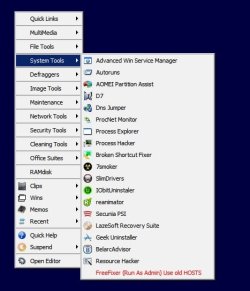
A quick press of Winkey+Z opens up the launcher. You can create your own layout and add your own shortcuts.


A menu with category separators on the left and a sub-menu with individual shortcuts displayed on the right.


Quick Cliq.jpg


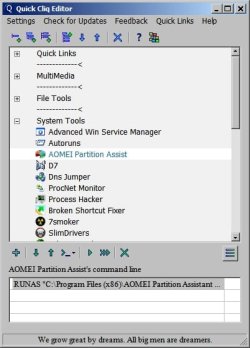
Shown below is the Editor - that's the screen that's used to create the menus.


Quick Cliq Editor.jpg


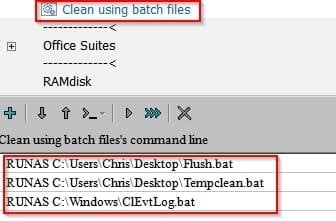
An example of launching multiple files (or shortcuts) with a single click:


Quick Cliq Editor2.jpg


The only real issue is that to avoid having to manually start Quick Cliq on every boot - it needs a shortcut to be added to:


%USERPROFILE%\AppData\Roaming\Microsoft\Windows\Start Menu

It might be something worth looking at. It doesn't require installation.
 

My Computer My Computer

Computer type
Laptop
Computer Manufacturer/Model Number
ASUS
OS
Microsoft Windows 7 Home Premium 64-bit 7601 Multiprocessor Free Service Pack 1
CPU
AMD C-60 APU with Radeon(tm) HD Graphics
Motherboard
ASUSTeK COMPUTER INC. X501U
Memory
4.00 GB
Graphics Card(s)
AMD Radeon HD 6290 Graphics
Sound Card
(1) AMD High Definition Audio Device (2) Realtek High Defi
Screen Resolution
1366 x 768 x 32 bits (4294967296 colors) @ 60 Hz
Hard Drives
Hitachi HTS545050A7E380 SATA Disk Device
Antivirus
Comodo CIS & FW, SecureAplus App Whitelisting, Threatfire
Browser
Cyberfox 64bit, Opera 64bit, Airfox
Other Info
Spy-The-Spy, HitmanPro.Alert, Norton Connect Safe, MJRegWatcher, BitDefender TrafficLight, Voodoo Shield, Zemana AntiMalware
Last edited:

My Computer My Computer

Computer type
Laptop
Computer Manufacturer/Model Number
ASUS
OS
Microsoft Windows 7 Home Premium 64-bit 7601 Multiprocessor Free Service Pack 1
CPU
AMD C-60 APU with Radeon(tm) HD Graphics
Motherboard
ASUSTeK COMPUTER INC. X501U
Memory
4.00 GB
Graphics Card(s)
AMD Radeon HD 6290 Graphics
Sound Card
(1) AMD High Definition Audio Device (2) Realtek High Defi
Screen Resolution
1366 x 768 x 32 bits (4294967296 colors) @ 60 Hz
Hard Drives
Hitachi HTS545050A7E380 SATA Disk Device
Antivirus
Comodo CIS & FW, SecureAplus App Whitelisting, Threatfire
Browser
Cyberfox 64bit, Opera 64bit, Airfox
Other Info
Spy-The-Spy, HitmanPro.Alert, Norton Connect Safe, MJRegWatcher, BitDefender TrafficLight, Voodoo Shield, Zemana AntiMalware

My Computer My Computer

Computer type
PC/Desktop
OS
Windows 10 Home x64
CPU
INTEL Core i5-750 Quad-Core 3.37GHz
Motherboard
ASUS P7P55D
Memory
HyperX Fury Black Series 8GB (2 x 4GB) 1866Mhz
Graphics Card(s)
EVGA GeForce GTX 750 Superclocked 1GB 128-Bit GDDR5
Monitor(s) Displays
LG 32MA68HY 32" IPS
Screen Resolution
1920 x 1080
Hard Drives
Samsung 840 Evo 120GB, SEAGATE 500GB Barracuda® 7200.12, SATA 3 Gb/s, 7200 RPM, 16MB cache
PSU
ANTEC TruePower New TP-550, 80 PLUS, 550W
Case
ANTEC Three Hundred Illusion
Cooling
COOLER MASTER Hyper 212 Plus, 4 x 120mm 1 x 140mm Noctua's
Internet Speed
85 + Mbps
Antivirus
Avast
Browser
Vivaldi
Back
Top