Solved A disk read error has occurred, - after deleting partition

ssell22

New member
Local time
12:06 PM
Messages
22
Hi,
I'm new to the forums and have decided to post so I can hopefully resolve the mess I have got my girlfriends laptop into....

1. The laptop already had windows 7 on it but I wanted a clean install so I created a W7 disk from an ISO on a usb stick.

2. It wouldn't however install onto the original partition as it froze during installation so I created another partition and installed W7 on there.

3.I then set the new partition as active and ran startup repair multiple times to allow the correct boot files to be installed onto the new partition

4.I then used command prompt to delete the old boot partition that had the old W7 on it, but then the laptop gave me the "A disk read error occurred" spiel

5.I have tried every command to rebuild my bcd in command prompt from the W7 disk but it still says no installations are found after the /rebuildbcd command

Specs:
W7 64 bit
Toshiba Sattelite C660
4GB Ram

Thanks for reading and replying in advanced, any help would be greatly appreciated.
 

My Computer My Computer

OS
Windows 7 64 bit
Does the new win7 partition boot succesfully? Does it have a bootmenu with 2 options (new win7, old win7)?
Please post full screen image of diskmanagement with all fields visible. Please tell on which partition old win7 is and on which partition new win7
 

My Computer My Computer

Computer type
Laptop
Computer Manufacturer/Model Number
ACER ASPIRE 5742G
OS
Microsoft Windows 7 Home Premium 64-bits 7601 Multiprocessor Free Service Pack 1
CPU
Intel(R) Core(TM) i3 CPU M 370 @ 2.40GHz
Motherboard
Acer Aspire 5742G
Memory
4,00 GB
Graphics Card(s)
ATI Mobility Radeon HD 5400 Series
Sound Card
(1) AMD High Definition Audio Device (2) Realtek High Defi
Screen Resolution
1366 x 768 x 32 bits (4294967296 colors) @ 60 Hz
Hard Drives
WDC WD5000BEVT-22ZAT0
Thanks for the reply,

No it does not boot at all. All i get is black screen saying Disk Error. I did before get two options to pick Windows 7 at startup just after bios loading screen. I have completely deleted the old partition it is just unallocated space now, I cant get into disk management because the laptop will not boot.
 

My Computer My Computer

OS
Windows 7 64 bit
Hi,

3.I then set the new partition as active and ran startup repair multiple times to allow the correct boot files to be installed onto the new partition

4.I then used command prompt to delete the old boot partition that had the old W7 on it, but then the laptop gave me the "A disk read error occurred" spiel

5.I have tried every command to rebuild my bcd in command prompt from the W7 disk but it still says no installations are found after the /rebuildbcd command

Point 5 is normal! the OS is already in bootmenu.

Did you reboot after doing point 3? and system booted fine then?
 

My Computer My Computer

Computer type
Laptop
Computer Manufacturer/Model Number
ACER ASPIRE 5742G
OS
Microsoft Windows 7 Home Premium 64-bits 7601 Multiprocessor Free Service Pack 1
CPU
Intel(R) Core(TM) i3 CPU M 370 @ 2.40GHz
Motherboard
Acer Aspire 5742G
Memory
4,00 GB
Graphics Card(s)
ATI Mobility Radeon HD 5400 Series
Sound Card
(1) AMD High Definition Audio Device (2) Realtek High Defi
Screen Resolution
1366 x 768 x 32 bits (4294967296 colors) @ 60 Hz
Hard Drives
WDC WD5000BEVT-22ZAT0
Yes. After step 3 everything was fine but then I deleted boot partition in command prompt on the W7 disk and then it gave me the error.
 

My Computer My Computer

OS
Windows 7 64 bit
If you boot into Recovery Environment... does it see the win7 installation?
How many partitions are on disk?

"command prompt" in win7 recovery environment:
Code:
diskpart
select disk 0
list part  [COLOR=red](now you see how many partitions and the numbers)[/COLOR]
sel part 0
det part
sel par 1
det part
sel par 2
det par
sel par 3
det par
exit

all partitions are healthy?

diskpart
list vol
exit

post results
 

My Computer My Computer

Computer type
Laptop
Computer Manufacturer/Model Number
ACER ASPIRE 5742G
OS
Microsoft Windows 7 Home Premium 64-bits 7601 Multiprocessor Free Service Pack 1
CPU
Intel(R) Core(TM) i3 CPU M 370 @ 2.40GHz
Motherboard
Acer Aspire 5742G
Memory
4,00 GB
Graphics Card(s)
ATI Mobility Radeon HD 5400 Series
Sound Card
(1) AMD High Definition Audio Device (2) Realtek High Defi
Screen Resolution
1366 x 768 x 32 bits (4294967296 colors) @ 60 Hz
Hard Drives
WDC WD5000BEVT-22ZAT0
Yes. After step 3 everything was fine but then I deleted boot partition in command prompt on the W7 disk and then it gave me the error.
so after step 3 you did boot succesfully. nice.
You didn't delete the boot partition I hope!! you mean old win7 partition I assume(?)
 

My Computer My Computer

Computer type
Laptop
Computer Manufacturer/Model Number
ACER ASPIRE 5742G
OS
Microsoft Windows 7 Home Premium 64-bits 7601 Multiprocessor Free Service Pack 1
CPU
Intel(R) Core(TM) i3 CPU M 370 @ 2.40GHz
Motherboard
Acer Aspire 5742G
Memory
4,00 GB
Graphics Card(s)
ATI Mobility Radeon HD 5400 Series
Sound Card
(1) AMD High Definition Audio Device (2) Realtek High Defi
Screen Resolution
1366 x 768 x 32 bits (4294967296 colors) @ 60 Hz
Hard Drives
WDC WD5000BEVT-22ZAT0
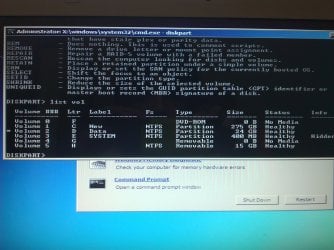
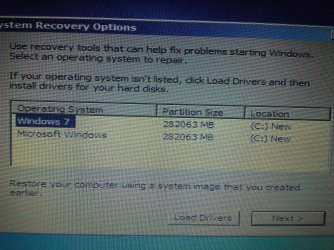
All are Healthy, for reference the C partition "New" is the created partition with W7 installed on it.

Also the second screen shot is of my system recovery screen
 

Attachments

  • WP_000152.jpg
    WP_000152.jpg
    763.4 KB · Views: 74
  • WP_000153.jpg
    WP_000153.jpg
    995.6 KB · Views: 34

My Computer My Computer

OS
Windows 7 64 bit
Yes I delete delete the old windows partition but it was still labeled as the boot partition even though the new one was set as active, I could not figure out how to make the new partition the boot one
 

My Computer My Computer

OS
Windows 7 64 bit
diskpart
sel disk 0
list part


post ouput as well. C (new) is active?
 

My Computer My Computer

Computer type
Laptop
Computer Manufacturer/Model Number
ACER ASPIRE 5742G
OS
Microsoft Windows 7 Home Premium 64-bits 7601 Multiprocessor Free Service Pack 1
CPU
Intel(R) Core(TM) i3 CPU M 370 @ 2.40GHz
Motherboard
Acer Aspire 5742G
Memory
4,00 GB
Graphics Card(s)
ATI Mobility Radeon HD 5400 Series
Sound Card
(1) AMD High Definition Audio Device (2) Realtek High Defi
Screen Resolution
1366 x 768 x 32 bits (4294967296 colors) @ 60 Hz
Hard Drives
WDC WD5000BEVT-22ZAT0
So 3 partitions on harddisk. Old win7 partition is gone according to diskpart.
In command prompt:
Code:
chkdsk/f  c:
chkdsk/f  d:
chkdsk/f  e:
does it find any errors? Repaired them succesfully? If so run commands again to see if errors are gone
 

My Computer My Computer

Computer type
Laptop
Computer Manufacturer/Model Number
ACER ASPIRE 5742G
OS
Microsoft Windows 7 Home Premium 64-bits 7601 Multiprocessor Free Service Pack 1
CPU
Intel(R) Core(TM) i3 CPU M 370 @ 2.40GHz
Motherboard
Acer Aspire 5742G
Memory
4,00 GB
Graphics Card(s)
ATI Mobility Radeon HD 5400 Series
Sound Card
(1) AMD High Definition Audio Device (2) Realtek High Defi
Screen Resolution
1366 x 768 x 32 bits (4294967296 colors) @ 60 Hz
Hard Drives
WDC WD5000BEVT-22ZAT0
Yes I delete delete the old windows partition but it was still labeled as the boot partition even though the new one was set as active, I could not figure out how to make the new partition the boot one
A label is just a name!! Just as new and data
 

My Computer My Computer

Computer type
Laptop
Computer Manufacturer/Model Number
ACER ASPIRE 5742G
OS
Microsoft Windows 7 Home Premium 64-bits 7601 Multiprocessor Free Service Pack 1
CPU
Intel(R) Core(TM) i3 CPU M 370 @ 2.40GHz
Motherboard
Acer Aspire 5742G
Memory
4,00 GB
Graphics Card(s)
ATI Mobility Radeon HD 5400 Series
Sound Card
(1) AMD High Definition Audio Device (2) Realtek High Defi
Screen Resolution
1366 x 768 x 32 bits (4294967296 colors) @ 60 Hz
Hard Drives
WDC WD5000BEVT-22ZAT0
yep C new is the active partition with the new copy of W7 on it
 

Attachments

  • WP_000154.jpg
    WP_000154.jpg
    785.1 KB · Views: 12

My Computer My Computer

OS
Windows 7 64 bit
yes i called it "new" aswell just so I could remember which was the new partition
edit--
ahh I see what you mean, I was worried that the label boot meant it booted only from this one
 

My Computer My Computer

OS
Windows 7 64 bit
no problems on any disk
 

My Computer My Computer

OS
Windows 7 64 bit
diskpart
sel disk 0
select part 2
detail part
exit

Is it active? (no screenshot needed)

Code:
bootsect/nt60  c:  /force
bootsect/nt60  c:  /force  /mbr

Bootsect commands succeed succesfully?
 

My Computer My Computer

Computer type
Laptop
Computer Manufacturer/Model Number
ACER ASPIRE 5742G
OS
Microsoft Windows 7 Home Premium 64-bits 7601 Multiprocessor Free Service Pack 1
CPU
Intel(R) Core(TM) i3 CPU M 370 @ 2.40GHz
Motherboard
Acer Aspire 5742G
Memory
4,00 GB
Graphics Card(s)
ATI Mobility Radeon HD 5400 Series
Sound Card
(1) AMD High Definition Audio Device (2) Realtek High Defi
Screen Resolution
1366 x 768 x 32 bits (4294967296 colors) @ 60 Hz
Hard Drives
WDC WD5000BEVT-22ZAT0
the Windows splash screen appears:Symptom

Probable Cause
  • "NTLDR is missing"
  • "A disk read error occurred"
  • System hangs after BIOS POST finishes
Boot sector is corrupt due to hard disk errors or virus infection
 

My Computer My Computer

Computer type
Laptop
Computer Manufacturer/Model Number
ACER ASPIRE 5742G
OS
Microsoft Windows 7 Home Premium 64-bits 7601 Multiprocessor Free Service Pack 1
CPU
Intel(R) Core(TM) i3 CPU M 370 @ 2.40GHz
Motherboard
Acer Aspire 5742G
Memory
4,00 GB
Graphics Card(s)
ATI Mobility Radeon HD 5400 Series
Sound Card
(1) AMD High Definition Audio Device (2) Realtek High Defi
Screen Resolution
1366 x 768 x 32 bits (4294967296 colors) @ 60 Hz
Hard Drives
WDC WD5000BEVT-22ZAT0
try to boot normally
 

My Computer My Computer

Computer type
Laptop
Computer Manufacturer/Model Number
ACER ASPIRE 5742G
OS
Microsoft Windows 7 Home Premium 64-bits 7601 Multiprocessor Free Service Pack 1
CPU
Intel(R) Core(TM) i3 CPU M 370 @ 2.40GHz
Motherboard
Acer Aspire 5742G
Memory
4,00 GB
Graphics Card(s)
ATI Mobility Radeon HD 5400 Series
Sound Card
(1) AMD High Definition Audio Device (2) Realtek High Defi
Screen Resolution
1366 x 768 x 32 bits (4294967296 colors) @ 60 Hz
Hard Drives
WDC WD5000BEVT-22ZAT0
and yes it is active
 

My Computer My Computer

OS
Windows 7 64 bit
Back
Top