
You are using an out of date browser. It may not display this or other websites correctly.
You should upgrade or use an alternative browser.
You should upgrade or use an alternative browser.
Solved A disk read error has occurred, - after deleting partition
- Thread starter ssell22
- Start date
I don't understand why "delete partion old win7" should touch the win7 new's bootsector ... strange. It shouldn't touch the Master Boot Code in MBR as well. It should only update the partition table (part of MBR). And it did that.. old win7 is gone.
My Computer
At a glance
Microsoft Windows 7 Home Premium 64-bits 7601...Intel(R) Core(TM) i3 CPU M 370 @ 2.40GHz4,00 GBATI Mobility Radeon HD 5400 Series
- Computer type
- Laptop
- Computer Manufacturer/Model Number
- ACER ASPIRE 5742G
- OS
- Microsoft Windows 7 Home Premium 64-bits 7601 Multiprocessor Free Service Pack 1
- CPU
- Intel(R) Core(TM) i3 CPU M 370 @ 2.40GHz
- Motherboard
- Acer Aspire 5742G
- Memory
- 4,00 GB
- Graphics Card(s)
- ATI Mobility Radeon HD 5400 Series
- Sound Card
- (1) AMD High Definition Audio Device (2) Realtek High Defi
- Screen Resolution
- 1366 x 768 x 32 bits (4294967296 colors) @ 60 Hz
- Hard Drives
- WDC WD5000BEVT-22ZAT0
Temporary mark C (partition 2) as inactive and boot normally. Of course it fails... but same error? Set it to active again after testing
My Computer
At a glance
Microsoft Windows 7 Home Premium 64-bits 7601...Intel(R) Core(TM) i3 CPU M 370 @ 2.40GHz4,00 GBATI Mobility Radeon HD 5400 Series
- Computer type
- Laptop
- Computer Manufacturer/Model Number
- ACER ASPIRE 5742G
- OS
- Microsoft Windows 7 Home Premium 64-bits 7601 Multiprocessor Free Service Pack 1
- CPU
- Intel(R) Core(TM) i3 CPU M 370 @ 2.40GHz
- Motherboard
- Acer Aspire 5742G
- Memory
- 4,00 GB
- Graphics Card(s)
- ATI Mobility Radeon HD 5400 Series
- Sound Card
- (1) AMD High Definition Audio Device (2) Realtek High Defi
- Screen Resolution
- 1366 x 768 x 32 bits (4294967296 colors) @ 60 Hz
- Hard Drives
- WDC WD5000BEVT-22ZAT0
Disk Editor View of Win2K/XP NTFS Boot Record
See the first hex dump. Althoug from winxp... it should be the same. So it's the bootsector of C:. Not the MBR!!
It wanna read something but cannot
0180: EB F2 C3 0D 0A 41 20 64 69 73 6B 20 72 65 61 64 .....A disk read
0190: 20 65 72 72 6F 72 20 6F 63 63 75 72 72 65 64 00 error occurred.
01A0: 0D 0A 4E 54 4C 44 52 20 69 73 20 6D 69 73 73 69 ..NTLDR is missi
01B0: 6E 67 00 0D 0A 4E 54 4C 44 52 20 69 73 20 63 6F ng...NTLDR is co
01C0: 6D 70 72 65 73 73 65 64 00 0D 0A 50 72 65 73 73 mpressed...Press
01D0: 20 43 74 72 6C 2B 41 6C 74 2B 44 65 6C 20 74 6F Ctrl+Alt+Del to
01E0: 20 72 65 73 74 61 72 74 0D 0A 00 00 00 00 00 00 restart........
See the first hex dump. Althoug from winxp... it should be the same. So it's the bootsector of C:. Not the MBR!!
It wanna read something but cannot
0180: EB F2 C3 0D 0A 41 20 64 69 73 6B 20 72 65 61 64 .....A disk read
0190: 20 65 72 72 6F 72 20 6F 63 63 75 72 72 65 64 00 error occurred.
01A0: 0D 0A 4E 54 4C 44 52 20 69 73 20 6D 69 73 73 69 ..NTLDR is missi
01B0: 6E 67 00 0D 0A 4E 54 4C 44 52 20 69 73 20 63 6F ng...NTLDR is co
01C0: 6D 70 72 65 73 73 65 64 00 0D 0A 50 72 65 73 73 mpressed...Press
01D0: 20 43 74 72 6C 2B 41 6C 74 2B 44 65 6C 20 74 6F Ctrl+Alt+Del to
01E0: 20 72 65 73 74 61 72 74 0D 0A 00 00 00 00 00 00 restart........
My Computer
At a glance
Microsoft Windows 7 Home Premium 64-bits 7601...Intel(R) Core(TM) i3 CPU M 370 @ 2.40GHz4,00 GBATI Mobility Radeon HD 5400 Series
- Computer type
- Laptop
- Computer Manufacturer/Model Number
- ACER ASPIRE 5742G
- OS
- Microsoft Windows 7 Home Premium 64-bits 7601 Multiprocessor Free Service Pack 1
- CPU
- Intel(R) Core(TM) i3 CPU M 370 @ 2.40GHz
- Motherboard
- Acer Aspire 5742G
- Memory
- 4,00 GB
- Graphics Card(s)
- ATI Mobility Radeon HD 5400 Series
- Sound Card
- (1) AMD High Definition Audio Device (2) Realtek High Defi
- Screen Resolution
- 1366 x 768 x 32 bits (4294967296 colors) @ 60 Hz
- Hard Drives
- WDC WD5000BEVT-22ZAT0
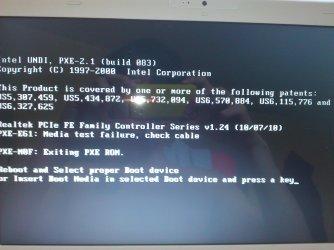
same error?Temporary mark C (partition 2) as inactive and boot normally. Of course it fails... but same error? Set it to active again after testing
My Computer
At a glance
Microsoft Windows 7 Home Premium 64-bits 7601...Intel(R) Core(TM) i3 CPU M 370 @ 2.40GHz4,00 GBATI Mobility Radeon HD 5400 Series
- Computer type
- Laptop
- Computer Manufacturer/Model Number
- ACER ASPIRE 5742G
- OS
- Microsoft Windows 7 Home Premium 64-bits 7601 Multiprocessor Free Service Pack 1
- CPU
- Intel(R) Core(TM) i3 CPU M 370 @ 2.40GHz
- Motherboard
- Acer Aspire 5742G
- Memory
- 4,00 GB
- Graphics Card(s)
- ATI Mobility Radeon HD 5400 Series
- Sound Card
- (1) AMD High Definition Audio Device (2) Realtek High Defi
- Screen Resolution
- 1366 x 768 x 32 bits (4294967296 colors) @ 60 Hz
- Hard Drives
- WDC WD5000BEVT-22ZAT0
sorrry missed that postWhen booting after setting as inactive I get a wall of text
My Computer
At a glance
Microsoft Windows 7 Home Premium 64-bits 7601...Intel(R) Core(TM) i3 CPU M 370 @ 2.40GHz4,00 GBATI Mobility Radeon HD 5400 Series
- Computer type
- Laptop
- Computer Manufacturer/Model Number
- ACER ASPIRE 5742G
- OS
- Microsoft Windows 7 Home Premium 64-bits 7601 Multiprocessor Free Service Pack 1
- CPU
- Intel(R) Core(TM) i3 CPU M 370 @ 2.40GHz
- Motherboard
- Acer Aspire 5742G
- Memory
- 4,00 GB
- Graphics Card(s)
- ATI Mobility Radeon HD 5400 Series
- Sound Card
- (1) AMD High Definition Audio Device (2) Realtek High Defi
- Screen Resolution
- 1366 x 768 x 32 bits (4294967296 colors) @ 60 Hz
- Hard Drives
- WDC WD5000BEVT-22ZAT0
this is a totally fresh install? No extra drivers and software installed yet?
My Computer
At a glance
Microsoft Windows 7 Home Premium 64-bits 7601...Intel(R) Core(TM) i3 CPU M 370 @ 2.40GHz4,00 GBATI Mobility Radeon HD 5400 Series
- Computer type
- Laptop
- Computer Manufacturer/Model Number
- ACER ASPIRE 5742G
- OS
- Microsoft Windows 7 Home Premium 64-bits 7601 Multiprocessor Free Service Pack 1
- CPU
- Intel(R) Core(TM) i3 CPU M 370 @ 2.40GHz
- Motherboard
- Acer Aspire 5742G
- Memory
- 4,00 GB
- Graphics Card(s)
- ATI Mobility Radeon HD 5400 Series
- Sound Card
- (1) AMD High Definition Audio Device (2) Realtek High Defi
- Screen Resolution
- 1366 x 768 x 32 bits (4294967296 colors) @ 60 Hz
- Hard Drives
- WDC WD5000BEVT-22ZAT0
hmmm read error from C-bootsector. We only did chkdsk/f
chkdsk/f/r c:
takes maybe one hour
chkdsk/f/r c:
takes maybe one hour
My Computer
At a glance
Microsoft Windows 7 Home Premium 64-bits 7601...Intel(R) Core(TM) i3 CPU M 370 @ 2.40GHz4,00 GBATI Mobility Radeon HD 5400 Series
- Computer type
- Laptop
- Computer Manufacturer/Model Number
- ACER ASPIRE 5742G
- OS
- Microsoft Windows 7 Home Premium 64-bits 7601 Multiprocessor Free Service Pack 1
- CPU
- Intel(R) Core(TM) i3 CPU M 370 @ 2.40GHz
- Motherboard
- Acer Aspire 5742G
- Memory
- 4,00 GB
- Graphics Card(s)
- ATI Mobility Radeon HD 5400 Series
- Sound Card
- (1) AMD High Definition Audio Device (2) Realtek High Defi
- Screen Resolution
- 1366 x 768 x 32 bits (4294967296 colors) @ 60 Hz
- Hard Drives
- WDC WD5000BEVT-22ZAT0
As far as I know bcd (bootmenu) is working and you did rebuild it. Say C is writable. Bootsector should only read bcd and bootmgr. Maybe bootmgr problem??
perform startup repair now. bootmgr is back now?
try to reboot normally
Code:
attrib  -h  -s  c:\bootmgr
del  c:\bootmgr
perform startup repair now. bootmgr is back now?
Code:
attrib c:\bootmgrtry to reboot normally
My Computer
At a glance
Microsoft Windows 7 Home Premium 64-bits 7601...Intel(R) Core(TM) i3 CPU M 370 @ 2.40GHz4,00 GBATI Mobility Radeon HD 5400 Series
- Computer type
- Laptop
- Computer Manufacturer/Model Number
- ACER ASPIRE 5742G
- OS
- Microsoft Windows 7 Home Premium 64-bits 7601 Multiprocessor Free Service Pack 1
- CPU
- Intel(R) Core(TM) i3 CPU M 370 @ 2.40GHz
- Motherboard
- Acer Aspire 5742G
- Memory
- 4,00 GB
- Graphics Card(s)
- ATI Mobility Radeon HD 5400 Series
- Sound Card
- (1) AMD High Definition Audio Device (2) Realtek High Defi
- Screen Resolution
- 1366 x 768 x 32 bits (4294967296 colors) @ 60 Hz
- Hard Drives
- WDC WD5000BEVT-22ZAT0

- Local time
- 1:54 PM
- Messages
- 50,634
The flags you should be looking for to show you've successfully moved the boot files are System Active, not Boot. Boot only signifies which partition you are booted into at the moment.
In addition if you installed Win7 from the old partition and not from the booted installer, then it would not be lettered C, so you may have deleted the new Win7.
In your case you have a 400mb hidden partition which Diskpart says is labeled System. This is likely an OEM partition intended to boot the system.
Mark WIn7 Partition Active and run Startup Repair - Run 3 Separate Times until Win7 starts and holds the System flag, as should have been done before deleting the old Win7 partitition.
If this fails delete all partitions in a Clean Reinstall - Factory OEM Windows 7.
In addition if you installed Win7 from the old partition and not from the booted installer, then it would not be lettered C, so you may have deleted the new Win7.
In your case you have a 400mb hidden partition which Diskpart says is labeled System. This is likely an OEM partition intended to boot the system.
Mark WIn7 Partition Active and run Startup Repair - Run 3 Separate Times until Win7 starts and holds the System flag, as should have been done before deleting the old Win7 partitition.
If this fails delete all partitions in a Clean Reinstall - Factory OEM Windows 7.
Last edited:
just do:access is denied when trying to delete bootmgr
ren c:\bootmgr c:\bootsave
and perform startup repair
then reboot normally.
Still failing with same error?
chkdsk/f/r c:
My Computer
At a glance
Microsoft Windows 7 Home Premium 64-bits 7601...Intel(R) Core(TM) i3 CPU M 370 @ 2.40GHz4,00 GBATI Mobility Radeon HD 5400 Series
- Computer type
- Laptop
- Computer Manufacturer/Model Number
- ACER ASPIRE 5742G
- OS
- Microsoft Windows 7 Home Premium 64-bits 7601 Multiprocessor Free Service Pack 1
- CPU
- Intel(R) Core(TM) i3 CPU M 370 @ 2.40GHz
- Motherboard
- Acer Aspire 5742G
- Memory
- 4,00 GB
- Graphics Card(s)
- ATI Mobility Radeon HD 5400 Series
- Sound Card
- (1) AMD High Definition Audio Device (2) Realtek High Defi
- Screen Resolution
- 1366 x 768 x 32 bits (4294967296 colors) @ 60 Hz
- Hard Drives
- WDC WD5000BEVT-22ZAT0
you can. But you have a RECOVERY partition (to restore to factory settings). And a DATA partition. DATA partition has important files I assume?is there a way I can just get rid of everything on the harddrive and then install windows 7 fresh or will it still not have all the boot files?
My Computer
At a glance
Microsoft Windows 7 Home Premium 64-bits 7601...Intel(R) Core(TM) i3 CPU M 370 @ 2.40GHz4,00 GBATI Mobility Radeon HD 5400 Series
- Computer type
- Laptop
- Computer Manufacturer/Model Number
- ACER ASPIRE 5742G
- OS
- Microsoft Windows 7 Home Premium 64-bits 7601 Multiprocessor Free Service Pack 1
- CPU
- Intel(R) Core(TM) i3 CPU M 370 @ 2.40GHz
- Motherboard
- Acer Aspire 5742G
- Memory
- 4,00 GB
- Graphics Card(s)
- ATI Mobility Radeon HD 5400 Series
- Sound Card
- (1) AMD High Definition Audio Device (2) Realtek High Defi
- Screen Resolution
- 1366 x 768 x 32 bits (4294967296 colors) @ 60 Hz
- Hard Drives
- WDC WD5000BEVT-22ZAT0
- Local time
- 1:54 PM
- Messages
- 50,634
I gave you the boot repair steps earlier to try after checking your HD. Additional measures are in step 8 here: Troubleshooting Windows 7 Failure to Boot
Rescue your data using Copy & Paste - in Windows Recovery Console or Paragon rescue disk; change drive letter; recover data.
You can try also running Recovery from it's hotkey at boot: Toshiba HDD Recovery Utility
However a Clean Reinstall - Factory OEM Windows 7 is a vastly superior install. Everything you need is in link.
Rescue your data using Copy & Paste - in Windows Recovery Console or Paragon rescue disk; change drive letter; recover data.
You can try also running Recovery from it's hotkey at boot: Toshiba HDD Recovery Utility
However a Clean Reinstall - Factory OEM Windows 7 is a vastly superior install. Everything you need is in link.
Similar threads
- Replies
- 32
- Views
- 11K
- Replies
- 1
- Views
- 13K
- Replies
- 2
- Views
- 14K

- Replies
- 9
- Views
- 3K