A few questions about Dual Boot

Tommyd

New member
Power User
Local time
6:41 AM
Messages
89
Location
Worcester
I am considering dual-booting my Win 7 Pro laptop with Linux, but have a few questions.

1)Which distro would be the best? The laptops specs are: 2GHz T5750 C2D, 3GB RAM, GMA x3100.

2)How hard is dual boot to set up? I know I would need to install Linux on a seperate partition, do I just need to create a partition and insert the CD to install, or is there something else?
 

My Computer My Computer

Computer Manufacturer/Model Number
Self Built
OS
Windows 7 Home Premium x64(desktop), Windows 7 Professional x86(laptop)
CPU
AMD Phenom II x4 965 @ 3.40GHz Black Edition
Motherboard
ASUS M4A785TD-V Evo
Memory
4GB Corsair XMS3 DDR3
Graphics Card(s)
Sapphire HD 5770 1024MB
Monitor(s) Displays
22" Viewsonic VX2260 Widescreen LCD
Screen Resolution
1900x1080 (1080p)
Hard Drives
Samsung Spinpoint F3 1TB SATA, 32MB Cache, 7200 RPM
PSU
600W OCZ StealthXStream
Case
Antec 902 Ultimate Gaming Case
Cooling
Stock - CPU, GPU, PSU, 3x120MMcase fans 1x200mm case fan
Keyboard
Saitek Eclipse II
Mouse
Roccat Kova Gaming Mouse
Dual booting isn't difficult as long as you start out correctly. That is, partition your hard drive leaving a sizable area as unallocated (for Linux to use). Install Windows first, then install Linux. Install the boot loader to the MBR.

As to what distibution of Linux to use - it depends on what you want to so. There are many Internet site that discuss Linux distributions.

Regards,
GEWB
 

My Computer My Computer

Computer type
PC/Desktop
Computer Manufacturer/Model Number
(7 different computers booting up to 10 systems)
OS
Linux Mint / XP / Win7 Home, Pro, Ultimate / Win8.1 / Win10
Other Info
Four desktops, two laptops, one notebook and one tablet
That's it, create a partition and use the install disk. Nowadays the Linux distros do a good job installing themselves. You seem to have a decent laptop, any distro would run just fine.

The issue that I found when I did this some time ago, was that Linux would install Grub by default as a boot manager. Now, there can be only one boot manager on the system, so it effectively replaces the Windows boot manager by Grub. It all works fine, however, should you later on decide to uninstall Linux, you will still be stuck with Grub - I found no easy way to remove it. There are of course various ways to restore the Windows boot manager - but it's annoying and hard.

So, I would recommend researching which boot manager will your distro use and decide for yourself, which one do you want on your laptop.
 

My Computer My Computer

Computer Manufacturer/Model Number
Dell Inspiron 530
OS
Windows 7 Ultimate (x64)
CPU
Q6600
Memory
8 GB
Graphics Card(s)
ATI Radeon HD 2600 XT
Monitor(s) Displays
Samsung Syncmaster P2450
Screen Resolution
1920x1080
Hard Drives
Samsung HD103UJ
Samsung HD501LJ
Internet Speed
25 Mb/s
Thank you for the answers. From what I can see and have heard, Ubuntu appears to be the most recommended distro, a good choice?
 

My Computer My Computer

Computer Manufacturer/Model Number
Self Built
OS
Windows 7 Home Premium x64(desktop), Windows 7 Professional x86(laptop)
CPU
AMD Phenom II x4 965 @ 3.40GHz Black Edition
Motherboard
ASUS M4A785TD-V Evo
Memory
4GB Corsair XMS3 DDR3
Graphics Card(s)
Sapphire HD 5770 1024MB
Monitor(s) Displays
22" Viewsonic VX2260 Widescreen LCD
Screen Resolution
1900x1080 (1080p)
Hard Drives
Samsung Spinpoint F3 1TB SATA, 32MB Cache, 7200 RPM
PSU
600W OCZ StealthXStream
Case
Antec 902 Ultimate Gaming Case
Cooling
Stock - CPU, GPU, PSU, 3x120MMcase fans 1x200mm case fan
Keyboard
Saitek Eclipse II
Mouse
Roccat Kova Gaming Mouse
What do you want to do in Linux? There are many distros for many purposes. If just to "try" a different OS, Ubuntu is a good starter as is Suse, Mandriva, PCLinuxOS, etc. I suggest a search and then read about different distributions - pick one and try it. Don't like it, pick another and overwrite!

Regards,
GEWB
 

My Computer My Computer

Computer type
PC/Desktop
Computer Manufacturer/Model Number
(7 different computers booting up to 10 systems)
OS
Linux Mint / XP / Win7 Home, Pro, Ultimate / Win8.1 / Win10
Other Info
Four desktops, two laptops, one notebook and one tablet
Thank you for the answers. From what I can see and have heard, Ubuntu appears to be the most recommended distro, a good choice?
I have Ubuntu 9.10 running on several boxes. It is a good one to start with.

Actually, restoring the Windows 7 bootmgr is quite easy and only takes a few minutes.

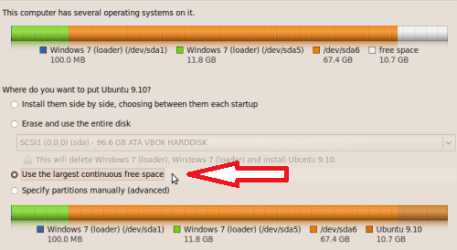
As for the amount of space to make for Ubuntu, it is only using 5.5GB on my system. So 10GB or more is ample space to start with. Just create the empty space at the end of your hard drive and then tell Ubuntu to install itself in the empty space. It will do the rest.

win7_plus_ubun2_06.PNG

I would be happy to walk you through the install steps if you like.

Here is the tutorial for restoring the Windows 7 bootmgr: http://www.sevenforums.com/tutorials/20864-mbr-restore-windows-7-master-boot-record.html

Cheers!
Robert
 

My Computer My Computer

OS
...
Thank you for the answers. From what I can see and have heard, Ubuntu appears to be the most recommended distro, a good choice?
I have Ubuntu 9.10 running on several boxes. It is a good one to start with.

Actually, restoring the Windows 7 bootmgr is quite easy and only takes a few minutes.

As for the amount of space to make for Ubuntu, it is only using 5.5GB on my system. So 10GB or more is ample space to start with. Just create the empty space at the end of your hard drive and then tell Ubuntu to install itself in the empty space. It will do the rest.

View attachment 53567

I would be happy to walk you through the install steps if you like.

Here is the tutorial for restoring the Windows 7 bootmgr: http://www.sevenforums.com/tutorials/20864-mbr-restore-windows-7-master-boot-record.html

Cheers!
Robert

I,m sure you,ll probably know this but If you want to upgrade your Ubuntu 9.10 desktop( Give" Ubuntu" ,Windows AERO type theme) then press Alt + F2 and then type "update-manager -d" (without quotes). It will show you that a new version of Ubuntu is available. Click on Upgrade to upgrade your current Ubuntu.
 

My Computer My Computer

Computer type
PC/Desktop
OS
Windows 7 X64 Bit
CPU
Intel(R) Core(TM)i7-4771 CPU @ 3.50GH
Motherboard
Asus Sabertooth Z87
Memory
Corsair 4x8 Vengeance (32GB)
Graphics Card(s)
NVIDIA GeForce GTX780
Monitor(s) Displays
LG
Screen Resolution
1920x1080
PSU
Corsair CX750
Case
Corsair 200 series
Cooling
H80i Liquid Cooler
Keyboard
Microsoft
Mouse
Microsoft
Internet Speed
good times-500-850 kbs bad times-50-100 kbs
It would be easier to virtualize the OS, you have enough memory.
 

My Computer My Computer

Computer Manufacturer/Model Number
Sony Vaio Z46GDU
OS
Windows 7 Ultimate x86-64
CPU
[email protected] 1066MHz FSB
Motherboard
Sony branded
Memory
6GB DDR3 1066MHz
Graphics Card(s)
9300M GS 256MB Dedicated (Speed) + Intel4500MHD (Stamina)
Sound Card
Realtek HD Audio
Monitor(s) Displays
13.1' WXGA
Screen Resolution
1600x900
Hard Drives
320GB 7200RPM w/ 16MB cache
Internet Speed
1MB/s
Back
Top