A question regarding the "scroll on click" feature

Treupp

New member
Local time
6:42 AM
Messages
3
Hello

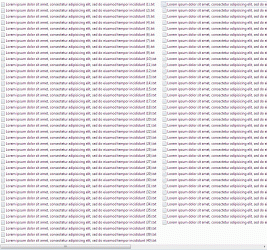
I'd like to ask you, whether there's a way (internally or via 3rd party software) to disable the feature which is slowly starting to drive me nuts. Namely, if you change your window layout to "list", you end up with several columns of files. If you try to click on a file which isn't in the leftmost column, the list will automatically scroll so that the column with the chosen file will become the leftmost. This effectively disables the ability to quickly rightclick a file that's not in the currently "focused" column.

Thank you for your time
 

My Computer

OS
Windows 7 Ultimate x86
Hi Treupp and welcome to the Forum
When I left click on a file in say the centre column then it stays in the centre when the pop up window with "Open" "Open with" and "Properties" at the bottom opens. If I left click on a file it just highlights it. If I double click on the file then, of course, it opens in my chosen program. I confirm I am in List view whilst doing this.
However if there is a file name in right hand column that cannot fit into the space to the edge of the Explorer window the file will scroll to the left to make it fit. Check you file name and have you got the Explorer window open to full screen?
 

My Computer

Computer type
PC/Desktop
OS
Microsoft Windows 7 Home Premium 64-bit 7601 Multiprocessor Free Service Pack 1
CPU
Intel(R) Core(TM) i7-3770 CPU @ 3.40GHz
Motherboard
ASUSTeK COMPUTER INC. P8H77-M
Memory
8.00 GB
Graphics Card(s)
Intel(R) HD Graphics 4000
Sound Card
On Board
Monitor(s) Displays
Dell 24"
Screen Resolution
1920 x 1080
Hard Drives
(1) INTEL SSDSC2CT180A3 ATA Device (2) ST500DM002-1BD142 ATA Device (3) WDC WD3200AAKS-75L9A0 ATA Device (4) Generic- Compact Flash USB Device (5) Generic- MS/MS-Pro USB Device (6) Generic- SD/MMC USB Device (7) Generic- SM/xD-Picture USB
PSU
500w Corsair
Case
Cooler Master
Cooling
3 Fans
Keyboard
Logitech MK300
Mouse
Logitech WOM
Internet Speed
75Mb
Antivirus
Norton 360
Browser
Firefox, Opera, IE
Well, one thing I didn't mention. It happens when filenames in the leftmost column are so long, that filenames in the next column are truncated. While I understand the mechanism that, when clicked, the list will be scrolled to show the full filename, I wish to disable it, if possible.

I attached a gif file, should my explanation turn out to be unclear. After clicking the file with the frame, the list will scroll.
 

Attachments

  • test.gif
    test.gif
    93.6 KB · Views: 5

My Computer

OS
Windows 7 Ultimate x86
I don't think you can do that. You didn't reply to uestion in the post above! Also is thee screenshot exactly what you see on your screen or have you cropped the right hand side?
 

My Computer

Computer type
PC/Desktop
OS
Microsoft Windows 7 Home Premium 64-bit 7601 Multiprocessor Free Service Pack 1
CPU
Intel(R) Core(TM) i7-3770 CPU @ 3.40GHz
Motherboard
ASUSTeK COMPUTER INC. P8H77-M
Memory
8.00 GB
Graphics Card(s)
Intel(R) HD Graphics 4000
Sound Card
On Board
Monitor(s) Displays
Dell 24"
Screen Resolution
1920 x 1080
Hard Drives
(1) INTEL SSDSC2CT180A3 ATA Device (2) ST500DM002-1BD142 ATA Device (3) WDC WD3200AAKS-75L9A0 ATA Device (4) Generic- Compact Flash USB Device (5) Generic- MS/MS-Pro USB Device (6) Generic- SD/MMC USB Device (7) Generic- SM/xD-Picture USB
PSU
500w Corsair
Case
Cooler Master
Cooling
3 Fans
Keyboard
Logitech MK300
Mouse
Logitech WOM
Internet Speed
75Mb
Antivirus
Norton 360
Browser
Firefox, Opera, IE
It's windowed, but it doesn't matter, it behaves exactly the same while fullscreen. As for the screenshot, it's not cropped. The right-hand side of the image is the right-hand side of the window as well.
 

My Computer

OS
Windows 7 Ultimate x86
Back
Top