Solved A specified file causing permission problems.

Extract

Vinny you can just extract using 7-zip and you'll get a .txt file in the extracted folder.
 

My Computer

Computer type
Laptop
Computer Manufacturer/Model Number
ASUS
OS
Microsoft Windows 7 Home Premium 64-bit 7601 Multiprocessor Free Service Pack 1
CPU
AMD C-60 APU with Radeon(tm) HD Graphics
Motherboard
ASUSTeK COMPUTER INC. X501U
Memory
4.00 GB
Graphics Card(s)
AMD Radeon HD 6290 Graphics
Sound Card
(1) AMD High Definition Audio Device (2) Realtek High Defi
Screen Resolution
1366 x 768 x 32 bits (4294967296 colors) @ 60 Hz
Hard Drives
Hitachi HTS545050A7E380 SATA Disk Device
Antivirus
Comodo CIS & FW, SecureAplus App Whitelisting, Threatfire
Browser
Cyberfox 64bit, Opera 64bit, Airfox
Other Info
Spy-The-Spy, HitmanPro.Alert, Norton Connect Safe, MJRegWatcher, BitDefender TrafficLight, Voodoo Shield, Zemana AntiMalware

My Computer

Computer type
PC/Desktop
Computer Manufacturer/Model Number
Unknown
OS
Windows 7 home premium 32bit
CPU
Intel Pentium dual CPU E220 @2.40Ghz
Motherboard
Intel
Memory
600GB
Graphics Card(s)
Intel Chipset
Browser
Google Chrome
Are you able to post screenshots of the scan?
 

My Computer

Computer type
PC/Desktop
Are you able to post screenshots of the scan?

I've closed the scan but it said something familiar to " there were some broken files , sfc did not able to fix them all"

thats not exact but yeah.
 

My Computer

Computer type
PC/Desktop
Computer Manufacturer/Model Number
Unknown
OS
Windows 7 home premium 32bit
CPU
Intel Pentium dual CPU E220 @2.40Ghz
Motherboard
Intel
Memory
600GB
Graphics Card(s)
Intel Chipset
Browser
Google Chrome
Hello Luc1f3r,

Please follow this guide, written by Gerry Conrell.

Please upload and share with everyone fresh copies of your System and Application logs from your Event Viewer.

To access the System log select Start, Control Panel, Administrative Tools, Event Viewer, from the list in the left side of the window select Windows Logs and System. Place the cursor on System, select Action from the Menu and Save All Events as (the default evtx file type) and give the file a name. Do the same for the Applications log. Do not provide filtered files.

Thank you,
VinnyBuxton
 

My Computer

Computer type
PC/Desktop
Hello Luc1f3r,

Please follow this guide, written by Gerry Conrell.

Please upload and share with everyone fresh copies of your System and Application logs from your Event Viewer.

To access the System log select Start, Control Panel, Administrative Tools, Event Viewer, from the list in the left side of the window select Windows Logs and System. Place the cursor on System, select Action from the Menu and Save All Events as (the default evtx file type) and give the file a name. Do the same for the Applications log. Do not provide filtered files.

Thank you,
VinnyBuxton

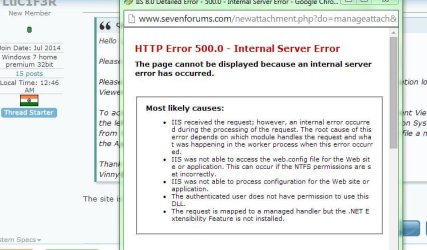
The site is not letting me upload the logs.. /:

EDIT : Yes, not even as .RAR
 

Attachments

  • h.JPG
    h.JPG
    63.9 KB · Views: 1

My Computer

Computer type
PC/Desktop
Computer Manufacturer/Model Number
Unknown
OS
Windows 7 home premium 32bit
CPU
Intel Pentium dual CPU E220 @2.40Ghz
Motherboard
Intel
Memory
600GB
Graphics Card(s)
Intel Chipset
Browser
Google Chrome
Would it be possible for you to post screenshots of them instead?
Have you ran Disk Check?
 

My Computer

Computer type
PC/Desktop
Would it be possible for you to post screenshots of them instead?
Have you ran Disk Check?

Please be more specified, and the sfc scan caused me alot of blue screen of death errors had to restore from back in time
 

My Computer

Computer type
PC/Desktop
Computer Manufacturer/Model Number
Unknown
OS
Windows 7 home premium 32bit
CPU
Intel Pentium dual CPU E220 @2.40Ghz
Motherboard
Intel
Memory
600GB
Graphics Card(s)
Intel Chipset
Browser
Google Chrome
You are infected with a Trojan that could possibly be a keylogger.


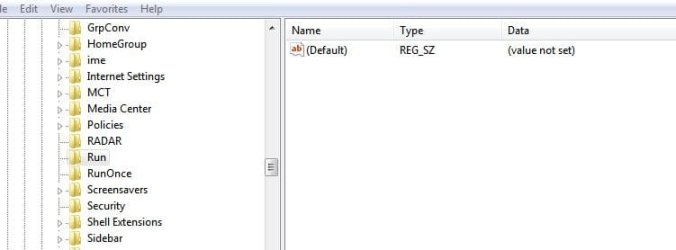
Type regedit in the start search box. See if you can open it (try to run as Administrator)


If you get to the registry, find:


[HKEY_CURRENT_USER\Software\Microsoft\Windows\CurrentVersion\Run]
  • (Default) = "[file and pathname of the sample #1]"
so that [file and pathname of the sample #1] runs every time Windows starts


What is the default file and pathname?
 

My Computer

Computer type
PC/Desktop
Computer Manufacturer/Model Number
Bruce ... somewhere in his 40's
OS
Windows 7 Ultimate 32bit SP1
CPU
Intel(R) Core(TM)2 Quad CPU @ 2.40GHz, 2400 MHz
Motherboard
INTEL/D975XBX2
Memory
4 GB
Graphics Card(s)
ATI Radeon HD 2600 Pro
Monitor(s) Displays
Samsung SyncMaster 914v
Screen Resolution
1280 x 1024
Hard Drives
2/500GB each ... ST3500630AS ATA Device.
One is not connected
PSU
Rocketfish 700 W
Case
G.Skill Gigabyte Chassis
Keyboard
Standard PS/2 Keyboard
Mouse
Microsoft PS/2 Mouse
Internet Speed
DSL
Antivirus
Avira Internet Security
Browser
IE 11
Other Info
ATI HDMI Audio
You are infected with a Trojan that could possibly be a keylogger.


Type regedit in the start search box. See if you can open it (try to run as Administrator)


If you get to the registry, find:


[HKEY_CURRENT_USER\Software\Microsoft\Windows\CurrentVersion\Run]
  • (Default) = "[file and pathname of the sample #1]"
so that [file and pathname of the sample #1] runs every time Windows starts


What is the default file and pathname?

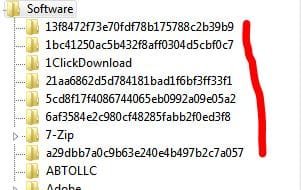
Hey , Thanks alot for replying and here is the picture of the following you asked for and there is these weird files which was totally not suppose to be on my computer.
 

Attachments

  • these.JPG
    these.JPG
    21.4 KB · Views: 19
  • not.JPG
    not.JPG
    24.5 KB · Views: 0

My Computer

Computer type
PC/Desktop
Computer Manufacturer/Model Number
Unknown
OS
Windows 7 home premium 32bit
CPU
Intel Pentium dual CPU E220 @2.40Ghz
Motherboard
Intel
Memory
600GB
Graphics Card(s)
Intel Chipset
Browser
Google Chrome
Still stuck with this problem anyone help.
 

My Computer

Computer type
PC/Desktop
Computer Manufacturer/Model Number
Unknown
OS
Windows 7 home premium 32bit
CPU
Intel Pentium dual CPU E220 @2.40Ghz
Motherboard
Intel
Memory
600GB
Graphics Card(s)
Intel Chipset
Browser
Google Chrome
Download Combofix from any of the links below, and save it to your desktop.<--Important
Link 1
Link 2
Link 3


Click on this link Here to see a list of programs that should be disabled.
The list is not all inclusive. If yours is not listed and you don't know how to disable it, please ask.
If your anti-virus or firewall complains, please allow this script to run as it is not malicious.
Next: Disconnect from the internet. If you are on Cable or DSL, unplug your computer from the modem.
Next: Please disable all onboard security programs (all running with back ground protection) as it may hinder the scanner from working.

This includes Antivirus, Firewall, and any Spyware scanners that run in the background.
  • Double click combofix.exe and follow the prompts.
  • When finished, it will produce a log for you.
Note: Do not mouseclick combofix's window while its running. That may cause it to stall
Please be patient while the scan runs, at times it may appear to stall.
When finished and after reboot (in case it asks to reboot), it should open a log, combofix.txt.
Post this log in your next reply
After rebooting ensure your Security applications have been re-enabled.

In your next reply post:
ComboFix.txt
***A guide and tutorial on "How to use Combofix" can be found here:
ComboFix: A guide and tutorial on using ComboFix


IF CF won't run:
During the download, rename Combofix.exe to sVchost.exe or remove the 'X' and name it combofi
 

My Computer

Computer type
PC/Desktop
Computer Manufacturer/Model Number
Bruce ... somewhere in his 40's
OS
Windows 7 Ultimate 32bit SP1
CPU
Intel(R) Core(TM)2 Quad CPU @ 2.40GHz, 2400 MHz
Motherboard
INTEL/D975XBX2
Memory
4 GB
Graphics Card(s)
ATI Radeon HD 2600 Pro
Monitor(s) Displays
Samsung SyncMaster 914v
Screen Resolution
1280 x 1024
Hard Drives
2/500GB each ... ST3500630AS ATA Device.
One is not connected
PSU
Rocketfish 700 W
Case
G.Skill Gigabyte Chassis
Keyboard
Standard PS/2 Keyboard
Mouse
Microsoft PS/2 Mouse
Internet Speed
DSL
Antivirus
Avira Internet Security
Browser
IE 11
Other Info
ATI HDMI Audio
Download Combofix from any of the links below, and save it to your desktop.<--Important
Link 1
Link 2
Link 3


Click on this link Here to see a list of programs that should be disabled.
The list is not all inclusive. If yours is not listed and you don't know how to disable it, please ask.
If your anti-virus or firewall complains, please allow this script to run as it is not malicious.
Next: Disconnect from the internet. If you are on Cable or DSL, unplug your computer from the modem.
Next: Please disable all onboard security programs (all running with back ground protection) as it may hinder the scanner from working.

This includes Antivirus, Firewall, and any Spyware scanners that run in the background.
  • Double click combofix.exe and follow the prompts.
  • When finished, it will produce a log for you.
Note: Do not mouseclick combofix's window while its running. That may cause it to stall
Please be patient while the scan runs, at times it may appear to stall.
When finished and after reboot (in case it asks to reboot), it should open a log, combofix.txt.
Post this log in your next reply
After rebooting ensure your Security applications have been re-enabled.

In your next reply post:
ComboFix.txt
***A guide and tutorial on "How to use Combofix" can be found here:
ComboFix: A guide and tutorial on using ComboFix


IF CF won't run:
During the download, rename Combofix.exe to sVchost.exe or remove the 'X' and name it combofi

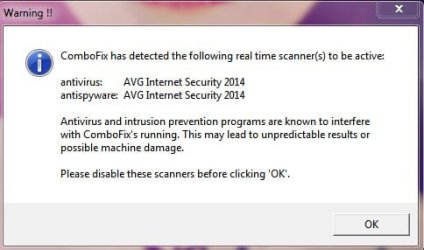
Hello, Thanks for replying i just did the following but before it even started it gave me this and its really trilling to me because i do not have any anti virus, i had ESET but it got deleted by itself and the problem started to happen.
 

Attachments

  • ok.JPG
    ok.JPG
    26.6 KB · Views: 11

My Computer

Computer type
PC/Desktop
Computer Manufacturer/Model Number
Unknown
OS
Windows 7 home premium 32bit
CPU
Intel Pentium dual CPU E220 @2.40Ghz
Motherboard
Intel
Memory
600GB
Graphics Card(s)
Intel Chipset
Browser
Google Chrome
Does AVG show in Programs and Features, msconfig, or in Services?
 

My Computer

Computer type
PC/Desktop
Computer Manufacturer/Model Number
Bruce ... somewhere in his 40's
OS
Windows 7 Ultimate 32bit SP1
CPU
Intel(R) Core(TM)2 Quad CPU @ 2.40GHz, 2400 MHz
Motherboard
INTEL/D975XBX2
Memory
4 GB
Graphics Card(s)
ATI Radeon HD 2600 Pro
Monitor(s) Displays
Samsung SyncMaster 914v
Screen Resolution
1280 x 1024
Hard Drives
2/500GB each ... ST3500630AS ATA Device.
One is not connected
PSU
Rocketfish 700 W
Case
G.Skill Gigabyte Chassis
Keyboard
Standard PS/2 Keyboard
Mouse
Microsoft PS/2 Mouse
Internet Speed
DSL
Antivirus
Avira Internet Security
Browser
IE 11
Other Info
ATI HDMI Audio
Does AVG show in Programs and Features, msconfig, or in Services?

No, it does not.

I just installed AVG thinking it will solve it, so it did got installed without the ACCESS DENIED error, but the problem is still not fixed

PS: I cannot so scans they stuck when they're about to finish.
 

My Computer

Computer type
PC/Desktop
Computer Manufacturer/Model Number
Unknown
OS
Windows 7 home premium 32bit
CPU
Intel Pentium dual CPU E220 @2.40Ghz
Motherboard
Intel
Memory
600GB
Graphics Card(s)
Intel Chipset
Browser
Google Chrome
If you're talking about Combofix scan, did you do this?


IF CF won't run:
****During the download***, rename Combofix.exe to sVchost.exe or remove the 'X' and name it combofi.exe


Are you disconnected from the Internet, and have your modem unplugged?
 

My Computer

Computer type
PC/Desktop
Computer Manufacturer/Model Number
Bruce ... somewhere in his 40's
OS
Windows 7 Ultimate 32bit SP1
CPU
Intel(R) Core(TM)2 Quad CPU @ 2.40GHz, 2400 MHz
Motherboard
INTEL/D975XBX2
Memory
4 GB
Graphics Card(s)
ATI Radeon HD 2600 Pro
Monitor(s) Displays
Samsung SyncMaster 914v
Screen Resolution
1280 x 1024
Hard Drives
2/500GB each ... ST3500630AS ATA Device.
One is not connected
PSU
Rocketfish 700 W
Case
G.Skill Gigabyte Chassis
Keyboard
Standard PS/2 Keyboard
Mouse
Microsoft PS/2 Mouse
Internet Speed
DSL
Antivirus
Avira Internet Security
Browser
IE 11
Other Info
ATI HDMI Audio
If you're talking about Combofix scan, did you do this?


IF CF won't run:
****During the download***, rename Combofix.exe to sVchost.exe or remove the 'X' and name it combofi.exe


Are you disconnected from the Internet, and have your modem unplugged?

Yes.
 

My Computer

Computer type
PC/Desktop
Computer Manufacturer/Model Number
Unknown
OS
Windows 7 home premium 32bit
CPU
Intel Pentium dual CPU E220 @2.40Ghz
Motherboard
Intel
Memory
600GB
Graphics Card(s)
Intel Chipset
Browser
Google Chrome
Download DDS from one of these links:
DDS.com

DDS.pif
  • Disable any script blocking protection
  • Double click the dds icon to run the tool.
  • When done, DDS will open two (2) logs:
    1. DDS.txt
    2. Attach.txt <--- will be minimized in the task tray
  • Save both reports to your desktop.
Include the contents of both logs in your next post. If you can't attach the .txt logs, then, copy/paste them.
 

My Computer

Computer type
PC/Desktop
Computer Manufacturer/Model Number
Bruce ... somewhere in his 40's
OS
Windows 7 Ultimate 32bit SP1
CPU
Intel(R) Core(TM)2 Quad CPU @ 2.40GHz, 2400 MHz
Motherboard
INTEL/D975XBX2
Memory
4 GB
Graphics Card(s)
ATI Radeon HD 2600 Pro
Monitor(s) Displays
Samsung SyncMaster 914v
Screen Resolution
1280 x 1024
Hard Drives
2/500GB each ... ST3500630AS ATA Device.
One is not connected
PSU
Rocketfish 700 W
Case
G.Skill Gigabyte Chassis
Keyboard
Standard PS/2 Keyboard
Mouse
Microsoft PS/2 Mouse
Internet Speed
DSL
Antivirus
Avira Internet Security
Browser
IE 11
Other Info
ATI HDMI Audio
Thanks everyone, i just had to format my computer and i've installed Windows 8 now.
 

My Computer

Computer type
PC/Desktop
Computer Manufacturer/Model Number
Unknown
OS
Windows 7 home premium 32bit
CPU
Intel Pentium dual CPU E220 @2.40Ghz
Motherboard
Intel
Memory
600GB
Graphics Card(s)
Intel Chipset
Browser
Google Chrome
Back
Top