about formatting

techno di

New member
Member
VIP
Local time
6:34 PM
Messages
99
when formatting .. the CD of installation is required and it is accompanying any PC at time of purchase . but nowadays that CD is no more accompanying the laptops .. how to format and reinstall windows on laptop if CD is NA ? personally I did not receive any CD at the time of purchase of my Toshiba laptop as well as others who bought Dell laptops . isn't the CD important as it is for PCs ?
and frankly speaking even for the PC .. sometimes copy CDs are used isn't it ?

secondly , it is not possible to install a windows different than that in the COA at the bottom of the laptop .. ie if you purchased a laptop with windows 7 homepre is preinstalled on .. then you can not change the family or series of homepre nor you can change it from windows 7 to 8 . because if you have a CD it would be the win7 homepre one and if you don't , that is my point above in first paragraph .

personally when I took the laptop to my technician he upgraded my system and installed a higher edition .. how he achieved that ?
 

My Computer

OS
windows 7 64 bit home premium
CPU
inter(R) core(TM) i5 CPU M430 @2.27GHZ
Memory
3 GB
I haven't bought a new machine in 5 years. Since then I've built my own. Dell really should have sent a CD with it. For the sake of forum rules, I can't say that copy CD's should ever be used. Some newer machines have recovery partitions on them that you might be able to use - but I know nothing of these.

Alternatively, if you look on the under side of the laptop, you should see a product key with the exact windows version (Home, Pro, etc.) If you could find a used windows 7 copy of that version/edition online, where they used up all the licenses, you could pick that up for cheap and used the product key that's on your laptop.

The tech who upgraded your version of windows would have had to purchase an upgrade copy of windows somewhere, and used a license. I believe some come with 1 license, some with 3, and some with more. One license per computer that it's installed to. It's matched to the hardware - that's how you're able to re use the one on your laptop.
 

My Computer

Computer type
PC/Desktop
Computer Manufacturer/Model Number
Custom Build
OS
Windows 7 Home Premium
CPU
AMD FX-4170 4.2GHz
Motherboard
ASRock 960GM/U3S3 FX
Memory
8GB Transcend Information DDR3 1333MHz PC3-10600
Graphics Card(s)
NVidia GTX 650-Ti 2Gb (Zotac Amp Edition)
Sound Card
Integrated
Monitor(s) Displays
Yup, I've got one of those.
Screen Resolution
I'm not into resolutions. I always break them.
Hard Drives
SG 1.5TB
WDC 1TB (Backup)
PSU
550W
Case
Mini ATX
Cooling
Fan
Keyboard
Cheap
Mouse
Logitec M510
Internet Speed
50Mph. I mean Mbps.
Antivirus
Avast
Browser
Firefox
Other Info
You forgot speakers, man. I've got those too! I've had these babies since windows 98!

My Computer

Computer type
PC/Desktop
Computer Manufacturer/Model Number
home built
OS
Multi-Boot W7_Pro_x64 W8.1_Pro_x64 W10_Pro_x64 +Linux_VMs +Chromium_VM
CPU
AMD Athlon II x4 620
Motherboard
Gigabyte GA-MA785G-UD3H
Memory
6GB GSkill DDR2 800
Graphics Card(s)
AMD 4670 GPU + AMD 4200 IGP
Sound Card
on board Realtek ALC889A
Monitor(s) Displays
RCA 40" LCD TV, Insignia 32" LCD TV, HP 15" LCD monitor
Screen Resolution
1680 x 1050
Hard Drives
OCZ Vertex 3 120GB,
Samsung F3 1TB (3),
Several others - WD, Seagate, Hitachi, ...
PSU
Corsair 500 W
Case
Rosewill mid tower
Cooling
CM 90mm rifle
Keyboard
Gyration wireless, Logitech wireless, Dell USB wired
Mouse
Gyration wireless, Logitech wireless, V7 USB wired
Internet Speed
Spectrum - 100Mbps D / 10Mbps U
Antivirus
Avast, MBAM3, EMET, WinPatrol
Browser
Pale Moon, Firefox, IE
Other Info
2 multi-boot PC's
Mainly HTPC/Office/Gen purpose (no gaming).
Trendnet USB KVM.
LG DVD burner/Blue Ray Player.
Tray system for removable SATA backup drives.

Not currently OCd, under-volted.
I use Hybrid sleep, rarely re-boot or shutdown.

Hauppauge HD-PVR, Avermedia PCIe TV Tuner, Hauppauge PCI TV Tuner.
I did not receive any CD at the time of purchase of my Toshiba laptop

   Information
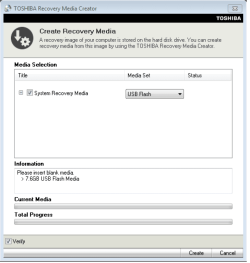
We always assume you have made your Recovery Disks using the OEM manufacturer's Recovery Media Creator app the first day you had your new PC.
& made the Startup Repair CD.
startup repair disc-create


Did you make the OEM manufacturer's Recovery Disks?

Toshiba USB.PNG

How to use Toshiba Recovery.
http://aps2.toshiba-tro.de/kb0/HTD7C02140000R01.htm
How to recover a Toshiba notebook with the HDD recovery procedure

You can order Toshiba Recovery disks from here:
https://www.csd.toshiba.com/cgi-bin/tais/support/jsp/serviceUnitVerification.jsp
 

My Computer

OS
ME/XP/Vista/Win7

My Computer

Computer type
Laptop
Computer Manufacturer/Model Number
Employer provided Dell Latitude
OS
W7 Pro SP1 64bit
CPU
i7
Memory
8GB
Graphics Card(s)
Intel HD Graphics
Hard Drives
crappy SSD
Antivirus
Employer mandated Symantec Endpoint Protection
Browser
Pale Moon 64bit, IE11 64bit & Chrome 64bit
Maybe too late now but usually you are supposed to burn a disk when you start using it, for just this event.
Do one next time.
 

My Computer

Computer Manufacturer/Model Number
DIY
OS
Windows 7 home premium x64
CPU
AMD FX-4100 AM3+ 3.6GHz 12MB Black Edition
Motherboard
Asus M5A97 Pro
Memory
Crsair vengeance 12Gb DDR3 1600MHz CL9
Graphics Card(s)
Asus GTX 560 1GB
Sound Card
Realtek onboard
Monitor(s) Displays
Hanns G 1680x1050 native
Hard Drives
OCZ 128Gb Petrol ssd
2x500 Gb Samsung
PSU
OCZ StealthXstream II 500W
Internet Speed
8Mb or better
Maybe too late now but usually you are supposed to burn a disk when you start using it, for just this event.
Do one next time.
I've done that with Toshiba and it is more like 6 DVDs.

I then learned that you can uninstall much of the bloatware and burn the DVDs again. So I have two sets.

I think that Toshiba is just using the regular Windows imaging tool... but I could be wrong about that.

On an older XP Toshiba, I ordered the recovery CDs... the support staff told me that I just missed getting them for free. They changed to charging $30. (I really could have lived without knowing that they would have been free a week earlier.) Anyway, Toshiba used AutoIt to install all of their bloatware. The "restore CDs" were not images - just automated installations of crapware.

I've had to stop suggesting Toshiba laptops since they have had too many dead keyboards. I've had a total of 6 users have this issue with brand new Toshiba laptops. I've had a few Dell laptops come with bad keyboards too - and one new/dead power supply unit - which Dell claimed was not covered by their warranty.
 

My Computer

Computer type
Laptop
Computer Manufacturer/Model Number
Employer provided Dell Latitude
OS
W7 Pro SP1 64bit
CPU
i7
Memory
8GB
Graphics Card(s)
Intel HD Graphics
Hard Drives
crappy SSD
Antivirus
Employer mandated Symantec Endpoint Protection
Browser
Pale Moon 64bit, IE11 64bit & Chrome 64bit
I haven't bought a new machine in 5 years. Since then I've built my own. Dell really should have sent a CD with it. For the sake of forum rules, I can't say that copy CD's should ever be used. Some newer machines have recovery partitions on them that you might be able to use - but I know nothing of these.

Alternatively, if you look on the under side of the laptop, you should see a product key with the exact windows version (Home, Pro, etc.) If you could find a used windows 7 copy of that version/edition online, where they used up all the licenses, you could pick that up for cheap and used the product key that's on your laptop.

you mean that any online or burnt on CD version of windows which is for cheap ie copied is accepted by the laptop as long as its of the same edition of COA in the underside of laptop .
and hence a new edition would be easily installed if matches the COA .
ok what about a completely different edition ?

The tech who upgraded your version of windows would have had to purchase an upgrade copy of windows somewhere, and used a license. I believe some come with 1 license, some with 3, and some with more. One license per computer that it's installed to. It's matched to the hardware - that's how you're able to re use the one on your laptop.
but hoe could that be ? the two editions are different ?

thnx
 

My Computer

OS
windows 7 64 bit home premium
CPU
inter(R) core(TM) i5 CPU M430 @2.27GHZ
Memory
3 GB
I did not receive any CD at the time of purchase of my Toshiba laptop


   Information
We always assume you have made your Recovery Disks using the OEM manufacturer's Recovery Media Creator app the first day you had your new PC.​

& made the Startup Repair CD.
startup repair disc-create


Did you make the OEM manufacturer's Recovery Disks?

View attachment 274209

How to use Toshiba Recovery.
http://aps2.toshiba-tro.de/kb0/HTD7C02140000R01.htm
How to recover a Toshiba notebook with the HDD recovery procedure

You can order Toshiba Recovery disks from here:
https://www.csd.toshiba.com/cgi-bin/tais/support/jsp/serviceUnitVerification.jsp

I didn't
I used my laptop for nearly 2 yrs on first installation .
about a yr back I got it formatted and upgraded to home premium
I don't know how it is achieved . because they say that a user cant change the edition while re installing windows .
can I do it now ? or is better to use the web .
 

My Computer

OS
windows 7 64 bit home premium
CPU
inter(R) core(TM) i5 CPU M430 @2.27GHZ
Memory
3 GB
Yes, you can reinstall Windows for the version that came with your PC.
See posts #3 and #7 about this.
The tutorial in those links has everything needed, including how to get a genuine Win 7 installation disc (for free), but you do need a valid Genuine Product key to activate it.

It's questionable if your current upgraded version that was installed by your technician is genuine and valid.
See post #5 by UsernameIssues about this.

If your upgraded version is genuine and valid, you need to get the key to be able to reinstall that version and activate it.
Did you pay the technician for the upgraded version?
 
Last edited:

My Computer

Computer type
PC/Desktop
Computer Manufacturer/Model Number
home built
OS
Multi-Boot W7_Pro_x64 W8.1_Pro_x64 W10_Pro_x64 +Linux_VMs +Chromium_VM
CPU
AMD Athlon II x4 620
Motherboard
Gigabyte GA-MA785G-UD3H
Memory
6GB GSkill DDR2 800
Graphics Card(s)
AMD 4670 GPU + AMD 4200 IGP
Sound Card
on board Realtek ALC889A
Monitor(s) Displays
RCA 40" LCD TV, Insignia 32" LCD TV, HP 15" LCD monitor
Screen Resolution
1680 x 1050
Hard Drives
OCZ Vertex 3 120GB,
Samsung F3 1TB (3),
Several others - WD, Seagate, Hitachi, ...
PSU
Corsair 500 W
Case
Rosewill mid tower
Cooling
CM 90mm rifle
Keyboard
Gyration wireless, Logitech wireless, Dell USB wired
Mouse
Gyration wireless, Logitech wireless, V7 USB wired
Internet Speed
Spectrum - 100Mbps D / 10Mbps U
Antivirus
Avast, MBAM3, EMET, WinPatrol
Browser
Pale Moon, Firefox, IE
Other Info
2 multi-boot PC's
Mainly HTPC/Office/Gen purpose (no gaming).
Trendnet USB KVM.
LG DVD burner/Blue Ray Player.
Tray system for removable SATA backup drives.

Not currently OCd, under-volted.
I use Hybrid sleep, rarely re-boot or shutdown.

Hauppauge HD-PVR, Avermedia PCIe TV Tuner, Hauppauge PCI TV Tuner.
If a technician installed Win7 Upgrade on your PC he/she would have charged you around $100 or more for Home Premium Upgrade edition, and by law is required to provide you with the COA sticker showing its Genuine Windows. Did they do this?

If so use that Product Key to activate the Clean Reinstall following the steps you've been given twice now.

If not contact the technician to ask how to get the Product Key and tell them this is being aired in the top Forums for Win7 so he needs to be quite specific as we don't buy hoo-haw here. You need the Product Key to reinstall Geniuine Windows which is what he should have installed or he is a criminal. Genuine Windows always comes with the Product Key so there is the ability to reinstall whenever you want.

The moderators watch these threads very closely so you want to be sure to cooperate if you want our help. If you have been sold counterfeit Win7 then you may be able to get a new Key from MS just for cooperating with their investigation.

If its only a matter that the Product Key is missing you can audit it from the HD using Belarc Advisor freeware. If there is a question then run the Genuine diagnostics given earlier so we can help you determine if you have Genuine Windows.
 

My Computer

Computer type
Laptop
Computer Manufacturer/Model Number
Employer provided Dell Latitude
OS
W7 Pro SP1 64bit
CPU
i7
Memory
8GB
Graphics Card(s)
Intel HD Graphics
Hard Drives
crappy SSD
Antivirus
Employer mandated Symantec Endpoint Protection
Browser
Pale Moon 64bit, IE11 64bit & Chrome 64bit
Yes, you can reinstall Windows for the version that came with your PC.
See posts #3 and #7 about this.
The tutorial in those links has everything needed, including how to get a genuine Win 7 installation disc (for free).

that seems to be amazing if possible .. specially for free
It's questionable if your current upgraded version that was installed by your technician is genuine and valid.
See post #5 by UsernameIssues about this.
I don't know but I think it is gen
anyways this is data regarding
Code:
Diagnostic Report (1.9.0027.0):
-----------------------------------------
Windows Validation Data-->
Validation Code: 0
Cached Online Validation Code: 0x0
Windows Product Key: *****-*****-V9488-FGM44-2C9T3
Windows Product Key Hash: rmk1OjF0iZq7gQoRmEcpnJHr0oc=
Windows Product ID: 00426-OEM-8992662-00010
Windows Product ID Type: 2
Windows License Type: OEM SLP
Windows OS version: 6.1.7601.2.00010100.1.0.001
ID: {E21B850A-7D7F-48FE-9C59-E2BB4030E752}(1)
Is Admin: Yes
TestCab: 0x0
LegitcheckControl ActiveX: N/A, hr = 0x80070002
Signed By: N/A, hr = 0x80070002
Product Name: Windows 7 Ultimate
Architecture: 0x00000009
Build lab: 7601.win7sp1_gdr.130318-1533
TTS Error: 
Validation Diagnostic: 
Resolution Status: N/A
Vista WgaER Data-->
ThreatID(s): N/A, hr = 0x80070002
Version: N/A, hr = 0x80070002
Windows XP Notifications Data-->
Cached Result: N/A, hr = 0x80070002
File Exists: No
Version: N/A, hr = 0x80070002
WgaTray.exe Signed By: N/A, hr = 0x80070002
WgaLogon.dll Signed By: N/A, hr = 0x80070002
OGA Notifications Data-->
Cached Result: N/A, hr = 0x80070002
Version: N/A, hr = 0x80070002
OGAExec.exe Signed By: N/A, hr = 0x80070002
OGAAddin.dll Signed By: N/A, hr = 0x80070002
OGA Data-->
Office Status: 109 N/A
OGA Version: N/A, 0x80070002
Signed By: N/A, hr = 0x80070002
Office Diagnostics: 025D1FF3-364-80041010_025D1FF3-229-80041010_025D1FF3-230-1_025D1FF3-517-80040154_025D1FF3-237-80040154_025D1FF3-238-2_025D1FF3-244-80070002_025D1FF3-258-3
Browser Data-->
Proxy settings: N/A
User Agent: Mozilla/4.0 (compatible; MSIE 8.0; Win32)
Default Browser: C:\Program Files (x86)\Google\Chrome\Application\chrome.exe
Download signed ActiveX controls: Prompt
Download unsigned ActiveX controls: Disabled
Run ActiveX controls and plug-ins: Allowed
Initialize and script ActiveX controls not marked as safe: Disabled
Allow scripting of Internet Explorer Webbrowser control: Disabled
Active scripting: Allowed
Script ActiveX controls marked as safe for scripting: Allowed
File Scan Data-->
Other data-->
Office Details: <GenuineResults><MachineData><UGUID>{E21B850A-7D7F-48FE-9C59-E2BB4030E752}</UGUID><Version>1.9.0027.0</Version><OS>6.1.7601.2.00010100.1.0.001</OS><Architecture>x64</Architecture><PKey>*****-*****-*****-*****-2C9T3</PKey><PID>00426-OEM-8992662-00010</PID><PIDType>2</PIDType><SID>S-1-5-21-1112354959-2099310128-1486380906</SID><SYSTEM><Manufacturer>TOSHIBA</Manufacturer><Model>Satellite L650</Model></SYSTEM><BIOS><Manufacturer>INSYDE</Manufacturer><Version>2.20</Version><SMBIOSVersion major="2" minor="6"/><Date>20110627000000.000000+000</Date></BIOS><HWID>83433D07018400FC</HWID><UserLCID>0409</UserLCID><SystemLCID>0409</SystemLCID><TimeZone>India Standard Time(GMT+05:30)</TimeZone><iJoin>0</iJoin><SBID><stat>3</stat><msppid></msppid><name></name><model></model></SBID><OEM><OEMID>ACRSYS</OEMID><OEMTableID>ACRPRDCT</OEMTableID></OEM><GANotification/></MachineData><Software><Office><Result>109</Result><Products/><Applications/></Office></Software></GenuineResults>  
Spsys.log Content: 0x80070002
Licensing Data-->
Software licensing service version: 6.1.7601.17514
Name: Windows(R) 7, Ultimate edition
Description: Windows Operating System - Windows(R) 7, OEM_SLP channel
Activation ID: 7cfd4696-69a9-4af7-af36-ff3d12b6b6c8
Application ID: 55c92734-d682-4d71-983e-d6ec3f16059f
Extended PID: 00426-00178-926-600010-02-1033-7600.0000-3382012
Installation ID: 003073179335187255700686537635534173971190420504185140
Processor Certificate URL: [URL]http://go.microsoft.com/fwlink/?LinkID=88338[/URL]
Machine Certificate URL: [URL]http://go.microsoft.com/fwlink/?LinkID=88339[/URL]
Use License URL: [URL]http://go.microsoft.com/fwlink/?LinkID=88341[/URL]
Product Key Certificate URL: [URL]http://go.microsoft.com/fwlink/?LinkID=88340[/URL]
Partial Product Key: 2C9T3
License Status: Licensed
Remaining Windows rearm count: 4
Trusted time: 6/28/2013 12:33:32 AM
Windows Activation Technologies-->
HrOffline: 0x00000000
HrOnline: 0x00000000
HealthStatus: 0x0000000000000000
Event Time Stamp: 6:21:2013 03:39
ActiveX: Registered, Version: 7.1.7600.16395
Admin Service: Registered, Version: 7.1.7600.16395
HealthStatus Bitmask Output:
 
HWID Data-->
HWID Hash Current: MAAAAAEAAgABAAEAAAACAAAAAgABAAEAeqhwnRKJCJ+aUcBn5r+aiJ6EvlYo+Vxd
OEM Activation 1.0 Data-->
N/A
OEM Activation 2.0 Data-->
BIOS valid for OA 2.0: yes
Windows marker version: 0x20001
OEMID and OEMTableID Consistent: yes
BIOS Information: 
  ACPI Table Name OEMID Value OEMTableID Value
  APIC   TOSINV  TOSINV00
  FACP   TOSINV  TOSINV00
  HPET   TOSINV  TOSINV00
  BOOT   TOSINV  TOSINV00
  MCFG   TOSINV  TOSINV00
  WDAT   INTEL   Calpella
  ASF!   TOSINV  TOSINV00
  SLIC   ACRSYS  ACRPRDCT
  SSDT   INTEL   SataAhci
  ASPT   INTEL   Calpella
  SSDT   INTEL   SataAhci


If your upgraded version is genuine and valid, you need to get the key to be able to reinstall that version and activate it.
and I need installation CD ok ?
Did you pay the technician for the upgraded version?
...
 

My Computer

OS
windows 7 64 bit home premium
CPU
inter(R) core(TM) i5 CPU M430 @2.27GHZ
Memory
3 GB
I've asked someone to stop by and look at your diag report. It might take a day or more.
 

My Computer

Computer type
Laptop
Computer Manufacturer/Model Number
Employer provided Dell Latitude
OS
W7 Pro SP1 64bit
CPU
i7
Memory
8GB
Graphics Card(s)
Intel HD Graphics
Hard Drives
crappy SSD
Antivirus
Employer mandated Symantec Endpoint Protection
Browser
Pale Moon 64bit, IE11 64bit & Chrome 64bit
A quick look at the report tells me this version of windows is counterfeit: the product ID is for an HP OEM_SLP key the SLIC table matches an Acer and the computer its self is a Toshiba, it is clearly counterfeit. you will need to purchase a legal copy of windows.
 

My Computer

Computer Manufacturer/Model Number
Lenovo ThinkCenter, Custom Built PC, Acer Aspire V3-771G-9809
OS
Windows 7 enterprise 64 bit, Windows 7 Pro 64 bit ,Windows 8 64bit
CPU
Core i5-2400, Athlon 64 X2 6400+ ,Core i7-3632QM
Motherboard
ASUS M4A79 Deluxe
Memory
4GB, 4gb g.skill ddr2, 8gb
Graphics Card(s)
Radeon HD 4550 sgb, Radeon HD 4870, NVIDIA Geforce GT 650m
Monitor(s) Displays
dual samsung 22" monitors
Hard Drives
500GB, Western Digital WD Blue WD6400AAKS 640GB 7200 RPM 16MB Cache SATA 3.0Gb/s, 1TB
Case
Antec Twelve Hundred V3 Black Steel ATX Full Tower
Cooling
ASUS Silent Square Pro
Mouse
Razar Death adder
Internet Speed
20 mbps
Yes, the w7 disk or iso is indeed free, but would will still need a valid Genuine Product key to activate it.
 

My Computer

Computer type
PC/Desktop
Computer Manufacturer/Model Number
Home Built Desktop By DataTech
OS
Windows 7 Ultimate X64 SP1
CPU
Intel i5-2550K, Differing ~4.4-4.8GHz No built in GPU
Motherboard
ASUS P8Z68-V PRO/GEN3
Memory
16GB G.Skill Sniper 1866MHz @ 2133MHz 2x8GB
Graphics Card(s)
ASUS GTX650TIB-DC2OC-2GD5, (650TI Boost)
Sound Card
Onboard Realtek 5-1
Monitor(s) Displays
Samsung P2570HD
Screen Resolution
1920x1080
Hard Drives
Samsung 840 Pro 256GB SSD for OS, 500GB Seagate Constellation (Enterprise drive) for Data
PSU
Corsair HX650W
Case
Inwin Dragon Rider
Cooling
Hyper 212 EVO w/two Noctua fans, push-pull, @1300 RPM
Keyboard
E-Z Eyes, bright yellow keys with large characters
Mouse
steelseries SENSEI Laser Pro Gaming
Internet Speed
48-51Mbs Mbs down, 11 Mbs up Xfinity Cable
Antivirus
Norton Internet Security 2013
Browser
IE 10, Opera, Pale Moon if needed
Other Info
4 case fans, LG BluRay-RE, ASUS DVD-RW, Mr. Fusion power supply, 1.21 gigawatts.
What OS version came preinstalled and is listed on the COA sticker on bottom of PC?

Is the Product Key still readable?
 
Technician Guidelines.

View attachment Microsoft Refurbished PC Licensing Guidelines FY13Q3.pdf

Microsoft said:
Q. I have acquired a used PC with the original manufacturer’s
Windows desktop operating system COA on the computer’s
case and the matching copy of the original OEM recovery
media disk or recovery media image that came with the PC
when it was new. Is the Original Equipment Manufacturer
(OEM) Windows desktop operating system on this used PC
properly licensed?


A. Yes, in this case it appears that you have the genuine OEM
Windows desktop operating system software which is designed
exclusively for computer manufacturers to preinstall on their
computers. Genuine OEM software always comes with a COA
(note: the OEM COA is different from an orange retail proof of
license label) and a manual or Quick Start Guide. Some major
manufacturers provide an OEM disc for reinstalling programs,
while smaller manufacturers are required to provide a Microsoft
Windows edge-to-edge hologram disc. OEM software cannot
be downloaded and may not be unbundled or re-bundled from
sources other than the OEM selling you the computer.


Q. I have recovery media from a manufacturer that will install
the Windows operating system on a different model than
the one specified on the media. I also have recovery media
from one manufacturer that works on PCs from another
manufacturer. Can I use these for the PCs I am refurbishing?


A. No. Recovery media can only be used with the original PC that
it accompanied when supplied by the OEM to the end user
customer.
 

My Computer

OS
ME/XP/Vista/Win7
Back
Top