About my email...

BDani

New member
Member
VIP
Local time
8:30 PM
Messages
146
Hey guys :) Im not sure this has anything to do with Windows 7 but I'd like to know if I as a gmail user am able to turn my @gmail into somthing else? and for free?

Thank's :D
 

My Computer

Computer type
PC/Desktop
OS
Windows 8.1 Pro 64-Bit
CPU
Intel Core i5-4460 @ 3.20GHz
Motherboard
Gigabyte Technology Co., Ltd. H97-D3H-CF (SOCKET 0)
Memory
8.00GB Dual-Channel DDR3 @ 799MHz (11-11-11-28)
Graphics Card(s)
1023MB NVIDIA GeForce GTX 560 Ti (Gigabyte)
Monitor(s) Displays
SyncMaster (1920x1080@59Hz)
Screen Resolution
1980 X 1080
Hard Drives
488GB Western Digital WDC WD5000AAKS-00M9A0 ATA Device (IDE)

My Computer

Computer Manufacturer/Model Number
HP, Dell, Gateway, Toshiba - 4 laptops and 2 desktops
OS
Vista, Windows7, Mint Mate, Zorin, Windows 8
CPU
from 1.6GHz Duo to i7
Monitor(s) Displays
2x HP w2207
Hard Drives
5x HDD, 7x SSD, 12x Externals
Keyboard
with trackball - no mices
Mouse
Trackball mice
Internet Speed
DSL 6000
I'd like to change the @gmail into somthing else for free. and when peaple send email to the "new" adress I will still recieve email on my gmail. Can I do it? And how?
 

My Computer

Computer type
PC/Desktop
OS
Windows 8.1 Pro 64-Bit
CPU
Intel Core i5-4460 @ 3.20GHz
Motherboard
Gigabyte Technology Co., Ltd. H97-D3H-CF (SOCKET 0)
Memory
8.00GB Dual-Channel DDR3 @ 799MHz (11-11-11-28)
Graphics Card(s)
1023MB NVIDIA GeForce GTX 560 Ti (Gigabyte)
Monitor(s) Displays
SyncMaster (1920x1080@59Hz)
Screen Resolution
1980 X 1080
Hard Drives
488GB Western Digital WDC WD5000AAKS-00M9A0 ATA Device (IDE)
I'd like to change the @gmail into somthing else for free. and when peaple send email to the "new" adress I will still recieve email on my gmail. Can I do it? And how?
No idea. I would think that you need a new Email address if you move away from Gmail. I use AOL. Has served me well for many years.
 

My Computer

Computer Manufacturer/Model Number
HP, Dell, Gateway, Toshiba - 4 laptops and 2 desktops
OS
Vista, Windows7, Mint Mate, Zorin, Windows 8
CPU
from 1.6GHz Duo to i7
Monitor(s) Displays
2x HP w2207
Hard Drives
5x HDD, 7x SSD, 12x Externals
Keyboard
with trackball - no mices
Mouse
Trackball mice
Internet Speed
DSL 6000
I ment to ask that if I use GMail or AOL can I change what peaple write after the @?
I mean instead of @gmail there will be @XXX.com
 

My Computer

Computer type
PC/Desktop
OS
Windows 8.1 Pro 64-Bit
CPU
Intel Core i5-4460 @ 3.20GHz
Motherboard
Gigabyte Technology Co., Ltd. H97-D3H-CF (SOCKET 0)
Memory
8.00GB Dual-Channel DDR3 @ 799MHz (11-11-11-28)
Graphics Card(s)
1023MB NVIDIA GeForce GTX 560 Ti (Gigabyte)
Monitor(s) Displays
SyncMaster (1920x1080@59Hz)
Screen Resolution
1980 X 1080
Hard Drives
488GB Western Digital WDC WD5000AAKS-00M9A0 ATA Device (IDE)

My Computer

Computer Manufacturer/Model Number
HP, Dell, Gateway, Toshiba - 4 laptops and 2 desktops
OS
Vista, Windows7, Mint Mate, Zorin, Windows 8
CPU
from 1.6GHz Duo to i7
Monitor(s) Displays
2x HP w2207
Hard Drives
5x HDD, 7x SSD, 12x Externals
Keyboard
with trackball - no mices
Mouse
Trackball mice
Internet Speed
DSL 6000

My Computer

Computer Manufacturer/Model Number
HP DV6 1330sa
OS
Windows 7 Professional 64 Bit SP1
CPU
INTEL DUAL CORE 2.1Ghz
Motherboard
N/A
Memory
4GB DDR3
Graphics Card(s)
INTEL
Sound Card
LAPTOP
Monitor(s) Displays
2
Screen Resolution
3200x1080
Hard Drives
250GB
PSU
LAPTOP
Case
LAPTOP
Cooling
LAPTOP
Keyboard
SOLID YEAR 260U
Mouse
USB
Internet Speed
20 MB/S
I ment to ask that if I use GMail or AOL can I change what peaple write after the @?
I mean instead of @gmail there will be @XXX.com
You need to "own" the entire address: [email protected]. Once you own it, whether paid or free, you can follow the instructions in Lost Colonist's link.
 

My Computer

Computer type
PC/Desktop
Computer Manufacturer/Model Number
OQO 2+
OS
Windows 8 Pro w/MC 32-bit
CPU
Intel Atom 1.86 GHz
Motherboard
OQO 2+
Memory
2 GB
Graphics Card(s)
Intel GMA 500
Sound Card
IDT
Monitor(s) Displays
LCD
Screen Resolution
800 x 480 (portable) 1280 x 1024 (docked)
Hard Drives
64 GB SSD
PSU
9 Ah Battery (portable) or OQO Brick (docked)
Case
Shirt Pocket Sized
Cooling
Tiny Fan
Keyboard
Slide out (portable) DiNovo Edge (docked)
Mouse
Eraser head (portable) Logitech Bluetooth (docked)
Internet Speed
WWAN or 802.11G (portable) T1 (docked)
Browser
IE 10
Other Info
DVD-RW OQO Docking Station
Here's some basics about using multiple email accounts.

First, there really is no limit how many email accounts you can have. Normally each account consists of one email address, but some email providers allow you to use so called aliases when in fact you can have more email addresses belonging to one email account. However, to keep this simple let's just stay in basics; one email account = one email address.

You can use different email accounts for different purposes. All accounts can be from the same provider, or all accounts can have a different provider. You can decide to whom you want to give which address, for instance only to give your private email address to family and friends, and work email address only to co-workers, customers and so on.

A quite typical scenario is to have three accounts: one for work, one for personal, private mail and one to use when you need to provide an email address to for instance login in to a website but you would not like to provide your real email address. You could for instance have these three email accounts from three different providers: a work email address workmail@gmail.com, an email for private mail privatemail@live.com and one to use when you do not want to use the "real" email addresses spammail@yahoo.com. (Please notice, these three are only for demonstration purposes. They are not real email addresses.)

When you now send an email from any of these three accounts, and the receiver replies it, the reply is by default sent to the same address as from which the mail was sent. However, you can in most cases change this so called Reply-To email address, so that for instance when you send an email from workmail@gmail.com to me and I reply to it, you get my reply to privatemail@live.com instead of the workmail@gmail.com.

Usually every web based email provider has the option to change the Reply-To address. Here's for instance how to change it in Hotmail (@hotmail.com, @live.com and @msn.com addresses):
  • In Live (Hotmail), click Options > More Options under your name on top right corner of the page:
    .
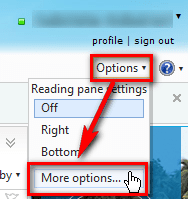
    Reply_to_0.png
    .
  • Click Reply-To address under Writing email:
    .
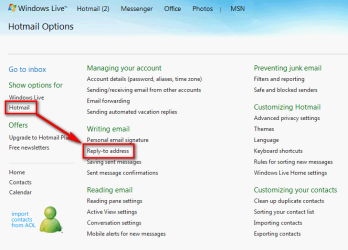
    Reply_to_1.png
  • Select Other address and add any valid email address where you want to receive replies. Click Save:
    .
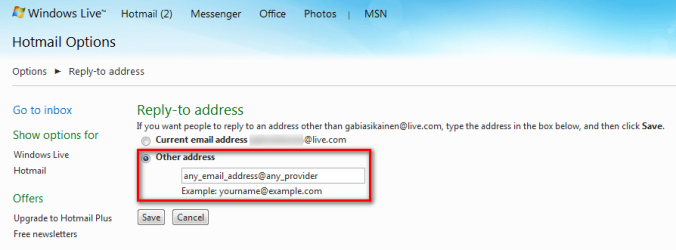
    Reply_to_2.png
Done. Now the replies to your email are no longer sent to your original email address. Instead, they are sent to this secondary Reply-To address.

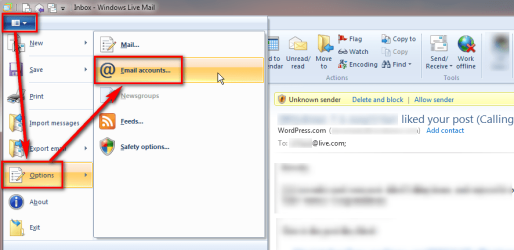
If you use an email client application to manage your email, this can be done from your email client application's settings. Here's how to change Reply-To address in Windows Live Mail 2011:
  • Open the main menu by clicking the white down arrow on top left corner. Select Options > Email accounts:
    .
    Reply_to_3.png
    .
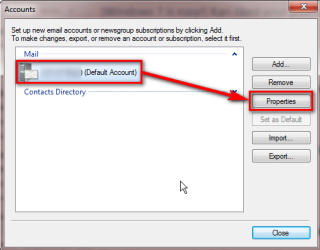
  • Select the account you want to modify, click Properties:
    .
    Reply_to_4.png
    .
  • Under General tab, add the Reply-To address and click OK:
    .
    Reply_to_5.png

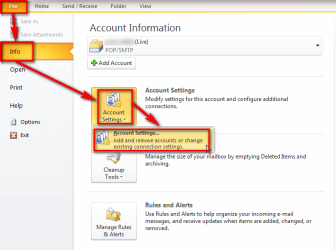
And one more, here's the same done in Outlook 2010:
  • Click File > Info > Account Settings > Account Settings:
    .
    Reply_to_6.png
    .
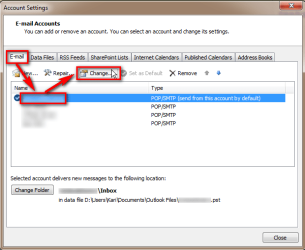
  • Under E-mail tab, select the account you want to modify, click Change:
    .
    Reply_to_7.png
    .
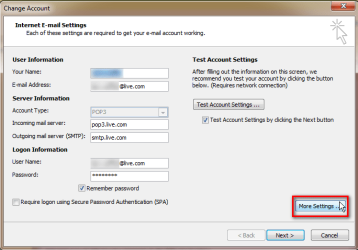
  • Click More Settings:
    .
    Reply_to_8.png
    .
  • Under General tab, add the Reply-To address you want to. Click OK:
    .
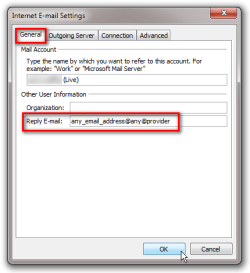
    Reply_to_9.png

So, to use multiple email accounts is easy and has no limits, as far as you can remember all your addresses and passwords ;)

You can decide if you want to use different accounts when sending email and get replies back to respective accounts, or if you want to gather all replies to one account using a global Reply-To address.

Kari

 

My Computer

Computer type
Laptop
Computer Manufacturer/Model Number
HP ENVY 17-1150eg
OS
Windows 10 Pro x64 EN-GB
CPU
1.6 GHz Intel Core i7-720QM Processor
Memory
6 GB
Graphics Card(s)
ATI Mobility Radeon HD 5850 Graphics
Sound Card
Beats sound system with integrated subwoofer
Monitor(s) Displays
17" laptop display, 22" LED and 32" Full HD TV through HDMI
Screen Resolution
1600*900 (1), 1920*1080 (2&3)
Hard Drives
Internal: 2 x 500 GB SATA Hard Disk Drive 7200 rpm
External: 2TB for backups, 3TB USB3 network drive for media
Cooling
As Envy runs a bit warm, I have it on a Cooler Master pad
Keyboard
Logitech diNovo Media Desktop Laser (bluetooth)
Mouse
Logitech Performance Mouse MX
Internet Speed
50/10 Mbps VDSL
Antivirus
Windows Defender 4.3.9431.0
Browser
Maxthon 3.5.2., IE11
Thanks Kari. The recipient sees both the from and replyto addresses when they reply. As that recipient, I'd be tempted to add the from address to the replyto address just to be sure it really goes back to the person I intended (the one who sent the original). I could imagine different addresses causing confusion if I save the dialog of emails in the conversation in a folder but the replys are adderssed to a different place than the originating mail.
 

My Computer

Computer type
PC/Desktop
Computer Manufacturer/Model Number
OQO 2+
OS
Windows 8 Pro w/MC 32-bit
CPU
Intel Atom 1.86 GHz
Motherboard
OQO 2+
Memory
2 GB
Graphics Card(s)
Intel GMA 500
Sound Card
IDT
Monitor(s) Displays
LCD
Screen Resolution
800 x 480 (portable) 1280 x 1024 (docked)
Hard Drives
64 GB SSD
PSU
9 Ah Battery (portable) or OQO Brick (docked)
Case
Shirt Pocket Sized
Cooling
Tiny Fan
Keyboard
Slide out (portable) DiNovo Edge (docked)
Mouse
Eraser head (portable) Logitech Bluetooth (docked)
Internet Speed
WWAN or 802.11G (portable) T1 (docked)
Browser
IE 10
Other Info
DVD-RW OQO Docking Station
Yes, using Reply To address does not hide the sender's address, in fact it really shows both the original address and alternative Reply To address to receiver.

I just tried to cover that aspect, too, not fully understanding what OP wanted to know :)

Kari
 

My Computer

Computer type
Laptop
Computer Manufacturer/Model Number
HP ENVY 17-1150eg
OS
Windows 10 Pro x64 EN-GB
CPU
1.6 GHz Intel Core i7-720QM Processor
Memory
6 GB
Graphics Card(s)
ATI Mobility Radeon HD 5850 Graphics
Sound Card
Beats sound system with integrated subwoofer
Monitor(s) Displays
17" laptop display, 22" LED and 32" Full HD TV through HDMI
Screen Resolution
1600*900 (1), 1920*1080 (2&3)
Hard Drives
Internal: 2 x 500 GB SATA Hard Disk Drive 7200 rpm
External: 2TB for backups, 3TB USB3 network drive for media
Cooling
As Envy runs a bit warm, I have it on a Cooler Master pad
Keyboard
Logitech diNovo Media Desktop Laser (bluetooth)
Mouse
Logitech Performance Mouse MX
Internet Speed
50/10 Mbps VDSL
Antivirus
Windows Defender 4.3.9431.0
Browser
Maxthon 3.5.2., IE11
Back
Top