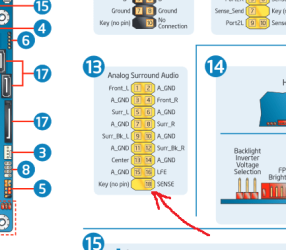
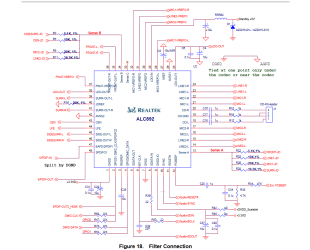
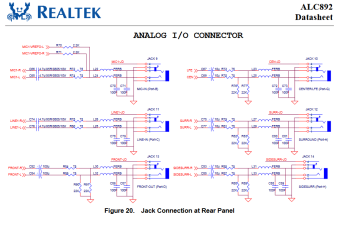
This shows the difference between the AC'97 and HD audio front panels.
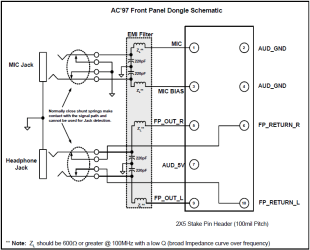
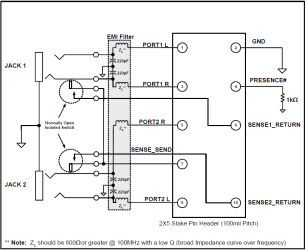
The main reason for the difference is to do with speaker assignment. With the older AC'97 system, only a single pair of stereo speakers was supported. These could be switched on and off by a standard switching stereo jack socket. With the introduction of HD audio, and the ability to feed upto 8 speakers (7.1 audio), a different method of muting had to be utilized. This method uses circuits built in to the audio chip itself to control the rear socket muting. All the front panel has to do is to provide the correct signals to the audio circuitry to tell it whether it should mute the rear panel or not. To do this, specially designed jack sockets are used. Inserting a set of headphones into the front panel socket will cause all rear panel sockets that have been assigned as speaker sockets to be muted. Since the rear microphone socket can also be re-assigned as a speaker socket, a similar arrangement also exists for a front panel microphone as well. This disables the rear pink (MIC) socket, but not if it is assigned as a speaker socket.
Note that an AC'97 style front panel WILL NOT mute speakers connected to the rear panel of a HD equiped motherboard - only a HD front panel is configured to do so.
Even cases that come with front panels fitted with both HD and AC'97 audio plugs for the motherboard will not mute these speakers as the jack sockets are still the type used for AC'97, meaning that the required muting signals are never received by the audio chip on the motherboard.
The main reason for the difference is to do with speaker assignment. With the older AC'97 system, only a single pair of stereo speakers was supported. These could be switched on and off by a standard switching stereo jack socket. With the introduction of HD audio, and the ability to feed upto 8 speakers (7.1 audio), a different method of muting had to be utilized. This method uses circuits built in to the audio chip itself to control the rear socket muting. All the front panel has to do is to provide the correct signals to the audio circuitry to tell it whether it should mute the rear panel or not. To do this, specially designed jack sockets are used. Inserting a set of headphones into the front panel socket will cause all rear panel sockets that have been assigned as speaker sockets to be muted. Since the rear microphone socket can also be re-assigned as a speaker socket, a similar arrangement also exists for a front panel microphone as well. This disables the rear pink (MIC) socket, but not if it is assigned as a speaker socket.
Note that an AC'97 style front panel WILL NOT mute speakers connected to the rear panel of a HD equiped motherboard - only a HD front panel is configured to do so.
Even cases that come with front panels fitted with both HD and AC'97 audio plugs for the motherboard will not mute these speakers as the jack sockets are still the type used for AC'97, meaning that the required muting signals are never received by the audio chip on the motherboard.
Last edited:
My Computer
- Computer type
- PC/Desktop
- Computer Manufacturer/Model Number
- Dwarf Dwf/11/2012 r09/2013
- OS
- Windows 8.1 Pro RTM x64
- CPU
- Intel Core-i5-3570K 4-core @ 3.4GHz (Ivy Bridge) (OC 4.4GHz)
- Motherboard
- ASRock Z77 Extreme4-M
- Memory
- 4 x 4GB DDR3-1600 Corsair Vengeance CMZ8GX3M2A1600C9B (16GB)
- Graphics Card(s)
- MSI GeForce GTX770 Gaming OC 2GB
- Sound Card
- Realtek High Definition on board solution (ALC 898)
- Monitor(s) Displays
- ViewSonic VA1912w Widescreen (VGA)
- Screen Resolution
- 1440x900
- Hard Drives
- OCZ Agility 3 SSD 120GB SATA III x2 (RAID 0)
Samsung HD501LJ 500GB SATA II x2
Hitachi HDS721010CLA332 1TB SATA II
Iomega 1.5TB Ext USB 2.0
WD 2.0TB Ext USB 3.0
- PSU
- XFX Pro Series 850W Semi-Modular
- Case
- Gigabyte IF233
- Cooling
- 1 x 120mm Front Inlet 1 x 120mm Rear Exhaust
- Keyboard
- Microsoft Comfort Curve Keyboard 3000 (USB)
- Mouse
- Microsoft Comfort Mouse 3000 for Business (USB)
- Internet Speed
- NetGear DG834Gv3 ADSL Modem/Router (Ethernet) ~4.0 Mb/s (O2)
- Antivirus
- Avast! 8.0.1497
- Browser
- IE 11
- Other Info
- Optical Drive: HL-DT-ST BD-RE BH10LS30 SATA Bluray
Lexmark S305 Printer/Scanner/Copier (USB)
WEI Score: 8.1/8.1/8.5/8.5/8.25
Asus Eee PC 1011PX Netbook (Windows 7 x86 Starter)