
Solved AC'97 front panel, mic not working

danielocdh

New member
Local time
1:09 PM
Messages
3
I lost my old panel which worked ok, I'm using a new panel but the microphone is not working.
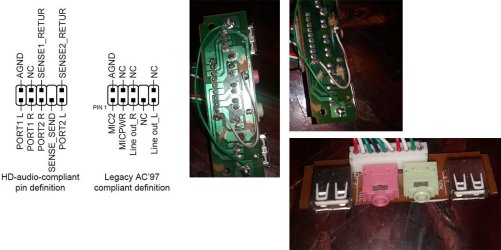
I had interference from the usb ground to the audio ground (that's why panel is scratched/wired)
Audio output works perfectly.
The only change from when my mic worked is the panel, every configuration and drivers are the same.
Motherboard asus m5a97 r2.0, (diagram attached is from motherboard manual).
I already tried both HD and AC'97 setting on bios, with the old panel I used AC'97.

For the PCB/motherboard connections:
black = AGND
white = Line out_R
green = Line out_L
red = MIC2 (I already tried connecting it only to MICPWR and to both MIC2+MICPWR)

Any ideas what is the problem?
could it just be the jack on the panel or is there something else wrong?

Thanks
 

Attachments
  • audio.jpg
    audio.jpg
    84.1 KB · Views: 6

My Computer

Computer type
PC/Desktop
OS
Windows 7 Ultimate x64
Trace out the wiring, both in the AC97 plug that connects to the motherboard and the jack. An Ohmmeter can be used to verify the wiring from the AC97 plug to the Pink mic jack Tip, Ring and Sleeve.
 

My Computer

Computer type
PC/Desktop
Computer Manufacturer/Model Number
My Own Build
OS
Windows 10 64 bit
CPU
Intel i7 6700K
Motherboard
ASUS ROG Maximus VIII Hero
Memory
16GB Corsair Dominator
Graphics Card(s)
Intel CPU Graphics
Sound Card
RealTek
Monitor(s) Displays
27" Dell S2719dgf
Screen Resolution
2560X1440
Hard Drives
1 TB Samsung 850 EVO SSD for Win 10 Pro
500GB Samsung 850 EVO SSD for Win 10 Insider
2 TB drive for backup
PSU
EVGA Supernova 750G2
Case
BeQuiet Silent Base 600
Cooling
Deepcool Captain 120EX
Keyboard
Microsoft Wireless 2000
Mouse
Microsoft wireless
Internet Speed
100 MB/sec (Cable)
Antivirus
Microsoft Defender and Malwarebytes
Browser
Edge/Firefox
Other Info
Cakewalk (Sonar) by BandLab and Studio One 4.1 Pro recording studio software. MOTU 896Mk3 Hybrid recording interface, Frontier Tranzport wireless control unit, Behringer X-Touch Control Surface.
Five USB connected optical drives for CD Audio production using Nero BurningROM
Trace out the wiring, both in the AC97 plug that connects to the motherboard and the jack. An Ohmmeter can be used to verify the wiring from the AC97 plug to the Pink mic jack Tip, Ring and Sleeve.

I don't have one but I'll try that as soon as I get my hands on one, thanks.
Any idea what should be the correct wiring for the red cable? (MIC2/MICPWR/MIC2+MICPWR)
 

My Computer

Computer type
PC/Desktop
OS
Windows 7 Ultimate x64
I have no idea on the wiring as the colors used can vary from vendor to vendor.
Pin 1 in the connectors, according to your drawing, would be the signal (tip) line. Pin 2 is the +5VDC (ring) line and the ground is noted.
 

My Computer

Computer type
PC/Desktop
Computer Manufacturer/Model Number
My Own Build
OS
Windows 10 64 bit
CPU
Intel i7 6700K
Motherboard
ASUS ROG Maximus VIII Hero
Memory
16GB Corsair Dominator
Graphics Card(s)
Intel CPU Graphics
Sound Card
RealTek
Monitor(s) Displays
27" Dell S2719dgf
Screen Resolution
2560X1440
Hard Drives
1 TB Samsung 850 EVO SSD for Win 10 Pro
500GB Samsung 850 EVO SSD for Win 10 Insider
2 TB drive for backup
PSU
EVGA Supernova 750G2
Case
BeQuiet Silent Base 600
Cooling
Deepcool Captain 120EX
Keyboard
Microsoft Wireless 2000
Mouse
Microsoft wireless
Internet Speed
100 MB/sec (Cable)
Antivirus
Microsoft Defender and Malwarebytes
Browser
Edge/Firefox
Other Info
Cakewalk (Sonar) by BandLab and Studio One 4.1 Pro recording studio software. MOTU 896Mk3 Hybrid recording interface, Frontier Tranzport wireless control unit, Behringer X-Touch Control Surface.
Five USB connected optical drives for CD Audio production using Nero BurningROM
I couldn't get an ohmmeter but I tested with my phone line (don't try this at home... lol).
Mic red cable was faulty on 2 places(middle and near the connector), I just changed it with a piece from an old UTP cable.

For my setup right now I have connected both MIC2+MICPWR on red.

Thanks fireberd for the idea.
 

My Computer

Computer type
PC/Desktop
OS
Windows 7 Ultimate x64
Back
Top