Access Denied - Optical Drive -

RyanGambrill

New member
Local time
8:56 AM
Messages
5
I have an HP Netbook with Win 7 Starter and have been able to map access to my desktop (Running XP Media Center) hard disks and can access the files with no problem.

I have also mapped to the two Optical Drives (DVD & DVD-R DL). But when I try to access the CD or DVD in that drive, I get this error:

V:\ is not accessible
Access is Denied.

Please help. Totally Confused.
 

My Computer

OS
XP & Win 7 Starter
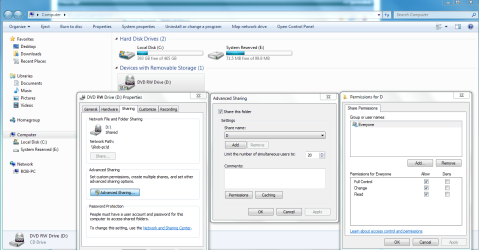
Just go to My Computer, highlight the D drive then right click, choose "share with" then choose advanced sharing, then choose advance sharing again. The picture shows how to share the drive then on the right you can choose who to share with.
 

Attachments

  • Sharing D  drive and permissions.PNG
    Sharing D drive and permissions.PNG
    65.4 KB · Views: 726
Last edited:

My Computer

Computer type
PC/Desktop
Computer Manufacturer/Model Number
Home built
OS
Windows 7 Ult, Windows 8.1 Pro,
CPU
Q9650-4.275GHz, E8600 4.5GHz, E6750-3.8GHz
Motherboard
Evga 780i FTW
Memory
G.Skill PC2 9600 1200Mhz 5 5 5 15 2T
Graphics Card(s)
GTX480
Sound Card
Asus Xonar D2
Monitor(s) Displays
HannsG
Screen Resolution
1680X1050
Hard Drives
GSkill Phoenix Pro 120GB SSD
PSU
ThermalTake Toughpower 1000Watt modular
Case
ThermalTake XaserV
Cooling
Xigmatek S1283
Keyboard
Logitech G15
Mouse
Logitech G9
Internet Speed
T1
Hello-

I appreciate all of your help. Either I am missing something or we have things backwards.

The issue I am having is connecting from my Win 7 Starter Netbook to either of my optical drives on the Win XP Desktop.

I took a look at your instructions and they seem to show how to grant access on the Netbook drive. I can see your exact screenshots on the Win 7 Netbook. But when I look at the Win XP Desktop, nothing is matching up.

When I get to the sharing tab on the drive (Desktop XP), I have both checked (share this folder on the network, & allow network users to change files).

I have confirmed that there is no problem getting from the netbook (win 7 to the hard drives on the desktop) to the desktop. Also double checked and all of the settings on the hard drives are the same as optical drives.

Any ideas?
 

My Computer

OS
XP & Win 7 Starter
Could you perhaps try to make identical users (same account name) on both machines (netbook and laptop) and then grant full permissions to each (identical) user at both ends; and then grant full permission to the optical drive.
 

My Computer

OS
Windows XP - Now Windows 7 Home Premium (64-bit).
Hello-

I appreciate all of your help. Either I am missing something or we have things backwards.

The issue I am having is connecting from my Win 7 Starter Netbook to either of my optical drives on the Win XP Desktop.

I took a look at your instructions and they seem to show how to grant access on the Netbook drive. I can see your exact screenshots on the Win 7 Netbook. But when I look at the Win XP Desktop, nothing is matching up.

When I get to the sharing tab on the drive (Desktop XP), I have both checked (share this folder on the network, & allow network users to change files).

I have confirmed that there is no problem getting from the netbook (win 7 to the hard drives on the desktop) to the desktop. Also double checked and all of the settings on the hard drives are the same as optical drives.

Any ideas?

Changed the picture to D drive just for you. It won't matter much as this will look different on the XP machine but you get the idea.

I don't have pictures from an XP machine handy as all my machines are now Win7.

In any event the sharing will work from the D drive of the XP machines if you just click on My Computer>then right click D drive from the XP machine and then share the drive with everyone.

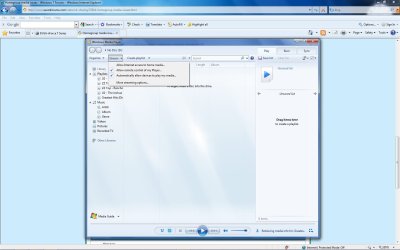
You may also need to allow for media sharing on the XP machine and 7 machine.
 

Attachments

  • media sharing.jpg
    media sharing.jpg
    113.7 KB · Views: 328

My Computer

Computer type
PC/Desktop
Computer Manufacturer/Model Number
Home built
OS
Windows 7 Ult, Windows 8.1 Pro,
CPU
Q9650-4.275GHz, E8600 4.5GHz, E6750-3.8GHz
Motherboard
Evga 780i FTW
Memory
G.Skill PC2 9600 1200Mhz 5 5 5 15 2T
Graphics Card(s)
GTX480
Sound Card
Asus Xonar D2
Monitor(s) Displays
HannsG
Screen Resolution
1680X1050
Hard Drives
GSkill Phoenix Pro 120GB SSD
PSU
ThermalTake Toughpower 1000Watt modular
Case
ThermalTake XaserV
Cooling
Xigmatek S1283
Keyboard
Logitech G15
Mouse
Logitech G9
Internet Speed
T1
Hello-

I appreciate all of your help. Either I am missing something or we have things backwards.

The issue I am having is connecting from my Win 7 Starter Netbook to either of my optical drives on the Win XP Desktop.

I took a look at your instructions and they seem to show how to grant access on the Netbook drive. I can see your exact screenshots on the Win 7 Netbook. But when I look at the Win XP Desktop, nothing is matching up.

When I get to the sharing tab on the drive (Desktop XP), I have both checked (share this folder on the network, & allow network users to change files).

I have confirmed that there is no problem getting from the netbook (win 7 to the hard drives on the desktop) to the desktop. Also double checked and all of the settings on the hard drives are the same as optical drives.

Any ideas?

Changed the picture to D drive just for you. It won't matter much as this will look different on the XP machine but you get the idea.

I don't have pictures from an XP machine handy as all my machines are now Win7.

In any event the sharing will work from the D drive of the XP machines if you just click on My Computer>then right click D drive from the XP machine and then share the drive with everyone.

You may also need to allow for media sharing on the XP machine and 7 machine.

Looks like we are talking about the same thing.

My hard drives and optical drives are all currently shared on the XP machine. The settings are identical for sharing on all drives (Optical and Hard). My netbook is connecting to the hard but not the optical.

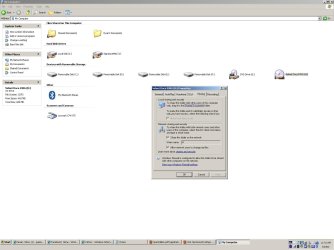
When I run thru your instructions, they do not match up on the XP machine. When I highlight and right click on the drive, there is no "Share With" option. Only "Sharing and Security". Then when you get to that tab, there is no "Advanced Sharing" button or option. Only two check boxes. One for "Share this Folder on Network" and one for "Allow Network Users To Change My Files'. Both of this are checked, and have been checked since the start.
 

Attachments

  • Win XP Desktop.JPG
    Win XP Desktop.JPG
    100.2 KB · Views: 192

My Computer

OS
XP & Win 7 Starter
For some reason lots of people are having problems sharing the DVD drive from an XP machine. But from what I'm seeing in your picture you did that part correctly.

It's very easy to do with my Win 7 machine though, I can play movies from one machine to the other any which way I want.

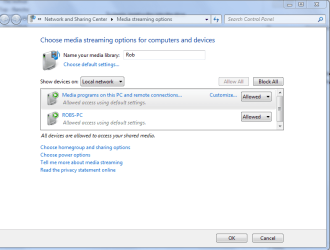
It may help to allow for Media streaming on both machines by going into WMP and allowing it to stream accross the network, picture below. You can click on more streaming options then allow for everyone.

I'll keep looking for a way to accomplish this on XP but the WMP steaming options will be similar I would imagine.

I don't have XP anymore so it's hard for me to check this.
 

Attachments

  • media sharing.jpg
    media sharing.jpg
    113.7 KB · Views: 105
  • media streaming options.PNG
    media streaming options.PNG
    26.7 KB · Views: 126

My Computer

Computer type
PC/Desktop
Computer Manufacturer/Model Number
Home built
OS
Windows 7 Ult, Windows 8.1 Pro,
CPU
Q9650-4.275GHz, E8600 4.5GHz, E6750-3.8GHz
Motherboard
Evga 780i FTW
Memory
G.Skill PC2 9600 1200Mhz 5 5 5 15 2T
Graphics Card(s)
GTX480
Sound Card
Asus Xonar D2
Monitor(s) Displays
HannsG
Screen Resolution
1680X1050
Hard Drives
GSkill Phoenix Pro 120GB SSD
PSU
ThermalTake Toughpower 1000Watt modular
Case
ThermalTake XaserV
Cooling
Xigmatek S1283
Keyboard
Logitech G15
Mouse
Logitech G9
Internet Speed
T1
I do not see that functionality in my Windows Media Player.

From what I have seen online, many people are having this problem. And I have yet to see a solution.

Thanks
 

My Computer

OS
XP & Win 7 Starter
Same here and lots of people with similar complaints. It works flawlessy in Windows 7 though I can tell you that for certain. I even tried to break streaming by running 4 different movies at once on four different machines and then I streamed the movies to every machine. Worked perfectly no matter what I did.

It's hard to believe that it can't be done from XP. From what I have read about this, it takes a certain amount of time..... for XP to accomplish the task of sharing a DVD drive. Some said they had to wait a good long time after setting it up before it worked correctly. Maybe rebooting both machines would speed up the process.
 

My Computer

Computer type
PC/Desktop
Computer Manufacturer/Model Number
Home built
OS
Windows 7 Ult, Windows 8.1 Pro,
CPU
Q9650-4.275GHz, E8600 4.5GHz, E6750-3.8GHz
Motherboard
Evga 780i FTW
Memory
G.Skill PC2 9600 1200Mhz 5 5 5 15 2T
Graphics Card(s)
GTX480
Sound Card
Asus Xonar D2
Monitor(s) Displays
HannsG
Screen Resolution
1680X1050
Hard Drives
GSkill Phoenix Pro 120GB SSD
PSU
ThermalTake Toughpower 1000Watt modular
Case
ThermalTake XaserV
Cooling
Xigmatek S1283
Keyboard
Logitech G15
Mouse
Logitech G9
Internet Speed
T1
If, we cannot find a solution, I assume upgrading my desktop to Windows 7 will give me the functionality I need?
 

My Computer

OS
XP & Win 7 Starter
If, we cannot find a solution, I assume upgrading my desktop to Windows 7 will give me the functionality I need?

It sure works well for me using the Homegroup network feature, I even spent a good amount of time testing it out. Once the drive is accessed you can see the files on the DVD, clicking on the IFO file will usually start the movie for you.

You should have no problems with that.
 

My Computer

Computer type
PC/Desktop
Computer Manufacturer/Model Number
Home built
OS
Windows 7 Ult, Windows 8.1 Pro,
CPU
Q9650-4.275GHz, E8600 4.5GHz, E6750-3.8GHz
Motherboard
Evga 780i FTW
Memory
G.Skill PC2 9600 1200Mhz 5 5 5 15 2T
Graphics Card(s)
GTX480
Sound Card
Asus Xonar D2
Monitor(s) Displays
HannsG
Screen Resolution
1680X1050
Hard Drives
GSkill Phoenix Pro 120GB SSD
PSU
ThermalTake Toughpower 1000Watt modular
Case
ThermalTake XaserV
Cooling
Xigmatek S1283
Keyboard
Logitech G15
Mouse
Logitech G9
Internet Speed
T1
Back
Top