"Access Denied" to many registry entries.

originaljgf

New member
Member
VIP
Local time
5:04 PM
Messages
121
Location
Ohio
Win7 Ultimate x86 update install over Vista Home Premium x86. All working so far except as I try to tweak to my satisfaction (for example removing "Libraries" and "Favorites" from explorer) regedit tells me "Access denied, you do not have permission...."; trying to alleviate this irritant I'm told i don't have permission to give myself permission. Running in admin account with UAC disabled.

FWIW, I did a clean install of this same Win7 on an old laptop a couple of years ago and made all these edits with no problem.

So, just where do I kick this thing so I can make these edits?
 

My Computers My Computers

  • At a glance

    win7 Pro SP1 x8664x2 6000+2gigGTX950
    Computer type
    PC/Desktop
    Computer Manufacturer/Model Number
    custom
    OS
    win7 Pro SP1 x86
    CPU
    64x2 6000+
    Motherboard
    winfast
    Memory
    2gig
    Graphics Card(s)
    GTX950
    Antivirus
    Avast
    Browser
    Brave
  • Computer type
    PC/Desktop
    Antivirus
    Avast
Most likely the affected registry keys are owned and locked by the TrustedInstaller user, and not even administrator group have been given access. Since you have administrator access, you can simply take ownership of the problematic keys and give yourself access before making the changes.

As TrustedInstaller is a service account, you can't login as it to avoid the nuance.
 

My Computer My Computer

At a glance

Windows 7 Ultimate x64Intel Core i7-740QM8 GB DDR3NVIDIA GeForce 330GT
Computer type
Laptop
Computer Manufacturer/Model Number
Toshiba Sattelite A665-S6092
OS
Windows 7 Ultimate x64
CPU
Intel Core i7-740QM
Memory
8 GB DDR3
Graphics Card(s)
NVIDIA GeForce 330GT
Screen Resolution
1366x768
Hard Drives
Samsung 840 SSD 500GB
1TB USB3 external HD
Cooling
Coolermaster Notepal U3 notebook cooling pad
Internet Speed
3mbps ASDL
Antivirus
ClamWin 0.98.7
Browser
Opera 12.17 x86 (main), Firefox 38 (sec), IE11 (last resort)
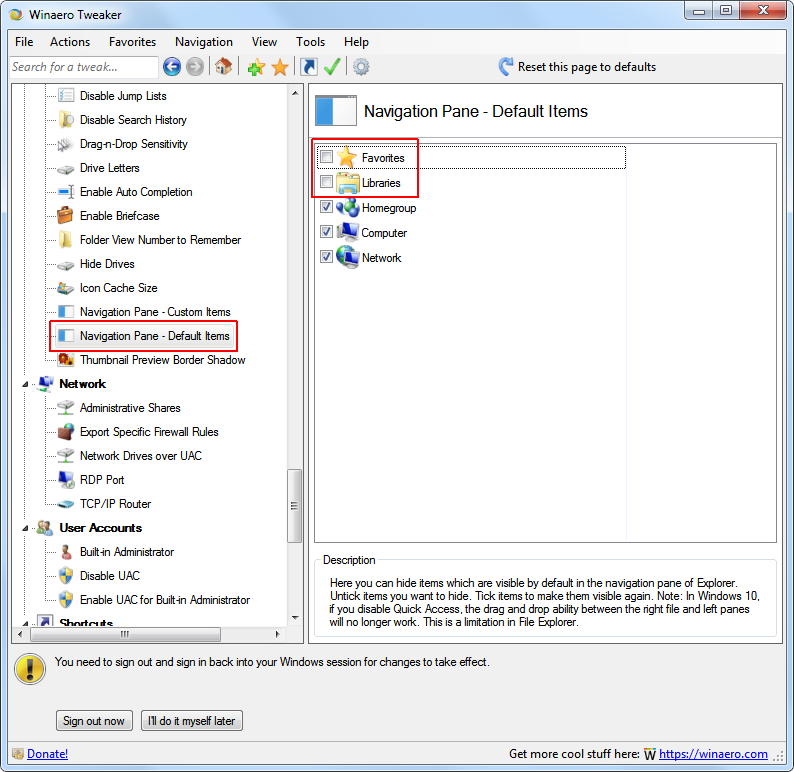
To remove Libraries and Favorites you can use winaero ( Winaero Tweaker )


vmRONI1.png


But if you need TrustedInstaller access to the registry, you can use AdvancedRun
( AdvancedRun - Run a Windows program with different settings )


uzYmhW5.png


(It's important that you run AdvancedRun as administrator)
 

My Computers My Computers

  • At a glance

    Windows 7 Ultimate 64-bit SP1Intel Core 2 Quad Q6700 @ 2.66GHz4.00GB Single-Channel DDR2 @ 399MHz2047MB NVIDIA GeForce GT 710 (ASUStek Compute...
    Computer type
    PC/Desktop
    OS
    Windows 7 Ultimate 64-bit SP1
    CPU
    Intel Core 2 Quad Q6700 @ 2.66GHz
    Motherboard
    ECS MCP73PVT-SM
    Memory
    4.00GB Single-Channel DDR2 @ 399MHz
    Graphics Card(s)
    2047MB NVIDIA GeForce GT 710 (ASUStek Computer Inc)
    Sound Card
    Realtek High Definition Audio
    Monitor(s) Displays
    HP 21kd
    Screen Resolution
    1920x1080@60Hz
    Hard Drives
    149GB Western Digital WDC WD1600AABS-61PRA0 ATA Device (SATA )
    4000GB Seagate ST4000DM004-2U9104 ATA Device (SATA )
    931GB TOSHIBA External USB 3.0 USB Device (USB (SATA) )
    Antivirus
    None. Don't Need it.
    Browser
    Librewolf Portable
    Other Info
    It's a very old system.
  • Computer type
    PC/Desktop
Thanks for the info, will try those utils.

"take ownership of the problematic keys and give yourself access before making the changes."
My first thought also, but there is no option to take ownership.

I'm curious if there is something i should/could have done during install to prevent this issue, or is it endemic to an upgrade install (as noted I had installed the same win7, from the same disk, on this laptop I'm currently using and never experienced any permissions issues; but this was a clean install to a formatted drive).
 

My Computers My Computers

  • At a glance

    win7 Pro SP1 x8664x2 6000+2gigGTX950
    Computer type
    PC/Desktop
    Computer Manufacturer/Model Number
    custom
    OS
    win7 Pro SP1 x86
    CPU
    64x2 6000+
    Motherboard
    winfast
    Memory
    2gig
    Graphics Card(s)
    GTX950
    Antivirus
    Avast
    Browser
    Brave
  • Computer type
    PC/Desktop
    Antivirus
    Avast
"take ownership of the problematic keys and give yourself access before making the changes."
My first thought also, but there is no option to take ownership.


You can change the owner in the owner tab of the permissions dialog box, just the very same process as with normal files.


I'm curious if there is something i should/could have done during install to prevent this issue, or is it endemic to an upgrade install (as noted I had installed the same win7, from the same disk, on this laptop I'm currently using and never experienced any permissions issues; but this was a clean install to a formatted drive).
This is a normal permission setting of a default Windows install, upgraded or not, and has been the standard since at least Windows 7 (don't remember on Vista) and continues to do so into Windows 11.

The fact that TrustedInstaller owns and controls some files and registry keys is to prevent accidental modification of some critical system files, and has been a common thing since years, not really an issue per itself (but annoying if you really want to change one of those).

It's just a matter of a trade-off between "protecting" the careless user from himself vs annoying the power user. Windows designers have always taken the first attitude.
 

My Computer My Computer

At a glance

Windows 7 Ultimate x64Intel Core i7-740QM8 GB DDR3NVIDIA GeForce 330GT
Computer type
Laptop
Computer Manufacturer/Model Number
Toshiba Sattelite A665-S6092
OS
Windows 7 Ultimate x64
CPU
Intel Core i7-740QM
Memory
8 GB DDR3
Graphics Card(s)
NVIDIA GeForce 330GT
Screen Resolution
1366x768
Hard Drives
Samsung 840 SSD 500GB
1TB USB3 external HD
Cooling
Coolermaster Notepal U3 notebook cooling pad
Internet Speed
3mbps ASDL
Antivirus
ClamWin 0.98.7
Browser
Opera 12.17 x86 (main), Firefox 38 (sec), IE11 (last resort)
Back
Top