Access is denied - WHY ??

I understand

I understand your instruction and thank you for it. I bumped your rep, but I stand by my rant.
 

My Computer My Computer

At a glance

Win 7 Professional 64-bitDUAL AMD OPTERON 2468 GigGforce FX 6200
Computer Manufacturer/Model Number
home built several years ago
OS
Win 7 Professional 64-bit
CPU
DUAL AMD OPTERON 246
Motherboard
TYAN THUNDER K8W S2885
Memory
8 Gig
Graphics Card(s)
Gforce FX 6200
Sound Card
internal
Monitor(s) Displays
Acer V223w LCD & Dell 17 LCD
Hard Drives
80 gb IDE Win 7 64 Professional,
240 gb, 1Tb partitioned x4,
plus 300 gb USB external for backup
8 gb USB jump drive/ReadyBoost
PSU
Antec 550w
Case
Antec SERVER 3U RACK MOUNT
Cooling
fans, fans and more fans. Monitored by SpeedFan
Other Info
Internet vendor is Clear wireless. Partially satisfied with them. This PC is networked with 2 other PC's, & 2 laptops.
I understand your instruction and thank you for it. I bumped your rep, but I stand by my rant.

But your rant is 'misguided':

"...Whatever witless computer engineer that thought it was a good idea to deny me access to all the above please stand up and hold up your hand, like the basketball players that foul another player (if they are man enough), and say "I fouled! Bad idea!"

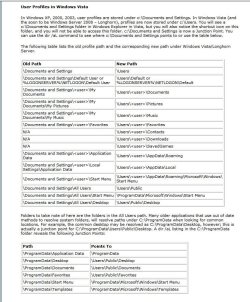
No access has been denied. Merely a new location, as is explained LogicEarth's sig links. You can access your data if you look in the right places. The following screenshot from the afore mentioned links should help:

User Profile Paths.JPG

James
 

My Computer My Computer

At a glance

Win7U 64 RTMQ95508GB GskillASUS|EAH4850/HTDI/1GD3/A
OS
Win7U 64 RTM
CPU
Q9550
Motherboard
GA-EP45-UD3R
Memory
8GB Gskill
Graphics Card(s)
ASUS|EAH4850/HTDI/1GD3/A
Sound Card
xfi Plat
Monitor(s) Displays
Dell 2405fpw
Screen Resolution
1920x1200
Hard Drives
Seagate & WD sata Drives
PSU
Antec
Case
Antec
Keyboard
MS Natural Ergonomic 4000
Mouse
Logitech MX610 USB Cordless
This thread should be altered somehow to hide or remove the advice given on page one by some new users. I understand they were trying to be helpful, but a red flag should have gone up when the OP was asking about "Documents and Settings." If someone else starts into this thread looking for a similar answer, they are going to be taking ownership and changing permissions before they learn that they shouldn't do it.
 

My Computer My Computer

At a glance

Windows 7 Ultimate RTM (Technet)3.00 gigahertz Intel Core2 Duo E84004GBATI Radeon X1950 Pro
Computer Manufacturer/Model Number
Custom
OS
Windows 7 Ultimate RTM (Technet)
CPU
3.00 gigahertz Intel Core2 Duo E8400
Motherboard
ASUSTeK Computer INC. P5K/EPU Rev 1.xx
Memory
4GB
Graphics Card(s)
ATI Radeon X1950 Pro
Sound Card
Built in HD Audio
Monitor(s) Displays
22" Gateway LCD
Screen Resolution
1920 x 1200
Hard Drives
ST3160023A [Hard drive] (160.04 GB) -- drive 0, rev 8.01, ST3500630AS [Hard drive] (500.11 GB) -- drive 2, rev 3.AAK
ST3500630AS [Hard drive] (500.11 GB) -- drive 1, rev 3.AAK
Keyboard
Logitech G11
Mouse
Microsoft Wireless Laser Mouse 5000
Internet Speed
13.44 Mbps
Standard Advice

This thread should be altered somehow to hide or remove the advice given on page one by some new users. I understand they were trying to be helpful, but a red flag should have gone up when the OP was asking about "Documents and Settings." If someone else starts into this thread looking for a similar answer, they are going to be taking ownership and changing permissions before they learn that they shouldn't do it.

The standard advice should be in giant letters on "help" pages:

ALWAYS make a backup image, BEFORE trying to adjust your system settings.
Ad infinitum

 
Last edited:

My Computer My Computer

At a glance

W7 Ultimate SP1, LM19.2 MATE, W10 Home 1703, ...AMD Phenom II x6 1100T, 3.3 GHz12GB DDR3 1333 G-Skill (4GB x 2), G-Skill (2G...NVIDIA GeForce GTX 660
Computer type
PC/Desktop
Computer Manufacturer/Model Number
n/a
OS
W7 Ultimate SP1, LM19.2 MATE, W10 Home 1703, W10 Pro 1703 VM, #All 64 bit
CPU
AMD Phenom II x6 1100T, 3.3 GHz
Motherboard
ASUS M4A88T-M/USB3 (AM3)
Memory
12GB DDR3 1333 G-Skill (4GB x 2), G-Skill (2GB x 2)
Graphics Card(s)
NVIDIA GeForce GTX 660
Sound Card
Realtek?
Monitor(s) Displays
Samsung S23B350
Screen Resolution
1920x1080
Hard Drives
WD Green 2TB (SATA), WD Green 3TB (SATA), WD Blue 4TB (SATA), WD Blue 6TB (SATA)
PSU
Cooler Master
Case
Antec GX300 Tower
Cooling
3x Antec TRICOOL 120mm Fans
Mouse
Wired Optical
Internet Speed
DSL
Antivirus
Avast
Browser
Pale Moon (64 bit)
Other Info
2018-12-27 Upgraded HDDs
2015-12-10 Upgraded case, graphics card, storage
2015-08-15 Upgraded motherboard & RAM
2015-07-15 Upgraded LM17.1 to LM17.2
How can I open folders like Documents and Settings ? I get "Access is denied" although my account is not a limited one. I would like the freedom of opening whatever folder I want to.

:(
I also had the same problem.....

I have done everything mentioned above but it didn't work .the problem was still on.

but now my problem is solved.....HERE IS THE SOLUTION......

1)Manually open the folder for which the access is denied.

2)select the Executable/application file in that folder.

3)Right click on it and go to PROPERTIES->COMPATIBILITY

4)Now see the PRIVILEGE LEVEL and check it for RUN AS ADMINISTRATOR

5)then click on CHANGE SETTING FOR ALL USERS.

6)I guess the problem is solved now.
 

My Computer My Computer

At a glance

Maharashtra
Computer type
PC/Desktop
OS
Maharashtra
Back
Top