Access & *selectively* delete some old Restore Points in WIN7 Home-P
Depending on how I look for them (admin cmd rstrui) I have:
Either 54 system restore points: 6 recent and the rest from 2015-2020,
Or, via routes to selective deletion, described below, only the 6 recent ones (Aug 2021-present).
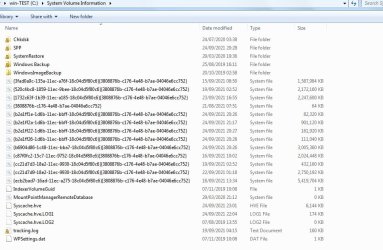
Apparently confirming the larger number, System Protection/Configure says I'm holding 158 GB (!) of all 54 SRPs, and creating a new one seems to use only about 1GB without deleting any of the oldest ones (so the older ones, if they really exist, must be pretty large).
If I try to reach the older ones to selectively delete (I don't want to lose all of the oldest ones), e.g. via the advice in
Please Wait... | Cloudflare
...the Vssadmin console tool only finds the latest 6 SRPs.
Likewise, C-Clean also recognises only the same 6 SRPs.
And the site to System Restore Explorer, from https://www.nicbedford.uk/software/systemrestoreexplorer/
...doesn't seem to be working.
Can anyone please advise me how to:
1) confirm that the old SRPs really do exist (and if not, how do I clear the 150 excess GB attributed to them?
2) how else to try to reach them to selectvely delete some of the 48 older ones.
Advice greatly appreciated - P
Depending on how I look for them (admin cmd rstrui) I have:
Either 54 system restore points: 6 recent and the rest from 2015-2020,
Or, via routes to selective deletion, described below, only the 6 recent ones (Aug 2021-present).
Apparently confirming the larger number, System Protection/Configure says I'm holding 158 GB (!) of all 54 SRPs, and creating a new one seems to use only about 1GB without deleting any of the oldest ones (so the older ones, if they really exist, must be pretty large).
If I try to reach the older ones to selectively delete (I don't want to lose all of the oldest ones), e.g. via the advice in
Please Wait... | Cloudflare
...the Vssadmin console tool only finds the latest 6 SRPs.
Likewise, C-Clean also recognises only the same 6 SRPs.
And the site to System Restore Explorer, from https://www.nicbedford.uk/software/systemrestoreexplorer/
...doesn't seem to be working.
Can anyone please advise me how to:
1) confirm that the old SRPs really do exist (and if not, how do I clear the 150 excess GB attributed to them?
2) how else to try to reach them to selectvely delete some of the 48 older ones.
Advice greatly appreciated - P
My Computer
At a glance
Windows7 Home Premium SP1 64 bitIntel i7 8core 860s @ 2.80 GHz8 GBAMD Radeon R7 360
- Computer type
- PC/Desktop
- Computer Manufacturer/Model Number
- Dell XPS Sudio
- OS
- Windows7 Home Premium SP1 64 bit
- CPU
- Intel i7 8core 860s @ 2.80 GHz
- Motherboard
- Original
- Memory
- 8 GB
- Graphics Card(s)
- AMD Radeon R7 360
- Monitor(s) Displays
- 1 Dell 1907FP |(Digital) + 2nd: Generic PnP
- Screen Resolution
- Fairly sharp
- Hard Drives
- 1 TB SSD, 3TB Internal HDD
- PSU
- upgraded from original
- Case
- original
- Cooling
- upgraded from original
- Keyboard
- Dell HID
- Mouse
- Logitech cordless
- Antivirus
- Symantec & MalwareBytes
- Browser
- Chrome & Firefox
- Other Info
- Old machine, intermittently upgraded.