
PurpleMountain
New member
- Local time
- 2:28 PM
- Messages
- 2
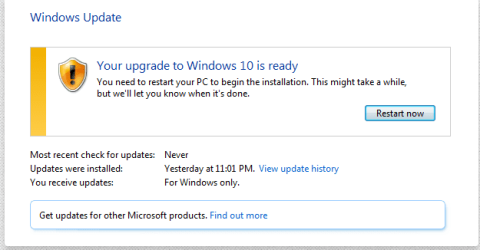
So I let my computer install updates automatically which was a mistake to greet me with a random restart on my pc where it said, "Initializing Windows 10 Update, Please Do Not Turn Off The Computer." Obviously I didn't want Windows 10 so I turned off the computer. Now in my Windows Update it has a pending update for Windows 10 Upgrade and won't let me cancel it. I'm just scared my PC with shut off and it will install a whole new OS that I do not want. Please help with this ASAP as I can't turn my PC off until it is  The main thing I need is to just cancel the pending Windows 10 installation.
Thanks
Here is a screenshot of my Windows Update Page: Screenshot by Lightshot
The main thing I need is to just cancel the pending Windows 10 installation.Thanks
Here is a screenshot of my Windows Update Page: Screenshot by Lightshot
My Computer
At a glance
Windows 7 64 bitIntel i7 4790K16GB Hyper X RAMNvidia Geforce GTX 680 2GB
- Computer type
- PC/Desktop
- Computer Manufacturer/Model Number
- Custom Build
- OS
- Windows 7 64 bit
- CPU
- Intel i7 4790K
- Motherboard
- Gigabyte GA-Z97X-UD3H
- Memory
- 16GB Hyper X RAM
- Graphics Card(s)
- Nvidia Geforce GTX 680 2GB
- Hard Drives
- Single 2TB Hitachi HDD
- Antivirus
- Avira
- Browser
- Google Chrome


