accidently activated windows live photo gallery...

pleiades357

New member
Member
Local time
9:06 PM
Messages
74
Location
Southern CA
this is going to be awkward... I don't know the correct terms


I had my pictures in "My Pictures" the original windows folder...

I connected a new camera, the window that opened offered several choices so I tried "Windows Live Photo Gallery" to upload the photos...
I found it hard to use... the "gallery" and navigation pane disappear if I select on photo and there does not seem to be anyway to get it back, I'm still trying to find out if Canon has a software to upload and do simple editing...

then I found WLPG had taken over all "My Pictures"
I want to go back to the earlier... what... format?

how to do that?
I have not been able to find anything in a search, part of the problem, not sure what terms describe the issue...

thanks!
 

My Computer My Computer

At a glance

Windows 7 Home Premium x64Intel(R) Core(TM) 2 Quad CPU Q830Intel (R) G33/G31 Express Chipset family
Computer type
PC/Desktop
Computer Manufacturer/Model Number
PoweSpec B409
OS
Windows 7 Home Premium x64
CPU
Intel(R) Core(TM) 2 Quad CPU Q830
Graphics Card(s)
Intel (R) G33/G31 Express Chipset family
Antivirus
MS Security Essentials
Browser
FireFox

My Computer My Computer

At a glance

Win-7-Pro64bit 7-H-Prem-64biti7-5930K 2nd i9-9940x both water blocked VRM'...Trident-z 3200C14 2nd Trident-z 3600C16EVGA 1080ti ftw3 2nd Titan Xp both water blocked
Computer type
PC/Desktop
Computer Manufacturer/Model Number
Custom assembled by me :}
OS
Win-7-Pro64bit 7-H-Prem-64bit
CPU
i7-5930K 2nd i9-9940x both water blocked VRM's too
Motherboard
ASUS SABERTOOTH X99 2nd ASUS x299 Apex
Memory
Trident-z 3200C14 2nd Trident-z 3600C16
Graphics Card(s)
EVGA 1080ti ftw3 2nd Titan Xp both water blocked
Sound Card
Built-in Realtek
Monitor(s) Displays
1-AOC G2460PG 24"G-Sync 144Hz/ 2nd 1-ASUS VG248QE 24" 144Hz
Screen Resolution
1920 x 1080 144Hz
Hard Drives
2-Samsung M.2 Evo & Evo Plus
2-Samsung 850 EVO 500GB SSD's/ 3-2.5 W.D. Black 1tb-&3-1tb/3-3.5 WD Black 1tb hdd's
PSU
EVGA SuperNOVA 1000-P2 2nd 1200-P2
Case
2-Corsair Obsidian Series 450D Black ATX Mid Tower
Cooling
Custom water loops
Keyboard
Logitech G710+/ 2nd Logitech G910
Mouse
2-RedDragon M901 Perdition 16400 dpi Gaming mouse = wired
Internet Speed
Comcast Ping 19ms 89.31mbps download speed 6.12mbps upload
Antivirus
Malwarebytes Pro/ Superantispyware Pro
Browser
FireFox & Pale moon
Other Info
2nd ASUS X299 Apex/Intel i9-9940x with Custom water loop/7H-Prem-x64/Corsair 450D case/Ram Trident-z 3600C16 4x8gb / Samsung970Evo plus 500gb SSD/Dual ssd EZ swap evo/PSU EVGA SuperNova 1200w-P2 80+Platinum/GPU Titan Xp /8-ML-140 on push-pull on 2-280GTX rads
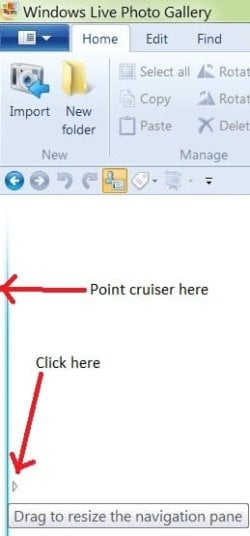
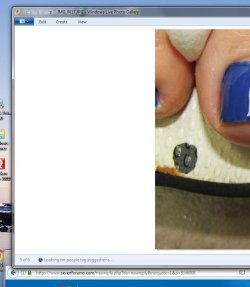
there is no triangle, no line visible in the window...

realized, is that because I am in "Import"?
it imports the new photos, if I open one picture to look at, I cannot get back to the navigation pane and the row on recently imported pictures .....


I like to learn my way around the features, but the perpetual refresh time of the image intesnitve logo for each "picture" makes WPGL clumsy for me...

thank you
and thanks for the line about adding images....
 

Attachments

  • WLPG no triangle 7-2017.JPG
    WLPG no triangle 7-2017.JPG
    49.1 KB · Views: 2

My Computer My Computer

At a glance

Windows 7 Home Premium x64Intel(R) Core(TM) 2 Quad CPU Q830Intel (R) G33/G31 Express Chipset family
Computer type
PC/Desktop
Computer Manufacturer/Model Number
PoweSpec B409
OS
Windows 7 Home Premium x64
CPU
Intel(R) Core(TM) 2 Quad CPU Q830
Graphics Card(s)
Intel (R) G33/G31 Express Chipset family
Antivirus
MS Security Essentials
Browser
FireFox
terminology
the, is it called a program? that is "Windows live photo gallery"

then what is the format that was the previous windows program that organized and uploaded pictures I saved, for example, on the internet....

it will be easier to ask questions if I learn the terms... the information I find on the internet is so often beyond those I am familiar with...

for example... 1. Click on a listed file extension below the blue NOTE box that you would like to restore the default associations of. This will be for the downloadable .reg file for the listed file extension.

I ave no idea where I would find the file extension... or what the file extension of my old format for window "Pictures" should be


thanks!
 

My Computer My Computer

At a glance

Windows 7 Home Premium x64Intel(R) Core(TM) 2 Quad CPU Q830Intel (R) G33/G31 Express Chipset family
Computer type
PC/Desktop
Computer Manufacturer/Model Number
PoweSpec B409
OS
Windows 7 Home Premium x64
CPU
Intel(R) Core(TM) 2 Quad CPU Q830
Graphics Card(s)
Intel (R) G33/G31 Express Chipset family
Antivirus
MS Security Essentials
Browser
FireFox
Hi,
You're in the photo gallery viewer not photo gallery the program
Refer to the default file type restore link to switch back to windows photo viewer install or do it manually file type by file type = jpg-jpeg-png-......
 

My Computer My Computer

At a glance

Win-7-Pro64bit 7-H-Prem-64biti7-5930K 2nd i9-9940x both water blocked VRM'...Trident-z 3200C14 2nd Trident-z 3600C16EVGA 1080ti ftw3 2nd Titan Xp both water blocked
Computer type
PC/Desktop
Computer Manufacturer/Model Number
Custom assembled by me :}
OS
Win-7-Pro64bit 7-H-Prem-64bit
CPU
i7-5930K 2nd i9-9940x both water blocked VRM's too
Motherboard
ASUS SABERTOOTH X99 2nd ASUS x299 Apex
Memory
Trident-z 3200C14 2nd Trident-z 3600C16
Graphics Card(s)
EVGA 1080ti ftw3 2nd Titan Xp both water blocked
Sound Card
Built-in Realtek
Monitor(s) Displays
1-AOC G2460PG 24"G-Sync 144Hz/ 2nd 1-ASUS VG248QE 24" 144Hz
Screen Resolution
1920 x 1080 144Hz
Hard Drives
2-Samsung M.2 Evo & Evo Plus
2-Samsung 850 EVO 500GB SSD's/ 3-2.5 W.D. Black 1tb-&3-1tb/3-3.5 WD Black 1tb hdd's
PSU
EVGA SuperNOVA 1000-P2 2nd 1200-P2
Case
2-Corsair Obsidian Series 450D Black ATX Mid Tower
Cooling
Custom water loops
Keyboard
Logitech G710+/ 2nd Logitech G910
Mouse
2-RedDragon M901 Perdition 16400 dpi Gaming mouse = wired
Internet Speed
Comcast Ping 19ms 89.31mbps download speed 6.12mbps upload
Antivirus
Malwarebytes Pro/ Superantispyware Pro
Browser
FireFox & Pale moon
Other Info
2nd ASUS X299 Apex/Intel i9-9940x with Custom water loop/7H-Prem-x64/Corsair 450D case/Ram Trident-z 3600C16 4x8gb / Samsung970Evo plus 500gb SSD/Dual ssd EZ swap evo/PSU EVGA SuperNova 1200w-P2 80+Platinum/GPU Titan Xp /8-ML-140 on push-pull on 2-280GTX rads
Refer to the default file type restore link to switch back to windows photo viewer install or do it manually file type by file type = jpg-jpeg-png-......

sorry, still don't understand...
I'm not sure what you mean....
the pictures are still jpeg, or what ever they were...
the file is now a "WPGL" format... every picture opens with a graphic that takes too long to show the small icon and refreshes often

when I open "my picture" file... do I do something somewhere? or... what, where do I go to do this?
what do I open?

thank you....
 

My Computer My Computer

At a glance

Windows 7 Home Premium x64Intel(R) Core(TM) 2 Quad CPU Q830Intel (R) G33/G31 Express Chipset family
Computer type
PC/Desktop
Computer Manufacturer/Model Number
PoweSpec B409
OS
Windows 7 Home Premium x64
CPU
Intel(R) Core(TM) 2 Quad CPU Q830
Graphics Card(s)
Intel (R) G33/G31 Express Chipset family
Antivirus
MS Security Essentials
Browser
FireFox
Hi,
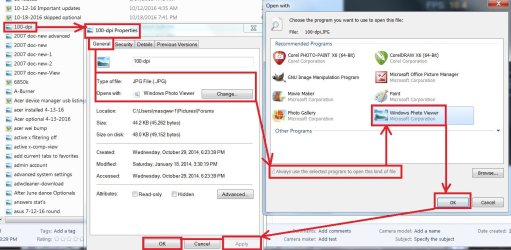
An easier way is to simply right click one of your jpg images and select Properties
file properties change program.jpg
 

My Computer My Computer

At a glance

Win-7-Pro64bit 7-H-Prem-64biti7-5930K 2nd i9-9940x both water blocked VRM'...Trident-z 3200C14 2nd Trident-z 3600C16EVGA 1080ti ftw3 2nd Titan Xp both water blocked
Computer type
PC/Desktop
Computer Manufacturer/Model Number
Custom assembled by me :}
OS
Win-7-Pro64bit 7-H-Prem-64bit
CPU
i7-5930K 2nd i9-9940x both water blocked VRM's too
Motherboard
ASUS SABERTOOTH X99 2nd ASUS x299 Apex
Memory
Trident-z 3200C14 2nd Trident-z 3600C16
Graphics Card(s)
EVGA 1080ti ftw3 2nd Titan Xp both water blocked
Sound Card
Built-in Realtek
Monitor(s) Displays
1-AOC G2460PG 24"G-Sync 144Hz/ 2nd 1-ASUS VG248QE 24" 144Hz
Screen Resolution
1920 x 1080 144Hz
Hard Drives
2-Samsung M.2 Evo & Evo Plus
2-Samsung 850 EVO 500GB SSD's/ 3-2.5 W.D. Black 1tb-&3-1tb/3-3.5 WD Black 1tb hdd's
PSU
EVGA SuperNOVA 1000-P2 2nd 1200-P2
Case
2-Corsair Obsidian Series 450D Black ATX Mid Tower
Cooling
Custom water loops
Keyboard
Logitech G710+/ 2nd Logitech G910
Mouse
2-RedDragon M901 Perdition 16400 dpi Gaming mouse = wired
Internet Speed
Comcast Ping 19ms 89.31mbps download speed 6.12mbps upload
Antivirus
Malwarebytes Pro/ Superantispyware Pro
Browser
FireFox & Pale moon
Other Info
2nd ASUS X299 Apex/Intel i9-9940x with Custom water loop/7H-Prem-x64/Corsair 450D case/Ram Trident-z 3600C16 4x8gb / Samsung970Evo plus 500gb SSD/Dual ssd EZ swap evo/PSU EVGA SuperNova 1200w-P2 80+Platinum/GPU Titan Xp /8-ML-140 on push-pull on 2-280GTX rads
Back
Top