Windows Live Photo Gallery will not run

nicole2007

New member
Local time
10:07 AM
Messages
8
I really don't know what happened. I went to access Windows Live Photo Gallery (WLPG) and got the message that it has stopped working. I ran sfc \scannow and it states that corrupt files were found and not all were able to be fixed, but I don't know how to open that log to see what it says.

I tried doing a System Restore back to the earliest date I had and that didn't work.

Can someone please help me with this?
 

My Computer My Computer

At a glance

Windows 7 Home Premium 64 bitIntel(R) Core(TM) i5-2450M CPU @ 2.50 GHz6 GB
Computer type
Laptop
Computer Manufacturer/Model Number
Asus
OS
Windows 7 Home Premium 64 bit
CPU
Intel(R) Core(TM) i5-2450M CPU @ 2.50 GHz
Memory
6 GB
Antivirus
Emsisoft
Browser
Chrome
I haven't received any answers yet, but I want to add that I now can open Windows Photo Gallery so that I can access photos, but I still can't open a photo using it. I have to right click on a photo and "open with" Paint. I hope someone will answer and help me with this.

I ran Disk Check and then did some more messing around and it finally opened.
 

My Computer My Computer

At a glance

Windows 7 Home Premium 64 bitIntel(R) Core(TM) i5-2450M CPU @ 2.50 GHz6 GB
Computer type
Laptop
Computer Manufacturer/Model Number
Asus
OS
Windows 7 Home Premium 64 bit
CPU
Intel(R) Core(TM) i5-2450M CPU @ 2.50 GHz
Memory
6 GB
Antivirus
Emsisoft
Browser
Chrome
it's beginning to look like I'm not going to get any answers on this and I do so need some help. If you read this, please offer some help. I can open Windows Photo Gallery, and I can open pictures as long as I right click on them and use the "open with" and select Paint or Windows Photo Viewer. But I can't just click on a picture and open it.
 

My Computer My Computer

At a glance

Windows 7 Home Premium 64 bitIntel(R) Core(TM) i5-2450M CPU @ 2.50 GHz6 GB
Computer type
Laptop
Computer Manufacturer/Model Number
Asus
OS
Windows 7 Home Premium 64 bit
CPU
Intel(R) Core(TM) i5-2450M CPU @ 2.50 GHz
Memory
6 GB
Antivirus
Emsisoft
Browser
Chrome
Hi and welcome to SevenForums,
Sorry for the late reply,
Go to Uninstall a program and uninstall windows essentials 2012 or which ever version you show,
This program set has a fix program option please use it if you haven't already.

Also Google Picasa is much better imho if I were interested in using one that would be it
Otherwise Windows and your pictures library is just as good as for a viewer along with windows photo viewer.
If you need a real photo editor look into Free GIMP it rules anyway and you can do SO much more with it
There are literally thosands of youtube videos for GIMP usage ;)
 

My Computer My Computer

At a glance

Win-7-Pro64bit 7-H-Prem-64biti7-5930K 2nd i9-9940x both water blocked VRM'...Trident-z 3200C14 2nd Trident-z 3600C16EVGA 1080ti ftw3 2nd Titan Xp both water blocked
Computer type
PC/Desktop
Computer Manufacturer/Model Number
Custom assembled by me :}
OS
Win-7-Pro64bit 7-H-Prem-64bit
CPU
i7-5930K 2nd i9-9940x both water blocked VRM's too
Motherboard
ASUS SABERTOOTH X99 2nd ASUS x299 Apex
Memory
Trident-z 3200C14 2nd Trident-z 3600C16
Graphics Card(s)
EVGA 1080ti ftw3 2nd Titan Xp both water blocked
Sound Card
Built-in Realtek
Monitor(s) Displays
1-AOC G2460PG 24"G-Sync 144Hz/ 2nd 1-ASUS VG248QE 24" 144Hz
Screen Resolution
1920 x 1080 144Hz
Hard Drives
2-Samsung M.2 Evo & Evo Plus
2-Samsung 850 EVO 500GB SSD's/ 3-2.5 W.D. Black 1tb-&3-1tb/3-3.5 WD Black 1tb hdd's
PSU
EVGA SuperNOVA 1000-P2 2nd 1200-P2
Case
2-Corsair Obsidian Series 450D Black ATX Mid Tower
Cooling
Custom water loops
Keyboard
Logitech G710+/ 2nd Logitech G910
Mouse
2-RedDragon M901 Perdition 16400 dpi Gaming mouse = wired
Internet Speed
Comcast Ping 19ms 89.31mbps download speed 6.12mbps upload
Antivirus
Malwarebytes Pro/ Superantispyware Pro
Browser
FireFox & Pale moon
Other Info
2nd ASUS X299 Apex/Intel i9-9940x with Custom water loop/7H-Prem-x64/Corsair 450D case/Ram Trident-z 3600C16 4x8gb / Samsung970Evo plus 500gb SSD/Dual ssd EZ swap evo/PSU EVGA SuperNova 1200w-P2 80+Platinum/GPU Titan Xp /8-ML-140 on push-pull on 2-280GTX rads
I thank you for this reply. I did the repair, but still have the same problem. I have Windows Photo Viewer set as default. On my desktop, I can just double click a photo and it opens with WPV.

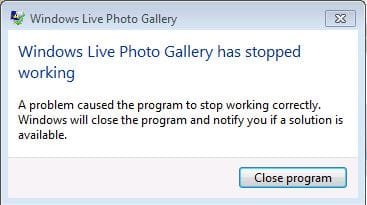
However, when I am in Windows Photo Gallery and double click on a photo to open it, after a few seconds I will get the window that Windows Live Photo Gallery has stopped working. (see screenshot)

I'm happy that now I can at least get into the Gallery because when I started this quest I couldn't even do that. I can now get in and I can right click on a photo within the Gallery and select WPV, or Paint and open photos that way so it's starting to look like I may have to just learn to live with that. Unless you have other possible solutions ...

I do also thank you for the recommendation of Google Picasa and GiMP and will be looking into both of those.

P.S. When I went into Programs and Features, I noticed two strange entries on the program list that appear to have an install date of 10-16. I have no idea what these are. Please see screenshot.
 

Attachments

  • wlg stopped working.JPG
    wlg stopped working.JPG
    20.4 KB · Views: 17
  • Programs on list..JPG
    Programs on list..JPG
    15.7 KB · Views: 17
Last edited:

My Computer My Computer

At a glance

Windows 7 Home Premium 64 bitIntel(R) Core(TM) i5-2450M CPU @ 2.50 GHz6 GB
Computer type
Laptop
Computer Manufacturer/Model Number
Asus
OS
Windows 7 Home Premium 64 bit
CPU
Intel(R) Core(TM) i5-2450M CPU @ 2.50 GHz
Memory
6 GB
Antivirus
Emsisoft
Browser
Chrome
Hi,
I would uninstall them live mesh is useless any way and I believe unsupported too :/
Not sure where that would come from ?

After uninstalling mesh run Adwcleaner
Post the scan results
The other 2 are for IF Adwcleaner finds stuff
Review Jacee’s instructions to run Adwcleaner here post #7,
Ignore the title of the thread,
http://www.sevenforums.com/system-security/316404-instant-savings-app.html
On the BleepingComputer site use the button that looks like this,
adwcleaner-button.JPG


You can use these free tools to see if they find anything,
Manually Update them before running full scans,
Try not to use your computer while the scans are running, (one at a time of course).
See this tutorial on how to download and run Malwarebytes,
http://www.sevenforums.com/tutorials/338716-malwarebytes-anti-malware-free.html
Also use the Custom scan option not the Threat scan,
Please Do Not clean/ Delete or Remove Any detections before posting the scan results first before review especially Malwarebytes,
Malwarebytes | Free Anti-Malware Detection & Removal Software

SAS is safe to remove anything it finds ;)
SUPERAntiSpyware | Remove Malware | Remove Spyware - AntiMalware, AntiSpyware, AntiAdware!
 

My Computer My Computer

At a glance

Win-7-Pro64bit 7-H-Prem-64biti7-5930K 2nd i9-9940x both water blocked VRM'...Trident-z 3200C14 2nd Trident-z 3600C16EVGA 1080ti ftw3 2nd Titan Xp both water blocked
Computer type
PC/Desktop
Computer Manufacturer/Model Number
Custom assembled by me :}
OS
Win-7-Pro64bit 7-H-Prem-64bit
CPU
i7-5930K 2nd i9-9940x both water blocked VRM's too
Motherboard
ASUS SABERTOOTH X99 2nd ASUS x299 Apex
Memory
Trident-z 3200C14 2nd Trident-z 3600C16
Graphics Card(s)
EVGA 1080ti ftw3 2nd Titan Xp both water blocked
Sound Card
Built-in Realtek
Monitor(s) Displays
1-AOC G2460PG 24"G-Sync 144Hz/ 2nd 1-ASUS VG248QE 24" 144Hz
Screen Resolution
1920 x 1080 144Hz
Hard Drives
2-Samsung M.2 Evo & Evo Plus
2-Samsung 850 EVO 500GB SSD's/ 3-2.5 W.D. Black 1tb-&3-1tb/3-3.5 WD Black 1tb hdd's
PSU
EVGA SuperNOVA 1000-P2 2nd 1200-P2
Case
2-Corsair Obsidian Series 450D Black ATX Mid Tower
Cooling
Custom water loops
Keyboard
Logitech G710+/ 2nd Logitech G910
Mouse
2-RedDragon M901 Perdition 16400 dpi Gaming mouse = wired
Internet Speed
Comcast Ping 19ms 89.31mbps download speed 6.12mbps upload
Antivirus
Malwarebytes Pro/ Superantispyware Pro
Browser
FireFox & Pale moon
Other Info
2nd ASUS X299 Apex/Intel i9-9940x with Custom water loop/7H-Prem-x64/Corsair 450D case/Ram Trident-z 3600C16 4x8gb / Samsung970Evo plus 500gb SSD/Dual ssd EZ swap evo/PSU EVGA SuperNova 1200w-P2 80+Platinum/GPU Titan Xp /8-ML-140 on push-pull on 2-280GTX rads
Instructions weren't clear to me on the ADWCleaner. It said after scan was finished to click on Report button, but there was no report button. I clicked on the log button and I will paste that here. I did not use the clean button.

As far as Malwarebtytes, I have the paid version of that and it runs in the background. I did a scan with that yesterday and it found nothing. I also did a scan with my Emsisoft and it found nothing. I did a scan this morning with SAS and it found 3 little things not dangerous.

# AdwCleaner v5.013 - Logfile created 16/10/2015 at 18:28:44
# Updated 09/10/2015 by Xplode
# Database : 2015-10-16.1 [Server]
# Operating system : Windows 7 Home Premium Service Pack 1 (x64)
# Username : Nicole - NICOLE-PC
# Running from : C:\Users\Nicole\Desktop\AdwCleaner.exe
# Option : Scan
# Support : Forum - ToolsLib

***** [ Services ] *****


***** [ Folders ] *****

Folder Found : C:\Program Files\Fighters
Folder Found : C:\Program Files (x86)\Fighters
Folder Found : C:\Program Files (x86)\Yahoo!\Companion
Folder Found : C:\ProgramData\Fighters
Folder Found : C:\Users\Nicole\AppData\Local\Surf_Canyon
Folder Found : C:\Users\Nicole\AppData\LocalLow\Yahoo! Companion
Folder Found : C:\Users\Nicole\AppData\LocalLow\Yahoo!\Companion
Folder Found : C:\Users\Nicole\AppData\LocalLow\surfcanyon
Folder Found : C:\Users\Nicole\AppData\Roaming\Fighters
Folder Found : C:\Users\Nicole\AppData\Roaming\Yahoo!\Companion

***** [ Files ] *****

File Found : C:\Windows\Downloaded Program Files\popcaploader.inf

***** [ DLLs ] *****


***** [ Shortcuts ] *****


***** [ Scheduled tasks ] *****


***** [ Registry ] *****

Key Found : HKLM\Software\Classes\popcaploader.popcaploaderctrl2
Key Found : HKLM\Software\Classes\popcaploader.popcaploaderctrl2.1
Key Found : HKLM\SOFTWARE\Classes\CLSID\{DF780F87-FF2B-4DF8-92D0-73DB16A1543A}
Key Found : HKLM\SOFTWARE\Classes\Interface\{E4E3E0F8-CD30-4380-8CE9-B96904BDEFCA}
Key Found : HKLM\SOFTWARE\Classes\Interface\{FE8A736F-4124-4D9C-B4B1-3B12381EFABE}
Key Found : HKLM\SOFTWARE\Classes\TypeLib\{C9C5DEAF-0A1F-4660-8279-9EDFAD6FEFE1}
Key Found : HKCU\Software\Microsoft\Windows\CurrentVersion\Ext\Stats\{DF780F87-FF2B-4DF8-92D0-73DB16A1543A}
Key Found : HKCU\Software\Microsoft\Windows\CurrentVersion\Ext\Settings\{DF780F87-FF2B-4DF8-92D0-73DB16A1543A}
Key Found : [x64] HKLM\SOFTWARE\Classes\Interface\{E4E3E0F8-CD30-4380-8CE9-B96904BDEFCA}
Key Found : [x64] HKLM\SOFTWARE\Classes\Interface\{FE8A736F-4124-4D9C-B4B1-3B12381EFABE}
Key Found : HKCU\Software\APN PIP
Key Found : [x64] HKCU\Software\APN PIP

***** [ Web browsers ] *****


########## EOF - C:\AdwCleaner\AdwCleaner[S1].txt - [2140 bytes] ##########

P.S. When I did a scan with SAS, I hadn't updated it. I don't use it often as I just have the free version and I got a pop up on my desktop after I posted this that my definitions hasn't been updated for 32 days. Wonder why that didn't come up when I did the scan. Anyway, it found 91 infections. I don't know if there was anything too sever or not so I am going to attach the log and would appreciate if you would take a look at it.

 

Attachments

Last edited:

My Computer My Computer

At a glance

Windows 7 Home Premium 64 bitIntel(R) Core(TM) i5-2450M CPU @ 2.50 GHz6 GB
Computer type
Laptop
Computer Manufacturer/Model Number
Asus
OS
Windows 7 Home Premium 64 bit
CPU
Intel(R) Core(TM) i5-2450M CPU @ 2.50 GHz
Memory
6 GB
Antivirus
Emsisoft
Browser
Chrome
Hi,
Yea I would use clean in adwcleaner it won't find anything good ;)
Yahoo has a lot of security holes if you use Yahoo toolbar please use anything else :)
Neither will sas I hope you cleared it's findings too ?

Wonder what mbam will find possibly a pup or 2 :/
 

My Computer My Computer

At a glance

Win-7-Pro64bit 7-H-Prem-64biti7-5930K 2nd i9-9940x both water blocked VRM'...Trident-z 3200C14 2nd Trident-z 3600C16EVGA 1080ti ftw3 2nd Titan Xp both water blocked
Computer type
PC/Desktop
Computer Manufacturer/Model Number
Custom assembled by me :}
OS
Win-7-Pro64bit 7-H-Prem-64bit
CPU
i7-5930K 2nd i9-9940x both water blocked VRM's too
Motherboard
ASUS SABERTOOTH X99 2nd ASUS x299 Apex
Memory
Trident-z 3200C14 2nd Trident-z 3600C16
Graphics Card(s)
EVGA 1080ti ftw3 2nd Titan Xp both water blocked
Sound Card
Built-in Realtek
Monitor(s) Displays
1-AOC G2460PG 24"G-Sync 144Hz/ 2nd 1-ASUS VG248QE 24" 144Hz
Screen Resolution
1920 x 1080 144Hz
Hard Drives
2-Samsung M.2 Evo & Evo Plus
2-Samsung 850 EVO 500GB SSD's/ 3-2.5 W.D. Black 1tb-&3-1tb/3-3.5 WD Black 1tb hdd's
PSU
EVGA SuperNOVA 1000-P2 2nd 1200-P2
Case
2-Corsair Obsidian Series 450D Black ATX Mid Tower
Cooling
Custom water loops
Keyboard
Logitech G710+/ 2nd Logitech G910
Mouse
2-RedDragon M901 Perdition 16400 dpi Gaming mouse = wired
Internet Speed
Comcast Ping 19ms 89.31mbps download speed 6.12mbps upload
Antivirus
Malwarebytes Pro/ Superantispyware Pro
Browser
FireFox & Pale moon
Other Info
2nd ASUS X299 Apex/Intel i9-9940x with Custom water loop/7H-Prem-x64/Corsair 450D case/Ram Trident-z 3600C16 4x8gb / Samsung970Evo plus 500gb SSD/Dual ssd EZ swap evo/PSU EVGA SuperNova 1200w-P2 80+Platinum/GPU Titan Xp /8-ML-140 on push-pull on 2-280GTX rads
I did clean the SAS scan.

I will run the ADW again and use the clean.

I don't have Yahoo Tool Bar. Did something show in the scans indicating that I do?

FTI, strange thing happened today. I just registered for this forum and I store my login information in a program called LastPass. I signed in several times throughout yesterday with no problems. Today when I tried to sign in it kept telling me I had either the wrong password or user name, which I definitely didn't. Then I got to 5 tries and it locked me out so I went ahead and clicked the "forgot password" option.
 

My Computer My Computer

At a glance

Windows 7 Home Premium 64 bitIntel(R) Core(TM) i5-2450M CPU @ 2.50 GHz6 GB
Computer type
Laptop
Computer Manufacturer/Model Number
Asus
OS
Windows 7 Home Premium 64 bit
CPU
Intel(R) Core(TM) i5-2450M CPU @ 2.50 GHz
Memory
6 GB
Antivirus
Emsisoft
Browser
Chrome
Hi,
Yep
Adwcleaner had Yahoo companion I believe there was some cookies from Yahoo and a boat load of others
Which you should also run mbam as well.

Probably should review your Chrome browser add-ons too and see what has snuck in there ;)
 

My Computer My Computer

At a glance

Win-7-Pro64bit 7-H-Prem-64biti7-5930K 2nd i9-9940x both water blocked VRM'...Trident-z 3200C14 2nd Trident-z 3600C16EVGA 1080ti ftw3 2nd Titan Xp both water blocked
Computer type
PC/Desktop
Computer Manufacturer/Model Number
Custom assembled by me :}
OS
Win-7-Pro64bit 7-H-Prem-64bit
CPU
i7-5930K 2nd i9-9940x both water blocked VRM's too
Motherboard
ASUS SABERTOOTH X99 2nd ASUS x299 Apex
Memory
Trident-z 3200C14 2nd Trident-z 3600C16
Graphics Card(s)
EVGA 1080ti ftw3 2nd Titan Xp both water blocked
Sound Card
Built-in Realtek
Monitor(s) Displays
1-AOC G2460PG 24"G-Sync 144Hz/ 2nd 1-ASUS VG248QE 24" 144Hz
Screen Resolution
1920 x 1080 144Hz
Hard Drives
2-Samsung M.2 Evo & Evo Plus
2-Samsung 850 EVO 500GB SSD's/ 3-2.5 W.D. Black 1tb-&3-1tb/3-3.5 WD Black 1tb hdd's
PSU
EVGA SuperNOVA 1000-P2 2nd 1200-P2
Case
2-Corsair Obsidian Series 450D Black ATX Mid Tower
Cooling
Custom water loops
Keyboard
Logitech G710+/ 2nd Logitech G910
Mouse
2-RedDragon M901 Perdition 16400 dpi Gaming mouse = wired
Internet Speed
Comcast Ping 19ms 89.31mbps download speed 6.12mbps upload
Antivirus
Malwarebytes Pro/ Superantispyware Pro
Browser
FireFox & Pale moon
Other Info
2nd ASUS X299 Apex/Intel i9-9940x with Custom water loop/7H-Prem-x64/Corsair 450D case/Ram Trident-z 3600C16 4x8gb / Samsung970Evo plus 500gb SSD/Dual ssd EZ swap evo/PSU EVGA SuperNova 1200w-P2 80+Platinum/GPU Titan Xp /8-ML-140 on push-pull on 2-280GTX rads
I ran mbam this morning and there was nothing found.

I checked the program list in Programs and Features and here is no Yahoo toolbar. I'm usng Chrome browser.
 

My Computer My Computer

At a glance

Windows 7 Home Premium 64 bitIntel(R) Core(TM) i5-2450M CPU @ 2.50 GHz6 GB
Computer type
Laptop
Computer Manufacturer/Model Number
Asus
OS
Windows 7 Home Premium 64 bit
CPU
Intel(R) Core(TM) i5-2450M CPU @ 2.50 GHz
Memory
6 GB
Antivirus
Emsisoft
Browser
Chrome
Last edited:

My Computer My Computer

At a glance

Win-7-Pro64bit 7-H-Prem-64biti7-5930K 2nd i9-9940x both water blocked VRM'...Trident-z 3200C14 2nd Trident-z 3600C16EVGA 1080ti ftw3 2nd Titan Xp both water blocked
Computer type
PC/Desktop
Computer Manufacturer/Model Number
Custom assembled by me :}
OS
Win-7-Pro64bit 7-H-Prem-64bit
CPU
i7-5930K 2nd i9-9940x both water blocked VRM's too
Motherboard
ASUS SABERTOOTH X99 2nd ASUS x299 Apex
Memory
Trident-z 3200C14 2nd Trident-z 3600C16
Graphics Card(s)
EVGA 1080ti ftw3 2nd Titan Xp both water blocked
Sound Card
Built-in Realtek
Monitor(s) Displays
1-AOC G2460PG 24"G-Sync 144Hz/ 2nd 1-ASUS VG248QE 24" 144Hz
Screen Resolution
1920 x 1080 144Hz
Hard Drives
2-Samsung M.2 Evo & Evo Plus
2-Samsung 850 EVO 500GB SSD's/ 3-2.5 W.D. Black 1tb-&3-1tb/3-3.5 WD Black 1tb hdd's
PSU
EVGA SuperNOVA 1000-P2 2nd 1200-P2
Case
2-Corsair Obsidian Series 450D Black ATX Mid Tower
Cooling
Custom water loops
Keyboard
Logitech G710+/ 2nd Logitech G910
Mouse
2-RedDragon M901 Perdition 16400 dpi Gaming mouse = wired
Internet Speed
Comcast Ping 19ms 89.31mbps download speed 6.12mbps upload
Antivirus
Malwarebytes Pro/ Superantispyware Pro
Browser
FireFox & Pale moon
Other Info
2nd ASUS X299 Apex/Intel i9-9940x with Custom water loop/7H-Prem-x64/Corsair 450D case/Ram Trident-z 3600C16 4x8gb / Samsung970Evo plus 500gb SSD/Dual ssd EZ swap evo/PSU EVGA SuperNova 1200w-P2 80+Platinum/GPU Titan Xp /8-ML-140 on push-pull on 2-280GTX rads
I ran ADW again and used the cleaning function this time.

I also un-selected that box in Chrome.

I guess I don't have anything further for the time being so I will say thank you for your help and close this off.
 

My Computer My Computer

At a glance

Windows 7 Home Premium 64 bitIntel(R) Core(TM) i5-2450M CPU @ 2.50 GHz6 GB
Computer type
Laptop
Computer Manufacturer/Model Number
Asus
OS
Windows 7 Home Premium 64 bit
CPU
Intel(R) Core(TM) i5-2450M CPU @ 2.50 GHz
Memory
6 GB
Antivirus
Emsisoft
Browser
Chrome
Hi,
You didn't post the extensions you have in Chrome :(
To uninstall adwcleaner simply run it as administrator again and click on Uninstall ;)
If you ever want to run it again download it again it does not update it's self.
 

My Computer My Computer

At a glance

Win-7-Pro64bit 7-H-Prem-64biti7-5930K 2nd i9-9940x both water blocked VRM'...Trident-z 3200C14 2nd Trident-z 3600C16EVGA 1080ti ftw3 2nd Titan Xp both water blocked
Computer type
PC/Desktop
Computer Manufacturer/Model Number
Custom assembled by me :}
OS
Win-7-Pro64bit 7-H-Prem-64bit
CPU
i7-5930K 2nd i9-9940x both water blocked VRM's too
Motherboard
ASUS SABERTOOTH X99 2nd ASUS x299 Apex
Memory
Trident-z 3200C14 2nd Trident-z 3600C16
Graphics Card(s)
EVGA 1080ti ftw3 2nd Titan Xp both water blocked
Sound Card
Built-in Realtek
Monitor(s) Displays
1-AOC G2460PG 24"G-Sync 144Hz/ 2nd 1-ASUS VG248QE 24" 144Hz
Screen Resolution
1920 x 1080 144Hz
Hard Drives
2-Samsung M.2 Evo & Evo Plus
2-Samsung 850 EVO 500GB SSD's/ 3-2.5 W.D. Black 1tb-&3-1tb/3-3.5 WD Black 1tb hdd's
PSU
EVGA SuperNOVA 1000-P2 2nd 1200-P2
Case
2-Corsair Obsidian Series 450D Black ATX Mid Tower
Cooling
Custom water loops
Keyboard
Logitech G710+/ 2nd Logitech G910
Mouse
2-RedDragon M901 Perdition 16400 dpi Gaming mouse = wired
Internet Speed
Comcast Ping 19ms 89.31mbps download speed 6.12mbps upload
Antivirus
Malwarebytes Pro/ Superantispyware Pro
Browser
FireFox & Pale moon
Other Info
2nd ASUS X299 Apex/Intel i9-9940x with Custom water loop/7H-Prem-x64/Corsair 450D case/Ram Trident-z 3600C16 4x8gb / Samsung970Evo plus 500gb SSD/Dual ssd EZ swap evo/PSU EVGA SuperNova 1200w-P2 80+Platinum/GPU Titan Xp /8-ML-140 on push-pull on 2-280GTX rads
Back
Top