
Accurate CPU temps

Dick Jagger

New member
Member
Local time
10:11 AM
Messages
74
With different software, it seems that there sometimes is a difference in reported temps. I normally have Core Temp set to run as soon as I start up, but I noticed that today while running task had the cpu at around 60-75% for hours, the cpu temp reported in Core Temp hasn't changed at all. So I ran CPUID hardware monitor and noticed two locations for CPU temps, one matching the 20deg reading as in Core Temp and readings of 81deg C and 59 deg C under the motherboard section for CPU temps. Screen shot attached. What do you guys use for accurate readings and is what is shown here something to be concerned about for high temps? Thanks.
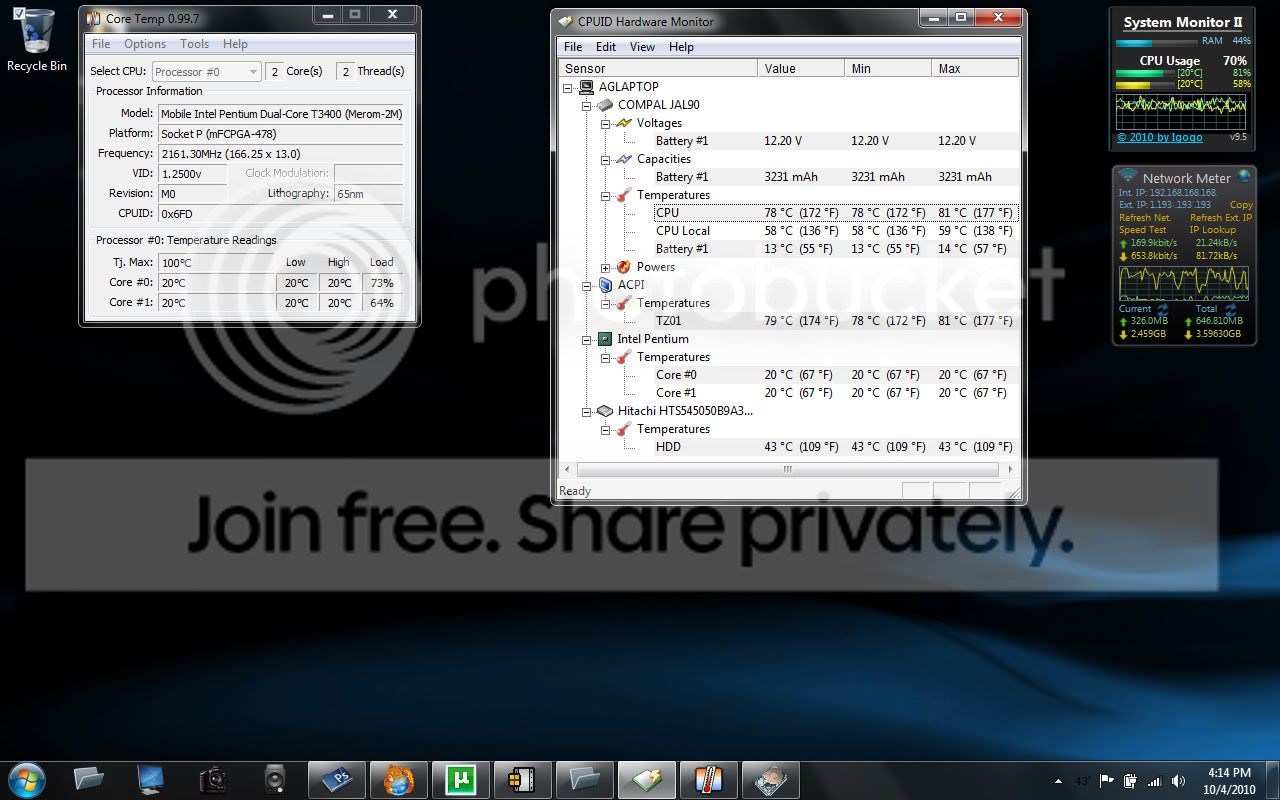
CPUtemps1.jpg
 

My Computer

Computer Manufacturer/Model Number
Acer Aspire 4730Z
OS
Windows 7 Ultimate
CPU
Intel Pentium Dual CPU T3400 @ 2.16GHz
Motherboard
Acer Aspire 4730Z V1.22 GL40
Memory
4.0GB Dual-Channel DDR2 @ 332MHz
Graphics Card(s)
Mobile Intel(R) 4 Series Express Chipset Family 1309 MB
Sound Card
Realtek High Definition Audio
Monitor(s) Displays
AOC 2795V
Screen Resolution
1920 x 1080
Hard Drives
500GB Hitachi HTS545050B9A300 ATA Travelstar
Hi,

According to the specs of your processor: Intel® Pentium® Processor T3400 (1M Cache, 2.16 GHz, 667 MHz FSB) Socket P with SPEC Code(s) SLB3P it can handle those temps, but if correct they are on the high side.
Processors on laptops usually get hotter though.

About the 20c reading, you could check the bios and see what it reads, it could be that the temperature sensors on the CPU are stuck but i'm not sure.

I always use Realtemp to monitor my CPU: Real Temp - CPU temperature monitoring you could give it a try and see what it reads.

If you want to try to lower the temps you could clean the airduct with some compressed air and you could raise the back of the laptop with some raisers to ensure enough air flow.

MK2
 

My Computer

OS
7
Thanks MK2,

I just got Real Temp and it is giving the same 20deg C reading, although I have around 8 programs fully taxing the cpu to 100% right now including PS, DPP, and DxO raw processing. I gues I was concerned about two different readings for CPU - under the intel CPU listing and on the motherboard. I have started regularly hitting the heat sink/fan assembly with compressed air which has managed to keep thing from getting to 100deg C and shutting off.
 

My Computer

Computer Manufacturer/Model Number
Acer Aspire 4730Z
OS
Windows 7 Ultimate
CPU
Intel Pentium Dual CPU T3400 @ 2.16GHz
Motherboard
Acer Aspire 4730Z V1.22 GL40
Memory
4.0GB Dual-Channel DDR2 @ 332MHz
Graphics Card(s)
Mobile Intel(R) 4 Series Express Chipset Family 1309 MB
Sound Card
Realtek High Definition Audio
Monitor(s) Displays
AOC 2795V
Screen Resolution
1920 x 1080
Hard Drives
500GB Hitachi HTS545050B9A300 ATA Travelstar
Did you check the bios?
It still looks like the core temperature sensors of the CPU are stuck and you only get a reading of the overall CPU temerature from the motherboard.
 

My Computer

OS
7

My Computer

Computer Manufacturer/Model Number
Privately built
OS
Windows 7 32 bit
CPU
Intel Core 2 Duo E8400 @ 3.00GHz
Motherboard
ASAUS P5KPL/1600
Memory
4GB
Graphics Card(s)
AOC LM729 on NVIDIA GeForce 7300 SE/7200 GS
Sound Card
On board
Monitor(s) Displays
AOC LM729 @ 1280x1024
Screen Resolution
1280 X 1024
Hard Drives
1X150BG 1X250GB
PSU
Intel core 2 DUO E8400
Case
Antec
Keyboard
Trust PS/2
Mouse
Trust PS/2
Internet Speed
10Mb
Did you check the bios?
It still looks like the core temperature sensors of the CPU are stuck and you only get a reading of the overall CPU temerature from the motherboard.
Just booted into BIOS but didn't see anything there related to the temps - the bios (Inside BIOS) has very limited configuration on this laptop.
 

My Computer

Computer Manufacturer/Model Number
Acer Aspire 4730Z
OS
Windows 7 Ultimate
CPU
Intel Pentium Dual CPU T3400 @ 2.16GHz
Motherboard
Acer Aspire 4730Z V1.22 GL40
Memory
4.0GB Dual-Channel DDR2 @ 332MHz
Graphics Card(s)
Mobile Intel(R) 4 Series Express Chipset Family 1309 MB
Sound Card
Realtek High Definition Audio
Monitor(s) Displays
AOC 2795V
Screen Resolution
1920 x 1080
Hard Drives
500GB Hitachi HTS545050B9A300 ATA Travelstar
Just out of curiosity - Have you tried SpeedFan?

Sure helps my workstations out, but come to think of it I haven't tried it on my HP Laptop...

Think i will try my own advice now :D and see what happens!

UPDATE:
Okay, I had no fans, or temp sensors show up, so it's non-functional for me. You may wish to give it a shot - you can vary fan utilization based on temperature. But only if the sensors that run the fans show up...

Hope it helps you, but on my HP Elitebook 8530p it's a no go.
 

My Computer

Computer Manufacturer/Model Number
Custom Creation
OS
Windows 7 Pro, Vista Business, Vista Ultimate, Windows XP
CPU
Core 2 Extreme
Back
Top