
Solved Confused by CPU temperature readings

adrek

New member
Hi all,

Recently my computer has shown brief moments of "stuttering". There isn't a single thing that triggers this problem, it can occur while watching youtube, working in excel, even doing simple things like opening windows explorer, etc.

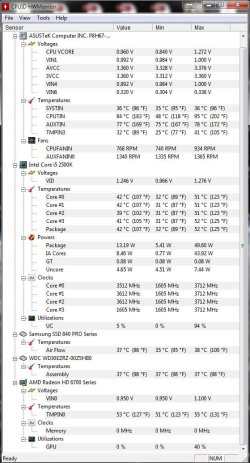
So, among other things, I looked at the CPU temperatures and I found out that HWMonitor shows a CPUTIN temp of around 90°C (picture attached shows 84°C).
HW temp.JPG

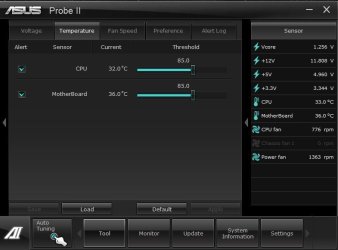
I thought this could be the real issue with my computer but decided to have a second opinion and downloaded Asus' monitoring tool and it showed temperatures around 30°C for the CPU.
Asus temp.JPG

Temperature in HWMonitor for TMPIN3 is almost the same as the CPU temp in Asus' utility which led me to think they get its reading from the same sensor on the MOBO.

So my questions would be:

1- Are both readings accurate?
2- If those readings are actually real, is it normal for the CPUTIN temp to go that high?
3- Are my temperatures something to worry about (CPUTIN in HWMonitor around 90°C)?

Tanks in advance guys!

Other info:
I haven't performed a fresh windows install in 2 years so there could be hundreds of other causes for the "stuttering". At this point I'm more concerned about the temperature readings because I will probably re install windows in the near future anyways.
 

My Computer

Computer type
PC/Desktop
Computer Manufacturer/Model Number
Custom Build
OS
Windows 7
CPU
Core i5 2500k
Motherboard
Asus P8H67-M PRO/CSM
Memory
Kingston HyperX 4GB x 2
Graphics Card(s)
AMD Radeon HD 6700
Monitor(s) Displays
AOC 27" x 2
Hard Drives
Samsung SSD 840 Pro 120 Gb (Windows)
Western Digital 3 TB (Storage)
PSU
Thermaltake 430W
Case
NZXT Vulcan
Cooling
Cooler Master Hyper EVO 212
Keyboard
Microsoft Natural ergonomic 4000
Mouse
Microsoft Basic Optical Mouse V2.0
Internet Speed
10 MB
Can you describe brief moments of "stuttering"?

On HWMonitor CPUID: What is CPUTIN, AUXTIN, SYSTIN and TMPIN3? - Apps - Apps General Discussion

CPUTIN = CPU Temperature Index
AUXTIN = Auxiliary Temperature Index
SYSTIN = System Temperature Index

CPUTIN is different from CoreTemp. CoreTemp is the sensor on the processor while CPUTIN is motherboard CPU temp sensor.
AUXTIN is the power supply temp sensor if there is one. While SYSTIN relates to Motherboard.

I would say that the readings you've got are fake as all others temperatures are low.
 

My Computers

System One System Two

  • Computer type
    PC/Desktop
    Computer Manufacturer/Model Number
    custom build
    OS
    Windows 7 HP 64
    CPU
    i5 6600K - 800MHz to 4200MHz
    Motherboard
    GA-Z170-HD3P
    Memory
    4+4G GSkill DDR4 3000
    Graphics Card(s)
    IG - Intel 530
    Monitor(s) Displays
    Samsung 226BW
    Screen Resolution
    1680x1050
    Hard Drives
    (1) -1 SM951 – 128GB M.2 AHCI PCIe SSD drive for Windows 7 and Lubuntu
    (2) -1 WD SATA 3 - 1T for Data
    (3) -1 WD SATA 3 - 1T for backup
    PSU
    Thermaltake 450W TR2 gold
    Keyboard
    Old and good Chicony mechanical keyboard
    Mouse
    Logitech mX performance - 9 buttons (had to disable some)
    Internet Speed
    500Mb/s
    Browser
    Firefox 64
    Other Info
    TinyWall firewall
  • Computer type
    Laptop
    System Manufacturer/Model Number
    Asus Q550LF
    OS
    Windows 7 Pro
    CPU
    i7-4500U 800MHz to 3.0GHz
    Motherboard
    Asus Q550LF
    Memory
    (4+4)G DDR3 1600
    Graphics Card(s)
    IG intel 4400 + NVIDIA GeForce GT 745M
    Sound Card
    Realtek
    Monitor(s) Displays
    LG Display LP156WF4-SPH1
    Screen Resolution
    1920 x 1080
    Hard Drives
    BX500 120G SSD for Windows and programs +
    1T HDD for data
    Internet Speed
    500 Mb/s
    Browser
    Firefox
    Other Info
    TinyWall firewall
Thanks for your reply,

I would describe it as... when you are typing in word or excel and the characters are not shown and the computer becomes unresponsive for a couple seconds and suddenly all of what you typed appears as soon as the computer is stable again.
Or when you are watching a video in any platform (youtube, local files, etc) and suddenly the sound and video pause as if you were hitting play/pause repeatedly with weird noises coming from the speakers.

Ultimately, I decided that I will perform a clean windows installa as soon as I have the time to do so. I was pretty worried about the CPU temp shown in HWMonitor but it looks like it is wrong as you said.

I hope I don't fry my CPU meanwhile.
 

My Computer

Computer type
PC/Desktop
Computer Manufacturer/Model Number
Custom Build
OS
Windows 7
CPU
Core i5 2500k
Motherboard
Asus P8H67-M PRO/CSM
Memory
Kingston HyperX 4GB x 2
Graphics Card(s)
AMD Radeon HD 6700
Monitor(s) Displays
AOC 27" x 2
Hard Drives
Samsung SSD 840 Pro 120 Gb (Windows)
Western Digital 3 TB (Storage)
PSU
Thermaltake 430W
Case
NZXT Vulcan
Cooling
Cooler Master Hyper EVO 212
Keyboard
Microsoft Natural ergonomic 4000
Mouse
Microsoft Basic Optical Mouse V2.0
Internet Speed
10 MB
What you describe is normal when you have another process on the background that are using all resources or the graphics card is processing something hard. When it finishes what you have typed appears. It can be the antivirus.

There is nothing as a clean install. When you finish with the updates, make a disk image with Macrium reflect so you can use next time. Macrium Software | Macrium Reflect Free

For the updates MS releases SP2 for Windows 7 - Windows 7 Help Forums
 

My Computers

System One System Two

  • Computer type
    PC/Desktop
    Computer Manufacturer/Model Number
    custom build
    OS
    Windows 7 HP 64
    CPU
    i5 6600K - 800MHz to 4200MHz
    Motherboard
    GA-Z170-HD3P
    Memory
    4+4G GSkill DDR4 3000
    Graphics Card(s)
    IG - Intel 530
    Monitor(s) Displays
    Samsung 226BW
    Screen Resolution
    1680x1050
    Hard Drives
    (1) -1 SM951 – 128GB M.2 AHCI PCIe SSD drive for Windows 7 and Lubuntu
    (2) -1 WD SATA 3 - 1T for Data
    (3) -1 WD SATA 3 - 1T for backup
    PSU
    Thermaltake 450W TR2 gold
    Keyboard
    Old and good Chicony mechanical keyboard
    Mouse
    Logitech mX performance - 9 buttons (had to disable some)
    Internet Speed
    500Mb/s
    Browser
    Firefox 64
    Other Info
    TinyWall firewall
  • Computer type
    Laptop
    System Manufacturer/Model Number
    Asus Q550LF
    OS
    Windows 7 Pro
    CPU
    i7-4500U 800MHz to 3.0GHz
    Motherboard
    Asus Q550LF
    Memory
    (4+4)G DDR3 1600
    Graphics Card(s)
    IG intel 4400 + NVIDIA GeForce GT 745M
    Sound Card
    Realtek
    Monitor(s) Displays
    LG Display LP156WF4-SPH1
    Screen Resolution
    1920 x 1080
    Hard Drives
    BX500 120G SSD for Windows and programs +
    1T HDD for data
    Internet Speed
    500 Mb/s
    Browser
    Firefox
    Other Info
    TinyWall firewall
Thanks for all the tips and info man.
 

My Computer

Computer type
PC/Desktop
Computer Manufacturer/Model Number
Custom Build
OS
Windows 7
CPU
Core i5 2500k
Motherboard
Asus P8H67-M PRO/CSM
Memory
Kingston HyperX 4GB x 2
Graphics Card(s)
AMD Radeon HD 6700
Monitor(s) Displays
AOC 27" x 2
Hard Drives
Samsung SSD 840 Pro 120 Gb (Windows)
Western Digital 3 TB (Storage)
PSU
Thermaltake 430W
Case
NZXT Vulcan
Cooling
Cooler Master Hyper EVO 212
Keyboard
Microsoft Natural ergonomic 4000
Mouse
Microsoft Basic Optical Mouse V2.0
Internet Speed
10 MB
Back
Top