Solved Acer 5552 recovery disc?

SnackCabinet

Banned
Local time
10:28 PM
Messages
139
Location
Indiana
Hi, I was wandering since I have a Toshiba HDD in my Acer Aspire 5552 and if I bought and used an Acer recovery disc, would it turn my Acer back to normal? Because right now it says everything a Toshiba would say as in like if you open up the "repair computer" option as you start it up. It has everything a Toshiba would and it won't let me restore to factory default. So just to make stuff clear. Will this work?


This is kind of confusing to explain. I've never been one to word paragraphs correctly so bare with me. :p
 

My Computer My Computer

At a glance

Microsoft Windows 7 Home Premium 64-bit SP1AMD K10 (45nm Technology)4.00 GB Dual-Channel DDR3 @ 536MHz (7-7-7-20)ATI Mobility Radeon HD 4200 Series (Acer Inco...
Computer Manufacturer/Model Number
Acer / PEW76(B)
OS
Microsoft Windows 7 Home Premium 64-bit SP1
CPU
AMD K10 (45nm Technology)
Motherboard
Acer JE51_DN (Socket S1G4)
Memory
4.00 GB Dual-Channel DDR3 @ 536MHz (7-7-7-20)
Graphics Card(s)
ATI Mobility Radeon HD 4200 Series (Acer Incorporated [ALI])
Sound Card
AMD High Definition Audio Device
Monitor(s) Displays
Generic PnP Monitor on ATI Mobility Radeon HD 4200 Series
Screen Resolution
Dual Monitor: 1366x768 / 1440 x 900
Hard Drives
298GB TOSHIBA MK3275GSX SATA Disk Device (SATA)
PSU
6-Cell Li-ion Battery
What problem are you having then?
 

My Computer My Computer

At a glance

Microsoft Windows 7 Home Premium 64-bit 7601 ...Intel(R) Core(TM) i7-3770 CPU @ 3.40GHz8.00 GBIntel(R) HD Graphics 4000
Computer type
PC/Desktop
OS
Microsoft Windows 7 Home Premium 64-bit 7601 Multiprocessor Free Service Pack 1
CPU
Intel(R) Core(TM) i7-3770 CPU @ 3.40GHz
Motherboard
ASUSTeK COMPUTER INC. P8H77-M
Memory
8.00 GB
Graphics Card(s)
Intel(R) HD Graphics 4000
Sound Card
On Board
Monitor(s) Displays
Dell 24"
Screen Resolution
1920 x 1080
Hard Drives
(1) INTEL SSDSC2CT180A3 ATA Device (2) ST500DM002-1BD142 ATA Device (3) WDC WD3200AAKS-75L9A0 ATA Device (4) Generic- Compact Flash USB Device (5) Generic- MS/MS-Pro USB Device (6) Generic- SD/MMC USB Device (7) Generic- SM/xD-Picture USB
PSU
500w Corsair
Case
Cooler Master
Cooling
3 Fans
Keyboard
Logitech MK300
Mouse
Logitech WOM
Internet Speed
75Mb
Antivirus
Norton 360
Browser
Firefox, Opera, IE
Some stuff just doesn't work like it did before. My FN keys don't work. My computer is running all kinds of Toshiba programs it doesn't need to be running and I would like to have the option of restoring my computer to factory default settings if needed. My computer doesn't run as smoothly as it did before. So will a bought Acer recovery disc put it back so it runs normally? And do I need a certain Acer recovery disc?
 

My Computer My Computer

At a glance

Microsoft Windows 7 Home Premium 64-bit SP1AMD K10 (45nm Technology)4.00 GB Dual-Channel DDR3 @ 536MHz (7-7-7-20)ATI Mobility Radeon HD 4200 Series (Acer Inco...
Computer Manufacturer/Model Number
Acer / PEW76(B)
OS
Microsoft Windows 7 Home Premium 64-bit SP1
CPU
AMD K10 (45nm Technology)
Motherboard
Acer JE51_DN (Socket S1G4)
Memory
4.00 GB Dual-Channel DDR3 @ 536MHz (7-7-7-20)
Graphics Card(s)
ATI Mobility Radeon HD 4200 Series (Acer Incorporated [ALI])
Sound Card
AMD High Definition Audio Device
Monitor(s) Displays
Generic PnP Monitor on ATI Mobility Radeon HD 4200 Series
Screen Resolution
Dual Monitor: 1366x768 / 1440 x 900
Hard Drives
298GB TOSHIBA MK3275GSX SATA Disk Device (SATA)
PSU
6-Cell Li-ion Battery

My Computer My Computer

At a glance

Microsoft Windows 7 Home Premium 64-bit 7601 ...Intel(R) Core(TM) i7-3770 CPU @ 3.40GHz8.00 GBIntel(R) HD Graphics 4000
Computer type
PC/Desktop
OS
Microsoft Windows 7 Home Premium 64-bit 7601 Multiprocessor Free Service Pack 1
CPU
Intel(R) Core(TM) i7-3770 CPU @ 3.40GHz
Motherboard
ASUSTeK COMPUTER INC. P8H77-M
Memory
8.00 GB
Graphics Card(s)
Intel(R) HD Graphics 4000
Sound Card
On Board
Monitor(s) Displays
Dell 24"
Screen Resolution
1920 x 1080
Hard Drives
(1) INTEL SSDSC2CT180A3 ATA Device (2) ST500DM002-1BD142 ATA Device (3) WDC WD3200AAKS-75L9A0 ATA Device (4) Generic- Compact Flash USB Device (5) Generic- MS/MS-Pro USB Device (6) Generic- SD/MMC USB Device (7) Generic- SM/xD-Picture USB
PSU
500w Corsair
Case
Cooler Master
Cooling
3 Fans
Keyboard
Logitech MK300
Mouse
Logitech WOM
Internet Speed
75Mb
Antivirus
Norton 360
Browser
Firefox, Opera, IE
mitchell65 - I've already done a clean install of windows. It didn't really help.
theog - I cannot do that because my old Acer HDD was corrupt. So I put in a Toshiba HDD and it works. So my eRecovery option isn't there. It's replaced by Toshiba's Recovery option. Which doesn't work on an Acer laptop.
 

My Computer My Computer

At a glance

Microsoft Windows 7 Home Premium 64-bit SP1AMD K10 (45nm Technology)4.00 GB Dual-Channel DDR3 @ 536MHz (7-7-7-20)ATI Mobility Radeon HD 4200 Series (Acer Inco...
Computer Manufacturer/Model Number
Acer / PEW76(B)
OS
Microsoft Windows 7 Home Premium 64-bit SP1
CPU
AMD K10 (45nm Technology)
Motherboard
Acer JE51_DN (Socket S1G4)
Memory
4.00 GB Dual-Channel DDR3 @ 536MHz (7-7-7-20)
Graphics Card(s)
ATI Mobility Radeon HD 4200 Series (Acer Incorporated [ALI])
Sound Card
AMD High Definition Audio Device
Monitor(s) Displays
Generic PnP Monitor on ATI Mobility Radeon HD 4200 Series
Screen Resolution
Dual Monitor: 1366x768 / 1440 x 900
Hard Drives
298GB TOSHIBA MK3275GSX SATA Disk Device (SATA)
PSU
6-Cell Li-ion Battery
let's see if I get it right:
You have an Acer laptop, the HDD dies, you place a HDD from a Toshiba Laptop and install Win 7 into it but then trigger its recovery partition or simply swap the hdd and wonder what the heck happened.

A hard drive is a computer main memory device. Everything is on a HDD, Windows 7, programs, whatever.
If the hdd from the toshiba laptop wasn't cleaned correctly, it still contains:
-the Windows 7 installation that ran on the other laptop
-the recovery partition and tools of the toshiba laptop

All your stuff is on the HDD you removed, Windows 7, programs, data.
If you tell what was the issue with that in more detail it may turn out it was fixable.

If that hard drive died, the best thing you can do is a clean install, and then search and download drivers, as explained in that tutorial linked above. And accept the loss of everything, and maybe start doing regular backups of important stuff in case this happens again.

A restore disk won't magically restore your stuff, will just restore the Acer the way it was when you first turned it on. If that is what you really want (why?), go ahead and buy it.
The recovery partition is the same, but wasting space on your HDD.
 

My Computer My Computer

At a glance

Win 7 Pro 64-bit 7601AMD Phenom 9650 QuadCore, revision DR-B35 GB yes I run 2x 2GB and 1x 1GB, different b...NVIDIA GeForce 9800 GT 512 Mb, unknown manufa...
Computer type
PC/Desktop
Computer Manufacturer/Model Number
custom built
OS
Win 7 Pro 64-bit 7601
CPU
AMD Phenom 9650 QuadCore, revision DR-B3
Motherboard
ASUS M4A78
Memory
5 GB yes I run 2x 2GB and 1x 1GB, different brand, spank me.
Graphics Card(s)
NVIDIA GeForce 9800 GT 512 Mb, unknown manufacturer.
Sound Card
Crappy Realtek Integrated Audio
Monitor(s) Displays
Fujitsu Siemens P19-3P
Screen Resolution
1280 x 1024 x 32 bits @ 60 Hz Oh yeah, 4:3 rocks!
Hard Drives
(1) MAXTOR S TM3320613AS SATA Disk Device (2) STM35004 18AS SATA Disk Device (3) TOSHIBA USB 2.5"-HDD
PSU
whatever, around 450w
Case
Scavenged from old company PC, 10+ years old
Cooling
CPU fan, GPU fan, case fan, nothing fancy
Keyboard
Microsoft, PS/2, white.
Mouse
Optical, logitec.
Internet Speed
effective max speeds: 70-ish kB/s down 30-ish kB/s up
Antivirus
Avira, free edition.
Browser
Firefox with FXChrome to make it look like Google Chrome :P
Other Info
Was discarded by previous owner due to "horrible performance".
Was running Win Xp from a IDE drive. Yeah. Was a pain.
SATA II drive and Win7 and it zips away! Yay!
Unplug all other HD's and peripherals,

Boot into BIOS setup to enable Legacy BIOS if present. Next check BIOS Boot order for an EFI Boot Disk and if present remove it, set DVD drive first to boot, HD second. Then set SATA controller to AHCI. Save changes and Exit.

Then boot into installer DVD or flash stick burned or written using tool and latest ISO for your licensed OS version here.

At first installer screen Press Shift + F10 to open a Command Box, type:

DISKPART
LIST DISK
SELECT DISK 0 (after confirming Windows 7 target HD #)
CLEAN
CREATE PARTITION PRIMARY SIZE=102400 (for 100gb partition, adjust as desired)
FORMAT FS=NTFS LABEL="WINDOWS 7"
ACTIVE
EXIT
EXIT

Next click Install Now, then Custom install to Clean Install Windows 7 to the partition you created. If it fails then report back at which step and the verbatim error message.

In addition read over these steps to understand the tools and methods which work best to get and maintain a perfect Clean Reinstall - Factory OEM Windows 7. The steps are the same for retail.
 
mitchell65 - I've already done a clean install of windows. It didn't really help.
theog - I cannot do that because my old Acer HDD was corrupt. So I put in a Toshiba HDD and it works. So my eRecovery option isn't there. It's replaced by Toshiba's Recovery option. Which doesn't work on an Acer laptop.

   Information
We always assume you have made your Recovery Disks using the OEM manufacturer's Recovery Media Creator app the first day you had your new PC.
& made the Startup Repair CD.
startup repair disc-create


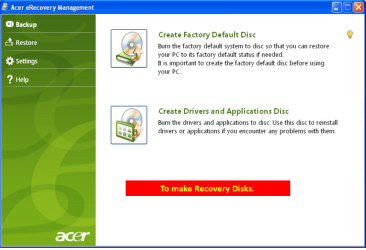
Did you make the OEM manufacturer's Recovery Disks?

Acer001-11.PNG

You can Order Acer recovery disks from here:
https://secure.tx.acer.com/RCDB/Main.aspx?brand=acer
 

My Computer My Computer

At a glance

ME/XP/Vista/Win7
OS
ME/XP/Vista/Win7
bobafetthotmail - Yes, I know all my programs will be gone. I could careless. I like organizing my computer and It'd give me something to do. So I do want it back to just like I turned it on for the first time.
----
Everybody, just simply answer this simplified question I'm about to ask. If I buy an Acer eRecovery Disc, will I be able to use that disc, to make my Acer just like I took it out of a box?
----
This would be a lot easier, but I was not the one who took it out. Someone "thought" they was fixing it, took my HDD out, threw it away with out my permission and slapped in the one I have now thinking it would be perfect.
 

My Computer My Computer

At a glance

Microsoft Windows 7 Home Premium 64-bit SP1AMD K10 (45nm Technology)4.00 GB Dual-Channel DDR3 @ 536MHz (7-7-7-20)ATI Mobility Radeon HD 4200 Series (Acer Inco...
Computer Manufacturer/Model Number
Acer / PEW76(B)
OS
Microsoft Windows 7 Home Premium 64-bit SP1
CPU
AMD K10 (45nm Technology)
Motherboard
Acer JE51_DN (Socket S1G4)
Memory
4.00 GB Dual-Channel DDR3 @ 536MHz (7-7-7-20)
Graphics Card(s)
ATI Mobility Radeon HD 4200 Series (Acer Incorporated [ALI])
Sound Card
AMD High Definition Audio Device
Monitor(s) Displays
Generic PnP Monitor on ATI Mobility Radeon HD 4200 Series
Screen Resolution
Dual Monitor: 1366x768 / 1440 x 900
Hard Drives
298GB TOSHIBA MK3275GSX SATA Disk Device (SATA)
PSU
6-Cell Li-ion Battery

My Computer My Computer

At a glance

ME/XP/Vista/Win7
OS
ME/XP/Vista/Win7
Everybody, just simply answer this simplified question I'm about to ask. If I buy an Acer eRecovery Disc, will I be able to use that disc, to make my Acer just like I took it out of a box?
Yes. But it will be full of acer-installed software that slows down the machine (nicknamed "bloatware" or "crapware" by most of us) that you will likely want to remove afterwards, and will cost you some money and waiting for it to arrive. The recovery disk is not recommended.

The recommended course of action is follow this tutorial and reinstall windows 7 on your own, for free.
When you are in step 8 use the panel to delete all partitions currently on the HDD (so you remove the old toshiba recovery partition).

To do that you just need the Win7 install disk iso and the activation key you have on the sticker under the belly of your laptop, the first step of this tutorial tell you how to download the iso for free.

This would be a lot easier, but I was not the one who took it out. Someone "thought" they was fixing it, took my HDD out, threw it away with out my permission and slapped in the one I have now thinking it would be perfect.
A punishment for this individual would be in order.
 

My Computer My Computer

At a glance

Win 7 Pro 64-bit 7601AMD Phenom 9650 QuadCore, revision DR-B35 GB yes I run 2x 2GB and 1x 1GB, different b...NVIDIA GeForce 9800 GT 512 Mb, unknown manufa...
Computer type
PC/Desktop
Computer Manufacturer/Model Number
custom built
OS
Win 7 Pro 64-bit 7601
CPU
AMD Phenom 9650 QuadCore, revision DR-B3
Motherboard
ASUS M4A78
Memory
5 GB yes I run 2x 2GB and 1x 1GB, different brand, spank me.
Graphics Card(s)
NVIDIA GeForce 9800 GT 512 Mb, unknown manufacturer.
Sound Card
Crappy Realtek Integrated Audio
Monitor(s) Displays
Fujitsu Siemens P19-3P
Screen Resolution
1280 x 1024 x 32 bits @ 60 Hz Oh yeah, 4:3 rocks!
Hard Drives
(1) MAXTOR S TM3320613AS SATA Disk Device (2) STM35004 18AS SATA Disk Device (3) TOSHIBA USB 2.5"-HDD
PSU
whatever, around 450w
Case
Scavenged from old company PC, 10+ years old
Cooling
CPU fan, GPU fan, case fan, nothing fancy
Keyboard
Microsoft, PS/2, white.
Mouse
Optical, logitec.
Internet Speed
effective max speeds: 70-ish kB/s down 30-ish kB/s up
Antivirus
Avira, free edition.
Browser
Firefox with FXChrome to make it look like Google Chrome :P
Other Info
Was discarded by previous owner due to "horrible performance".
Was running Win Xp from a IDE drive. Yeah. Was a pain.
SATA II drive and Win7 and it zips away! Yay!
Everybody, just simply answer this simplified question I'm about to ask. If I buy an Acer eRecovery Disc, will I be able to use that disc, to make my Acer just like I took it out of a box?
Yes. But it will be full of acer-installed software that slows down the machine (nicknamed "bloatware" or "crapware" by most of us) that you will likely want to remove afterwards, and will cost you some money and waiting for it to arrive. The recovery disk is not recommended.

The recommended course of action is follow this tutorial and reinstall windows 7 on your own, for free.
When you are in step 8 use the panel to delete all partitions currently on the HDD (so you remove the old toshiba recovery partition).

To do that you just need the Win7 install disk iso and the activation key you have on the sticker under the belly of your laptop, the first step of this tutorial tell you how to download the iso for free.

This would be a lot easier, but I was not the one who took it out. Someone "thought" they was fixing it, took my HDD out, threw it away with out my permission and slapped in the one I have now thinking it would be perfect.
A punishment for this individual would be in order.

Could I do the same thing you are talking about if I follow this tutorial? Because the tutorial you provided, I'd still need to buy a disc/usb. In the one I provided, I wouldn't need to. Now I have followed the tutorial I provided before, but I selected "Upgrade" which kept my files and documents. Would I need to select "Custom (advanced)" which doesn't let me keep my Files and Documents?
 

My Computer My Computer

At a glance

Microsoft Windows 7 Home Premium 64-bit SP1AMD K10 (45nm Technology)4.00 GB Dual-Channel DDR3 @ 536MHz (7-7-7-20)ATI Mobility Radeon HD 4200 Series (Acer Inco...
Computer Manufacturer/Model Number
Acer / PEW76(B)
OS
Microsoft Windows 7 Home Premium 64-bit SP1
CPU
AMD K10 (45nm Technology)
Motherboard
Acer JE51_DN (Socket S1G4)
Memory
4.00 GB Dual-Channel DDR3 @ 536MHz (7-7-7-20)
Graphics Card(s)
ATI Mobility Radeon HD 4200 Series (Acer Incorporated [ALI])
Sound Card
AMD High Definition Audio Device
Monitor(s) Displays
Generic PnP Monitor on ATI Mobility Radeon HD 4200 Series
Screen Resolution
Dual Monitor: 1366x768 / 1440 x 900
Hard Drives
298GB TOSHIBA MK3275GSX SATA Disk Device (SATA)
PSU
6-Cell Li-ion Battery
Why would you need to buy a disk? Twice you've been provided one for you to use to reinstall your licensed version in Clean Reinstall - Factory OEM Windows 7. Did you read the steps which have helped thousands to get a perfect reinstall without the factory bloatware?

I even gave you extra steps to wipe the HD first so you get the cleanest possible install.
 
Last edited:
Why would you need to buy a disk? Twice you've been provided one for you to use to reinstall your licensed version in Clean Reinstall - Factory OEM Windows 7. Did you even bother to read the steps which have helped thousands to get a perfect reinstall without the factory bloatware?

I even gave you extra steps to wipe the HD first so you get the cleanest possible install.

If I read right, I need to buy a Clean Disc/USB to put the Windows ISO on?...
 

My Computer My Computer

At a glance

Microsoft Windows 7 Home Premium 64-bit SP1AMD K10 (45nm Technology)4.00 GB Dual-Channel DDR3 @ 536MHz (7-7-7-20)ATI Mobility Radeon HD 4200 Series (Acer Inco...
Computer Manufacturer/Model Number
Acer / PEW76(B)
OS
Microsoft Windows 7 Home Premium 64-bit SP1
CPU
AMD K10 (45nm Technology)
Motherboard
Acer JE51_DN (Socket S1G4)
Memory
4.00 GB Dual-Channel DDR3 @ 536MHz (7-7-7-20)
Graphics Card(s)
ATI Mobility Radeon HD 4200 Series (Acer Incorporated [ALI])
Sound Card
AMD High Definition Audio Device
Monitor(s) Displays
Generic PnP Monitor on ATI Mobility Radeon HD 4200 Series
Screen Resolution
Dual Monitor: 1366x768 / 1440 x 900
Hard Drives
298GB TOSHIBA MK3275GSX SATA Disk Device (SATA)
PSU
6-Cell Li-ion Battery
I think you mean a Blank DVD Disc or USB stick
 

My Computer My Computer

At a glance

Win7 Enterprise, Win7 x86 (Ult 7600), Win7 x6...AMD fx8350 4ghz, AMD-32 2400mhz, AMD-64 3200m...2gb, 4gb on the Ult 7600, 4gb on Technet RTM,...Draw my own Graphics, several nVidia cards
Computer type
PC/Desktop
Computer Manufacturer/Model Number
Built them myself, Science Experiments !
OS
Win7 Enterprise, Win7 x86 (Ult 7600), Win7 x64 Ult 7600, TechNet RTM on AMD x64 (2.8Ghz)
CPU
AMD fx8350 4ghz, AMD-32 2400mhz, AMD-64 3200mhz, AMDx64 2.8G
Motherboard
SIS 755, ECS-K8M890M-M (Ult 7600), GigaByte & others
Memory
2gb, 4gb on the Ult 7600, 4gb on Technet RTM, 32gb on FX8350
Graphics Card(s)
Draw my own Graphics, several nVidia cards
Sound Card
on motherboard
Monitor(s) Displays
19" flat scr, 28" I-Inc widescr,22" Emprex Widescr, 23" Acer
Screen Resolution
1280 x 1024, 1440 x 900, 1920 x 1080
Hard Drives
6 pata Ide HD's & 2 Sata HD's
added 80gb external on Ult 7600 computer,
numerous extra 1tb, 2TB, 3Tb SATA HD's
A collection of ext HD Docks w/ HDs
PSU
430w, 550w, 600w, 700, 800, etc
Case
All Generic Full Towers
Cooling
Open Air & a few fans, some w/ colored LEDs
Keyboard
Compaq & Dell recycled from GoodWill
Mouse
Made in China Optical Wired Mouse
Internet Speed
Fast Cable InterNet
Antivirus
AVG Free on 24 different Desktops, NO Problems!
Browser
IE 8 is preferred, but use FireFox sometimes
Other Info
Linksys Routers, switches, & Hubs
Too Many USB Flash Drives to count, Biggest is 64GB !
Eight computers in my home network.
Sixteen computers at my business network.
Linked via TeamViewer !
Lots of old used spare computer parts everywhere!
Clean = Blank, yes. Wouldn't I though? Or could I burn the ISO to a virtual device with something like Daemon Tools?
 

My Computer My Computer

At a glance

Microsoft Windows 7 Home Premium 64-bit SP1AMD K10 (45nm Technology)4.00 GB Dual-Channel DDR3 @ 536MHz (7-7-7-20)ATI Mobility Radeon HD 4200 Series (Acer Inco...
Computer Manufacturer/Model Number
Acer / PEW76(B)
OS
Microsoft Windows 7 Home Premium 64-bit SP1
CPU
AMD K10 (45nm Technology)
Motherboard
Acer JE51_DN (Socket S1G4)
Memory
4.00 GB Dual-Channel DDR3 @ 536MHz (7-7-7-20)
Graphics Card(s)
ATI Mobility Radeon HD 4200 Series (Acer Incorporated [ALI])
Sound Card
AMD High Definition Audio Device
Monitor(s) Displays
Generic PnP Monitor on ATI Mobility Radeon HD 4200 Series
Screen Resolution
Dual Monitor: 1366x768 / 1440 x 900
Hard Drives
298GB TOSHIBA MK3275GSX SATA Disk Device (SATA)
PSU
6-Cell Li-ion Battery
Well, since blank DVD are fairly cheap & new 4gb USB Flash sticks are about $6.00, probably worth your investment to have arround if ever needed again. ;)
 

My Computer My Computer

At a glance

Win7 Enterprise, Win7 x86 (Ult 7600), Win7 x6...AMD fx8350 4ghz, AMD-32 2400mhz, AMD-64 3200m...2gb, 4gb on the Ult 7600, 4gb on Technet RTM,...Draw my own Graphics, several nVidia cards
Computer type
PC/Desktop
Computer Manufacturer/Model Number
Built them myself, Science Experiments !
OS
Win7 Enterprise, Win7 x86 (Ult 7600), Win7 x64 Ult 7600, TechNet RTM on AMD x64 (2.8Ghz)
CPU
AMD fx8350 4ghz, AMD-32 2400mhz, AMD-64 3200mhz, AMDx64 2.8G
Motherboard
SIS 755, ECS-K8M890M-M (Ult 7600), GigaByte & others
Memory
2gb, 4gb on the Ult 7600, 4gb on Technet RTM, 32gb on FX8350
Graphics Card(s)
Draw my own Graphics, several nVidia cards
Sound Card
on motherboard
Monitor(s) Displays
19" flat scr, 28" I-Inc widescr,22" Emprex Widescr, 23" Acer
Screen Resolution
1280 x 1024, 1440 x 900, 1920 x 1080
Hard Drives
6 pata Ide HD's & 2 Sata HD's
added 80gb external on Ult 7600 computer,
numerous extra 1tb, 2TB, 3Tb SATA HD's
A collection of ext HD Docks w/ HDs
PSU
430w, 550w, 600w, 700, 800, etc
Case
All Generic Full Towers
Cooling
Open Air & a few fans, some w/ colored LEDs
Keyboard
Compaq & Dell recycled from GoodWill
Mouse
Made in China Optical Wired Mouse
Internet Speed
Fast Cable InterNet
Antivirus
AVG Free on 24 different Desktops, NO Problems!
Browser
IE 8 is preferred, but use FireFox sometimes
Other Info
Linksys Routers, switches, & Hubs
Too Many USB Flash Drives to count, Biggest is 64GB !
Eight computers in my home network.
Sixteen computers at my business network.
Linked via TeamViewer !
Lots of old used spare computer parts everywhere!
Good quality DVD's are 5 for $2 on the wall rack by the camera dept at Walgreens.
 
Could I just use Daemon tools to burn the ISO to a Virtual Drive?
 

My Computer My Computer

At a glance

Microsoft Windows 7 Home Premium 64-bit SP1AMD K10 (45nm Technology)4.00 GB Dual-Channel DDR3 @ 536MHz (7-7-7-20)ATI Mobility Radeon HD 4200 Series (Acer Inco...
Computer Manufacturer/Model Number
Acer / PEW76(B)
OS
Microsoft Windows 7 Home Premium 64-bit SP1
CPU
AMD K10 (45nm Technology)
Motherboard
Acer JE51_DN (Socket S1G4)
Memory
4.00 GB Dual-Channel DDR3 @ 536MHz (7-7-7-20)
Graphics Card(s)
ATI Mobility Radeon HD 4200 Series (Acer Incorporated [ALI])
Sound Card
AMD High Definition Audio Device
Monitor(s) Displays
Generic PnP Monitor on ATI Mobility Radeon HD 4200 Series
Screen Resolution
Dual Monitor: 1366x768 / 1440 x 900
Hard Drives
298GB TOSHIBA MK3275GSX SATA Disk Device (SATA)
PSU
6-Cell Li-ion Battery
Back
Top