Solved Acer Factory Theme change from aero to basic?

sogone209

New member
Member
VIP
Local time
4:24 AM
Messages
103
Location
Eugene, Oregon
ok my computer came with a factory theme installed which i had on and i really liked. it was in basic which i wanted but i changed a theme to see what it looked like and changed back and its an aero theme. i want the theme without aero tho. cause aero messes with my movies and gaming. the theme also changes my windows loading start screen which is why i want it back but with basic instead of aero :) is there a way to just force it from not using aero to basic so i can use it? plz help. thanks
 
Last edited:

My Computer My Computer

At a glance

Windows 7 Professional x64 (6.1.7600)Amd Athlon ii x2 255 3.1 ghz4Gig Dual Channel DDR3 PC2-1300Amd Radeon HD 6670 1GB DDR5 256bit
Computer Manufacturer/Model Number
gameing build
OS
Windows 7 Professional x64 (6.1.7600)
CPU
Amd Athlon ii x2 255 3.1 ghz
Motherboard
asus m4a89td pro/usb3
Memory
4Gig Dual Channel DDR3 PC2-1300
Graphics Card(s)
Amd Radeon HD 6670 1GB DDR5 256bit
Monitor(s) Displays
Toshiba Lcd 40inch Tv
Screen Resolution
1920x1080 60htz
Hard Drives
Hitachi HDS721010CLA ata 1TB 7200Rpm
PSU
Cooler Master GX 550W
Case
Cooler Master Silencio 550
Cooling
Two 120mm fans, with stock heatsink with 140mm fan on top
Internet Speed
20MBps
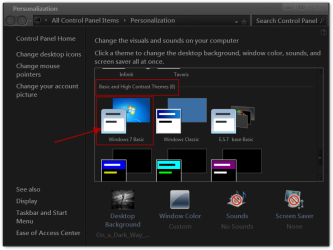
Right click on the desktop go to Personalize then scroll down to Basic and High contrast themes and choose Windows 7 basic
Jerry
Personalization.png
 

My Computer My Computer

At a glance

Win 7 Pro x64 / Win 10 ProIntel(R) Core(TM) i7-3630QM CPU @ 2.40GHz12 GB(1) Intel(R) HD Graphics 4000 (2) NVIDIA GeFo...
Computer type
Laptop
Computer Manufacturer/Model Number
Sager NP9170
OS
Win 7 Pro x64 / Win 10 Pro
CPU
Intel(R) Core(TM) i7-3630QM CPU @ 2.40GHz
Motherboard
CLEVO P170EM
Memory
12 GB
Graphics Card(s)
(1) Intel(R) HD Graphics 4000 (2) NVIDIA GeForce GTX 675M
Sound Card
(1) Realtek High Definition Audio (2) Intel(R) Display Aud
Monitor(s) Displays
17.3
Screen Resolution
1920x1080
Hard Drives
(1) Samsung 860 EVO 500GB(OS) (1) Samsung 860 EVO 500GB(Data)
Keyboard
Backlite
Antivirus
MSE, Malwarebytes Pro
Browser
Firefox
Other Info
DESKTOP: Custom-built.
OS: Win 10 Pro x64.
CASE: Rosewill R5.
CPU: Intel I5 4670K CPU @ 3.40GHz.
CPU COOLER: Cool Master Hyper 212 EVO.
MOTHERBOARD: Asus Z87-A.
MEMORY: Kingston HyperX 2x4 GB.
GPU: Nvidia Geforce 650 TI.
PSU: Corsair TX750.
DRIVES: (1) Samsung 840 120 GB SSD (2) Western Digital blue 500 GB 7200 RPM.
i have a installed ACER theme which is in aero form.

i want that theme but in basic.

is there a way to apply the theme then change from aero to basic?
 

My Computer My Computer

At a glance

Windows 7 Professional x64 (6.1.7600)Amd Athlon ii x2 255 3.1 ghz4Gig Dual Channel DDR3 PC2-1300Amd Radeon HD 6670 1GB DDR5 256bit
Computer Manufacturer/Model Number
gameing build
OS
Windows 7 Professional x64 (6.1.7600)
CPU
Amd Athlon ii x2 255 3.1 ghz
Motherboard
asus m4a89td pro/usb3
Memory
4Gig Dual Channel DDR3 PC2-1300
Graphics Card(s)
Amd Radeon HD 6670 1GB DDR5 256bit
Monitor(s) Displays
Toshiba Lcd 40inch Tv
Screen Resolution
1920x1080 60htz
Hard Drives
Hitachi HDS721010CLA ata 1TB 7200Rpm
PSU
Cooler Master GX 550W
Case
Cooler Master Silencio 550
Cooling
Two 120mm fans, with stock heatsink with 140mm fan on top
Internet Speed
20MBps
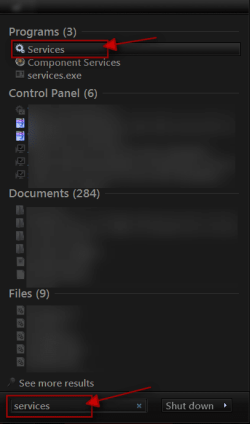
Click on the :orb: Start Button type in Services In the search box and then click on Services
1.png

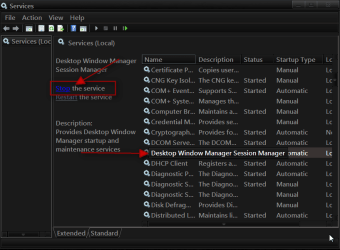
Scroll down until you see Desktop Windows Manager Sessions Manager select it in click on the Stop text
2.png

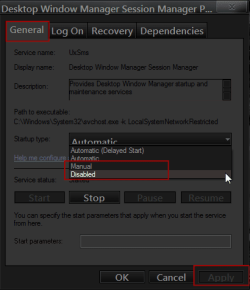
You will need to double-click on Desktop Windows Manager Sessions Manager go to the General tab use the drop down menu and choose manual or disable and apply it I have never done that so you will have to see if it works if it does just remember you'll need to start it again if you want to go back to aero
Region.png

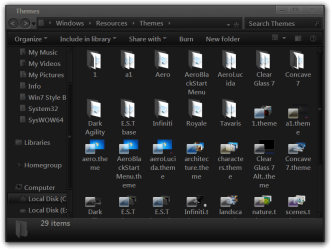
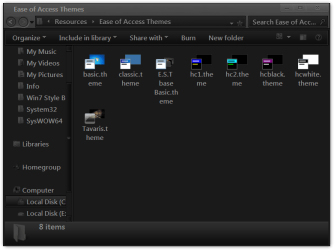
I would like to see a screenshot of C:\Windows\Resources\Themes and C:\Windows\Resources\Ease of Access Themes to see that Acer theme folders and files.
http://www.sevenforums.com/tutorials/9733-screenshots-files-upload-post-seven-forums.html
How to Use the Snipping Tool in Vista - Vista Forums
http://www.sevenforums.com/tutorials/9717-screenshot-paint.html
There may be a better way of doing it than turning off that service that is why I'd like to see the screenshots. Like these.
Themes.pngEase of Access Themes.png
Jerry
 

My Computer My Computer

At a glance

Win 7 Pro x64 / Win 10 ProIntel(R) Core(TM) i7-3630QM CPU @ 2.40GHz12 GB(1) Intel(R) HD Graphics 4000 (2) NVIDIA GeFo...
Computer type
Laptop
Computer Manufacturer/Model Number
Sager NP9170
OS
Win 7 Pro x64 / Win 10 Pro
CPU
Intel(R) Core(TM) i7-3630QM CPU @ 2.40GHz
Motherboard
CLEVO P170EM
Memory
12 GB
Graphics Card(s)
(1) Intel(R) HD Graphics 4000 (2) NVIDIA GeForce GTX 675M
Sound Card
(1) Realtek High Definition Audio (2) Intel(R) Display Aud
Monitor(s) Displays
17.3
Screen Resolution
1920x1080
Hard Drives
(1) Samsung 860 EVO 500GB(OS) (1) Samsung 860 EVO 500GB(Data)
Keyboard
Backlite
Antivirus
MSE, Malwarebytes Pro
Browser
Firefox
Other Info
DESKTOP: Custom-built.
OS: Win 10 Pro x64.
CASE: Rosewill R5.
CPU: Intel I5 4670K CPU @ 3.40GHz.
CPU COOLER: Cool Master Hyper 212 EVO.
MOTHERBOARD: Asus Z87-A.
MEMORY: Kingston HyperX 2x4 GB.
GPU: Nvidia Geforce 650 TI.
PSU: Corsair TX750.
DRIVES: (1) Samsung 840 120 GB SSD (2) Western Digital blue 500 GB 7200 RPM.
worked like a charm thank you. and there isnt a them under resorces which is wierd. i think its installed somewhere in a OEM folder in my recovery partition??
 

My Computer My Computer

At a glance

Windows 7 Professional x64 (6.1.7600)Amd Athlon ii x2 255 3.1 ghz4Gig Dual Channel DDR3 PC2-1300Amd Radeon HD 6670 1GB DDR5 256bit
Computer Manufacturer/Model Number
gameing build
OS
Windows 7 Professional x64 (6.1.7600)
CPU
Amd Athlon ii x2 255 3.1 ghz
Motherboard
asus m4a89td pro/usb3
Memory
4Gig Dual Channel DDR3 PC2-1300
Graphics Card(s)
Amd Radeon HD 6670 1GB DDR5 256bit
Monitor(s) Displays
Toshiba Lcd 40inch Tv
Screen Resolution
1920x1080 60htz
Hard Drives
Hitachi HDS721010CLA ata 1TB 7200Rpm
PSU
Cooler Master GX 550W
Case
Cooler Master Silencio 550
Cooling
Two 120mm fans, with stock heatsink with 140mm fan on top
Internet Speed
20MBps
Good to hear
Jerry
 

My Computer My Computer

At a glance

Win 7 Pro x64 / Win 10 ProIntel(R) Core(TM) i7-3630QM CPU @ 2.40GHz12 GB(1) Intel(R) HD Graphics 4000 (2) NVIDIA GeFo...
Computer type
Laptop
Computer Manufacturer/Model Number
Sager NP9170
OS
Win 7 Pro x64 / Win 10 Pro
CPU
Intel(R) Core(TM) i7-3630QM CPU @ 2.40GHz
Motherboard
CLEVO P170EM
Memory
12 GB
Graphics Card(s)
(1) Intel(R) HD Graphics 4000 (2) NVIDIA GeForce GTX 675M
Sound Card
(1) Realtek High Definition Audio (2) Intel(R) Display Aud
Monitor(s) Displays
17.3
Screen Resolution
1920x1080
Hard Drives
(1) Samsung 860 EVO 500GB(OS) (1) Samsung 860 EVO 500GB(Data)
Keyboard
Backlite
Antivirus
MSE, Malwarebytes Pro
Browser
Firefox
Other Info
DESKTOP: Custom-built.
OS: Win 10 Pro x64.
CASE: Rosewill R5.
CPU: Intel I5 4670K CPU @ 3.40GHz.
CPU COOLER: Cool Master Hyper 212 EVO.
MOTHERBOARD: Asus Z87-A.
MEMORY: Kingston HyperX 2x4 GB.
GPU: Nvidia Geforce 650 TI.
PSU: Corsair TX750.
DRIVES: (1) Samsung 840 120 GB SSD (2) Western Digital blue 500 GB 7200 RPM.
Back
Top